Expressvpn Glossary
DNS

What is DNS?
The Domain Name System (DNS) is a system that translates text-based web addresses into numerical IP addresses, which computers use to communicate over the internet.
When a website address such as “www.example.com” is entered into a browser, the device needs to determine the exact location of that website on the internet.
But the technology on which the internet is built primarily uses numbers rather than letters. Networks use numerical IP addresses to locate and communicate with each other, so the website address must be translated into a language that the computer understands.
DNS handles this translation.
How does DNS work?
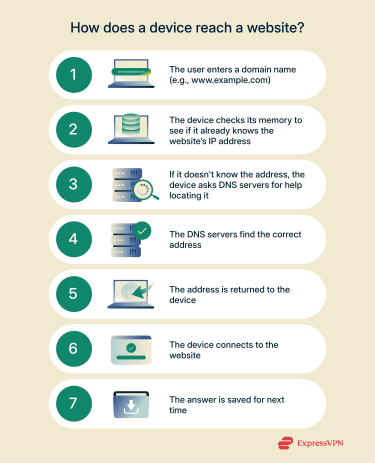
To translate website addresses into IP addresses, DNS uses a multi-step process called DNS lookup. This process usually occurs in the background and takes a few milliseconds. Here’s what transpires:
- Checking memory: The device first checks if it has recently visited the website and already knows the address. If so, no further steps are needed.
- Querying DNS servers: If the address isn’t already known, the device asks DNS servers for help by sending out a DNS query.
- Finding the address: The DNS servers narrow down the search step by step, starting from the most general level and narrowing it down until they reach a server that knows the exact address.
- Sending it back: The address is sent back to the device so it can connect to the website.
- Saving for future reference: The device and DNS servers usually store the address temporarily, allowing most of this process to be skipped in the future.
Why is it important?
DNS enables access to websites and services by entering simple, alphabetical strings. This is much easier than inputting long strings of numbers. It makes accessing websites faster, easier, and far more intuitive.
DNS also increases the overall efficiency of the internet. It temporarily stores answers to recent requests, so the same address doesn’t have to be looked up repeatedly. In addition, it distributes traffic across many servers worldwide, directing queries to the nearest or fastest one to speed up responses.
Finally, DNS provides for flexibility. A website owner moving their site to different servers or changing the IP address would cause significant inconvenience without DNS. With the system in place, users are still taken to the right place after such changes occur.
Where is it used?
DNS is used everywhere on the internet. Every time a website address is accessed, DNS is working behind the scenes to make sure that data is being sent to the right destination.
Beyond loading websites, DNS has other functions as well. For example, it’s responsible for telling email systems where to deliver messages. DNS also accommodates both types of IP addresses (IPv4 and IPv6), ensuring devices using either format can connect smoothly.
DNS uses various types of records (or instructions) to manage these functions. Here are some of the most common types of DNS records:
- A and AAAA records: Link domain names to IPv4 and IPv6 addresses, respectively.
- Mail Exchange (MX) records: Direct email traffic to the correct mail servers.
- Canonical Name (CNAME) records: Allow one domain name to point to another, so a website owner can make both “productname.com” and “company.com” lead to the same site.
- Text (TXT) records: These are widely used for domain verification and also play a critical role in systems like Sender Policy Framework (SPF) for email security.
Further reading
- What is DNS, and how does it work?
- Why is the DNS server not responding (and how to fix it)
- What is a DNS leak? How to check, fix, and prevent it
FAQ
What does it mean if a DNS server isn’t responding?
If a Domain Name System (DNS) server isn’t responding, it means the device can’t get the IP address it needs to reach a website or service. This can happen if the server is temporarily down or overloaded or if there’s a network issue between the device and the server.
When this occurs, websites may fail to load, and users will see error messages like “DNS server not responding” or “Server DNS address could not be found.”
What is DNS caching?
Domain Name System (DNS) caching is the temporary storage of IP addresses that have recently been looked up. This helps speed up browsing so a device doesn’t need to ask DNS servers for the same address repeatedly.
It’s not just devices that cache, though; DNS servers also store the results they get from other DNS servers. This is why settings like time to live (TTL) matter: they control how long cached results are kept. It also explains why changes to a domain’s configuration can take a while to show up everywhere, since old cached records need to expire first.
How long does it take for DNS changes to take effect?
When Domain Name System (DNS) records are updated, it can take anywhere from hours to days (typically up to 48 hours) for the update to spread across all DNS servers worldwide. This delay happens because servers temporarily store old information to speed up lookups. The exact timing depends on the time to live (TTL) value set in your domain’s DNS record, which tells servers how long to keep cached data before checking for updates. During this propagation period, some users may still be directed to the old IP address until their DNS cache updates.
