Expressvpn Glossary
Data logging
What is data logging?
Data logging is the process of recording and storing data or events from sources like software applications, devices, and sensors across both physical and digital environments. Organizations typically use logged data to monitor activity, troubleshoot problems, detect anomalies, support security investigations, and analyze trends.
Types of data logging
- System logs: Record operating system activity, including kernel processes, service starts and stops, hardware errors, and login events.
- Application logs: Capture software-level events such as errors, performance metrics, API calls, and user actions.
- Security logs: Track security-related activity, including authentication attempts, permission changes, access events, and detected threats.
- Audit logs: Show who performed specific actions and when, tracking system access, operations, configuration changes, and updates.
- Event logs: Record discrete events generated by systems or applications in chronological order for monitoring and troubleshooting. Depending on the platform, system, application, and security, logs may all be forms of event logs.
How does data logging work?
Data logging starts by capturing information from physical or digital sources. In physical environments, sensors measure conditions such as temperature or motion and convert them into digital signals. In digital systems, software records events such as authentication attempts, errors, API activity, and network events.
Logging tools timestamp data and organize it into structured entries before storing it locally, on servers, or in cloud environments. Organizations may then forward logs to centralized platforms, where they can be reviewed, correlated, and analyzed alongside other system data.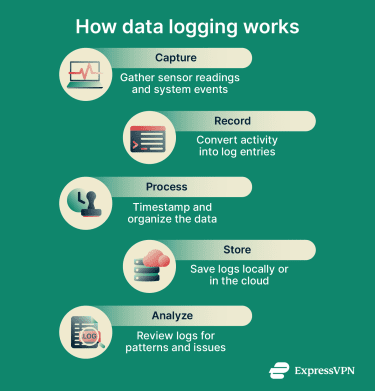
Why is data logging important?
In cybersecurity, data logging helps establish a baseline of normal system behavior, making unusual patterns easier to spot. This helps teams detect suspicious activity such as repeated failed login attempts or possible data exfiltration earlier, which can improve investigation and response.
In business, data logging captures what happens across customer touchpoints. Engagement metrics show which features, products, or pages users interact with. Teams can use this information to refine user experiences, content, and product decisions.
Where is data logging used?
- IT infrastructure and networks: Organizations can use data logging to collect machine data from network devices, servers, and applications, including firewalls, routers, cloud platforms, operating systems, web servers, and databases.
- Cybersecurity and threat detection: Security teams log system activity and user behavior to establish normal patterns, making it easier to identify anomalies that may indicate a breach or attack.
- Business applications and e-commerce: Businesses log transactions, cart activity, and user engagement to measure performance and understand customer behavior.
- Troubleshooting and performance monitoring: Engineers use logged data to identify root causes faster, catch performance issues early, and reduce downtime.
- Compliance and audit trails: Organizations maintain logs of access, changes, and system events to support regulatory compliance and internal investigations.
Risks and privacy concerns
- Data breaches: Poorly secured logs can expose sensitive data, including login credentials, financial information, personal data, and customer records. If attackers or unauthorized users gain access, this can disrupt operations and cause significant harm.
- Regulatory non-compliance: Inadequate log security can contribute to violations of data protection laws such as the General Data Protection Regulation (GDPR) or the Health Insurance Portability and Accountability Act (HIPAA), especially when logs contain personal data or protected health information that is not properly safeguarded.
- Insider threats: Employees with unnecessary or unrestricted access to logs may misuse or leak sensitive data, so access should be limited to authorized personnel.
Further reading
- Wi-Fi router logging: How to see and delete history
- What are VPN connection logs?
- Who can see my mobile data history?
- KPMG audit reports support ExpressVPN's privacy commitments
- Metadata explained: What it is, why it matters, and how to protect it




