Expressvpn Glossary
Data conversion
What is data conversion?
Data conversion is the process of transforming data into a different format while preserving its contents as much as possible. Examples include converting Word documents to PDFs or PNG image files to JPGs. Various software tools automate the conversion process to allow the same data to be used on different systems and applications.
How does data conversion work?
A typical data conversion process starts when a parser reads the source data to understand its structure, such as identifying fields in a spreadsheet or columns in a database. The system then maps each field to the target format, making sure information goes into the correct place.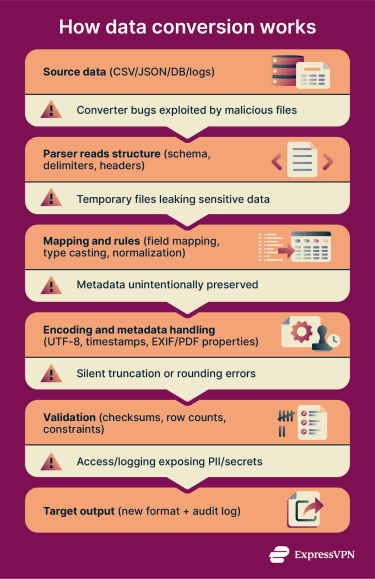 Next, it moves the data and adjusts types and encoding so numbers, text, and characters remain accurate. Finally, the system checks the output against the target rules and logs any errors, such as missing values or format mismatches, for review.
Types of data conversion
Common types of data conversion include:
- File format conversion: Changing data from one file format to another, like CSV to JSON format.
- Data type casting: Transforming a value from one data type to another, like an integer to a string.
- Character encoding conversion: Translating text from one encoding system to another, like UTF-8 to ISO-8859-1.
- Protocol and message conversion: Changing data to allow it to move between different communication protocols, like XML to JSON.
- Unit and normalization conversion: Converting the measurement units used in a set of data, like centimeters to inches.
Where is data conversion used?
Data conversion is common in both casual and professional settings. Users often rely on data converters to change the formats of documents and spreadsheets, such as converting a Word file into a PDF or an Excel sheet into a CSV.
Developers use data conversion during database migrations and extract, transform, load (ETL) pipelines to move and transform information between systems. APIs and integration middleware convert data formats so that different applications can communicate.
Security systems, like security information and event management (SIEM), convert log data for analysis, and cloud platforms convert files when creating backups or syncing storage.
Why is data conversion important?
Data conversion provides numerous benefits, including:
- Enabling interoperability between different systems and applications.
- Preventing data loss across tools and platforms.
- Improving analytics and search accuracy.
- Reducing the need for manual copy-paste data transfers and the errors they can induce.
- Standardizing data for compliance or reporting.
- Supporting workflow automation.
Risks and privacy concerns
The security and privacy risks associated with data conversion include:
- Hackers or unauthorized users can access sensitive data if conversion uses unsecured channels, weak permissions, or poorly protected temporary files.
- Incorrect field mappings can silently corrupt data, producing undetected errors.
- The process can expose metadata, such as file names, timestamps, or authors, revealing private information about users.
- In some cases, malicious files can exploit weaknesses in converter tools to compromise systems.
- Storing temporary files can cause data leaks or losses.
Further reading
- What is data encryption?
- Link manipulation: What is it and how to stay safe
- How to make your photos more private on social media