Password security: what changed from 2015 to 2025

In late 2025, Cybersecurity Researcher Jeremiah Fowler uncovered a data leak of 149 million logins and passwords, and shared his findings with ExpressVPN. This data leak revealed recent password trends, which Jeremiah compared to 2015 password trends, highlighting what has changed, and how important password security is. We are publishing his report to help the public stay informed and protected as part of our ongoing effort to highlight important security risks.
Recently I discovered a massive exposed database containing 149M logins, emails, usernames, and passwords. These records were publicly exposed for nearly a month after my responsible disclosure, until it was finally taken down, which allowed me to have the time to analyze the data while the hosting was still active. As an ethical security researcher, I never download the data I discover so in my previous discoveries of exposed credentials I was only able to review limited samples before reporting and the database went offline. I have often wondered if password security has improved or declined over the last decade, considering all the attempts to enforce stronger password rules (from companies with stricter rules or 2FA, password managers, journalists, experts, etc.) the extended exposure time of this database allowed me to have a rare look at millions of credentials. In this case I was able to remotely analyze real credentials and try to identify patterns, complexity, or predictability without downloading the logs and then compare that to data from a decade ago.
My overall assessment is that between 2015 and 2025, the “lesson learned” wasn’t that passwords got easier or more complex, it boils down to the fact that secure passwords that meet both modern standards and human memory are not compatible. In 2024 there was a survey that found on average people have 168 passwords across their numerous accounts. The reality is that very few of us can remember multiple complex passwords. We often take a lazy approach to passwords at our own risk choosing convenience over security. Even forced password complexity rules are not a silver bullet solution if they are reused on multiple accounts, exposed in a data breach, or compromised by malware. It is a fact that criminals are becoming more sophisticated, the use of AI in cyber-crime is growing, and we must do more to protect our credentials.
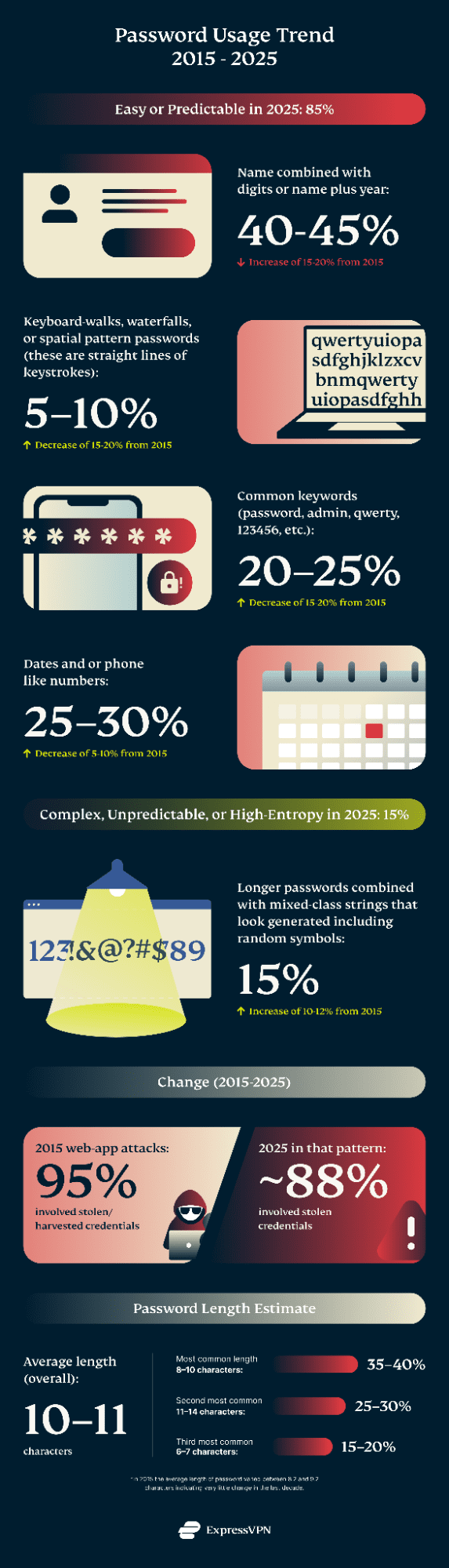
In my research I discovered that around 85% of the passwords I reviewed in the sample were dominated by human memorable constructions, while only 15% could be classified as complex. What is most disturbing is that the change from 2015 appears to have increased significantly in one specific area while other common patterns decreased. In 2015 plain numeric strings dominated while in 2025 it appears that passwords are more often attached to names combined with numbers and a single special character.
The credentials I would classify as low complexity or predictable usually contained known patterns from prior breaches or password-guessing models. This category includes common password words or similar variants such as “password,” “admin,” or “qwerty, or combinations of a name or dictionary word with a year or date and at most a single non-alphanumeric character. Passwords that are long but clearly structured were also considered easy when they are clearly structured, contain repeated characters, obvious phrases, or other patterns that make them highly predictable despite their length. Credentials that could be qualified as complex were at least twelve characters in length and contained at least four distinct character classes such as uppercase and lowercase letters, numbers, and symbols. These also did not contain an easily recognizable structure or predictable patterns.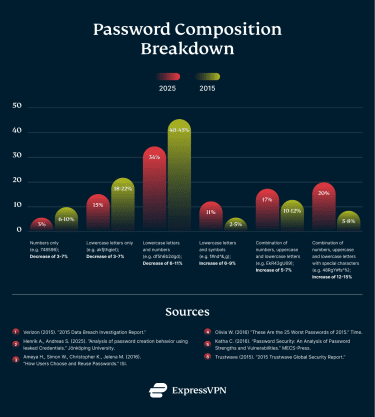
Reused Password Trends
Back in 2015 surveys were already indicating a serious gap between recommended password security practices and real world user behavior, particularly when it came to password reuse across multiple accounts. Multiple studies confirmed this trend, most notably a Google/Harris Poll conducted in 2018 found that a majority of those surveyed continued to reuse passwords with 52% reporting that they used the same password across multiple accounts, only 35% said they used a unique password for every account. More recent data shows little improvement. According to the 2025 GoDaddy Consumer Pulse survey, 61% of consumers still admit to reusing passwords across their online accounts. This indicates an estimated 11% increase in reusing passwords underscoring how entrenched this behavior remains despite years of security recommendations. People still create complicated passwords but then reuse them falsely assuming that they are hard to break and they can safely reuse them. Because complex passwords are more difficult to remember they may choose to reuse passwords. This increases the risks of multiple accounts being compromised if their password is leaked once. In the most recent Google digital security survey it was indicated over 60% of Gen X and Baby Boomers use passwords as their primary authentication method. Only 30% use methods such as social sign-ins or Passkeys showing a very slow transition in moving away from legacy login methods. In 2025 CyberNews reported that an estimated 6% of 19B analyzed passwords were unique leaving users potentially vulnerable to lowtech dictionary attacks.
Increase in keyloggers, infostealers, and malware
Keylogger malware and infostealer malware are both used to gather sensitive information from compromised systems. While the goal is the same they are slightly different, a keylogger records keystrokes, capturing credentials and other data with limited success. Infostealer malware is built to extract stored data directly from a system, including browser-saved passwords, session cookies, autofill information, keys, and other forms of credentials. Infostealers do not rely on user interaction the way a keylogger does and can harvest large volumes of data in a single execution.
In the last 2 years I have seen an increase in infostealer data that has been publicly exposed through a misconfigured database. The value of stolen credentials combined with the advancement of criminal technologies, and easy access to AI make the threat landscape a very dangerous place at the present time. Infostealers appear to be operating at an industrial scale with IBM’s X-Force 2025 Threat Intelligence Index reporting that there were 84% more infostealers per week in 2024 compared to 2023, and in early 2025 showing 180% higher weekly volume of phishing emails delivering infostealers from 2023.
The Evolution of Authentication and Account Security
Pre-2010: Niche security tools
- Early password managers and multi-factor authentication existed, but were used primarily by enterprises, and organizations that are security focused and technical.
2010–2014: Mainstream availability
- Password managers, browsers, and OS keychains become widely accessible to everyday users, but overall adoption is optional and low.
- Google and other major platforms introduce optional 2FA.
- App based OTP (one time password) replaces SMS verifications as a safer alternative, but enforcement and overall adoption is rare.
2015: Security turning point
- Security transitions from an optional feature to an expected infrastructure.
- Password managers become more widely recognized as a security tool for enterprises and average users. 2FA expands to both consumer and workplace accounts.
- Platforms and services begin implementing security by default and reducing optional user choices.
2016–2019: Normalization, enforcement, and policy hardening era
- MFA becomes standard in workplaces and moves to an enforced policy and not just recommended. MFA is becoming increasingly common for consumer accounts.
- Security guidance moves away from weak authentication methods such as SMS. Phishing-resistant Phishing resistance becomes an explicit design goal.
- Password managers evolve from password vaults into more advanced password tools that include credential strength checks and data breach awareness.
2020–2021: Platform consolidation and platform-led security
- Operating systems and browsers expand on credential security. Saved passwords go from being something the user installs and manages to being something your device and browser do for you automatically.
- Security decisions are increasingly made by platforms, not individuals. Built-in password managers become the default for many users.
2022–2025: Convergence and password replacement
- This period marks a shift away from relying solely on usernames and passwords and shifting toward systems that use devices and platforms themselves as part of the trust and authentication process. Passwords, managers, 2FA and MFA become widely adopted in the device and account ecosystem
- Passkeys and phishing resistant authentication emerge at a large scale to virtually all users with paid and free security tools.
- Password managers become digital identity and credential verification and not just a storage storage vault. Transition from static security to adaptive risk-based authentication toward Zero Trust architectures. Multi-factor authentication shifts from an added step to a device-based trust model.
What can we do?
Infostealer malware and keyloggers are a real threat but there are ways to reduce the risks. It starts with user behavior and being cautious online with the sites you visit, links you click, and files you download. Keeping operating systems, browsers, and applications up to date is critical. Many forms of malware can target known vulnerabilities. Use an antivirus software that allows real-time scans of your device. Use only official sources to install software, browser extensions, and mobile apps. Phishing is often among the most common delivery methods of malware, so beware of suspicious emails, messages, and links should especially if they contain file attachments or prompt file downloads. As an additional step I would recommend reviewing browser extensions and startup programs if you experience any type of unusual system behavior. No system is 100% secure but these simple steps can help reduce the likelihood of malware infection or identify and remove it quickly.
Use a password manager instead of relying on your memory. Password managers can automatically generate high-entropy passwords and store them in an encrypted form with most using strong cryptography such as AES-256 encryption as a standard. The password manager directly addresses the core weaknesses we see in real world password behavior and prevents predictability, reuse, and the dreaded forgotten password. This can also help reduce the impact of credential leaks and password reuse attacks. The primary consideration to be aware of when using a password manager is the master password. This password must be strong and protected with multi-factor authentication. The security benefits of a password manager far outweigh the alternatives of low-entropy and predictable passwords.
The statistics and percentage values presented in this analysis are derived from limited sample datasets and should be interpreted as informed estimates rather than precise population measurements. As an ethical security researcher I never download or extract the data I find publicly exposed. I was able to view and analyze the exposed passwords while they were publicly accessible and hosted by the respective owner. The comparisons between time periods are based on synthesized findings from multiple publicly available studies, historical breach analyses, and observed patterns within the sampled data. It should be noted that the reference datasets differ in size, source, collection methods, and classification. Percentage changes are expressed as approximate ranges intended to illustrate directional trends over time. These findings and my analysis are provided for research and educational purposes and should be viewed as trends in broader behavioral patterns in terms of password security.
2015 and historical password references
- Verizon (2015). “2015 Data Breach Investigation Report.”
- Henrik A., Andreas S. (2025). “Analysis of password creation behavior using leaked Credentials.” Jönköping University.
- Ameya H., Simon W., Christopher K., Jelena M. (2016). “How Users Choose and Reuse Passwords.” ISI.
- Olivia W. (2016) “These Are the 25 Worst Passwords of 2015.” Time.
- Katha C. (2016). “Password Security: An Analysis of Password Strengths and Vulnerabilities.” MECS-Press.
- Trustwave (2015). “2015 Trustwave Global Security Report.”






 Support Center
  FAQ
FAQ  VPN Setup Tutorials


