
Expressvpn Glossary
Web content filtering
What is web content filtering?
Web content filtering monitors and controls access to websites or web content based on security, compliance, age-appropriateness, or organizational policy. It helps block or warn users about sites that are malicious, inappropriate, risky, or otherwise restricted by automatically applying predefined access rules.
How does web content filtering work?
Filtering systems can apply rules at the network, device, browser, Domain Name System (DNS), proxy, or secure web gateway level. An administrator, user, browser, extension, or filtering provider may define or manage these rules, depending on the setup. The exact process varies by filtering method, but typically includes some or all of these steps:
- A user requests access to a website.
- The filter checks the URL, category, reputation, or page content, depending on the filtering method.
- The filter compares the request against predefined rules, categories, blocklists, allowlists, or threat intelligence.
- The system classifies the site, flags risky content, or assesses whether it matches a restricted category.
- The filter allows access, blocks the site, or displays a warning based on its rules.
Some systems also log browsing activity for reporting, auditing, security monitoring, or policy enforcement.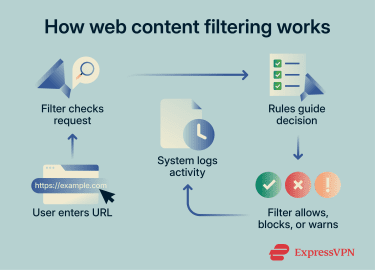
Types of web content filtering
Web filtering uses different methods to evaluate and control access:
- DNS-based filtering: Blocks or redirects DNS requests for restricted domains before a site loads.
- URL-based filtering: Applies more granular rules to full URLs, including specific pages, paths, or subdomains, depending on the setup.
- Keyword-based filtering: Scans visible content, URLs, search terms, or metadata for specific words or phrases linked to restricted topics.
- Category-based filtering: Groups websites into categories (e.g., social media, streaming, gaming) and applies category-specific rules.
- Reputation-based filtering: Uses threat intelligence and risk data to evaluate websites, such as links to malware or phishing, and adjust access dynamically.
Why is web content filtering important?
One key benefit of web filtering is the ability to limit access to malicious or risky sites. Some filters block domains or URLs associated with malware, phishing pages, and other harmful links. This can reduce security risks in corporate, institutional, and home environments.
Filters that block or manage website categories (for example, file-sharing or social media) can also reduce distractions, manage bandwidth use, and limit access to platforms that may introduce policy, compliance, or data-loss risks. For example, a network may restrict access to file-sharing platforms to help prevent unauthorized data transfers.
Some filtering systems can also log visited websites, access attempts, categories, actions, and timestamps for reporting and auditing. This can make it easier to review access history and identify unusual activity or potential threats, provided the logging is handled in line with applicable privacy laws and internal policies.
Where is web content filtering used?
Organizations and individuals use content filtering in various environments that require controlled internet access:
- Corporate networks and endpoint security: To apply consistent rules across many users, including on managed devices outside the main network.
- Schools and libraries: To restrict access to age-inappropriate, harmful, or policy-restricted content.
- Parental control software: To limit what content children can access without constant supervision.
- Public Wi-Fi networks: To apply baseline restrictions across shared networks with many temporary users.
- Regulated industries: To support acceptable-use policies, data protection, monitoring, and audit requirements where relevant.
Risks and privacy concerns
The main limitations of web filtering include inaccurate blocking, privacy concerns, and limited effectiveness against circumvention.
Filters don’t always classify content correctly. They can block useful websites, like educational or work resources, if the content uses restricted keywords or falls into broad categories. Some harmful websites may pass through if they’re new, not yet identified, or not yet categorized.
Monitoring features can also raise privacy concerns. Logging browsing activity can create a sense of surveillance and may affect user behavior, especially in managed environments. Any monitoring should be handled in line with applicable privacy laws, user notices, and internal policies.
Some web filters may also be vulnerable to bypass methods, depending on where and how they're enforced. For example, users may be able to use virtual private networks (VPNs), encrypted DNS, or changed DNS settings to bypass DNS-level restrictions unless additional controls are in place.
Further reading
- Web filtering: A detailed guide
- How to block a website on any device or browser
- How our blockers against trackers, ads, and adult sites work
- How to control internet access at home
- DNS security: How to protect your network from DNS threats







