
Expressvpn Glossary
VPN firewall
What is a VPN firewall?
A virtual private network (VPN) firewall is a specialized firewall or firewall feature that applies security rules to VPN traffic. It may be built into a VPN gateway or firewall appliance, placed near a VPN server, or used to control which VPN-connected users and devices can reach specific internal resources.
While a standard firewall decides whether to allow or block incoming and outgoing packets, a VPN firewall performs the same filtering functions with additional rules designed to handle encrypted VPN connections.
See also: Firewall, firewall rules, stateful firewall, host-based firewall, VPN gateway
How does a VPN firewall work?
A VPN firewall inspects VPN traffic where it can be seen, such as before it enters a VPN tunnel, after it exits the tunnel, or at the point where the VPN is terminated. It enforces rulesets for that traffic, including rules for VPN connections and, when decrypted traffic is visible, the traffic inside the tunnel. Firewall access control functionality is governed by a set of directives referred to as a ruleset. Administrators define these rules (such as allowed ports, protocols, and authorized sources) to determine what traffic can pass.
Remote-access VPNs allow the firewall administrator to determine which users have access to which network resources. This access control is normally available on a per-user and per-group basis. Placement also matters: placing the VPN behind the firewall would require traffic to pass through while still encrypted, preventing the firewall from inspecting the traffic inside the tunnel.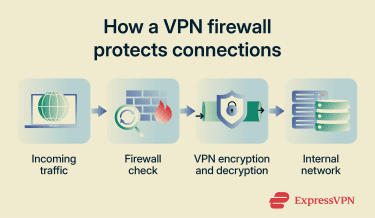
Why is a VPN firewall important?
Without a VPN firewall, encrypted remote connections could bypass security inspection. A VPN firewall helps ensure that traffic entering through VPN tunnels is subject to appropriate security policies, providing visibility and control over an otherwise opaque pathway into the network.
Where is a VPN firewall used?
VPN firewalls are deployed in remote work environments to secure connections between employees and internal resources. Enterprises use them at network perimeters to manage site-to-site and remote access traffic.
Home users may encounter similar functionality in firewall appliances or routers with built-in VPN support, or setups that route selected devices through a VPN.
Some consumer VPN applications implement firewall controls at the client level to reduce IP and Domain Name System (DNS) leaks. Features like kill switches can block internet traffic if the VPN connection drops, while DNS leak protection helps keep DNS queries from being sent outside the VPN tunnel. These are not VPN firewalls in the traditional enterprise sense, but they use similar traffic-control techniques to protect user privacy.
Risks and privacy concerns
While helpful, there are some concerns to keep in mind:
- Misconfiguration: Overly permissive rules, incorrect rule orders, or failure to update rules can lead to unintended access. Weak encryption protocols, improper authentication, or missing patches create additional vulnerabilities.
- Encrypted traffic: Firewalls cannot read encrypted application data unless they decrypt the traffic, inspect it after decryption, or terminate the VPN tunnel. A firewall that cannot understand the traffic flowing through it may not handle that traffic properly, for example, allowing traffic that should be blocked.
- Bypassed controls: Firewalls cannot prevent attacks that bypass network controls entirely, such as social engineering or stolen credentials. They may reduce exposure to some phishing-related traffic, but they cannot stop every phishing attempt.
- Disabled or malfunctioning software: If a personal firewall malfunctions, is disabled, or is misconfigured, it may fail to protect the system from unauthorized communication.
Further reading
- VPN vs. firewall: Key differences and when to use each
- What is a firewall and why it matters for security
- What is a VPN kill switch, and how does it work?
- What is a DNS leak? How to check, fix, and prevent it
- NAT “firewall”: Everything you need to know about network security







