
Expressvpn Glossary
Storage-as-a-Service

What is Storage-as-a-Service?
Storage-as-a-Service (StaaS) is a cloud-based model in which organizations rent storage capacity from a provider rather than buy and maintain their own hardware.
The provider manages the underlying storage infrastructure, while customers typically configure how their data is protected and used, including access controls, retention, backup policies, and some encryption settings. This lets organizations consume storage on demand without owning and maintaining the underlying hardware.
How does Storage-as-a-Service work?
Cloud service providers (CSPs) offer storage capacity on demand and charge customers based on factors such as stored or provisioned capacity, data transfer, requests, and, for some services, input/output operations per second (IOPS) or throughput.
StaaS platforms may offer different storage types and tiers based on performance and access needs. Frequently accessed data uses low-latency block, file, or hot object storage, while infrequently accessed data may be placed in lower-cost cool, cold, or archive object tiers for backups and long-term retention.
Organizations upload data through cloud interfaces, APIs, or integrated management tools. The provider then manages the underlying infrastructure by provisioning resources, distributing data, and monitoring service health, while the customer manages how the service is configured and used.
Some platforms can automatically move data between storage tiers as access patterns change, while others rely on customer-defined lifecycle or tiering policies.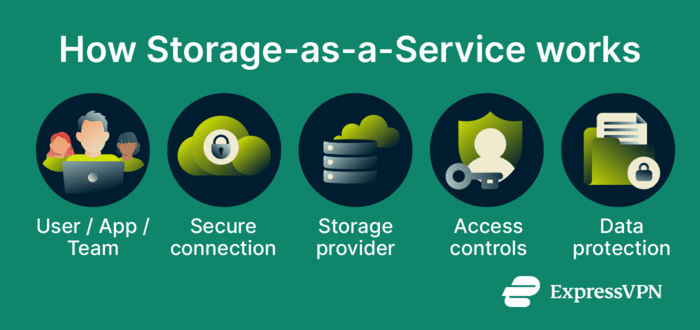
Types of Storage-as-a-Service
StaaS platforms typically use three main storage types, each designed for different workloads, performance requirements, and data structures.
- Block storage: Divides data into smaller blocks that the system stores and accesses independently. It's commonly used for workloads that need fast, low-latency access, such as databases and virtual machines (VMs).
- File storage: Organizes data into a hierarchical structure of folders and files, making it well-suited for shared access and collaborative environments.
- Object storage: Stores data as individual objects with associated metadata. This enables scalable, cost-efficient storage for unstructured data such as backups, archives, and media files.
Where is it used?
- Backup and disaster recovery: Stores backup copies and recovery data in the cloud to support business continuity.
- Data archiving: Stores old records for long-term retention and compliance.
- Data lakes: Support analytics and machine learning.
- Content delivery: Stores media and other static files that can be distributed worldwide through content delivery networks (CDN).
- Collaboration tools: Support file sharing and coauthoring for teams
Why is Storage-as-a-Service Important?
- Cost efficiency: Reduces the need for large upfront hardware investment. Organizations often pay through usage-based pricing, though costs may also depend on provisioned capacity, performance, requests, retrievals, and data transfer.
- Scalability: Organizations can increase or decrease storage capacity on demand, handling traffic spikes or rapid data growth with far less planning than traditional on-premises storage.
- Simpler operations: The provider handles the underlying infrastructure and much of the maintenance, while customers typically manage backup, monitoring, and recovery policies for their own data and workloads. This lets information technology teams focus on other tasks.
- Higher reliability and resilience: Many providers offer redundancy options, durability features, and service-level agreements to improve availability and reduce the risk of data loss, though the level of protection depends on the service and configuration chosen
- Better collaboration: Teams can access and share files from different locations and devices, whether in the same office or working remotely.
Risks and privacy concerns
StaaS can introduce security and privacy risks if it's not configured carefully. Weak access controls, missing multi-factor authentication (MFA), poor key management, and insufficient encryption can expose sensitive data. Organizations also need to verify that the provider supports the compliance requirements and data protection standards applicable to their industry.
Organizations also have less direct control over the underlying storage infrastructure because the provider runs and maintains it. That can limit visibility into certain infrastructure changes and service internals.
Access to stored data also depends on network connectivity. If the connection to the service is disrupted, access may be delayed or interrupted until connectivity is restored.
Further reading
- IoT cloud security: Threats and best practices
- How to back up files and encrypt them
- Security concerns in cloud computing
- End-to-end encryption: What it is and why it matters
- Anonymous file sharing: Stay private while sending files online







