
Expressvpn Glossary
Secure File Transfer Protocol (SFTP)
What is Secure File Transfer Protocol?
Secure File Transfer Protocol (SFTP) is a network protocol used to securely transfer, access, and manage files on a remote system. It runs over Secure Shell (SSH), which encrypts the connection to protect both data and commands during transfer.
SFTP was developed as a safer replacement for File Transfer Protocol (FTP), which can send login credentials and file data in plaintext. As a result, FTP is far more vulnerable to interception.
Despite the similar name, SFTP isn’t just FTP with added encryption. It’s a separate SSH-based file transfer protocol, commonly implemented with SSH-2, which is the standard most modern SSH implementations follow. That makes it suitable for secure file exchanges in business, IT, and other environments where sensitive data needs protection.
How does Secure File Transfer Protocol work?
SFTP begins with an SSH connection between a client and a server, typically over Transmission Control Protocol (TCP) port 22, the same port SSH uses by default. The client then authenticates the user with a password or an SSH key. Once authentication succeeds, SFTP runs as an SSH subsystem and uses the encrypted connection to handle file operations.
SFTP typically uses one SSH connection to carry both commands and file data. The client sends requests such as open, read, write, or close, and the server returns matching responses. This request-response structure lets users upload, download, and manage files remotely without exposing anything in plaintext.
SSH encrypts all data in transit and uses integrity protection to help detect tampering during the session. Using a single connection rather than separate control and data connections also simplifies firewall and Network Address Translation (NAT) configuration. By contrast, FTP and File Transfer Protocol Secure (FTPS) rely on separate control and data connections, with data ports that may be negotiated dynamically, which can make them harder to secure at the network level.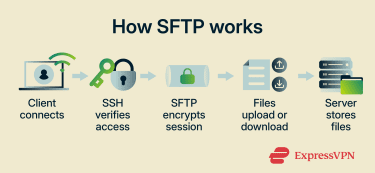
Why is Secure File Transfer Protocol important?
Here's how SFTP helps keep file transfers safe:
- Protects file contents in transit: SFTP encrypts both file data and transfer commands, helping protect information from exposure during transmission.
- Secures authentication: Unlike FTP, which sends login credentials in plaintext, SFTP uses SSH to protect authentication and verify the server connection.
- Protects data integrity: SSH integrity checks help detect tampering during the transfer.
- Supports security requirements: SFTP helps organizations meet policies and compliance requirements that require encrypted transfers of sensitive data.
- Supports secure remote management: Teams can access and manage files on remote systems without exposing the connection.
Where is it used?
Enterprises use SFTP to securely transfer files between internal teams, applications, and storage environments. IT teams rely on it for file-related server administration tasks, such as uploading files, retrieving backups, and managing remote files.
Managed hosting environments commonly support SFTP to give users secure access to website or application files. Businesses also use SFTP to exchange data with external partners and vendors over encrypted connections.
Many organizations integrate SFTP into internal workflows to automate file transfers between systems, cloud services, and external endpoints.
Risks and privacy concerns
While SFTP is designed to be secure, its effectiveness depends on proper configuration and management. Key vulnerabilities include:
- Server misconfiguration: Incorrect permissions, open directories, or poor server setup can unintentionally reveal sensitive files or access points.
- Outdated SSH implementations: Vulnerabilities can affect SSH implementations, extensions, or enabled algorithms. Administrators should keep SSH servers and SFTP clients up to date, enable available mitigations, and disable weak or vulnerable algorithms where recommended.
- Weak credentials: Even with encryption, attackers can exploit weak or reused credentials to gain unauthorized access.
- Poor key management: SSH keys must be properly generated, stored, and revoked. Unmanaged or shared keys can allow persistent unauthorized access.
- Insufficient logging: Without proper monitoring and logging, suspicious activity may go unnoticed, delaying incident response.
- Unprotected data at rest: SFTP encrypts data in transit, but files stored on the server are not automatically encrypted. Separate protections, such as storage encryption and access controls, are needed.
Further reading
- What is SSH? An introduction to Secure Shell protocol
- What is remote access? A complete beginner-to-pro guide
- SSH vs. VPN: Which should you use?
- Encryption protocols explained: What they are and how they work
- Network File System (NFS): A secure guide for remote access







