
Expressvpn Glossary
Network software
What is network software?
Network software is an umbrella term for programs and services that enable devices to communicate across a computer network. It controls how systems connect, route traffic, access shared resources, and monitor network activity.
Such software typically runs on servers, network devices such as routers and firewalls, and sometimes on endpoints such as computers and mobile devices.
See also: Network operating system, network protocols, network access control, software-defined networking, firewall
How does network software work?
Network software uses communication protocols to exchange data. When a device sends data to another device on the network, it specifies the destination using the IP address or a domain name. When it uses a domain name, the Domain Name System (DNS) resolves it to the corresponding IP address.
The Transmission Control Protocol (TCP) / Internet Protocol (IP) suite then handles delivery. Depending on the protocol in use, the transport layer may establish a connection and segment the data, while IP handles addressing and forwarding toward the destination. Routing tables and forwarding rules help determine the path packets take between devices.
In some cases, especially with security or access-control software, the system verifies user or device identity using mechanisms such as certificates or credentials. It then enforces security policies that determine which resources the device or user can access.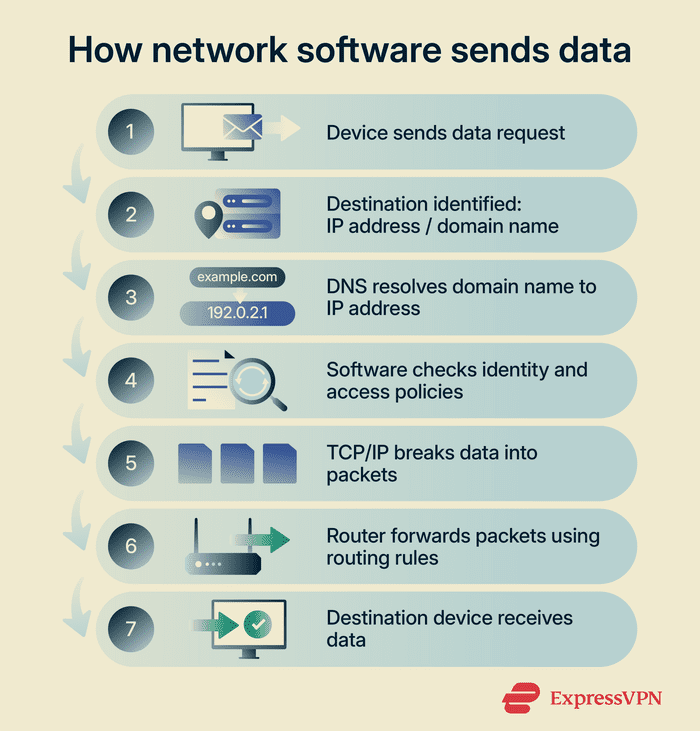
Types of network software
Network software falls into several categories based on function:
- Network operating systems: Provide core network services, such as authentication, communication, and shared resource management for servers and other networked systems.
- Routing and switching software: Directs how devices forward traffic between systems and supports network management, automation, and traffic optimization.
- Network management and monitoring tools: Track network performance, availability, and device status, and help detect faults across network operations.
- Security software: Enforces access controls, inspects traffic, and detects threats. Includes firewalls and intrusion detection and prevention systems (IDS/IPS).
- Remote access tools: Include software that allows devices outside a local network to securely connect to internal systems, for example, virtual private networks (VPNs).
- Virtual networking platforms: Create and manage software-based networks in cloud or data center environments.
Why is network software important?
Network software keeps networks reliable, maintains uptime, and supports informed decision-making around troubleshooting and optimization.
Monitoring tools that track network health, detect failures, and measure performance help identify problems early, sometimes before they disrupt services. They also collect traffic and system data to analyze performance and identify bottlenecks.
Security tools like firewalls help protect networks from threats such as malware spreading over network connections, unauthorized login attempts using stolen credentials, and distributed denial-of-service (DDoS) attacks that overwhelm networks with traffic.
Network software also supports scaling across locations. Remote access tools allow employees, branch offices, and cloud services to securely connect to the same infrastructure from outside the local network without increasing operational costs.
Where is it used?
Network software operates in many environments, including:
- Home networks: Wi-Fi routers and mesh systems that connect personal devices.
- Business networks: Local area networks (LANs), wide area networks (WANs), and corporate data centers.
- Cloud environments: Cloud networks and virtual private clouds that connect virtual machines (VMs) and services.
- Public sector environments: Networks in schools, hospitals, and government institutions.
- Telecommunications and connected systems: Mobile networks and Internet of Things (IoT) deployments.
Risks and privacy concerns
Network software can introduce operational and security risks if attackers compromise centralized components. In architectures like software-defined networking (SDN), an attacker who gains control of a central controller or administrative credentials can manipulate traffic or disrupt large parts of the network.
Configuration errors also pose risks because network software often manages many devices simultaneously. A single incorrect rule or policy may disrupt connectivity, expose internal network segments, or override security settings. Unsecured programmable interfaces and exposed APIs can also expand the attack surface.
Additional risks include software supply chain attacks or compromised endpoints, which may enable attackers to alter configurations, intercept traffic, or disrupt network operations.
Further reading
- SD-WAN vs. VPN: Which is the right choice for your business?
- Network configuration management for secure networks
- What is network mapping? Complete guide
- Network architecture: Building secure and modern networks
- What is cloud networking? A comprehensive overview







