
Expressvpn Glossary
Network discovery

What is network discovery?
Network discovery is the process of identifying and documenting devices connected to a network. It scans IP ranges to detect active assets, from servers to Internet of Things (IoT) devices, helping build an accurate inventory and improve visibility.
Discovery identifies which devices are present (e.g., "There is a server at 192.168.1.5"). Many tools pair discovery with port scanning to check how those devices can be accessed (for example, whether a port is open). Although distinct, the two are often used together in network management and attacker reconnaissance.
How does network discovery work?
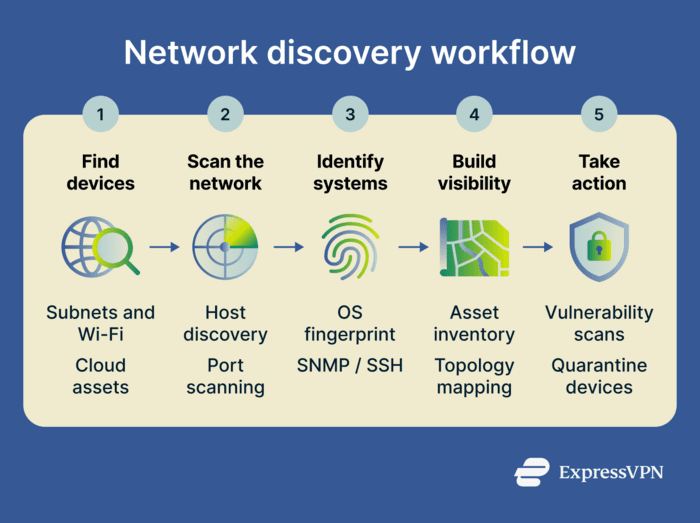
Network discovery tools use several techniques to identify devices and map infrastructure:
- IP scanning: Sends packets across IP networks to detect active devices, often using the Address Resolution Protocol (ARP) or the Internet Control Message Protocol (ICMP).
- Service queries: Uses protocols such as Domain Name System (DNS) and Dynamic Host Configuration Protocol (DHCP) to resolve hostnames and identify device roles.
- Management protocols: Tools may use Simple Network Management Protocol (SNMP) or Windows Management Instrumentation (WMI) to collect configuration and performance data.
- Passive monitoring: Some tools analyze network traffic to detect devices without directly querying them.
- Topology mapping: Collected data is combined to visualize how devices connect across the network.
Types of network discovery
Different methods are used depending on the depth of information needed and the sensitivity of the network environment.
- Active discovery: Sends packets to devices to prompt a response. This provides detailed data but generates network traffic.
- Passive discovery: Silently monitors traffic to identify communicating devices. It’s safe for fragile environments but may miss silent devices.
- Other methods: Authenticated discovery uses credentials for deeper analysis, while cloud discovery uses APIs to identify virtual assets.
Why is network discovery important?
Network discovery provides the baseline data needed for management. It:
- Finds hidden devices: Network discovery identifies "shadow IT," such as unauthorized personal phones or rogue routers that employees connect to without permission.
- Speeds up incident response: When a security alert occurs, responders can quickly identify the affected device and, if asset records are up to date, see its location and assigned owner.
- Identifies outdated systems: Helps IT teams find devices running old software that may need updates or patching.
- Verifies network segmentation: Checks whether restricted devices are visible in areas where they shouldn’t be.
- Supports compliance: Helps organizations maintain an accurate asset inventory, which is often required for audits and regulatory compliance.
Where is it used?
Network discovery is versatile, spanning home labs to enterprise clouds:
- Small business networks: Tracks office equipment and ensures no unauthorized devices are connected.
- Home labs: Maps devices to test network configurations.
- Security research: Analyzes network behavior and identifies potential vulnerabilities in a controlled environment.
- Cloud infrastructure: Maintains visibility across dynamic cloud and on-premise servers.
- Enterprise IT: Manages large-scale inventory and hardware lifecycles.
Risks and privacy concerns
While essential for administration, network discovery has some risks:
- Misuse: Attackers can use discovery tools to map networks and identify vulnerabilities.
- Unauthorized scanning: Scanning networks without authorization may violate computer misuse or cybersecurity laws, depending on jurisdiction.
- Disruption and alerts: Aggressive scans can trigger intrusion detection systems (IDSs) or overwhelm older hardware, causing outages.
- Data exposure: Inventory maps reveal the entire network topology.
Further reading
- What is network discovery? How to enable it safely
- What is network mapping? Complete guide
- Network configuration management for secure networks
- Address Resolution Protocol (ARP): What it is and why it matters