
Expressvpn Glossary
Internet Protocol address
What is an Internet Protocol address?
An Internet Protocol (IP) address is a numerical label assigned to a device or network interface so it can communicate over an IP-based network. It serves as both an identifier and a locator, helping networks determine where data comes from and where it needs to go. Without IP addresses, devices on the internet would have no reliable way to find or communicate with each other.
How does an Internet Protocol address work?
When a device connects to the internet, an internet service provider (ISP), router, or network assigns it an IP address. Data sent over the internet is broken into packets. Each packet includes an IP header with source and destination addresses, which routers use to move the packet toward its destination.
Because most users access the internet through human-readable domain names like example.com, the Domain Name System (DNS) translates those names into their corresponding IP addresses.
Additionally, Network Address Translation (NAT) allows multiple devices on a private network, such as a laptop, phone, and tablet, to share a single public IP address assigned by the ISP.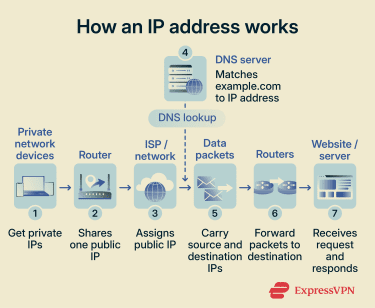
Types of Internet Protocol addresses
IP addresses come in different types depending on their format, visibility, and how a network assigns them:
- Internet Protocol version 4 (IPv4): Uses 32-bit addressing, supporting around 4.3 billion addresses in formats such as 203.0.113.5. This example comes from a range reserved for documentation. The growth of internet-connected devices has effectively exhausted the available IPv4 address pool.
- Internet Protocol version 6 (IPv6): Uses 128-bit addressing, supporting about 3.4 × 10³⁸ addresses in formats such as 2001:db8::1. Its vastly larger address space accommodates the ongoing expansion of the internet.
- Public IP addresses: Assigned by an ISP or network provider and routable on the public internet, allowing a device, router, or network to exchange data online.
- Private IP addresses: Used within local networks, such as homes or offices, and not directly routable on the public internet.
- Static IP addresses: Stay the same over time, which is useful for servers, remote access, and services that need a consistent address.
- Dynamic IP addresses: Can change when the network reassigns them, such as after a Dynamic Host Configuration Protocol (DHCP) lease expires, a device reconnects, or an ISP updates its assignment.
- Loopback addresses: Refer back to the device itself and are used for testing and local services. Common examples include 127.0.0.1 in IPv4 and ::1 in IPv6.
- Link-local addresses: Allow devices on the same local link to communicate without a router. They use 169.254.0.0/16 in IPv4 and fe80:: in IPv6.
Why are Internet Protocol addresses important?
IP addresses are the foundation of internet communication. Without them, devices couldn’t locate one another, and data would have no way to travel between source and destination.
They also play a broader operational role. Administrators rely on IP addresses to monitor traffic, apply access controls, troubleshoot connectivity issues, and allocate resources across infrastructure.
Risks and privacy concerns
While IP addresses are essential for connectivity, they can also introduce privacy and security risks, such as:
- Geolocation exposure: IP addresses can reveal a device’s approximate location and ISP. A virtual private network (VPN) can help mask an IP-based location by replacing the visible public IP address with a VPN server address.
- Expanded attack surface: A publicly reachable IP address or exposed service can attract port scans, distributed denial-of-service (DDoS) attacks, and exploitation attempts.
- User tracking: Websites, apps, and analytics services can log IP addresses and combine them with cookies, device identifiers, or other signals to help recognize activity across sessions.
- IP spoofing: Malicious actors can forge IP addresses to disguise the origin of attacks, making attribution more difficult.
- IPv6 device tracking: Some IPv6 configurations can use stable interface identifiers, making devices easier to recognize across networks. Privacy extensions, described in Request for Comments (RFC) 8981, generate temporary randomized addresses that rotate over time, but support and defaults vary by operating system, device, and network configuration.
Further reading
- Types of IP addresses explained: Complete guide
- How to trace an IP address: Step-by-step guide
- What can someone do with your IP address?
- IPv4 vs. IPv6: Which one is better?







