
Expressvpn Glossary
In-memory database

What is an in-memory database?
An in-memory database is one that keeps its active data in RAM rather than on disk. RAM lets the CPU access data directly instead of waiting for it to be retrieved from storage, so reading and writing is complete in microseconds instead of milliseconds.
How does an in-memory database work?
Because RAM is limited, in-memory databases have to be selective about what’s stored. Data that's accessed frequently remains available. Older or rarely used data may be removed or moved to slower storage, such as disk.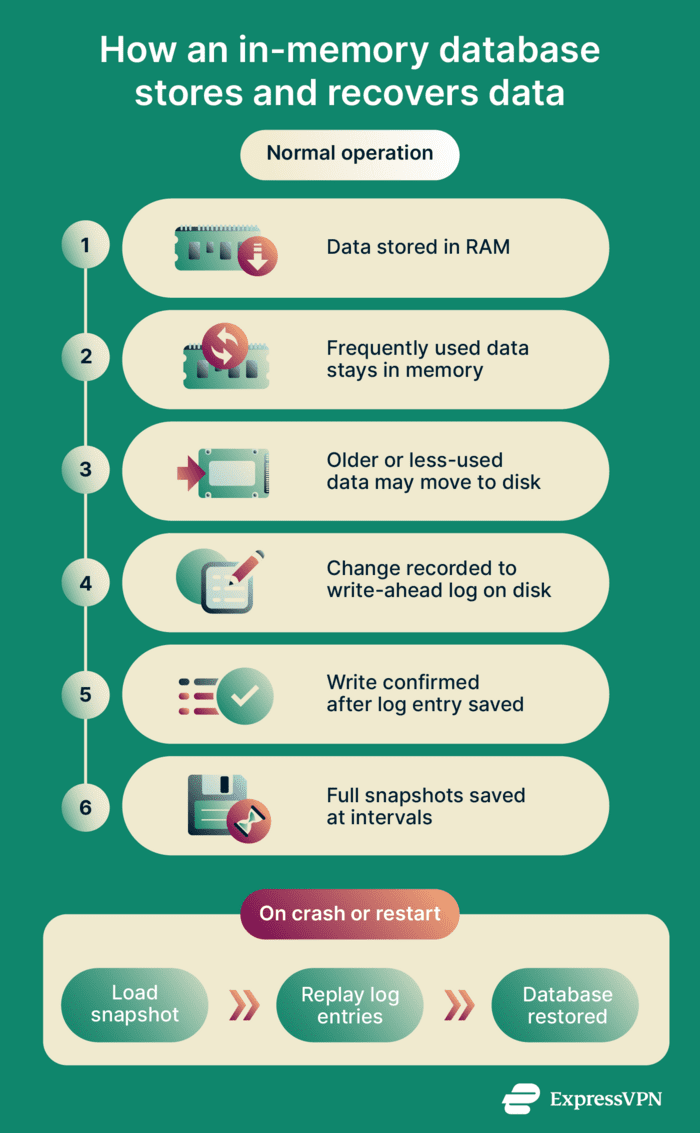
RAM almost always clears when power is lost, so the system also needs a way to rebuild the database after a crash or restart. When data changes, the database first records the change to a file on disk called a write-ahead log. The database confirms the write only after the record is saved. If the system crashes, the database can replay the log to rebuild the dataset to its most recent state.
To avoid replaying every logged change from the beginning, the in-memory database also saves full copies of its data at set intervals. These copies are called snapshots. During recovery, the system loads the most recent snapshot and only applies the log entries created afterward.
Why is an in-memory database important?
In-memory databases are designed for systems that require low-latency data access and high throughput. By storing active data in RAM rather than on disk, they can process read and write operations more quickly.
This allows systems to work with rapidly changing data and respond within tight timing constraints.
Disk-based databases remain well-suited for many workloads, particularly those that prioritize durability and cost efficiency. In-memory databases represent an alternative approach that emphasizes speed and responsiveness at the data layer.
Where is it used?
- Caching and session storage: Stores login sessions and temporary user data.
- Real-time analytics: Displays live metrics.
- Fraud detection: Evaluates transactions before approving them.
- IoT data processing: Processes continuous streams of data.
- API rate limiting: Tracks how many requests are sent per second.
Limitations and risks
Operational limitations
- Higher cost: RAM costs far more per gigabyte than disk storage, which makes it expensive to keep large datasets in memory.
- Limited persistence: Not all in-memory databases save their data to disk. If this feature isn't enabled, all data is lost if the system crashes or restarts. Even when logs or snapshots are available, data written shortly before a failure may not be recoverable, depending on how persistence is configured.
Security and privacy risks
- Network exposure: In-memory databases are often deployed inside private networks. If firewall or network access rules are misconfigured, the database can end up exposed to the public internet.
- Weak access controls: If authentication is disabled or access controls are misconfigured, anyone who can connect to the server may be able to read or modify data.
- Memory dumps: During crashes or debugging, RAM contents can be written to disk. If sensitive data was stored in memory, it may end up in files that aren't properly protected.
- Data stored in plaintext: Data stored in memory is usually kept in plain form for performance. If an attacker gains access to the system, that data can be read directly. Unencrypted backups can also create an additional attack surface.
Further reading
-
- What is TrustedServer technology?
- Fileless malware: What is it and how to stop it?
FAQ
Is an in-memory database just a cache?
How does persistence work in RAM-first systems?
Some systems also store older or less frequently accessed data on disk to free up RAM while keeping active data in memory.