
Expressvpn Glossary
DNS filtering
What is DNS filtering?
Domain Name System (DNS) filtering is a security and access-control method that determines whether a device can reach a domain. With filtering in place, rather than resolving every request as usual, a DNS resolver or another enforcement point evaluates the domain and either returns the correct IP address or blocks the lookup.
DNS filtering is commonly used in home networks, workplaces, and public Wi-Fi to restrict access to malicious or inappropriate websites.
How does DNS filtering work?
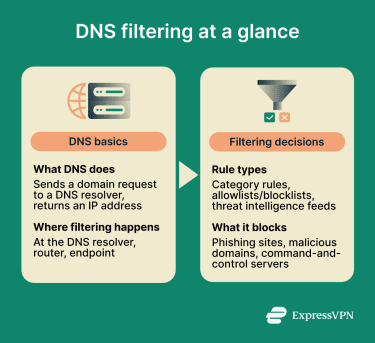 When a device goes to connect to a website, it must first perform a DNS lookup. Normally, the device asks a DNS resolver to translate the domain name into an IP address so it knows where to connect. The resolver handles this lookup and sends back an address, after which the browser connects to the site.
With DNS filtering enabled, the resolver evaluates the requested domain name before responding to the lookup. The domain is compared against filtering rules or threat-intelligence feeds.
If it’s permitted, the resolver returns the real IP address, and the device proceeds to load the website. If it’s blocked, the request is denied, and the user may see a warning page, a browser error, or another blocked-response message, depending on how the filter is configured.
Filtering doesn’t always occur at the resolver. Some networks apply DNS filtering at routers or network gateways, while endpoint software can enforce the same rules directly on devices. In each case, the decision still happens during the name lookup step.
Types of DNS filtering
DNS filtering can be implemented in several ways, depending on where the control is applied and how domains are evaluated. Common methods include:
- Blocklist/allowlist filtering: Prohibits access to predefined lists of domains or only allows access to permitted domains.
- Category-based filtering: Blocks domains associated with categories such as gambling, adult content, or social media.
- Threat-intelligence filtering: Uses continuously updated threat-intelligence feeds to block domains associated with phishing and other threats.
- Endpoint agent filtering: Relies on software installed on devices to enforce filtering regardless of network location.
- Network resolver filtering: Uses a centralized resolver or router to apply rules to devices using that network’s DNS path
Why is DNS filtering important?
Many organizations turn to DNS filtering to block websites with objectionable content. Companies may seek to improve productivity by limiting access to social media or other non-work sites. Parents can also use it for a similar purpose, blocking specific sites or content categories.
Benefits and limitations of DNS filtering
DNS filtering provides protection at the domain lookup stage, but it also has technical constraints. The trade-offs are summarized below:
| Benefits | Limitations |
| Provides quick protection at the DNS stage | Cannot inspect full URLs or page content |
| Enables centralized policy management across multiple devices | Direct IP access may bypass domain-based filtering in some cases |
| Blocks phishing and malware command-and-control domains | May lose visibility or allow bypass when devices use external encrypted DNS outside the organization’s control |
| Can extend coverage to unmanaged and personal devices, depending on the deployment method | Offers less granular control than proxy or firewall inspection |
Security and privacy risks
Because the decision to allow or block a domain occurs during name resolution, the device never contacts the destination server via normal DNS when a domain is blocked. These events may be logged for reporting or auditing by the filtering service or network administrator, depending on the product and configuration. This can raise privacy concerns for anyone using the network.
Blocking errors may disrupt legitimate services, and users sometimes attempt workarounds, such as switching to alternate DNS services or disabling protections, which can expose the device to additional security risks.
Further reading
- DNS security: How to protect your network from DNS threats
- How our blockers against trackers, ads, and adult sites work
- How to control internet access at home
- How to block a website on any device or browser
- Complete guide to understanding managed DNS







