
Expressvpn Glossary
Browser isolation

What is browser isolation?
Browser isolation is a cybersecurity method that separates web browsing from the user’s device. In many cases, organizations achieve this through remote browser isolation (RBI), in which website code runs in an isolated environment rather than directly on a laptop, phone, or tablet.
This reduces the risk of malicious scripts, exploit code, or browser-based malware reaching the endpoint. It can also limit some phishing risks, especially when combined with controls for credential entry, downloads, uploads, or the clipboard.
How does browser isolation work?
Browser isolation usually works in three steps.
- Session opens: If a browsing request matches the defined security policies, the web content opens in an isolated environment instead of being executed directly on the user’s device.
- Page loads remotely: The page loads and runs in an isolated environment rather than on the endpoint, often in a remote cloud-based session.
- User receives rendered output: The user receives a rendered version of the page, sometimes streamed visually, while active web code remains contained on the user’s device and, depending on the deployment, within the organization’s protected network.
For example, if someone clicks a suspicious link in an email, browser isolation can open that page in an isolated session. The person can still view it, but malicious scripts or exploit code stay inside the separate environment rather than running on the laptop itself.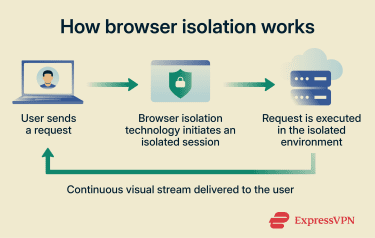
Types of browser isolation
There are three main types of browser isolation:
- RBI: Runs the browsing session in a remote environment, often in the cloud. Only the rendered output, such as pixels or rendering commands, reaches the user’s device. This is the model many people mean when they refer to browser isolation.
- On-premises browser isolation: Runs the isolated browsing environment on an organization's managed infrastructure. This gives teams more control over deployment, policy, and data handling, but the isolation server still needs to be protected from internal network resources.
- Client-side isolation: Runs a sandbox, container, or virtualized browser environment directly on the endpoint, separating risky browsing activity closer to the device.
Why is browser isolation important?
People use browsers to access email, documents, Software-as-a-Service (SaaS) apps, and public websites, making browsers a common entry point for attacks. Malicious scripts, phishing pages, harmful extensions, and browser exploits can all turn routine browsing into a security risk.
Browser isolation reduces the web-based attack surface by containing malicious scripts, risky links, and zero-day browser exploits before they reach the endpoint. It can also reduce phishing risk when paired with controls that restrict credential entry, downloads, uploads, or clipboard use.
It also supports a zero-trust approach to browsing by treating website code as untrusted by default, and it can help protect unmanaged or higher-risk devices without blocking access outright.
Where is browser isolation used?
Organizations use browser isolation when they need safer web access without entirely blocking work. Common use cases include:
- Accessing sensitive web apps and cloud consoles in zero-trust or compliance-driven networks.
- Browsing on remote, hybrid, bring your own device (BYOD), or contractor devices.
- Opening suspicious email links and viewing some attachments in an isolated environment.
Risks and privacy concerns
Browser isolation reduces risk but has its limitations:
- Incomplete traffic coverage: If the isolation policy covers only certain browsers, apps, or URL categories, unprotected traffic remains exposed to the same threats that isolation is meant to reduce.
- Session logging and privacy: In managed environments, administrators may log or inspect isolated browsing sessions, policy events, URLs, or user actions such as downloads, uploads, copy/paste, and printing. On BYOD or personal devices, this can capture work-related browsing activity that users may not expect to be monitored.
- Degraded user experience: Some sites may load more slowly, and features like drag-and-drop, printing, or media playback may not work the same way as in a standard browser.
- Weak transfer controls: If organizations don't restrict uploads, downloads, copy-and-paste, and printing within isolated sessions, malicious files may still reach the endpoint, and sensitive data may still leave the organization.
Further reading
- Browser isolation: A detailed guide
- What are malicious websites, and how can you safeguard yourself?
- What is browser hijacking? How it works and how to stop it







