
Expressvpn Glossary
Web shell

What is a web shell?
A web shell is a malicious script placed on a web server to give an adversary remote access to the server and, in many cases, maintain persistence. It's typically installed by exploiting vulnerabilities in web applications or content management systems (CMS). Once deployed, a web shell may allow attackers to execute system commands, steal data, move laterally within a network, and upload additional malware.
How does a web shell work?
A web shell is commonly deployed by exploiting vulnerabilities in web applications, plugins, or server configurations. Common exploitation methods include remote code execution (RCE), file upload vulnerabilities, remote file inclusion (RFI), command or code injection, Structured Query Language (SQL) injection in some attack chains, stolen credentials, and unpatched software vulnerabilities.
Once installed, the web shell script resides on the server and accepts commands from the attacker via HTTP requests. The attacker sends requests to the shell's URL, and the server returns responses as part of normal web traffic. This can allow malicious activity to blend in with legitimate communications, though the web shell’s capabilities depend on the server’s permissions and configuration.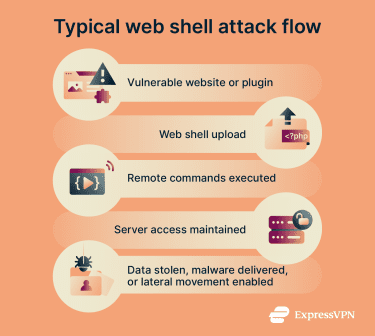
Types of web shells
Web shells are categorized by the programming language in which they are written, which determines the server environments they target:
- Hypertext Preprocessor (PHP) web shells: Among the most commonly observed types. Deployed on servers running PHP, often through vulnerable file upload forms or unpatched CMS. May allow file management, system command execution, and other server-side actions.
- Active Server Pages (ASP) and ASP.NET web shells: Target Microsoft Internet Information Services (IIS) servers. Often deployed through vulnerable, misconfigured, or outdated web applications. Provide remote access and control similar to PHP shells.
- Jakarta Server Pages (JSP) web shells: Target servers running Java-based web applications. Commonly deployed on enterprise application servers and used in targeted attacks.
- Perl, Python, and Unix shell scripts: Less common variants that run on servers with support for these languages. Functionality aligns with other web shell types.
Web shell attack impact
A web shell is a major indicator of server compromise and can enable persistent attacker access. Operating over standard HTTP or HTTPS, it often bypasses perimeter defenses and supports data theft, lateral movement, and broader infrastructure compromise.
Common targets include vulnerable CMS installations, shared hosting environments, public-facing enterprise applications, and misconfigured admin panels. Risks include exposure of sensitive data, credential theft, malware delivery from trusted domains, and long-term, undetected persistence.
Preventing web shell attacks
Prevention centers on patching vulnerabilities, applying least privilege, and segmenting networks with a demilitarized zone (DMZ) to isolate public-facing servers. Secure configurations include disabling unnecessary services, avoiding default credentials, and deploying web application firewalls (WAFs). Strict input validation blocks file inclusion and injection attacks, while file integrity monitoring and regular vulnerability scans help detect unauthorized changes and exposed weaknesses.
Further reading:
- What are malicious websites, and how can you safeguard yourself?
- What is a script kiddie? How they attack and why it matters
- Log4Shell vulnerability: What it is and how to stay protected
- What is a rootkit, and why is it so dangerous?
- What is SysJoker malware? Risks, detection, and prevention
FAQ
What is the difference between a web shell and a backdoor?
How do attackers install web shells?
Are web shells always malicious?
Some web shells are developed and distributed by malicious actors. These tools often include hidden access mechanisms, callbacks, or other functionality that allows another party to regain access, even when the web shell appears protected, such as with a password.







