
Expressvpn Glossary
Virtualization security

What is virtualization security?
Virtualization security is the set of controls that protect virtual machines (VMs), hypervisors, and the shared resources they rely on. It isolates workloads, hardens the underlying system, and restricts access so that multiple virtual systems running on the same physical server are protected from one another and external threats.
Because multiple VMs run on the same physical hardware, a compromised hypervisor can expose every VM on the host, and weak isolation between workloads can allow threats to spread laterally. Virtualization security addresses these risks through layered controls.
How does virtualization security work?
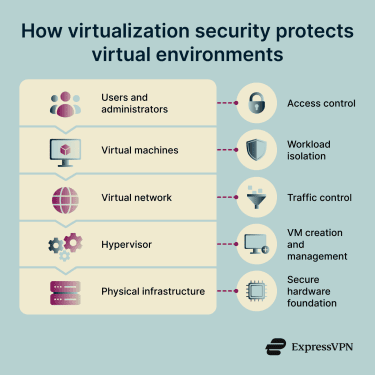
Virtualization security applies protection in layers, from the host system down to individual workloads. The main mechanisms include:
- Hypervisor hardening: Securing the virtualization layer by restricting access, disabling unnecessary components, and applying security patches.
- Workload isolation: Enforcing boundaries between VMs so that a compromise in one does not reach the others on the same host.
- Network segmentation and monitoring: Controlling and inspecting traffic between VMs to limit lateral movement.
- Access controls: Granting users and administrators only the permissions required for their role.
- Snapshot and image security: Managing VM templates and snapshots to prevent the use of outdated or insecure configurations.
- Monitoring and detection: Tracking activity across the environment to identify anomalies such as unauthorized access attempts or unexpected changes to VM configurations.
Why is virtualization security important?
Virtual environments rely on shared infrastructure, dynamic workloads, and layered access controls. Virtualization security helps address these challenges through targeted controls:
- Containing threats: Strong isolation between VMs prevents malware from spreading from one workload to another.
- Managing dynamic infrastructure: Virtualized security is more flexible and scalable than hardware-based security, supporting automated deployment of security policies across multiple data centers and environments.
- Protecting the hypervisor: The hypervisor is a high-value target. A compromise at this layer can give attackers control over every VM on the host, making hypervisor security central to preventing large-scale breaches.
- Reducing attack surfaces: Micro-segmentation and virtual firewalls restrict traffic between VMs, limiting how far an attacker can move after an initial compromise.
- Maintaining data integrity and confidentiality: Encryption and access controls protect data at rest in VM images and in transit between workloads, reducing exposure if storage is accessed without authorization.
- Supporting compliance requirements: Securing virtual workloads ensures regulatory compliance and enables faster disaster recovery in case of a cyber incident.
Where is virtualization security used?
Virtualization security applies in any environment that depends on virtual systems. Enterprise data centers use it to separate the many VMs running on shared physical servers. Private and public cloud platforms rely on it to protect tenants and workloads on shared infrastructure.
It is also central to virtual desktop infrastructure (VDI), where VMs replace physical endpoints and are centrally managed. Development, testing, and managed hosting environments use virtualization security to keep systems isolated and reduce the risk of unintended access between projects.
Risks and privacy concerns
Common risks in virtualized environments include:
- Hypervisor vulnerabilities and escape attacks: Exploits that allow an attacker to break out of a VM and reach the host or other VMs.
- Misconfigured VMs: Weak settings, default credentials, or unpatched software can create entry points for unauthorized access.
- Insecure snapshots and images: Stored VM images that contain sensitive data or outdated software, which can be exploited if accessed.
- Excessive administrative privileges: Broad access rights that amplify the impact of a compromised account.
- VM sprawl: Uncontrolled growth of VMs reduces visibility and complicates security monitoring and patching.
Further reading
- Desktop virtualization: The complete guide
- Virtual server vs. physical server: Key differences explained
- What is a cloud server? Everything you need to know
- What is IaaS? Infrastructure-as-a-Service explained
- Security concerns in cloud computing and how to address them