
Expressvpn Glossary
Virtual networking
What is virtual networking?
Virtual networking is the use of software to create and manage network connections. Instead of changing hardware for every update, administrators define connections and traffic rules in software.
Physical infrastructure still carries data, but software controls how systems connect. This allows networks to be built and changed without hardware reconfiguration.
How does virtual networking work?
Virtual networking works through a software control layer that manages how traffic moves across physical infrastructure. It’s similar to software-defined networking (SDN), in which network behavior is centrally controlled rather than configured directly on hardware devices.
This layer runs in environments such as hypervisors and cloud platforms.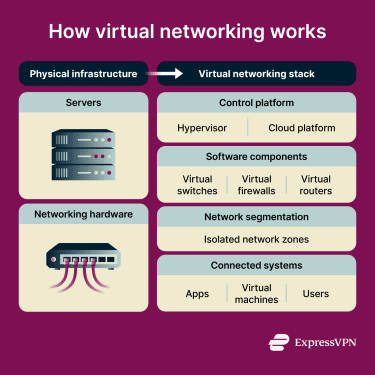
A hypervisor creates virtual machines (VMs) on a physical server and connects them through virtual interfaces. The networking layer then creates software-based networking components that would otherwise exist as separate physical devices.
These components include switches, routers, and firewalls, created and managed in software. Administrators configure them through a central interface, often using APIs or automation tools.
Because networks are software-defined, administrators can divide them into isolated segments with their own access control rules. For example, different teams can share the same infrastructure without accessing each other’s traffic.
New workloads can be supported through software updates rather than hardware changes.
Why is virtual networking important?
Traditional networks were designed for fixed environments, but modern systems are distributed across cloud platforms and remote users.
Virtual networking lets configurations change at the same pace as modern systems. Adding an application or adjusting access rules can happen through software changes rather than physical intervention. If a system is compromised, administrators can isolate it by limiting internal (east–west) traffic.
Where is virtual networking used?
Virtual networking is common in environments where infrastructure changes often or runs across multiple locations:
- Cloud infrastructure: Cloud providers use virtual networking to give each customer an isolated network environment within shared physical infrastructure. This is commonly called a virtual private cloud (VPC). It’s a logically isolated network within the provider’s infrastructure.
- Hybrid and multi-cloud setups: Organizations use them to apply consistent network policies across cloud and on-premises systems, though differences between providers can make full consistency harder to achieve.
- Enterprise data centers: Large organizations use them to manage VMs and enforce internal access rules through software.
- Containerized applications: Some modern applications are split into many small programs called containers that run on the same server. Virtual networking lets those programs communicate with each other while staying isolated from other applications. This can be implemented using overlay networks, which create virtual connections between containers on top of the existing network.
Benefits and risks of virtual networking
Virtual networking offers several operational advantages, but it also introduces risks that organizations need to manage.
Benefits include:
- Faster provisioning: New network segments and access rules can be deployed via software updates rather than hardware changes.
- Centralized policy management: Administrators can apply access and security rules across an environment from a single location.
- Reduced hardware dependency: Fewer dedicated network devices are needed for routine changes.
- Automation: Many networking tasks can be handled through scripts or orchestration tools. This includes infrastructure-as-code (IaC), where network configurations are defined and managed through code.
The main risks are misconfiguration and visibility gaps.
Misconfiguration can expose services or open unintended connections between systems. Errors in management interfaces or APIs can also increase the attack surface by exposing systems to unauthorized access.
In terms of visibility, traffic inside virtual layers, such as east–west traffic within data centers, may not appear in the same monitoring tools used for physical networks. This is especially true for overlay networks, which can bypass traditional perimeter-based monitoring.
Further reading
- What is cloud networking? A comprehensive overview
- What is a VLAN? A complete guide to virtual LANs
- Network architecture: Building secure and modern networks
- The ultimate guide to remote access VPN solutions







