
Expressvpn Glossary
System Integrity Protection (SIP)
What is System Integrity Protection?
System Integrity Protection (SIP) is a built-in security feature in macOS that prevents software from modifying protected parts of the operating system.
Before SIP, software with root-level access could modify or overwrite core system files and apps, making Macs vulnerable to persistent malware and rootkits.
Apple introduced SIP in OS X El Capitan to restrict root-level access to protected system folders and apps, including critical directories and preinstalled macOS applications.
How does System Integrity Protection work?
SIP restricts access to specific critical system locations, making protected components read-only for most processes and allowing changes only from Apple-signed processes with special entitlements.
It also restricts runtime changes to protected system processes, preventing third-party software from attaching to, injecting into, or altering them.
Apple enforces these protections even when a process has administrative or root privileges. SIP is enabled by default on macOS and remains active unless it's deliberately disabled.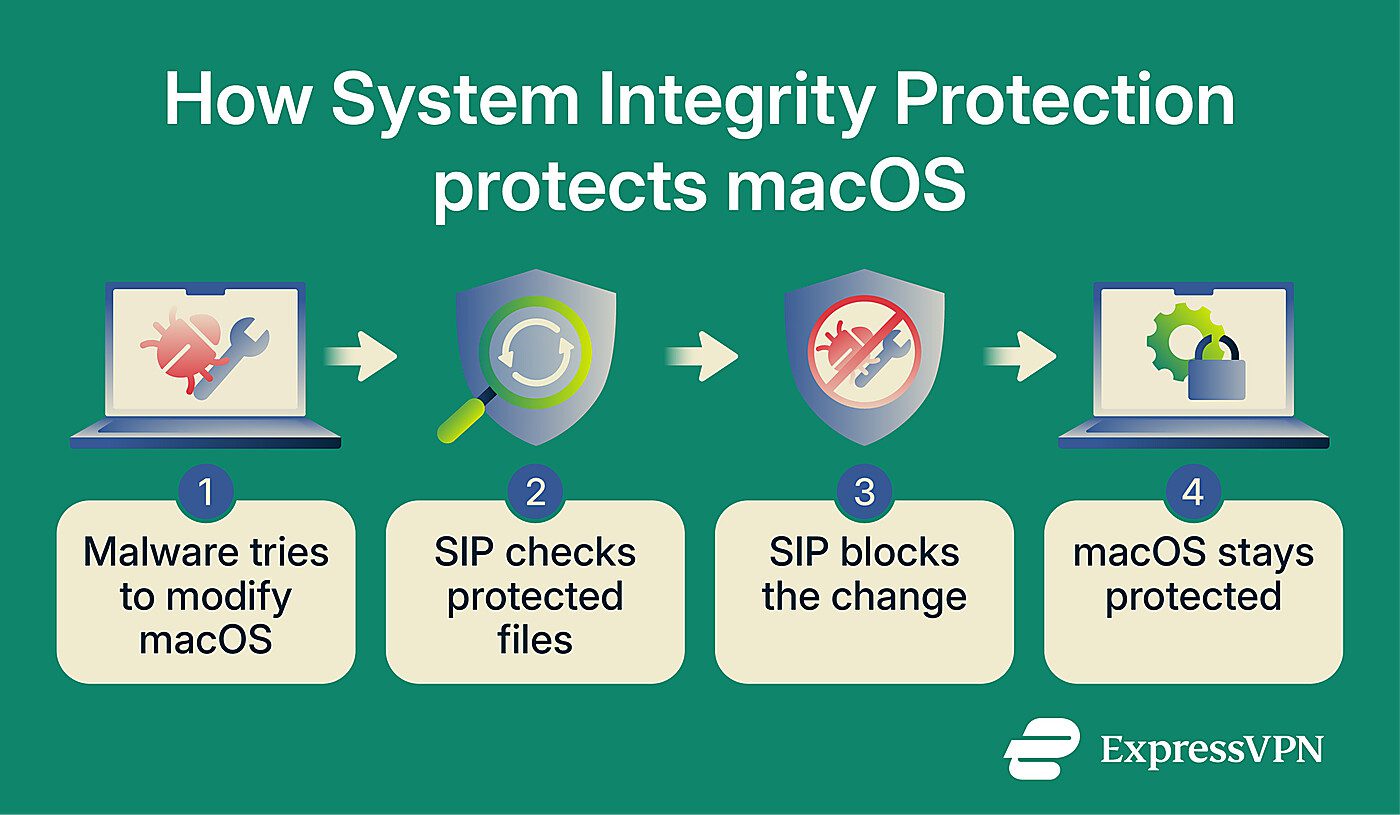
Why is System Integrity Protection important?
SIP blocks malware from modifying critical system directories like /System, /usr, and preinstalled applications. This helps prevent attackers from modifying protected system files or installing certain persistent components, such as rootkits or backdoors.
It also limits damage from already-exploited applications. Even if malware runs on the system, SIP prevents it from injecting code into or attaching to protected system processes, limiting what attackers can do.
Where is it used?
Apple enables SIP by default on Macs running OS X El Capitan or later, including personal and company-managed devices.
Developers may temporarily reduce or disable SIP for low-level testing, such as unsigned kernel extensions or system-level software, but most users and organizations should keep it enabled to maintain system integrity.
Risks and limitations
Disabling SIP removes protections around critical system locations, making it easier for malware with sufficient privileges to modify protected files, tamper with core macOS components, or attempt persistent changes.
Even when SIP is enabled, it doesn't prevent threats like:
- Living-off-the-land (LotL) attacks: SIP can’t prevent attackers from using legitimate system tools such as curl, shell scripts, or AppleScript to download payloads or execute commands.
- Permission-based abuse: If malicious software gains valid user or admin permissions, SIP doesn’t block actions performed within those approved access levels.
- Signed malware: SIP doesn’t stop all signed malicious code from running, but third-party signing alone doesn’t allow software to modify SIP-protected system components.
- User-space malware: SIP doesn't stop malware that runs entirely in user space, such as data stealers or cryptocurrency miners that operate without modifying protected files.
Further reading
- MacBook security: Complete guide to protecting privacy and data
- How to fix "Apple could not verify app is free of malware"
- How to remove malware from Mac: The complete cleanup checklist
- Signs that your MacBook is hacked (and what to do about it)
- Privilege escalation explained: Types of attacks and prevention