
Expressvpn Glossary
Session cookie

What is a session cookie?
A session cookie is a temporary file stored in a browser during a browsing session. It usually holds a random identifier that links multiple requests from the same browser, allowing the server to recognize the user across pages without re-authenticating at each step.
Unlike persistent cookies, session cookies carry no expiration date and are generally removed when the browser ends, though some browsers’ session-restore features can preserve them across restarts.
How does a session cookie work?
When a user logs in or performs an authenticated action, the server generates a unique session ID and sends it to the browser as a cookie. The browser stores this identifier and automatically includes it in subsequent HTTP requests to the same site, subject to the cookie’s scope rules.
For each request, the server reads the session ID and matches it to the corresponding session data stored on the server, allowing interaction to continue without re-verifying credentials.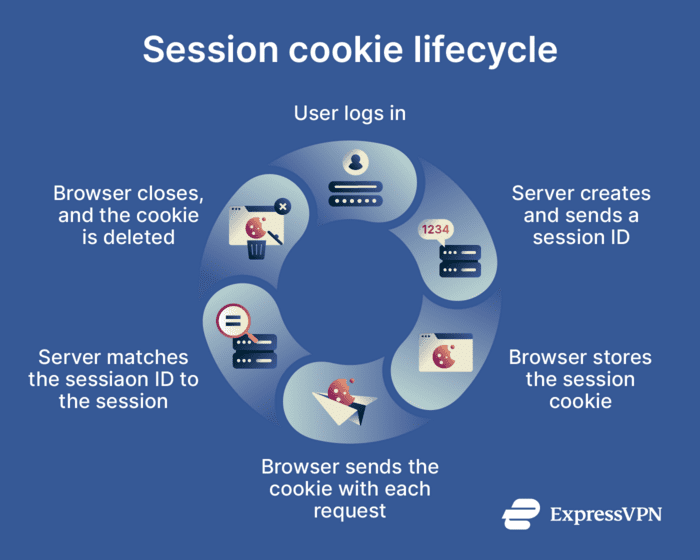
Where is a session cookie used, and why is it important?
Session cookies are used wherever a service needs to maintain session state during a browsing session: account login pages, online banking, e-commerce checkouts, web applications, and secure administrative panels.
In banking, they help the server recognize an authenticated session across multiple requests. In e-commerce, they preserve cart contents and track progress through checkout steps. In admin panels and web applications, they confirm that an authenticated user remains signed in as they navigate between pages.
Their importance lies in reducing repeated authentication prompts, maintaining session continuity, and enabling features such as forms and shopping carts during a temporary browsing session.
Risks and privacy concerns
- Session hijacking: It occurs when an attacker obtains a valid session identifier and uses it to impersonate a legitimate user. Because the server relies on the session ID to associate requests with an authenticated session, it may not distinguish between the attacker and the original user. This can result from weaknesses in session handling, client-side attacks such as cross‑site scripting (XSS) that expose cookies, session fixation, transport-layer interception on insecure connections, or compromise of the user’s device.
- Unsecured transmission: Session cookies sent without HTTPS protection can be exposed or altered in transit. An attacker on the same network may capture the session ID and use it to gain unauthorized access. Using HTTPS and the Secure attribute helps reduce this risk.
- Insecure networks: Public or untrusted networks, such as open Wi-Fi, can increase the risk of interception when a site doesn't properly protect session cookies in transit. Session identifiers sent over unsecured HTTP are more exposed than those sent over HTTPS.
- Poor cookie configuration: Three attributes directly affect the security of session cookies. The Secure attribute restricts the cookie to HTTPS connections. HttpOnly prevents client-side scripts from accessing it, and SameSite limits when the cookie is sent in cross-site requests. Omitting any of these can increase exposure to specific attacks.
- Tracking within a session: Although session cookies are temporary, they still enable a server to link a series of requests to the same browser during a visit. In practice, the cookie typically contains only a session identifier, while details such as pages visited, interactions, and workflow steps are typically stored on the server side or inferred there until the session ends.
Further reading
- Cache vs. cookies: What they store and how it affects you
- Should you accept cookies?
- Cookieless tracking: How you’re tracked without cookies
- What is a replay attack? How it works and ways to prevent it
- Address Resolution Protocol (ARP): What it is and why it matters







