
Expressvpn Glossary
Network security protocols

What are network security protocols?
Network security protocols are communication standards that secure data exchanged between devices or systems across a network.
They use mechanisms such as encryption, authentication, and integrity checks to help protect data in transit from unauthorized access, alteration, or impersonation.
How do network security protocols work?
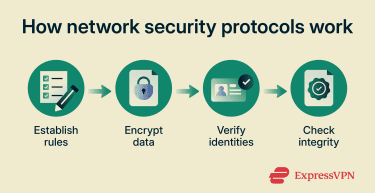 Many protocols follow a sequence of steps to establish trust and protect data during communication.
- Set connection rules: Define how devices connect, which messages are valid, and what security steps occur before data flows.
- Encrypt data: Convert data into ciphertext so it isn’t readable without the correct key.
- Verify identities: Authenticate users, devices, or servers before communication.
- Check integrity: Use hashes or message authentication codes to detect alteration and reject invalid data.
Types of network security protocols
Network security protocols are commonly classified by the layer on which they operate:
- Transport-layer protocols: Protect application sessions and control how they’re established and maintained, such as Transport Layer Security (TLS).
- Network-layer protocols: Secure traffic at the IP layer, often between networks, as seen with Internet Protocol Security (IPsec).
- Application-layer protocols: Protect application traffic using transport-layer security, such as Hypertext Transfer Protocol Secure (HTTPS), which uses TLS to secure HTTP traffic.
Why are network security protocols important?
- Reduce interception and spoofing by securing communication channels.
- Protect sensitive data during transmission.
- Enforce authentication before granting access.
- Meet compliance requirements for controlled data handling.
- Support secure communication across distributed users and networks.
Where are network security protocols used?
Network security protocols are used across environments where data is transmitted, including:
- Web browsing and online services.
- Virtual private networks (VPNs) and remote work environments.
- Corporate networks and intranets.
- Cloud environments and APIs.
- Email and file transfer services.
Risks and privacy concerns
- Outdated protocols may expose known vulnerabilities or deprecated cryptography.
- Misconfigurations, such as fallback to older TLS versions, can weaken protections.
- Weak encryption algorithms reduce security.
- Improper certificate validation can allow impersonation.
- Legacy system support may require weaker security settings.
Further reading
- What is TLS encryption, and how does it protect your data?
- What is IPsec? How this security protocol protects your network
- What is SSH? An introduction to Secure Shell protocol
- SSL vs. TLS: Key differences and why TLS is better
FAQ
What is the difference between SSL and TLS?
Transport Layer Security (TLS) replaced Secure Sockets Layer (SSL) and is used in modern secure communication. SSL is now deprecated due to known security weaknesses.
Which network security protocols are still safe to use?
Protocols are considered safe when used with modern versions and strong configurations, such as Transport Layer Security (TLS) 1.2 or TLS 1.3. Other widely used protocols include Internet Protocol Security (IPsec) and Secure Shell (SSH).
How do network security protocols support VPNs?
Network security protocols support VPNs by creating encrypted tunnels that protect data between systems or networks. Protocols such as Internet Protocol Security (IPsec) and Internet Key Exchange version 2 (IKEv2) establish and secure these connections.
What happens when a protocol is outdated?
Outdated protocols may become insecure and are often deprecated after vulnerabilities are found. They may also lose support in modern systems, preventing connections or exposing data to known risks.
What are common examples of network security protocols?
Common examples include Transport Layer Security (TLS), Hypertext Transfer Protocol Secure (HTTPS), Internet Protocol Security (IPsec), Secure Shell (SSH), and Domain Name System Security Extensions (DNSSEC).







