
Expressvpn Glossary
Network drive

What is a network drive?
A network drive is shared storage that is accessed over a computer network rather than through a physical connection to a single device. The data is hosted on a central system, such as a file server, a network-attached storage (NAS) device, or a shared network location.
Though performance is affected by network conditions, it can also depend on the storage system and the workload on the remote host. A network drive often behaves like a physical disk. It appears in a device’s file manager and can be used to open, save, and organize files. Most operating systems allow network drives to be mapped, making them easier to access.
Access to a network drive is controlled through permissions and organizational policies, which define who can view, modify, or manage the stored data.
How does a network drive work?
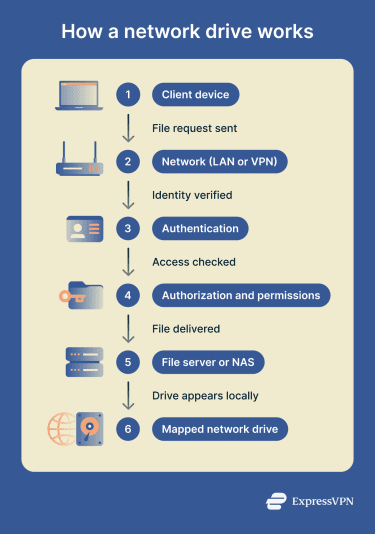 A network drive allows a client device to access files stored on a remote system over a network. Instead of reading data from local storage, the client communicates with a server, NAS, or shared host that manages the files.
Access and data transfer follow a structured process:
- Client requests files from a remote host: The device sends a request to the system that stores the files.
- Protocols handle access and transfers: File-sharing protocols manage how files are located, read, and written over the network.
- Authentication verifies user identity: The system confirms who is making the request using credentials or identity services.
- Authorization enforces read and write rights: Permissions determine what actions the authenticated user is allowed to perform.
- Traffic travels across a network: Data is transmitted over a local area network (LAN) or through a secure virtual private network (VPN) for remote access.
Types of network drives
Network drives can be implemented in different ways depending on the operating system and file-sharing technology in use.
Common types include:
- Mapped drives in Windows environments: Shared network locations are assigned a drive letter so they appear like local disks in File Explorer.
- Server Message Block (SMB) file shares: Network drives that use the SMB protocol, common in Windows and mixed-platform networks.
- Network File System (NFS) shares on Unix systems: File shares based on the NFS protocol, widely used in Linux and Unix environments.
- NAS-based shared folders: Centralized storage hosted on a dedicated NAS device and shared across the network, often using SMB or NFS.
- Web distributed authoring and versioning (WebDAV) shares: Remote file shares accessed using WebDAV over HTTP or HTTPS, often for remote or internet-based access.
Where is it used?
Network drives are used in environments where files need to be shared across multiple devices while remaining centrally stored and managed. They are common in both personal and organizational settings.
Typical use cases include:
- Home networks with a NAS: Creates a central storage area for backups, media libraries, and shared files.
- Small-business shared file servers: Provide teams with access to documents and internal resources from a single location.
- Enterprises with Active Directory (AD): Supports file access in large environments and ties permissions to user identities, security groups, and access control lists.
- Media workflows and shared projects: Enable collaborative work on large files, such as video or design assets.
- Remote access through VPN gateways: Secures access to internal file shares from outside the local network.
Risks and privacy concerns
While network drives enable centralized storage and collaboration, they can also introduce security and privacy risks if poorly configured. Because multiple users and systems rely on the same shared resources, a single weakness can have a broad impact.
Common risks include:
- Weak permissions expose sensitive files: Overly broad access rights can allow users to view or modify data they should not be able to access.
- SMB misconfigurations enable lateral movement: Improperly secured file-sharing services or administrative shares can be abused by attackers to move laterally across a network.
- Unencrypted or weakly protected links expose data in transit: If file-sharing traffic is not properly protected, data may be intercepted or altered while traveling across the network.
- Credential theft grants broad access: Compromised usernames or passwords can give attackers access to large portions of shared storage.
- Broad write access increases ransomware impact: If too many users or systems can modify shared files, malware may be able to encrypt or alter data across the network drive and beyond.
Further reading
- What is the SMB protocol?
- What is Network File System (NFS)?
- What is network-attached storage (NAS)?
- What is an open port?
- How to open ports on a router







