
Expressvpn Glossary
Digest authentication
What is digest authentication?
Digest authentication is an HTTP authentication method that verifies a user’s identity without sending their password in plaintext. Instead, it uses a hash of the username, password, and other request details to prove the user has the correct credentials. This makes it more secure than basic authentication for protecting access to web resources.
How does digest authentication work?
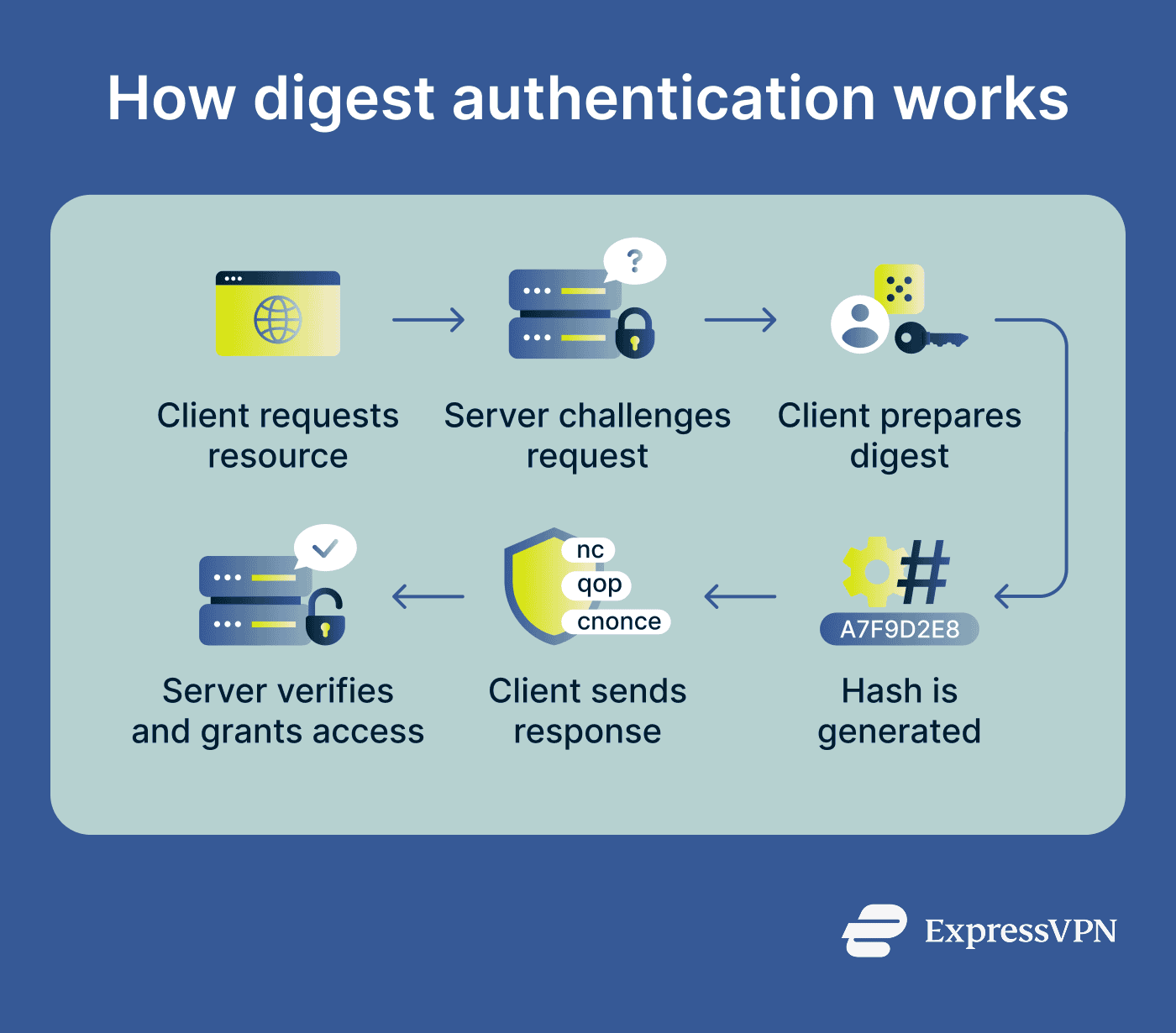
Digest authentication follows a challenge-response process in which the server challenges the client to prove its identity, and the client responds with cryptographic proof rather than a raw password.
Here's how the exchange works:
- Client makes a request: The client tries to access a protected resource.
- Server issues a challenge: The server responds with a 401 Unauthorized status, along with a realm (a label identifying the protected area) and a nonce (a unique, time-sensitive value).
- Client hashes its credentials: The client combines the username, password, nonce, HTTP method, and requested Uniform Resource Identifier (URI) into a hash, which represents the data without exposing it.
- Additional parameters strengthen the request: Values like quality of protection (qop), a client-generated nonce (cnonce), and a nonce count (nc) help ensure each request is unique.
- Server verifies the response: The server performs the same calculation using the stored credentials. If the values match, access is granted.
Why is digest authentication important?
Digest authentication reduces the risk of credential exposure by ensuring passwords are never transmitted directly. Even if an exchange is intercepted, only a hash is visible, not the actual password.
It also helps prevent replay attacks. The nonce prevents a captured response from being reused to gain unauthorized access, since each exchange produces a unique hash.
Compared to basic authentication, it provides a more secure approach for HTTP-based access control. Newer versions also support Secure Hash Algorithm 2 (SHA-2), which offers stronger cryptographic protection.
Where is digest authentication used?
Common use cases include:
- Legacy web applications: Older systems built before modern authentication standards became widespread often use digest authentication as an improvement over basic authentication.
- Routers and network appliances: Some administrative interfaces for routers, firewalls, and other network devices use digest authentication to control access.
- APIs with HTTP authentication: Certain APIs, especially those designed with older standards, use HTTP digest authentication for client verification.
- Proxy authentication scenarios: Digest authentication can be used by proxy servers to validate users before allowing access to external resources.
- Embedded enterprise systems: Devices and software with limited resources, such as printers or industrial systems, often rely on digest authentication for lightweight security.
Risks and privacy concerns
Digest authentication has several limitations that affect its security in modern environments. One is its historical reliance on Message-Digest Algorithm 5 (MD5), a hashing algorithm now considered too weak for secure use. While newer digest authentication standards support SHA-2, systems still running MD5-based digest authentication are typically more vulnerable.
Without HTTPS, digest authentication is also susceptible to man-in-the-middle (MITM) attacks, where an attacker can intercept and manipulate the exchange between the client and the server. Weak passwords compound this further, as captured hashes can be targeted with dictionary attacks, which systematically test common passwords against the hash.
Digest authentication also provides limited message integrity protection, so there’s no guarantee that all parts of the message remain unchanged during transmission. Additionally, it only protects authentication data. The rest of the HTTP request and response remains readable unless encryption, such as HTTPS, is used.
Further reading
- What is NTLM? Understanding this legacy authentication protocol
- What is a pass-the-hash attack and how to prevent it
- What is a replay attack? How it works and ways to prevent it
- Hashing vs. encryption: Key differences
- Authentication vs. authorization: What’s the difference?
- HTTP vs. HTTPS: How to choose the secure option for your site