Stay protected with Internet Kill Switch
Internet Kill Switch is the ExpressVPN kill switch. It helps keep your data protected even if your VPN connection drops, blocking all internet traffic until protection is restored.
Even when the power flickers, you change Wi-Fi networks, or your computer goes to sleep, your connection remains secure. It’s a default feature on ExpressVPN apps for Windows, macOS, and Linux.
What is a VPN kill switch?
A VPN protects your privacy and lets you browse securely. But what if your VPN connection gets interrupted? Your browser and other apps won’t warn you that you are connecting without protection. That’s where a VPN kill switch comes in.
If your VPN drops, the kill switch disables all internet traffic and also helps prevent any data from leaving your device unprotected. This reduces exposure of your IP address and other sensitive information, which can otherwise be exposed during interruptions. Once your VPN connection is restored, your secure internet access resumes.
Why do I need a VPN kill switch?
If you need a VPN, you need a kill switch. A kill switch is designed to reduce the risk of your device leaking your IP address or location, or sending any of your data unencrypted. This protects your identity and communications from being observed or intercepted.

The kill switch helps block internet traffic from leaving the VPN tunnel during interruptions, supporting stronger privacy.
Internet Kill Switch: How it works

Robust firewall rules
ExpressVPN's Internet Kill Switch begins with a “block everything” firewall rule on all desktop platforms. A second rule then allows only VPN-routed traffic. These rules stay active through the entire connection cycle, including during reconnects and disruptions, ensuring continuous coverage during connection changes.

Comprehensive traffic management
The kill switch covers all types of network traffic—IPv4, IPv6, and DNS requests—to help prevent any data from leaking outside the VPN tunnel. This broad coverage helps maintain privacy, even amid network instability or when switching Wi-Fi networks.
When is the VPN kill switch activated?
ExpressVPN’s kill switch is enabled by default and stays active until you choose to disconnect. It keeps your connection secure when:
-
When you switch between VPN servers
There is a small time window between disconnecting from your old server and connecting to your new one. If your apps send data during that window, your IP could be revealed if Internet Kill Switch is off.
-
When malicious apps attempt to bypass the VPN
The kill switch activates when unauthorized apps attempt to bypass the VPN, helping block their traffic to maintain data security.
-
When your bandwidth gets throttled
When networks operate beyond capacity, internet service providers have to throttle the bandwidth of each user. This leads to unreliable connections and could destabilize your VPN and increase the risk of leaks if the kill switch is off.
-
When public Wi-Fi is unstable
When your Wi-Fi signal is weak, your device will constantly switch between cellular and Wi-Fi connections. This can interfere with the connection between your computer and your VPN server.
Is Internet Kill Switch automatic?
Indeed it is! Internet Kill Switch is enabled by default. As long as you do not disable it, your internet traffic will automatically be blocked if the VPN drops or your network is disrupted. This proactive measure safeguards against interrupted connections and helps prevent any off-VPN traffic from leaking out, serving as an essential form of leak protection. When the VPN connection is back up, you’ll regain access once the VPN reconnects.
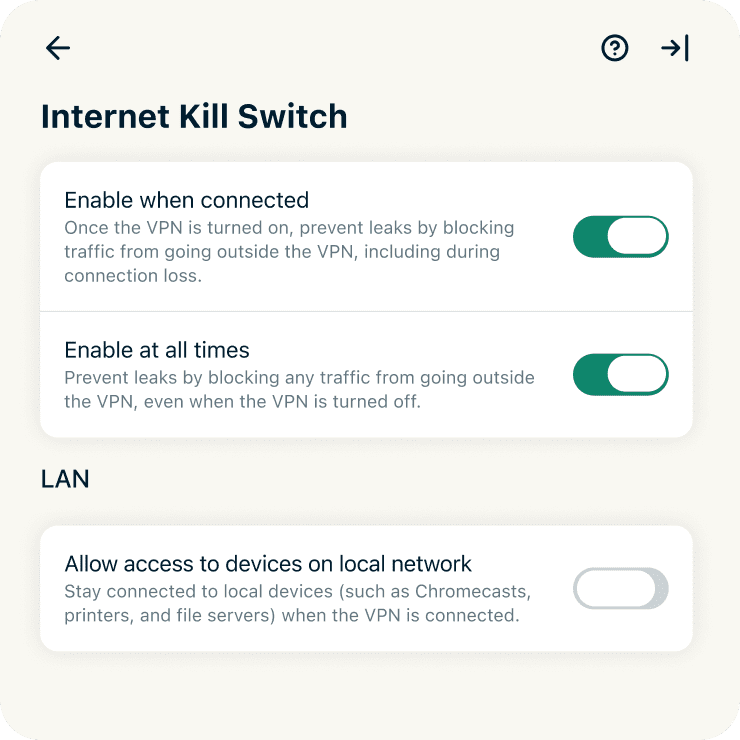
Windows, Mac, and Linux users can turn off the kill switch with a few clicks. Linux, macOS, and Windows users can also toggle the "Enable at all times" option, which prevents leaks even when the VPN is turned off. (Turning off Internet Kill Switch is not recommended.)
ExpressVPN apps with Internet Kill Switch
Apps for Mac, Windows, and Linux
Internet Kill Switch keeps your laptops and desktops secure, no matter where you are. It safeguards your privacy even when your internet connection is in flux. You can turn on “Enable at all times” to keep the kill switch active during reconnects, blocking all non-VPN traffic until the connection is restored, while still allowing access to local devices when enabled.
Android and iOS
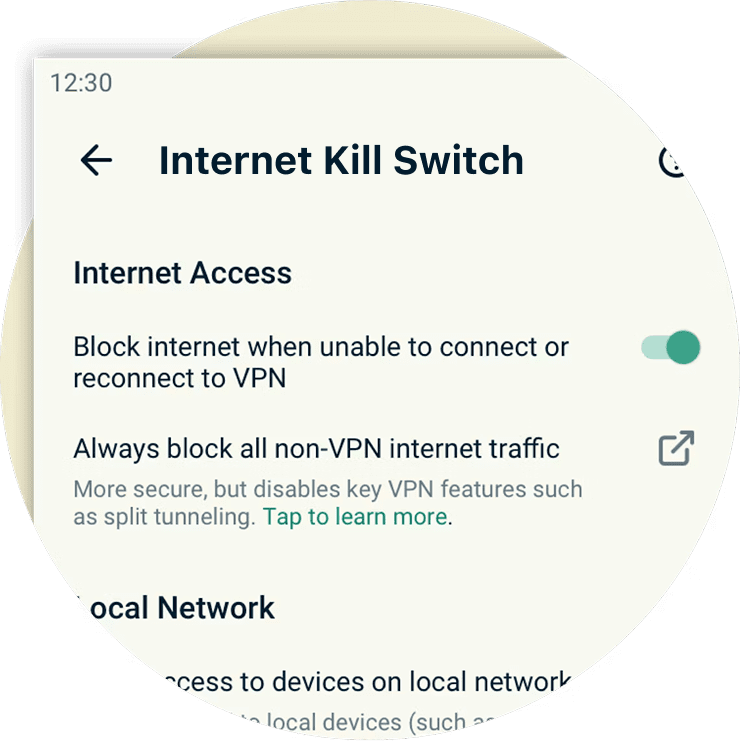
On Android, ExpressVPN offers two layers of protection. The in-app kill switch is enabled by default and helps reduce leaks during brief disruptions, while still allowing split tunneling and access to local devices. For stricter protection, Android also supports a system-level kill switch. When enabled, it blocks all traffic that isn’t routed through the VPN, even after you disconnect, for always-on leak prevention.
On iOS, you can choose between two options. Standard Kill Switch activates only if the VPN disconnects unexpectedly. Advanced Kill Switch blocks all internet traffic whenever the VPN is off, so your data never leaves the device without VPN protection.
Frequently asked questions
Do all VPN services include a kill switch?
No, some VPN services do not include a kill switch. However, ExpressVPN includes a kill switch called Internet Kill Switch. If your VPN disconnects, it stops all network traffic, helping protect your IP address and other sensitive information.
How do you turn on the kill switch in ExpressVPN?
ExpressVPN’s kill switch is enabled by default and will engage automatically if needed. Unless you disable it, your network traffic is protected without any effort on your part.
How do I disable the VPN kill switch?
You can disable Internet Kill Switch by following these instructions, but disabling the kill switch is not recommended. Without it, your traffic may be briefly exposed if the VPN connection is interrupted, which can happen when the power flickers, your computer goes to sleep, or you switch between Wi-Fi networks.
What if the ExpressVPN kill switch is not working?
If you are having problems with Internet Kill Switch, you can try restarting your device and then restarting the ExpressVPN app. If that does not resolve your issue, please contact Support.
Get the best VPN kill switch and protect yourself
If you need a VPN with a kill switch designed to help keep your connection protected, go with ExpressVPN.
Try it now, risk-free. If you’re not satisfied with Internet Kill Switch, contact Support and get a full refund within 30 days. It’s that simple.
