USPS phishing mail: How to recognize and avoid it


Many people receive genuine tracking updates from the United States Postal Service (USPS), so a phishing email pretending to come from there can look ordinary at first glance. That familiarity is exactly what scammers rely on.
This guide explains how USPS phishing emails work, how to verify legitimate tracking notifications safely, and what to do if you click on a suspicious link in the email.
What is a USPS phishing mail?
USPS phishing mail is an email scam in which criminals impersonate the USPS to steal sensitive information. The message usually claims a problem with a package to get the victim’s attention, such as a failed delivery attempt, an address confirmation request, a package on hold, or an unpaid shipping fee.
Most USPS phishing emails contain either a link or an attachment. The link typically redirects victims to a fraudulent website designed to mimic an official USPS page, where scammers ask for personal details, payment information, or login credentials. Any information entered on that site goes directly to the attacker.
In cases where the email includes an attachment, clicking it usually installs malicious software (malware) when opened. That malware may be able to steal stored passwords, capture financial information, or give criminals remote access to the device.
Learn more: Why is it called "phishing"?
Why USPS emails are common targets
Scammers often use the USPS as the basis for phishing campaigns because delivery notifications are familiar and widely expected. USPS-themed messages can be believable because:
- Tracking emails are routine: Many people regularly receive legitimate shipping updates, so a delivery notice does not immediately raise suspicion.
- People expect packages: When someone is waiting for a shipment, a message about a delay or failed delivery feels plausible.
- Delivery issues create a sense of urgency: A notice claiming action is required increases the likelihood of a quick click.
- Peak shopping seasons provide cover: During holidays and major online sales events, a higher volume of expected packages makes fraudulent delivery emails even more likely to trick their targets.
Signs of a USPS phishing email
Recognizing the warning signs of phishing emails helps distinguish real USPS messages from well-designed scams. These emails often share several characteristics.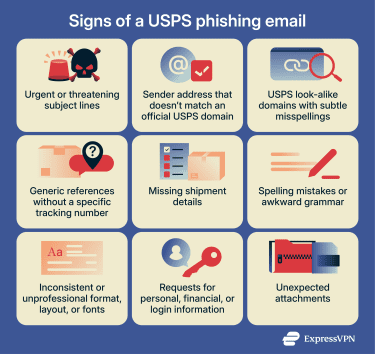
Suspicious subject lines
Phishing emails often use urgency or fear to trick victims into acting quickly without thinking. Real USPS emails typically use straightforward, neutral language, and they normally report a status update rather than a deadline. If an email feels like it's trying to panic you into clicking immediately, that's your first red flag.
Unusual formatting can also be a clue. Excessive capitalization, multiple exclamation points, or attention-grabbing phrasing don’t match typical postal service notifications.
Sender address red flags
The sender address is often one of the easiest places to spot a fake. More often than not, phishing emails come from obviously fake addresses because the scammers count on the victim not checking carefully.
That said, some scammers can take it a step further to make it appear as if their email is coming from the USPS using these two main techniques:
- Email spoofing: A technique scammers use to forge the "From" field to make it look like it's coming from USPS. The inbox might show something like "noreply@usps.com," but the email actually originates somewhere else entirely.
- Lookalike domains: A registered domain that resembles a legitimate USPS address but contains subtle variations, like an added extra word, a symbol, or subtle misspellings that are easy to overlook at a glance. Unlike spoofing, the email technically does come from the address shown, but that address itself is fake because the scammers own that lookalike domain.
Content inconsistencies and errors
Phishing emails often reveal themselves through vague details and poor quality control that legitimate USPS communications wouldn't have, including:
- Lack of specific information: Phishing emails usually don’t include the tracking number, sender, mailing service, or origin location. They often keep things generic because scammers are sending the same message to thousands of people.
- Invented delivery problems: Scam emails can claim there’s an issue with your order, even though there’s no visible history or prior delivery attempt to support it.
- Unusual requests that don't match normal USPS procedures: Real USPS tracking updates don't require sensitive information just to check delivery status.
- Formatting problems: Some phishing messages may use mismatched fonts within the same paragraph, inconsistent spacing, odd text alignment, or a layout that looks unprofessional or hastily assembled.
- Tone or branding inconsistencies: Phishing emails often contain small differences in phrasing, terminology, or structure when compared to real USPS emails.
It’s important to note that modern phishing emails may be well-written or even copied from real USPS messages (a tactic known as clone phishing). Many modern phishing messages use AI, which means that spelling, grammar, and formatting errors are no longer fully reliable red flags.
Unexpected attachments or download requests
Legitimate USPS emails rarely include attachments, making this one of the easiest red flags to spot.
If an email claiming to be from USPS comes with an attached file, it's almost certainly malware. Scammers use these attachments to deliver malware such as viruses, ransomware, or credential-stealing software to your computer. Real USPS tracking and delivery information is always accessed through links to the official website, not through downloadable files.
Why USPS phishing scams are so dangerous
USPS-themed phishing scams can lead to serious consequences because they target information people commonly use for financial and account access. The risks can include:
- Identity theft: If scammers obtain personal details such as your full name, address, date of birth, or Social Security number (SSN), they may attempt to open credit accounts, apply for loans, or commit other forms of identity fraud.
- Fraudulent “package fee” payments: Some phishing messages request small delivery or redelivery fees. Entering payment information can lead to unauthorized charges or stolen card details.
- Account credential theft: Fake USPS tracking pages often prompt users to log in or confirm details. Stolen credentials can be reused to access email accounts, banking platforms, or shopping services.
- Broader scam exposure: Once scammers confirm that an email address or phone number is active and responsive, they may add it to future phishing lists or sell it to other criminal groups.
How to verify a suspicious USPS email
If you've received an email claiming to be from USPS and something feels off, here are several straightforward ways to verify whether the message is legitimate before you click anything or share information.
Check the sender address
The first step in verifying any USPS email is examining where it actually came from. Legitimate USPS emails only come from a handful of official domains, including @usps.com, @usps.gov, @uspis.gov (for the U.S. Postal Inspection Service), or occasionally @emails.usps.com for marketing.
Anything else should be treated as suspicious, regardless of how official the email looks.
To check the actual sender address, look beyond just the display name. In most email clients, you can click on the sender's name to reveal the full email address. On mobile, tap the sender to see the complete address.
Inspect email headers to verify the sender domain
If you want to dig deeper, check the email headers for email authentication protocols: Sender Policy Framework (SPF), DomainKeys Identified Mail (DKIM), and Domain-based Message Authentication, Reporting, and Conformance (DMARC).
These can help protect against email spoofing by verifying that the sender is authorized to send emails from the domain listed.
Here’s how to check email headers in Gmail:
- Click the three dots next to Reply and select Show original.
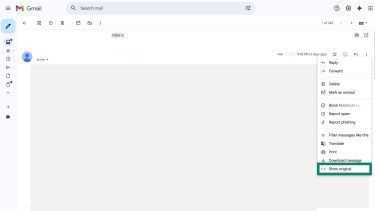
- A new page will display the full technical header information.
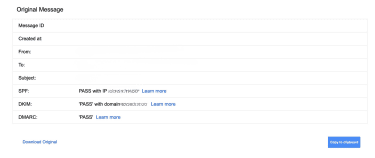
The most important section to review is the authentication results near the top, which show:
- SPF
- DKIM
- DMARC
If these show PASS, the sending server is authorized to send emails for the domain listed in the From address. If any show FAIL, the message may have been spoofed.
You should also verify that the actual domain in the From field matches an official USPS domain, such as @usps.com or @usps.gov.
Inspect links
Never click links in suspicious emails. The clickable text in an email can say anything, including "www.usps.com,” while the actual link goes to a completely different website. To check a link without clicking it, hover your mouse over the link on desktop or press and hold the link until a menu appears on mobile.
Red flags that may indicate a malicious link include:
- Domains that don’t end in .usps.com or .usps.gov.
- Close variations such as usps.co or usps.net aren’t official.
- Shortened links (such as bit.ly or tinyurl).
- Misspellings or added characters.
- Long strings of random characters in the domain name.
- Redirects through multiple websites before reaching the final page.
Real USPS tracking links lead to usps.com or a subdomain of usps.com, and they follow patterns such as tools.usps.com/ (with the tracking number included in the URL).
Check USPS official tracking pages only
When you receive any notification about a USPS package, the safest approach is to bypass the email entirely and go directly to the source.
To verify package information safely:
- In your web browser, manually type tools.usps.com into the address bar.
- Enter your tracking number in the official tracking tool.
- If there's a real issue with your delivery, it’ll show up here.
You can also use the official USPS Mobile app or log into informeddelivery.usps.com if you have a USPS Informed Delivery account. Your dashboard will show all mail and packages headed to your address.
Real delivery issues appear in official USPS systems. If the tracking number from the email doesn't work on the official site, or if the official site shows no problems while the email claims there's an urgent issue, there’s a strong chance it’s fake.
How real USPS notifications look
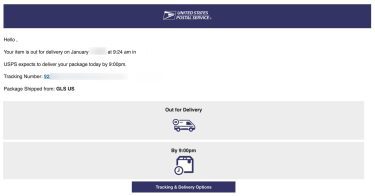
Official postal service notifications provide shipment updates and basic delivery information. They typically include:
- Consistent, professional formatting (no odd spacing, mismatched fonts, or sloppy layout).
- The official USPS logo and branding in clear, high-resolution form.
- A valid tracking number that you recognize or that corresponds to a tracking request you made.
- Clear delivery details, such as expected or actual delivery dates and service type.
What to do if you clicked a phishing link
Clicking a link doesn't automatically mean your device or accounts are compromised. Here's what to do depending on how far you went.
Immediate security actions
Before you close the tab, document what you see. Screenshot the phishing email and the website it led to, and note the time you clicked and the URL. This helps if you need to report it or if issues arise later.
Next, run a security scan with reputable antivirus software to check for any malware that may have been downloaded automatically.
Protecting your personal and financial data
If you entered passwords or login credentials:
- Change passwords immediately: Start with the compromised account, then change passwords for email, banking, and any accounts using the same or similar passwords. Use unique, strong passwords for each account (a password generator can help).
- Enable two-factor authentication (2FA): Add this extra security layer to every account that offers it, especially email and financial accounts.
- Alert your contacts: If you entered email or social media credentials, warn your contacts that your account may be compromised and could send phishing messages.
If you entered credit card, banking, or Social Security information:
- Contact financial institutions immediately: Call your bank and credit card companies. Explain what happened and request account monitoring. Consider requesting new card numbers or temporarily freezing accounts.
- Place a credit freeze: If you shared enough information for identity theft, contact all three credit bureaus, Equifax, Experian, and TransUnion, to freeze your credit reports for free. This prevents new accounts from being opened in your name. For more information, read our guide on how to freeze your credit.
Monitoring for identity theft
The level of monitoring you need depends on what information you shared.
If you only clicked the link but didn’t enter any information, the risk is generally low. Close the page and monitor your financial accounts for the next few weeks for unusual activity. In most cases, no further action is necessary unless you notice suspicious behavior.
If you entered login credentials, payment information, or personal details, you should remain vigilant for several months. Review bank and credit card statements regularly, look for unfamiliar charges, and set up account alerts if your bank offers them.
You should also consider obtaining free credit reports and reviewing them for:
- Accounts you don’t recognize.
- Unexpected credit inquiries.
- Address changes you did not authorize.
Other warning signs of identity misuse include unexpected bills, debt collection notices, password reset requests you did not initiate, or a sudden increase in spam calls and emails.
If you shared personal information, you may consider identity theft protection services that monitor for new accounts opened in your name or exposure of your data. For example, ExpressVPN’s Identity Defender (available to U.S. users on select subscriptions) offers ID Alerts that monitor for dark web exposure, SSN activity, unauthorized address changes, court or property record changes, and suspicious financial transactions. It also includes a credit scanner, data removal services, and identity theft insurance.*
Finally, keep detailed records related to the incident. Save the phishing email, take screenshots of the fraudulent website, and document conversations with financial institutions. Having a clear record will make it easier to dispute charges or correct fraudulent accounts if identity theft occurs.
How to report USPS phishing
If you receive an email impersonating the USPS, forward the message to spam@uspis.gov, the reporting address for the United States Postal Inspection Service (USPIS).
If you believe you provided personal or financial information, you can also file a report with the Federal Trade Commission at IdentityTheft.gov.
Reporting to your email provider
You can report the phishing attack to your email provider, too.
Gmail
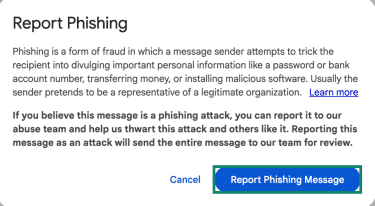
- Open the email, click the three dots, and select Report phishing.
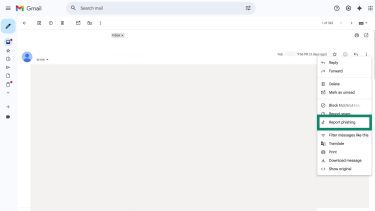
- Confirm the action by selecting Report Phishing Message. This will forward the message in its entirety to the Gmail team responsible for reviewing the reports.
Outlook
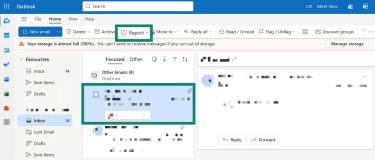
Outlook also has a built-in tool to report phishing:
- Select the phishing message in your inbox and click the Report button on the toolbar.
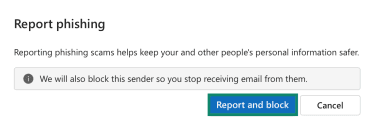
- Click Report and block in the pop-up.
Reporting fake SMS messages
If you received what looks like a USPS phishing message via text (also known as smishing), you can screenshot and forward it to spam@uspis.gov. You can also send it to 7726 (SPAM); most mobile carriers use this system to identify and block similar messages.
Reporting fake calls
Scammers sometimes engage in vishing, short for voice phishing, where they call or leave a voicemail, impersonating Postal Inspectors, or other individuals in USPS and USPIS. You can report these attempts by emailing the USPIS Cyber Crime Unit at ISCCU@usps.gov and including:
- Your name and contact information.
- The name and contact details used by the impersonator.
- A summary of the phone call, or a copy of the voicemail, text, or email you received.
FAQ: Common questions about USPS phishing mail
How do I report USPS phishing?
If you receive a suspicious email claiming to be from USPS, you can forward it to spam@uspis.gov. If you received a phishing text message, you can forward it to 7726 (SPAM) to report it to your mobile carrier. If you shared any personal or financial information, it’s also a good idea to file a report at IdentityTheft.gov.
How can I verify a USPS tracking update?
Open your browser and manually type tools.usps.com, then enter the tracking number directly on the official tracking page. You can also confirm that tracking notifications were requested through legitimate services such as Informed Delivery.
Are USPS phishing scams more common during holidays?
Yes. Phishing campaigns often increase during peak shopping and shipping seasons, such as holidays and major online sales events. During these periods, more people are expecting deliveries, which makes fraudulent shipping messages blend in more easily with legitimate notifications.
What should I do if I fell for a USPS scam?
The next steps depend on what information you shared. If you clicked a phishing link, close the page and monitor your accounts for unusual activity.
If you entered login credentials or payment information, change your passwords and contact your bank or credit card provider right away. Finally, if you shared sensitive personal data, monitor your credit reports and consider filing a report at IdentityTheft.gov.
What signs distinguish fake from real USPS emails?
Fake USPS emails often include urgent subject lines, generic references to “your package,” suspicious sender addresses, or links that lead to unfamiliar domains. Some may request personal or financial information.
Legitimate USPS notifications include recognizable tracking numbers, clear delivery details, and links that lead only to official USPS domains. USPS also doesn’t send unsolicited emails asking for sensitive information.
*The insurance is underwritten and administered by American Bankers Insurance Company of Florida, an Assurant company, under group or blanket policies issued to Array US Inc, or its respective affiliates, for the benefit of its Members. Please refer to the actual policies for terms, conditions, and exclusions of coverage. Coverage may not be available in all jurisdictions. Review the Advanced Tier Summary of Benefits and the Pro Tier Summary of Benefits.
Take the first step to protect yourself online. Try ExpressVPN risk-free.
Get ExpressVPN