Does a VPN protect you from hackers?


A VPN can protect you from hackers who target your internet connection. It encrypts the data traveling between your device and the VPN server, making it much harder for someone on the same Wi-Fi network to see what you’re doing online. A VPN can also help prevent Domain Name System (DNS) requests from being redirected to fake websites and hide your real IP address from the sites and services you use.
But a VPN can’t protect you from every type of online threat. For example, it can’t remove malware that’s already on your device, stop you from entering your password on a phishing site, or prevent a company’s data breach from exposing your personal information.
However, depending on your plan and country, ExpressVPN offers additional tools that can help protect against some of these risks.
How ExpressVPN protects you from hackers
Most of these protections work as soon as you connect to ExpressVPN, with no settings to change.
Encryption
When you connect to ExpressVPN, the app encrypts your internet traffic before it leaves your device and sends it to our VPN server. The server decrypts the traffic, sends it to the website or app you’re using, and then encrypts the response before sending it back to your device.
This encrypted route between your device and the VPN server is called a VPN tunnel. If someone intercepts your traffic on the same local network, they’ll see encrypted data traveling to an ExpressVPN server rather than the contents of your connection. Our proprietary Lightway protocol also uses Hash-based Message Authentication Code (HMAC) authentication, which protects your data from tampering while it travels to the VPN server.
Lightway and ExpressVPN's version of WireGuard also include post-quantum protection by default. This protects against "harvest now, decrypt later" attacks, where attackers collect encrypted traffic today and store it until quantum computers can break current encryption. Both protocols use the Module-Lattice-Based Key-Encapsulation Mechanism (ML-KEM), the post-quantum standard published by the U.S. National Institute of Standards and Technology (NIST).
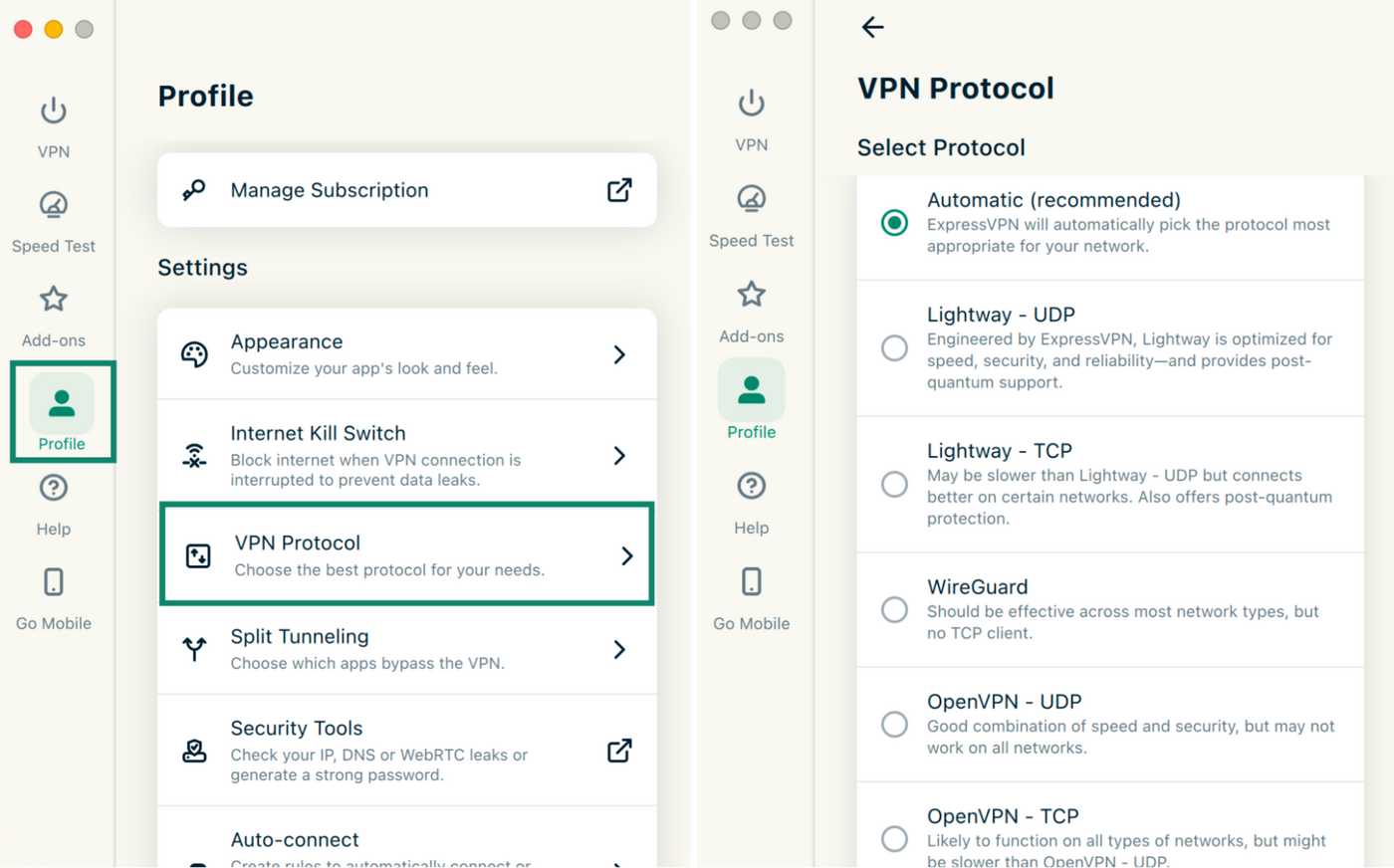
The ExpressVPN app chooses a protocol for you by default. This is usually Lightway. To see which protocol is selected or switch to a different one, open the Profile tab and select VPN Protocol.
A different IP address
Your public IP is the address your internet service provider (ISP) assigns to your connection. Websites, apps, and anyone you connect to directly, such as other players in some online games, can see it. Someone who collects it can use it to target your home network, for example, by flooding it with traffic.
With ExpressVPN connected, they see the IP address of an ExpressVPN server instead. Since that address doesn't lead back to your home network, anything aimed at it reaches the server rather than your connection.
To confirm the change, open ExpressVPN’s IP address checker before and after you connect. Compare the IP addresses rather than the locations, since a nearby server can show the same city as you.
Malicious sites blocker
Phishing links and malicious ads lead to sites that host malware or fake login pages. ExpressVPN's Block malicious sites feature stops your device from connecting to known sites like these.
The app checks each site against ExpressVPN's blocklists, which are compiled from open-source lists of known malicious domains and updated every week. The check happens on your device, and blocked domains don’t leave it. Because the blocker only recognizes sites already on these lists, a newly created phishing site can still load. The blocker also can’t check sites if your browser’s secure DNS setting uses a custom provider.
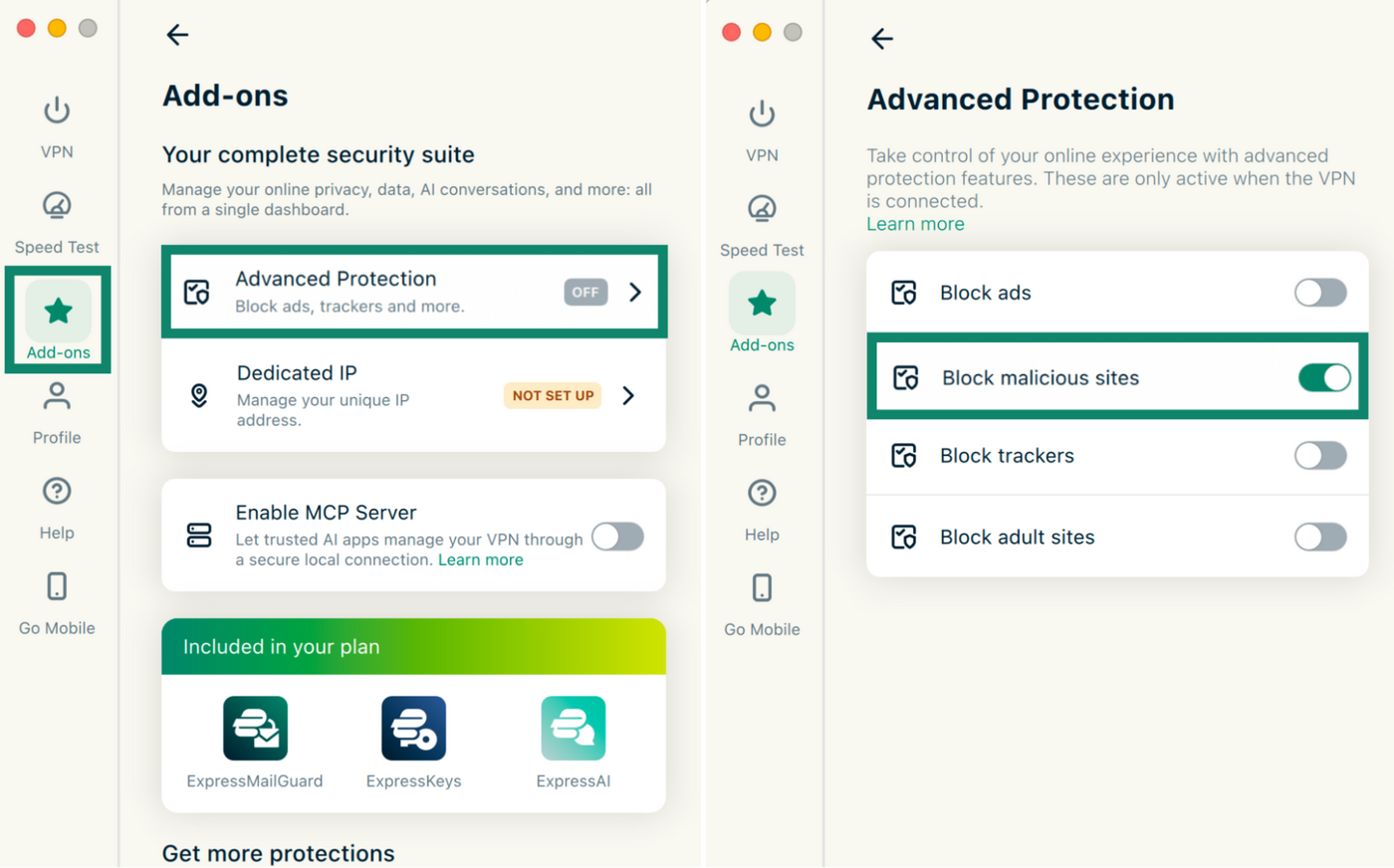
The blocker is included on all plans and is off by default. To turn it on, go to Add-ons > Advanced Protection in the desktop or mobile app, toggle on Block malicious sites, and connect with any protocol except IKEv2.
Private DNS
When your device needs to resolve a domain name, it asks a DNS server for the site's IP address, the numeric address it needs to connect. These DNS requests are often sent unencrypted, so whoever runs the network you're on can read them. Malicious actors can also attempt to change the reply and send you to a fake version of the site.
With ExpressVPN connected, your DNS requests travel through the encrypted VPN tunnel to our own private DNS, which runs on every VPN server. Your local network can't read the requests or change the replies, and ExpressVPN doesn't log them.
To see which DNS provider handles your requests, use ExpressVPN’s DNS leak test. If it shows a provider other than ExpressVPN, there are two likely explanations.
The first is a DNS leak: requests bypass the VPN tunnel and go to another DNS server, often your ISP's. That provider can then see which sites you look up. If this happens, this ExpressVPN support guide can help fix it.
The second is a custom secure DNS provider. Browsers like Chrome, Firefox, and Edge let you choose a provider for DNS over HTTPS (DoH), a setting that encrypts DNS requests and sends them to that provider instead. These requests still go through the VPN tunnel, so your local network can’t see them. However, they bypass ExpressVPN’s private DNS, which also stops the malicious site blocker from checking the sites you open. Switching the setting back to the browser’s default, or turning off DoH, lets ExpressVPN’s private DNS handle your requests again.
Internet Kill Switch
A VPN connection can drop for a moment, for example, when you switch Wi-Fi networks or lose signal. Until the app reconnects, your device could send traffic outside the tunnel, without the VPN's encryption and from your real IP address.
ExpressVPN’s Internet Kill Switch blocks all internet traffic until the VPN connection is restored. It’s on by default. This feature doesn't block traffic when you disconnect from the VPN yourself, so your internet works normally then.
TrustedServer and a no-logs policy
All VPN traffic passes through the provider's servers. Servers that store data on hard drives keep it until it's erased and overwritten, so a hacked server could expose whatever was left on it.
ExpressVPN's TrustedServer technology runs every server on RAM only, and nothing is written to the hard drive. Unlike a hard drive, RAM can't keep data without power, so everything on the server is wiped each time it restarts.
Each restart also loads a fresh copy of the server's entire software stack. If an attacker tampered with a server, the next restart would remove their changes. TrustedServer has been audited by PwC and Cure53.
Because of its no-logs policy, ExpressVPN has no records of the sites you visit, your DNS queries, your IP address, or the times you connect. Even an attacker who broke into a server wouldn't find a history of your activity. The few details ExpressVPN does collect, such as the dates you connect, can't be linked to anything you do online.
What cyber risks can a VPN protect you from?
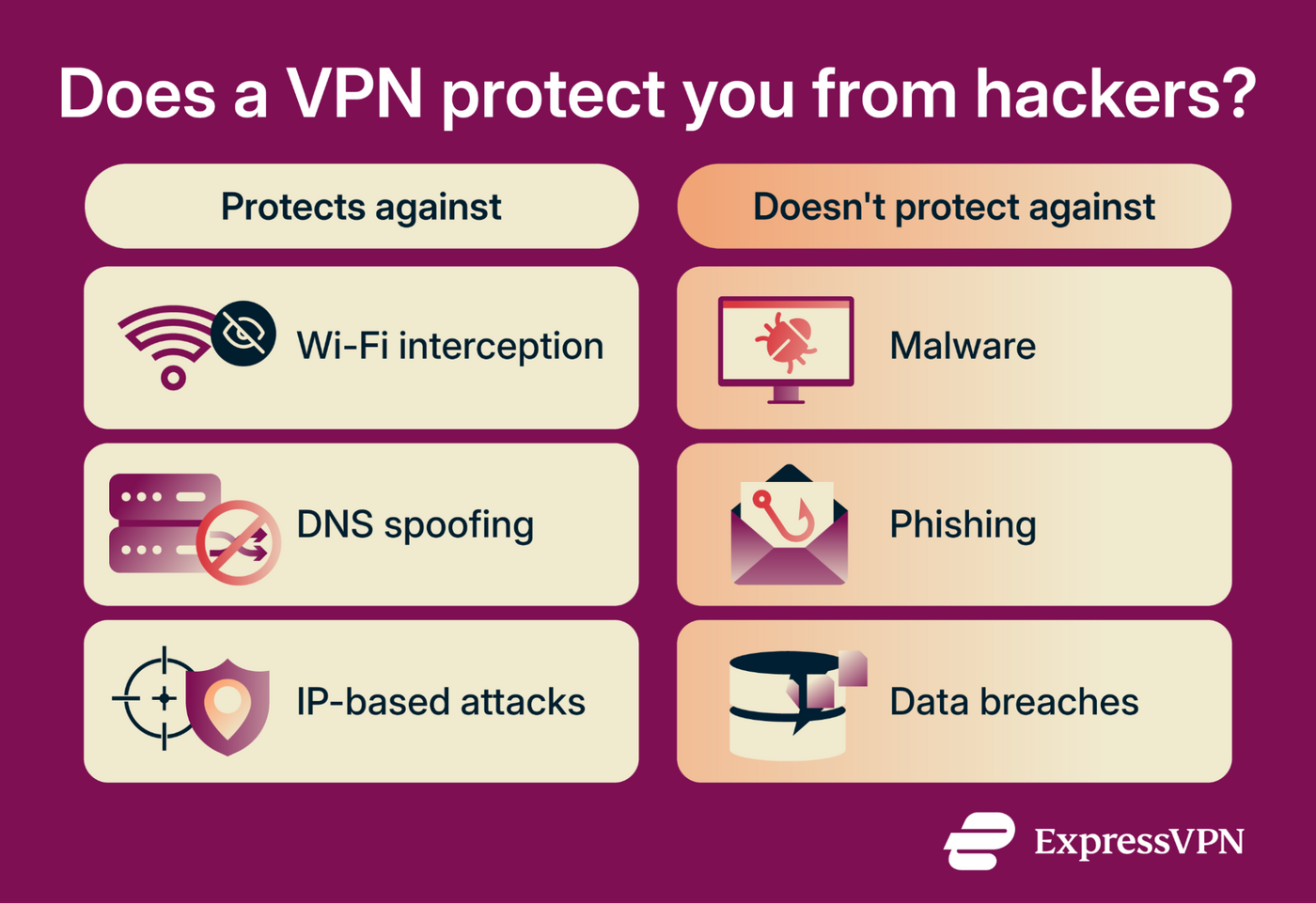
A VPN helps against attacks that intercept your traffic, redirect your connections, or target your public IP address.
Interception on public Wi-Fi
An attacker can set up a fake hotspot with a name that resembles a café or airport network. Devices that connect to it send their traffic through the attacker's equipment, where it can be read or changed. This is a type of man-in-the-middle attack.
Without a VPN, how much the attacker gets depends on the site or app. HTTPS, which most websites now use, keeps logins and card details unreadable. But the attacker can still see which sites the user visits and can attempt to downgrade a HTTPS connection to HTTP.
A VPN encrypts all of this traffic before it leaves your device, so the attacker can't see which sites you visit or read any of the data you exchange with them. The attacker can only tell that your device is connected to a VPN server, when it's connected, and roughly how much data it sends.
DNS spoofing
Before a device can open a website, it asks a DNS server for the site's IP address. On a network the attacker controls, the attacker can answer that request with a fake address. The user types the correct web address, but the browser loads a copycat site, often one built to collect logins.
Without a VPN, HTTPS is the main safeguard. A copycat site can't prove it belongs to the real website, so the browser usually shows a warning or refuses to load the page. This only works on sites that use HTTPS, and only if the user doesn't click past the warning.
A VPN keeps the attacker from answering the request at all. It sends your DNS requests through the encrypted tunnel to the VPN's own DNS servers, so the attacker never sees a request to answer.
This doesn't help if you open a lookalike address yourself, such as a misspelled version of your bank's web address. The scammer owns that address, so the VPN's DNS servers correctly send you to the scammer's site. The Block malicious sites feature can stop the connection, but only if it’s enabled and the address is already on its blocklists.
Attacks that need your IP address
Your public IP address works like a return address for your home network. Some games and file-sharing apps connect users directly to each other, which exposes it to other users. Someone who collects the address can use it in two ways:
- Flooding the connection: Sending so much traffic that the internet connection slows down or drops. When the traffic comes from many sources at once, it's called a distributed denial-of-service (DDoS) attack.
- Probing the network: Looking for devices that accept connections from the internet, then trying to break into any that have a weak password or outdated software.
With a VPN on, your game or app connects to other users through the VPN server, so they see the server's IP address instead of yours. If they flood or probe that address, the traffic hits the server rather than your home network.
That said, a VPN can't change what an attacker already knows. If someone collected your home IP address before you connected, they can still target your router directly. Attackers also run automated scans across large ranges of IP addresses, and those scans can find your router whether or not your devices use a VPN. That's why keeping the router's firmware updated and its admin password strong still matters.
What a VPN can't protect you from (but ExpressVPN can help reduce some of these risks)
A VPN only protects your data while it travels through the tunnel. It doesn't control what runs on your device, what you choose to share, or what other companies do with the data they hold.
Malware on your device
A VPN doesn't scan files, downloads, or attachments. Malware on a device can read passwords, session cookies, and other data directly, where the VPN's encryption doesn't reach.
Protecting the device takes antivirus software and regular updates to the operating system and apps.
Phishing and scams
Phishing tricks people into handing over information themselves, through a fake login page, an email, or a phone call. A VPN can't tell whether a site, message, or caller is genuine. It encrypts a connection to a fake page just as it does to a real one.
Besides the malicious site blocker, two ExpressVPN tools can reduce the risk:
- ExpressKeys: Our password manager autofills a saved login only when the site's address matches the one in your vault, which helps prevent entering a password on a lookalike site. It also stores passkeys, which sign you in with a fingerprint, face scan, or device PIN instead of a password and are tied to the site they were created for. ExpressKeys is included with Advanced and Express Pro plans and is also sold separately.
- Caller Identification: This feature warns about or blocks suspected scam calls. It's part of ExpressVPN’s Identity Defender and available on Android and iOS for Express Pro subscribers in the U.S. It doesn't cover calls made through messaging apps.
Neither tool scans emails or text messages. When a message asks you to sign in or pay, opening the company's app or typing its web address yourself avoids the fake page.
Stolen, weak, or reused passwords
After a data breach, attackers try the leaked email and password combinations on other sites. A VPN doesn't stop this, because the attacker signs in with a real password rather than intercepting your traffic.
ExpressKeys creates strong, unique passwords and autofills them, so you don't need to remember a different one for every site. It also flags saved passwords that are weak, reused, or exposed.
Additionally, ExpressKeys can generate codes for two-factor authentication (2FA), which adds a second step when you sign in. On accounts where that's turned on, a stolen password alone isn't enough to get in.
Breaches at companies that hold your data
A VPN can't prevent a breach at a company that already holds your data. ExpressMailGuard lets you sign up for sites with an email alias that forwards messages to your real inbox. If a site is breached, the alias leaks instead of your real address.
An alias covers only your email address, not your name, payment details, or anything else you share. If an alias starts getting spam after a leak, you can turn it off. It's included with Basic, Advanced, and Express Pro plans.
Data that's already been leaked or sold
A VPN can't remove your details from a leaked database or a data broker's site. Changing your IP address doesn't affect copies of your information that others already hold.
Identity Defender alerts you when details such as your Social Security number (SSN) appear in a breach or on the dark web. It also sends removal requests to data broker sites and includes ID Theft Insurance* for eligible losses.
Identity Defender is available to new U.S. customers on Advanced and Express Pro plans.
FAQ
Can a VPN or its servers be hacked?
ExpressVPN's servers run from RAM and keep no activity or connection logs, so there's no stored browsing history to take. That limits what an attacker could find, but a server compromised while it's running could still put traffic passing through it at risk.
To further limit potential damage from such an attack, ExpressVPN automatically reinstalls its servers at least once a week, wiping any changes made to the running system and replacing the entire software stack with a verified, up-to-date version. This makes it harder for attackers to maintain access to a compromised server.
We also pay security researchers who report flaws through our bug bounty program.
Is a VPN still useful if websites already use HTTPS?
Will a VPN protect me if my home router is hacked?
A VPN also doesn't fix the router. Securing it means updating its firmware, resetting it to factory settings, and changing the admin password. If the router no longer receives security updates, replacing it is the safer option.
Does a VPN protect against session hijacking?
Does incognito mode protect me from hackers?
*The insurance is underwritten and administered by American Bankers Insurance Company of Florida, an Assurant company, under group or blanket policies issued to Array US Inc. or its respective affiliates, for the benefit of its Members. Please refer to the actual policies for terms, conditions, and exclusions of coverage. Coverage may not be available in all jurisdictions. Review the Advanced Tier Summary of Benefits and the Express Pro Tier Summary of Benefits .