Can a VPN protect you against a man-in-the-middle (MITM) attack?
 Magdalena Madej
A VPN can protect you against some man-in-the-middle (MITM) attacks, but not all of them, since this depends on where the attacker is positioned.
ExpressVPN protects the connection between your device and its server, making it harder for someone on the same network to see or intercept your traffic. That protection stops at the server, though: it doesn't cover attacks beyond that point, and it can't stop you from being tricked into visiting a fake website.
Where an attacker sits and what protects you
An MITM attack requires the attacker to sit between you and what you're connecting to. Which protection applies depends on exactly where the attacker is.
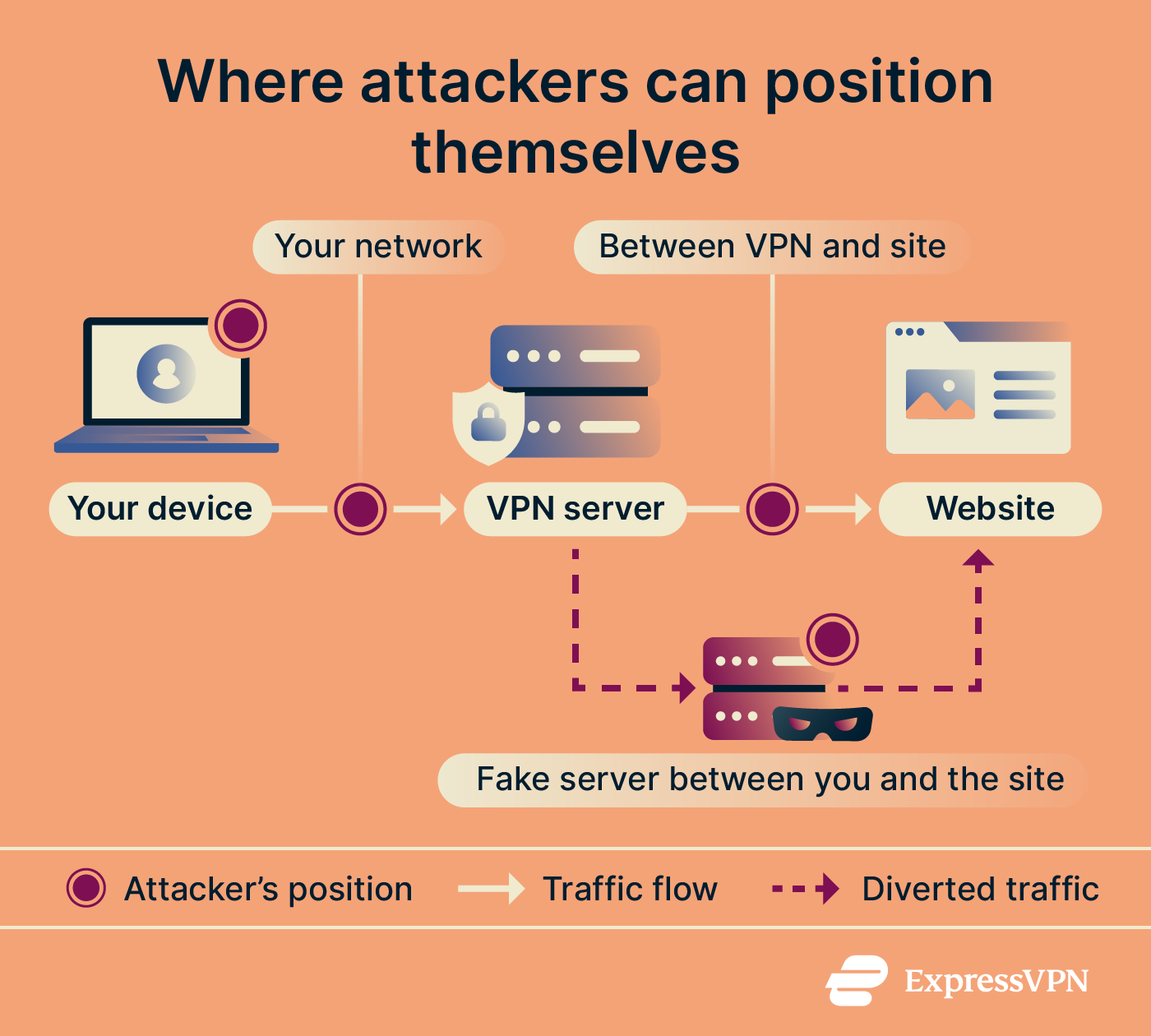
Reaching a website happens in two steps. First, your device asks a Domain Name System (DNS) server to translate the website's name into a numerical address; then it sends your traffic to that address. An attacker could try to intercept either one.
ExpressVPN encrypts both of these steps between your device and its own server, so nobody sharing your local network can see what you're doing or where you're going. But once your traffic leaves ExpressVPN's server and continues to the website itself, that leg of the trip isn't covered by the VPN anymore. Other protections, like the site's own HTTPS encryption, can still apply there, though.
REFERENCE
| Attacker position | Risk | Protection |
|---|---|---|
| Your network | Someone on the same network can read your traffic | VPN encryption |
| Your network | You type the right address but are sent to a fake site | ExpressVPN private DNS |
| Your network, mid-drop | Your VPN disconnects without you noticing | Internet Kill Switch |
| Fake server between you and the site | A phishing server relays your login to the real site and captures your password and session cookie | Block malicious sites (known domains only), passkeys in ExpressKeys |
| Between VPN and site | Interception further along the route | HTTPS (no VPN protection) |
| Your device | Malware or a rogue certificate | Antivirus software (no VPN protection) |
The first three risks matter most on networks you don't control, like coffee shop, airport, or hotel Wi-Fi, though a poorly secured home network counts too. The rest apply no matter which network you're on.
When the attacker is on your network
There are three scenarios here to consider:
Someone controls the network you joined
An attacker can set up a rogue Wi-Fi hotspot with a name that looks legitimate, such as a café’s network. If you connect to it, your internet traffic passes through the attacker’s device, letting them see which sites you're visiting and read anything that isn't protected by HTTPS. However, capturing something like a password on an HTTPS site would require a separate technique, like SSL stripping or sending you to a fake login page.
ExpressVPN's Lightway protocol encrypts traffic between your device and the VPN server, so anyone watching that network sees encrypted traffic rather than what you're doing.
Someone sends you to the wrong address
Your device asks a DNS server to translate a website's name into its numerical address. On a network the attacker controls, that answer can come from them instead of a legitimate DNS server. Your device then connects to whatever address the attacker provided.
With ExpressVPN connected, your DNS queries resolve on its private DNS, automatically, rather than the network's, so a spoofed answer from someone on that network never reaches you. This only covers spoofing attempted on your local network: if a domain's records were compromised further upstream, such as at its registrar, ExpressVPN would resolve that record faithfully and still send you to the wrong address.
Someone captures your traffic to decrypt later
An attacker can capture your encrypted traffic now and attempt to decrypt it later. ExpressVPN's Lightway protocol uses perfect forward secrecy, meaning it doesn't reuse the same encryption key across sessions, so a key that was somehow compromised would only expose the traffic tied to that one key, not other sessions past or future.
When the connection drops
If your VPN connection drops, your device falls back to its regular connection, losing the encryption and protection provided by the VPN tunnel. This reopens the risks already covered above: someone on the local network can read your traffic again, or redirect you through a spoofed DNS response.
ExpressVPN's Internet Kill Switch blocks internet traffic as soon as the connection drops and keeps it blocked until the VPN reconnects, so nothing leaves your device outside the tunnel in the meantime.
The Lightway protocol also avoids fully disconnecting when you switch networks or briefly lose signal. Instead, the connection stays idle, not terminated, resuming the same session once you're back online, which is faster than reconnecting from scratch and shortens how long you're exposed to this gap.
When a fake server sits between you and the site
Some phishing attacks do more than trick you into entering your password on a fake website. In an adversary-in-the-middle (AiTM) attack, a malicious server acts as a middleman between you and a legitimate website. It passes information back and forth, so you see the real login process, including any multi-factor authentication (MFA) prompts. The attacker can intercept your login details and, after you authenticate, steal the session cookie that keeps you signed in. They may then use that cookie to access your account without entering your password or completing MFA again.
A VPN alone isn't enough to protect against this. The Block malicious sites feature, part of ExpressVPN’s Advanced Protection, checks the destination against a list of known phishing domains, malware sites, and other fraudulent websites, and blocks the connection before the page can load. However, it can't block malicious websites that haven't yet been identified and added to its blocklists.
Passkeys offer stronger protection. Unlike passwords and conventional MFA codes, passkeys are tied to the legitimate website's domain. Even if an attacker relays the real website's login process through a fake site, your browser won't let that fake site use your passkey to sign in. ExpressKeys, our password manager, lets users create, store, and manage passkeys alongside passwords. It has dedicated apps for iOS, macOS, and Android, and it's also available as a browser extension for Chrome, Firefox, Edge, and Brave.
What's outside the VPN's reach
As mentioned, there are also some types of MITM attacks that can’t be prevented with a VPN.
Beyond the VPN server
Your traffic doesn't stop at ExpressVPN's server. From there, it continues to the website itself, a stretch of the journey the VPN doesn't cover.
HTTPS is what protects that part of the trip instead, using certificates to confirm the site's identity. A certificate warning is HTTPS telling you something's wrong in exactly this stretch, so it's worth taking seriously.
On your own device
Malware, a malicious browser extension, or a rogue root certificate can all read your data before it's ever encrypted, since they operate on your device itself, before your traffic reaches the VPN tunnel or the site's HTTPS connection.
None of this is something ExpressVPN's tunnel addresses. Antivirus software, along with keeping your browser and its extensions up to date, is the actual defense here.
How to turn on the ExpressVPN protections against MITM attacks
Encryption and private DNS don't need to be turned on. Both start automatically the moment you connect to ExpressVPN.
Internet Kill Switch
The standard kill switch is on by default on Windows, Mac, Linux, iOS, and Android. It blocks your internet only if the VPN drops unexpectedly, not if you disconnect it yourself.
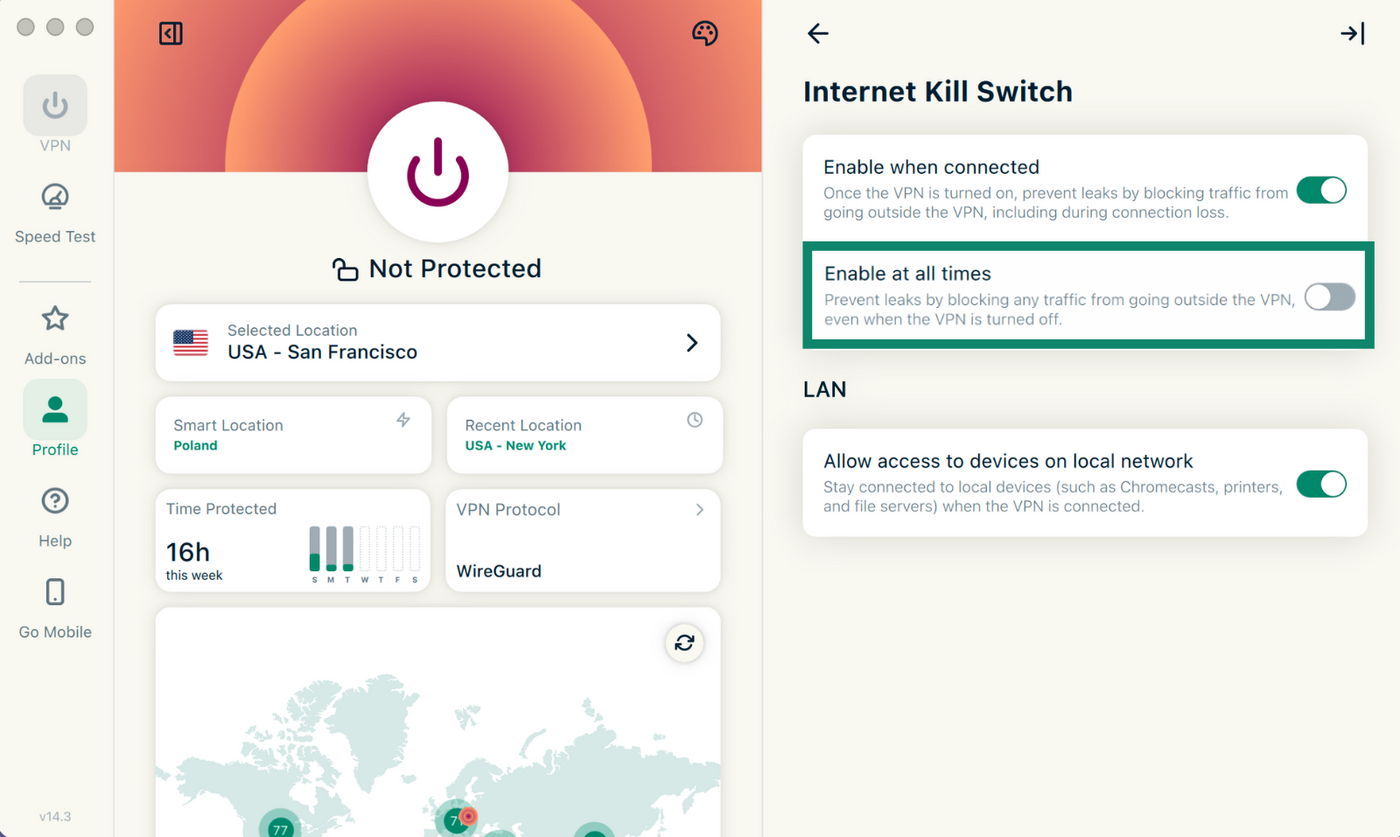
On Windows, Mac, and Linux, a stricter option called "Enable at all times" blocks all internet access whenever the VPN isn't connected, including after you disconnect it yourself. To turn it on, open the app, go to Profile, then Internet Kill Switch, and toggle Enable at all times.
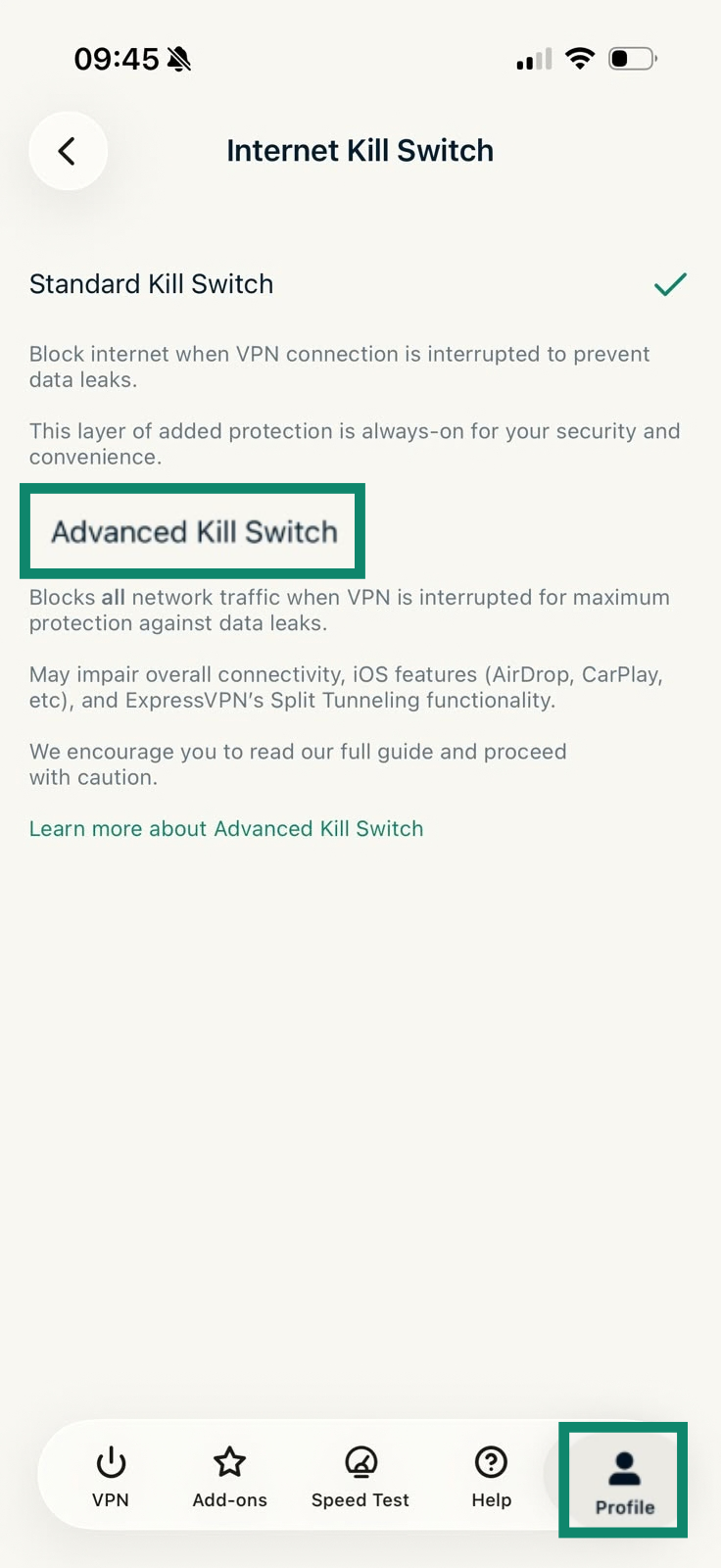
On iOS, the stricter option is called Advanced Kill Switch, which blocks all internet traffic whenever the VPN is off, so your data never leaves the device without VPN protection. To turn it on, open the app, tap Profile > Internet Kill Switch > Advanced Kill Switch.
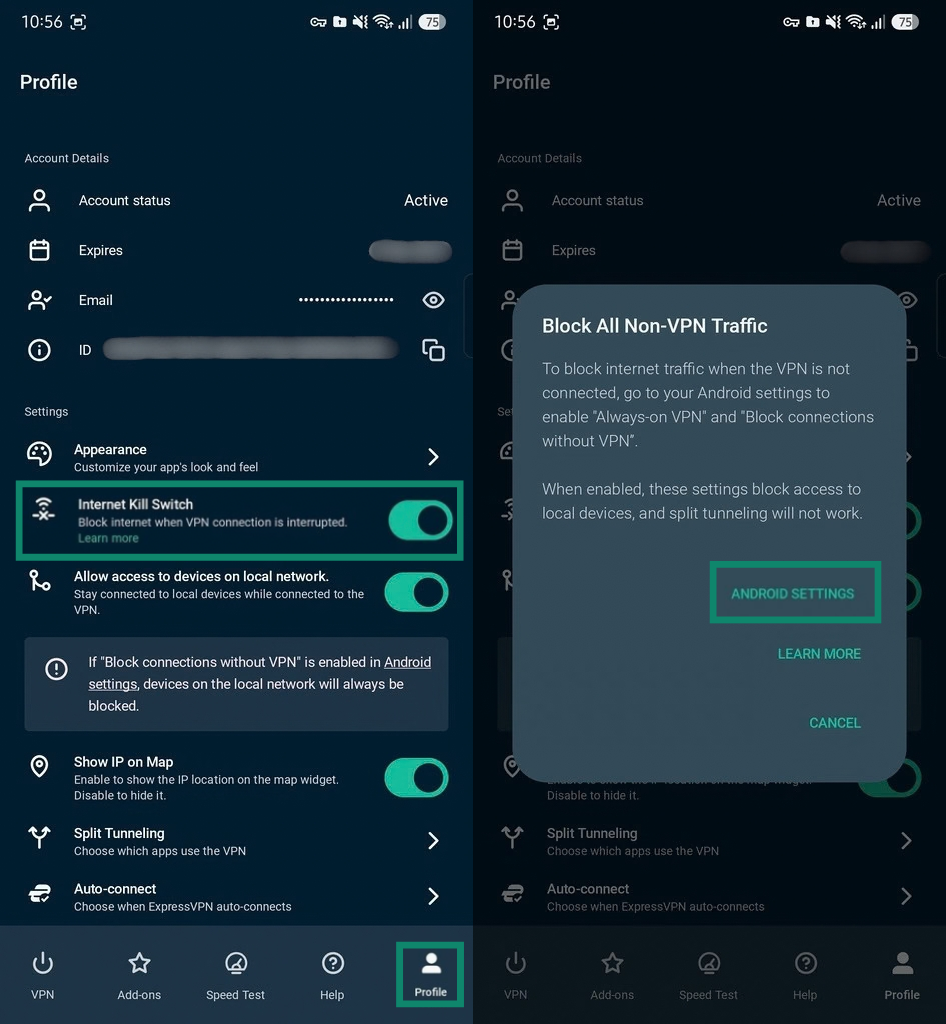
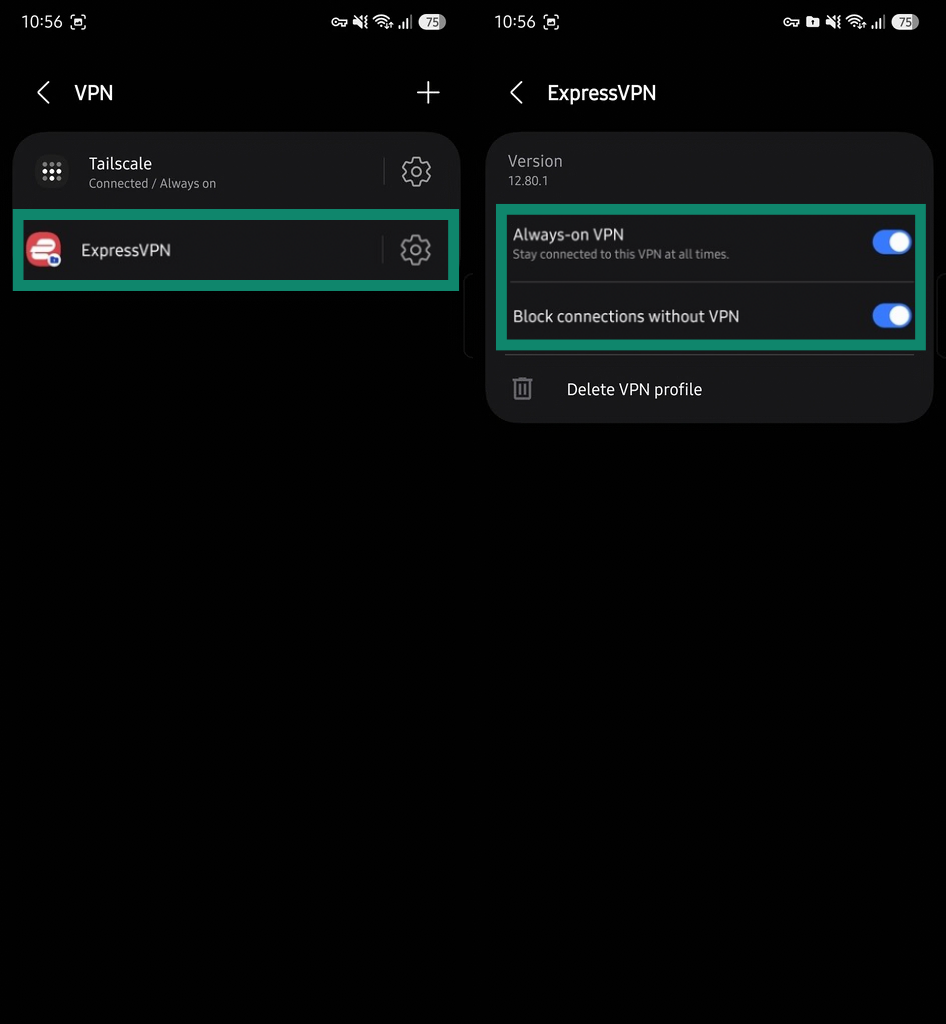
The advanced option on Android works a bit differently: it's a system-level kill switch, enabled through Android's own settings rather than the app, and it blocks all internet traffic that isn't routed through the VPN, even after the VPN has disconnected. To turn it on, tap Profile, then under Internet Kill Switch, tap Learn more, and select Android Settings.
Tap the cog icon next to ExpressVPN, and toggle on both Always-on VPN and Block connections without VPN.
Block malicious sites
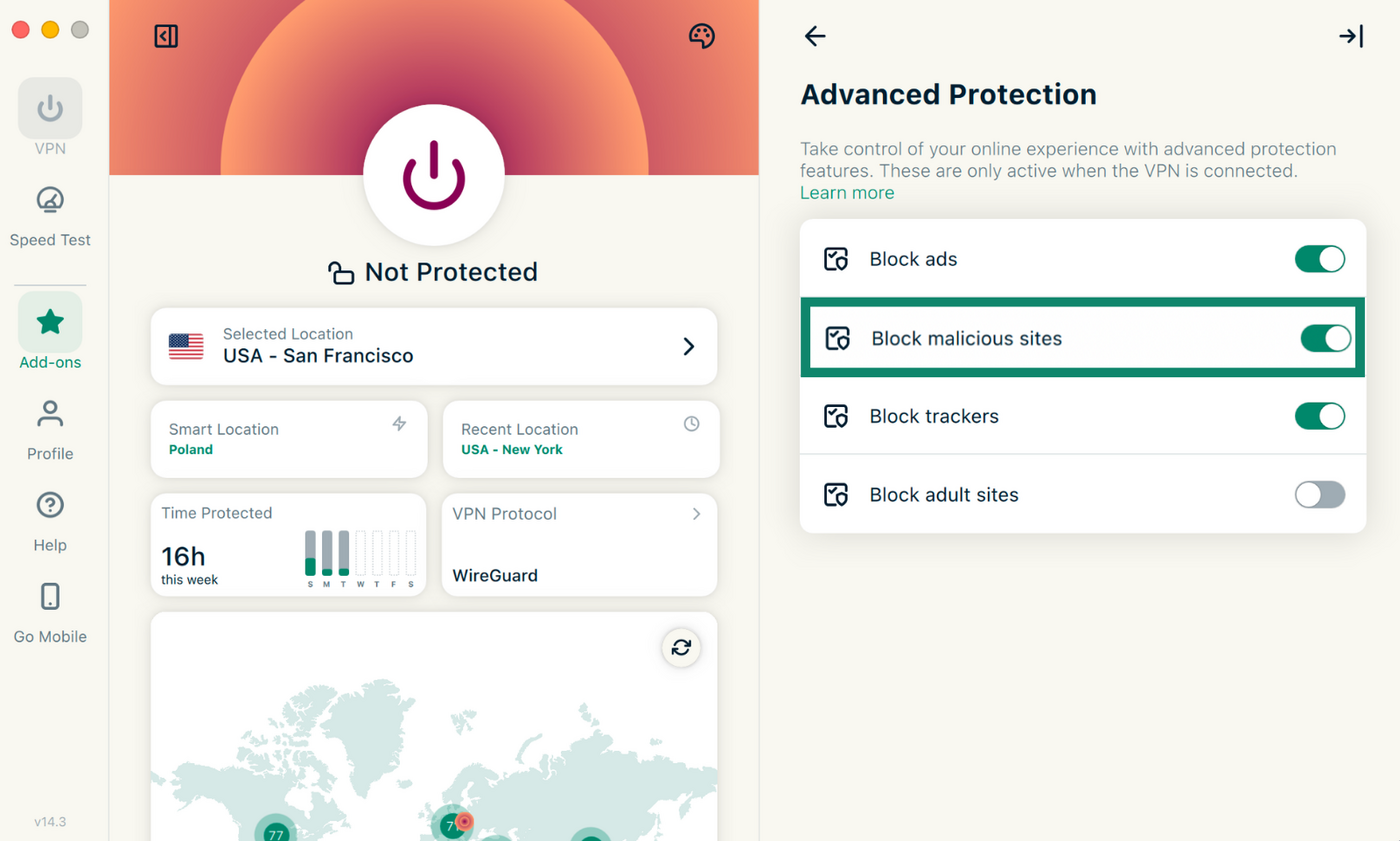
This feature is disabled by default and requires an active VPN connection to work. To turn it on, open the app, choose Add-ons > Advanced Protection > Block malicious sites.
Confirm the VPN is protecting your traffic
Everything covered on this page assumes ExpressVPN is actually encrypting your traffic and handling your DNS queries. A misconfigured device or setting can sometimes send some of that traffic outside the tunnel without you noticing. These two checks can help confirm that your VPN is working as it should.
-
Run a DNS leak testWith ExpressVPN connected, open the DNS Leak Test tool. It shows which DNS servers are handling your requests.
If you only see ExpressVPN's own servers, you're covered. If you see something else, it could be a real leak, or it could be your browser's DNS over HTTPS (DoH) setting sending queries to a third-party provider like Cloudflare while still keeping them inside the VPN tunnel, which looks identical to a real leak in the results.
To find out which one it is: turn off DoH in your browser, then run the test again. If ExpressVPN's servers show up this time, the original result was DoH, and your traffic wasn’t at risk. If a server other than ExpressVPN's still shows up after DoH is off, that's most likely a leak. -
Run an IP address checkOpen the IP address checker. It should show the IP address of the ExpressVPN server you're connected to, not your own. If it shows your real IP address, your traffic isn't actually routing through the VPN.
Protect your connection with ExpressVPN