What is a text mail subscriber and how does it work?


The term “text mail subscriber” typically refers to someone who has signed up to receive automated text messages from organizations such as local governments, schools, delivery services, banks, or retailers. These messages typically include alerts, reminders, and time-sensitive updates delivered directly to a mobile phone.
Unfortunately, text mail systems can also be abused for spam, phishing, and other scams. In this guide, we’ll explain how text mail works, what benefits it offers, and what to watch out for.
What is a text mail subscriber?
In simple terms, you’re a text mail subscriber if your phone number’s been added to a system that sends texts automatically. You may have signed up intentionally, such as for delivery updates, or provided your number to a business or platform as part of creating an account or completing a transaction. The key idea is that messages are sent through a system, not by an individual typing them out.
Common examples of text mail subscriptions include:
- Weather and emergency alerts from local governments.
- School closure or campus safety notifications.
- Package tracking updates from delivery services.
- Bank fraud alerts or transaction notifications.
- Appointment reminders from healthcare providers.
- Retail promotions or loyalty program updates.
These messages are typically delivered using automated messaging platforms that integrate with mobile carrier networks. Organizations may use short codes, registered business numbers, or messaging providers to send texts at scale.
Am I at risk of a text mail subscriber scam?
Not necessarily, but scams abusing text mail systems do carry real risks. Many legitimate services rely on text messaging for account alerts, deliveries, appointment reminders, and security notifications.
At the same time, automated text systems are attractive to scammers because they’re inexpensive, scalable, and can make messages appear to come from trusted sources. Scammers may use bulk messaging platforms or Voice over Internet Protocol (VoIP) services to generate disposable or spoofed numbers, making it harder to trace the true sender.
This overlap between legitimate alerts and fraudulent messages can make it difficult to tell what’s real. According to the Federal Trade Commission (FTC), consumers reported losing $470 million to text scams in 2024. That was roughly five times higher than the amount reported for 2020.
How text mail subscriber services work
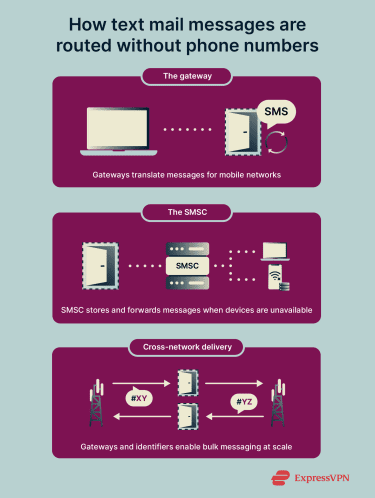
Text mail subscriber services automate message delivery on behalf of businesses, platforms, or organizations. The messages look like standard SMS texts, but they’re sent using specialized software and messaging providers rather than a personal mobile phone. Here’s how the process typically works:
- Compose and send: A business creates a message (such as a verification code or promotional alert) using an SMS platform.
- Routing to the provider: The message is sent through an SMS gateway or messaging provider that connects with mobile carrier networks. These providers handle large-scale delivery and ensure messages are properly formatted and routed.
- Delivery to the recipient: The message is passed to the recipient’s carrier and delivered to their device via an SMS service center (SMSC). If the phone is offline, the carrier may temporarily store the message and deliver it once the device reconnects.
Why sender numbers may change
Organizations can send automated texts using short codes, registered business numbers, or virtual numbers. In some cases, such as marketing campaigns or high-volume alerts, numbers may rotate or be reassigned. This can happen for operational, traffic management, or compliance reasons.
Because these numbers aren’t tied to a single personal device, they may look unfamiliar to recipients. While this can be normal for automated systems, unfamiliar numbers can also be used in scams, which is why it’s important to verify unexpected messages carefully.
Legal and consent considerations
Text messaging laws vary by country, but many regions regulate automated marketing texts and generally require some form of prior consent.
In the U.S., certain automated or marketing text messages are regulated under the Telephone Consumer Protection Act (TCPA), which requires businesses to obtain consent before sending promotional messages to wireless numbers. Transactional messages such as fraud alerts or delivery updates may be subject to different rules.
In the EU, marketing texts typically require prior consent under the ePrivacy Directive, and phone numbers are considered personal data under the General Data Protection Regulation (GDPR).
How to recognize text mail subscriber scams
Scammers exploit text mail services because they can reach large numbers of people quickly and at minimal cost. These messages are a type of phishing scam, where cybercriminals impersonate trusted organizations to trick recipients into revealing sensitive information.
Phishing scams sent via SMS are often called smishing (a combination of “SMS” and “phishing”). Smishing messages frequently contain malicious links that may lead to fake websites or attempt to install malware. Even if you don’t enter any information, interacting with these links can put your device and personal data at risk.
Smishing messages aimed at text mail subscribers often mimic the alerts and updates you expect. For example, a scam might claim to be:
- A bank alert warning of unusual activity.
- A delivery service notice about a missed package.
- A school or government account notification.
These messages often create a sense of urgency, warning about account problems, suspicious activity, payments, or deliveries. Others might promise rewards such as prizes, discounts, or special offers. The goal is to get recipients to click links, provide sensitive details like login credentials, or share financial information on insecure platforms.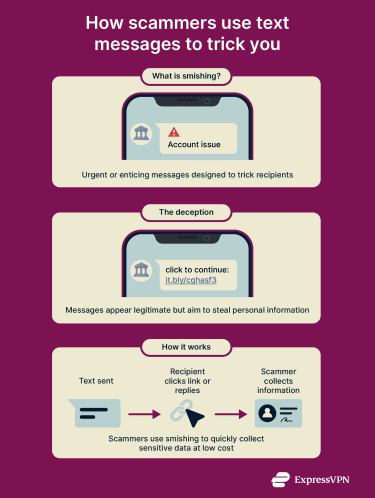
Common scam message patterns
Scam messages targeting text mail subscribers often follow simple, repeatable patterns. Because these systems send messages to many people automatically, attackers know that vague or generic wording can reach a wide audience. For example, a message might refer to “your account” without naming a specific service.
However, many scammers also impersonate well-known companies, such as FedEx, DHL, Amazon, or a bank, to make their messages appear legitimate.
Scammers often create pressure to prompt immediate action, such as setting deadlines, threatening consequences if you don’t respond, or claiming a delivery attempt failed and asking you to update information. Other red flags include poor grammar, awkward phrasing, or unusual capitalization, which are common in bulk scam messages.
Here are some examples of what these messages could look like:
- “Warning: Unusual activity detected on your bank account. Confirm your identity here to prevent unauthorized access.”
- “Delivery attempt unsuccessful. Please update your shipping information here.”
- “Your account will be suspended in 24 hours unless you verify your details now.”
Text messages from legitimate services and scam campaigns can look very similar at first glance. The table below summarizes some general differences that may help you distinguish between them:
| Legitimate SMS messages | Scam SMS messages |
| Sent in response to an action you took | Often arrive unexpectedly or out of context |
| Usually clearly identify the company or service | May use vague, generic, or spoofed sender names |
| Typically don’t ask for passwords or full payment details | May request sensitive information or verification |
| Use neutral, informational language | Often create urgency, fear, or excitement |
| Link to official domains you recognize | May include shortened or suspicious links |
| Allow time to respond or verify | Pressure you to act immediately |
Checking the origin of a sender
If you receive an unexpected text, consider:
- Recent activity: Does the message relate to something you recently signed up for or purchased?
- Sender identification: Does the sender clearly match the organization it claims to represent?
- Clarity and detail: Legitimate messages usually reference specific, relevant information.
- Consistency: Official alerts from the same organization tend to follow a recognizable pattern.
Numbers and identifiers to watch for
Text mail subscriber messages can arrive from numbers or identifiers that don’t look like personal phones. These include short codes (5–6 digit numbers), toll-free numbers (starting with 800 or 888), alphanumeric sender IDs, or registered virtual/mobile numbers used for automated messaging.
While legitimate services often use these types of numbers, scammers may adopt similar identifiers to appear credible. Legitimate alerts generally follow regulatory frameworks and include clear sender identification and opt-out instructions.
Who is typically targeted?
Scammers usually target large groups of phone numbers rather than specific individuals. Numbers are often sourced from data breaches, leaked marketing lists, social media, online directories, fake giveaway sign-up forms, or compromised devices.
Once a list is built, messages are sent out in bulk to see who will respond. This makes text mail subscribers particularly attractive targets, since their numbers are already opted in to receive automated messages and are more likely to trust incoming alerts.
What to do if you receive a suspicious message
If you receive a suspicious text mail message, it’s important to act quickly but carefully:
- Document the message: Take screenshots of the text, including the sender’s number and any links or instructions. Keeping a record can help when reporting the message to your carrier, a platform, or consumer protection agencies.
- Don’t reply: Responding can confirm to scammers that the number is active, which may lead to more spam.
- Avoid clicking links: Links in scam messages can install malware or lead to phishing sites that steal your personal information.
- Block the sender: Use your phone or mobile carrier’s tools to prevent future messages from the same number.
- Report the message: Forward suspicious texts to your carrier’s designated spam reporting number, use your messaging app’s built-in reporting feature, or contact consumer protection agencies if appropriate.
- Verify independently: If the message claims to be from a bank, delivery service, or platform, you can reach out to these services directly using official contact info to check if the alert is real.
What to do if you responded to a phishing SMS
If you’ve already interacted with a suspicious message, taking immediate action can help minimize potential damage:
- Stop further interaction: To prevent any further damage, it’s best to stop responding to messages and avoid clicking any links.
- Change affected passwords: Update passwords for any accounts you may have shared credentials for. Consider a password manager, which can create strong, unique passwords for all your accounts and store them in one location.
- Enable two-factor authentication (2FA): For added protection, turn on 2FA for affected accounts so logins require a second verification step, such as a code sent to your phone or generated by an app.
- Notify your bank or service provider: If you shared any credentials related to financial accounts, contact your bank or other service providers immediately so they can monitor for suspicious activity and take protective measures.
- Scan your device for malware: You can use a reputable mobile security app to check for malicious software.
- Review app permissions/account security: Check recently installed apps, revoke unnecessary permissions, and review security settings to ensure that no unauthorized changes have been made.
- Monitor accounts: Keep an eye on your email, banking, and social accounts for unusual activity. Dark web monitoring services can alert you if your personal information appears on illicit marketplaces.
Preventive measures and best practices
The habits below can reduce the chances of receiving suspicious messages and make it easier to spot potential scams.
- Enable spam filters: Turn on built-in message filtering in your phone or messaging apps. These tools can automatically flag or separate suspected spam and scam messages.
- Be selective with opt-ins: Only subscribe to trusted services and avoid unknown mailing lists or promotions. Even legitimate-sounding services can sometimes share your number with third parties.
- Limit public exposure: Avoid posting your phone number on social media, forums, or public websites, and think carefully before sharing it with unfamiliar services.
For added protection, consider using data removal services, which can help remove your phone number from marketing lists, directories, and public databases, reducing the likelihood that scammers or telemarketers will reach you. While these services don’t guarantee complete removal, they can significantly reduce unwanted exposure over time.
How to block or report text mail subscriber messages
If you receive unwanted or suspicious text mail messages, you can block the sender to prevent future messages. Here’s how to do it on Android and iOS devices.
Android
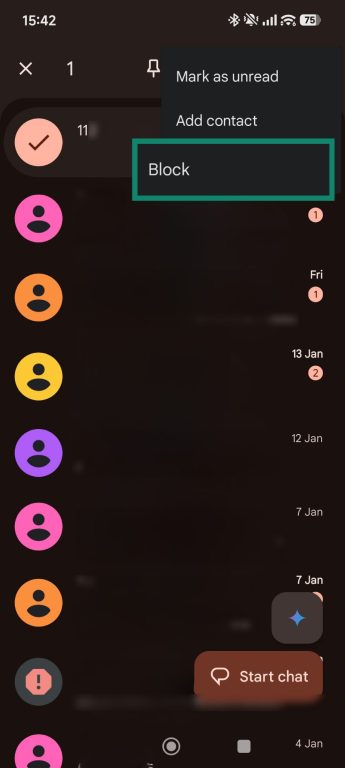
- Open Messages.
- Tap and hold the unwanted message, then select Block.
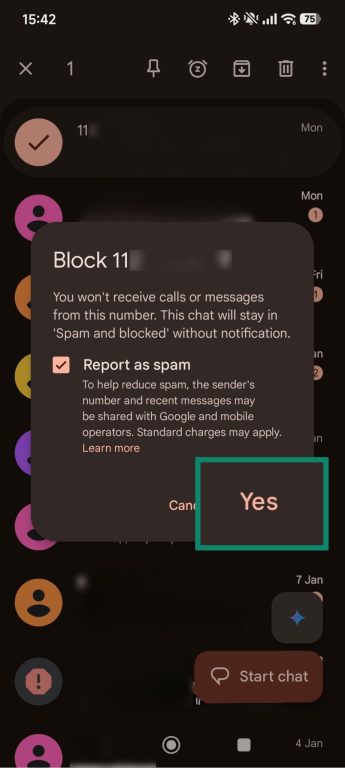
- Select Yes to stop future messages from that number.
iOS
- Open the Messages app and open the conversation with the unwanted message.
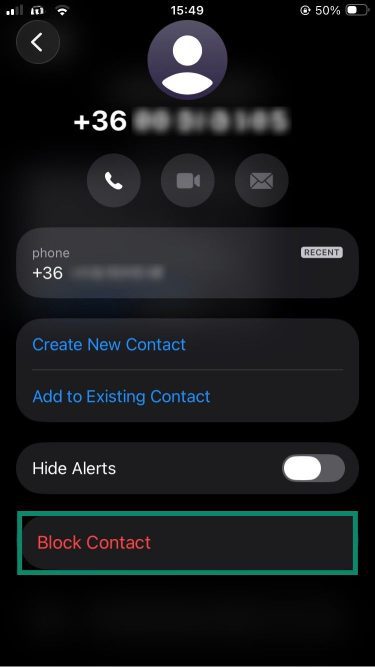
- Tap the contact name or number at the top.
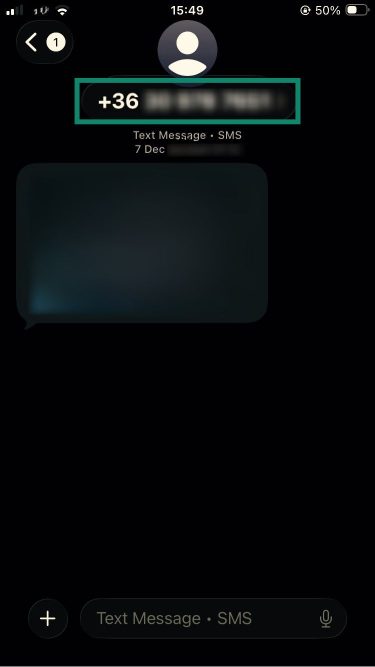
- Scroll down and tap Block Contact to prevent future messages.
Blocking through your mobile carrier
Mobile carriers often provide tools to block unwanted text messages and calls, including:
- AT&T: The ActiveArmor app offers spam and fraud call blocking, nuisance call alerts, and unknown call blocking; an upgraded version adds caller ID, reverse number lookup, and extra call controls.
- Verizon: The Call Filter app provides spam detection, filtering, a whitelist for iOS, and neighborhood spoofing protection; paid upgrades add caller ID, spam lookup, a risk meter, and personal block lists.
- T-Mobile: This provider’s Scam Shield app includes caller ID, scam detection and blocking, and a proxy number to protect your real number.
Reporting scam messages
Reporting scam messages helps carriers and authorities track and limit abusive behavior. Most messaging apps allow you to report a message directly from the conversation menu. You can also report spam messages to your carrier for free by forwarding them to 7726 (SPAM), which helps carriers identify and prevent abusive senders.
FAQ: Common questions about text mail subscribers
What does “text mail subscriber is unavailable” mean?
It usually means the message sent couldn’t be delivered to the recipient. This happens when the system behind the number can’t accept replies, is temporarily inactive, or was never meant for two-way messaging. In many cases, the number is designed only to send messages, not receive them, so replies are automatically rejected. It doesn’t necessarily mean the number is broken, just that it’s limited in what it can do.
Can a text mail subscriber receive calls?
No, a text mail subscriber typically can’t receive voice calls. These numbers are set up specifically for text-based messaging and aren’t connected to a phone that can ring or answer. This separation helps automated systems send messages at scale without functioning like normal phones.
Is it safe to respond to a text mail subscriber?
In most cases, it’s best not to respond unless the message is legitimate. While some services allow simple replies like confirmations, scammers also rely on responses to confirm that a number is active. By replying, the recipient signals that the number is in use, which can lead to more unwanted messages later.
Why do I get messages from unknown numbers?
Many messages from text mail subscribers come from short codes, virtual numbers, or shared service numbers rather than personal phones, so they may appear as unknown numbers. Businesses and services use these to send alerts, confirmations, or updates at scale.
Sometimes, however, unknown numbers are from scammers attempting smishing attacks. Always check whether the message matches an action you took or a service you signed up for before engaging.
Are short codes safe?
Short codes are generally safe when used by trusted organizations. They are specially assigned numbers for business or automated messaging, making them different from personal phone numbers. Legitimate companies use short codes for notifications, promotions, or alerts, but scammers can also mimic these formats. Always verify the sender and avoid clicking unknown links.
How can I unsubscribe safely?
Use the opt-out instructions provided in the message. Legitimate text mail services include clear ways to stop receiving messages, usually by replying “STOP” or following a link provided in the text. That said, avoid interacting with suspicious messages or links. Instead, block the number and report it to your carrier or the relevant authorities if you suspect fraud.
Take the first step to protect yourself online. Try ExpressVPN risk-free.
Get ExpressVPN