What is a phishing campaign, and how do you stay protected?


Some phishing messages are easy to recognize: for example, an email from a “Nigerian prince” promising to send you millions of dollars, or a text message with spelling and grammar mistakes saying you won a raffle you never entered.
However, it’s becoming more common for scammers to create believable phishing campaigns. These campaigns are carefully coordinated attacks that target multiple people or organizations, often using the same theme or storyline across messages. They use social engineering techniques and sometimes generative AI tools to craft convincing emails, texts, and phone calls.
This guide will cover what phishing campaigns are, what you need to watch out for, the different types of phishing attacks, and how to protect yourself and your company.
What is a phishing campaign?
A phishing campaign refers to a coordinated phishing effort carried out at scale, where the same or similar deceptive messages are sent to many recipients. These campaigns are typically planned in advance and use templates, automation, and shared infrastructure to maximize reach and success.
The term is also used within organizations in the context of cybersecurity training. In those cases, it refers to controlled phishing simulations used to raise awareness. These exercises are designed to mirror real-world attack patterns and help identify where users may be vulnerable. We’ll cover how phishing simulation campaigns work later in this article.
How phishing campaigns differ from single phishing attempts
A single phishing attempt typically targets one individual or a very small number of people. The attacker makes contact once, often with an urgent request to click a link, send a payment, or download a file, and then moves on if the attempt fails.
A phishing campaign, by contrast, focuses on breadth rather than persistence. Attackers distribute the same scam message to many recipients, relying on scale rather than repeated engagement to achieve results. Even if most recipients ignore the message, a small percentage of responses can still make the campaign effective.
Some phishing campaigns also involve follow-up messages or the use of multiple channels, but these tactics are optional enhancements, not defining features.
For example, an attacker might send a spoofed email that appears to come from a manager asking for access to a document. If this message is sent to a single employee, it would be considered a single phishing attempt or spear phishing. If the same message is sent to dozens or hundreds of employees, it becomes a phishing campaign.
Social engineering tactics used in phishing campaigns
Social engineering attacks are designed to manipulate people into doing things they normally wouldn’t. The scammers don’t exploit a vulnerable system; they rely on trust and create an urgent scenario to push someone into making a quick decision that compromises personal or organizational security.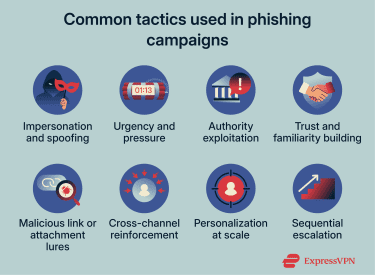
Certain social engineering tactics show up repeatedly in phishing campaigns:
- Impersonation and spoofing: Messages are designed to look like they come from trusted people or organizations, making them easier to believe at first glance.
- Malicious link or attachment lures: Attackers use convincing messages to persuade victims to click links or open attachments, often framing them as invoices, security alerts, or shared documents.
- MFA fatigue: Repeated authentication requests are sent to wear people down until one is approved out of frustration or confusion.
Common types of phishing campaigns
There are different types of phishing campaigns, but they generally fit into a few basic categories. Understanding what the scammers' methods are and what to look out for can help you spot a red flag before it’s too late.
Email-based phishing campaigns
Email phishing campaigns are particularly popular among scammers, who can find your email address on social media or a company website or on a mailing list they’ve purchased. Using a domain to find emails associated with it is also very straightforward.
What to look for
- Urgent or threatening language: Messages pressure you to act quickly to avoid negative consequences.
- Unexpected links or attachments: Files or URLs you weren’t expecting, especially from unfamiliar senders.
- Requests for sensitive information: Emails asking for passwords, payment details, or verification codes are a red flag.
- Suspicious sender details: Email addresses that closely resemble legitimate domains but don’t exactly match.
Smishing campaigns
Smishing campaigns use SMS messages to reach the target on their phones. The messages often impersonate banks, delivery services, government agencies, or companies you already interact with, so it’s easy to assume they’re legitimate.
Smishing attacks frequently include links that lead to fake websites or prompts asking recipients to share personal information.
What to look for
- Unknown or hidden numbers: Messages sent from unfamiliar or masked phone numbers.
- Alarmist or urgent tone: Claims about account issues, deliveries, or suspicious activity.
- Requests for personal details: Texts asking for passwords, PINs, or login information.
- Suspicious links: Shortened or unfamiliar URLs pointing to fraudulent websites.
- Generic wording: Messages lacking personalization or specific account details.
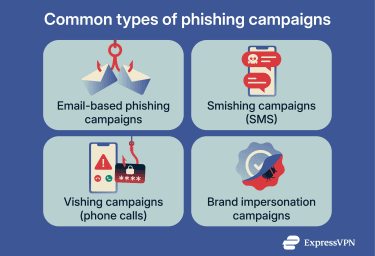
Vishing campaigns
Vishing or voice phishing campaigns involve phone calls that attempt to trick people into making a direct payment. For example, a scammer may pretend to call from a utility company, saying you need to pay your bill or the electricity will be turned off in 5 minutes, or they might pose as a customer service agent requesting confirmation of your credit card number.
More recently, vishing attacks have become harder to recognize due to the use of AI-generated voices that convincingly mimic real individuals. The scammer can get a voice sample of a person you trust from social media or YouTube and have the AI replicate their voice.
What to look for
- Caller ID spoofing: Calls that appear to come from trusted numbers but involve unexpected requests for payment or sensitive information.
- Requests for sensitive information: Demands for passwords, one-time passcodes (OTPs), or security answers.
- Pressure and intimidation: Urgent payment demands or aggressive, threatening behavior.
- Unprofessional conduct: Guilt-tripping, bullying, or rude language.
- Poor call quality: Robotic voices, heavy static, or frequent disconnections.
- Immediate hold requests: Calls that place you on hold as soon as you answer.
Brand impersonation campaigns
Brand impersonation campaigns exploit trust in well-known companies, banks, service providers, or employers. Attackers copy logos, language, formatting, and tone to make messages seem like legitimate communications from brands people already recognize and rely on.
What to look for
- Requests for sensitive information: Messages asking for passwords, OTPs, or login details.
- Unexpected account issues: Claims about security problems, payment failures, or account suspensions you weren’t expecting.
- Links that mimic real brands: URLs that look similar to legitimate websites but contain extra characters or misspellings.
- Pressure to act quickly: Warnings that your account will be locked, charged, or closed unless you respond immediately.
- Unverified contact details: Emails, texts, or calls that don’t match the official contact information listed on the company’s website.
Why phishing campaigns are dangerous
Phishing campaigns are more dangerous than one-off phishing attempts simply because of their mass, coordinated nature: instead of targeting a single person with a single message, attackers run structured campaigns that reach multiple victims, sometimes across different channels, adjusting tactics as they go. The scale and persistence increase the likelihood of success and amplify the impact.
Common risks associated with phishing campaigns include:
- Compromised passwords and account credentials
- Account takeover and unauthorized access
- Financial loss and fraudulent transactions
- Exposure of personal or business data
Common warning signs of coordinated phishing attacks
Coordinated phishing campaigns often leave patterns that don’t appear in isolated, one-off attacks. While individual messages may seem legitimate on their own, the broader activity across channels, accounts, or timeframes can reveal a larger campaign at work.
Key warning signs include:
- Patterns across multiple messages: You (or your organization) receive several similar messages over a short period, possibly across different email addresses, phone numbers, or accounts. These messages often share the same theme, sender style, or fake domain. Unlike one-off phishing attempts, campaigns tend to repeat and scale.
- Cross-channel reinforcement: Attackers follow up an initial message with contact through another channel, such as an email followed by an SMS, phone call, or social media message that references the same request. This reinforcement is designed to make the story feel legitimate.
- Personalized targeting at scale (hybrid phishing): Messages reference company details, job roles, colleagues, or recent projects, even though similar messages are being sent broadly across a team or organization. Campaigns may combine mass outreach with personal details gathered from public sources or previous data breaches.
- Subtle sender or domain inconsistencies: Coordinated campaigns may use multiple lookalike domains or slightly different sender names to bypass filters. You might see messages that appear to come from different “official” addresses, each with minor spelling variations or formatting differences.
How to protect yourself from phishing campaigns
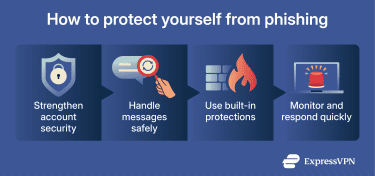
Protecting yourself from phishing campaigns requires a combination of common sense, vigilance, and cybersecurity software.
Safe email and messaging practices
Instead of relying on instinct alone, use the SLAM method: check the Sender, Links, Attachments, and Message carefully to help assess whether a message is safe before acting on it.
Other best practices include:
- Avoid acting directly from messages: Don’t click links, download attachments, or make payments directly from emails or texts. If a message claims to come from a company or service you use, access your account through a bookmarked website or the official app instead.
- Verify requests through a second channel: If a message asks for urgent action, confirm it using contact information you already trust, not the details provided in the message itself.
- Limit the information you share publicly: Reducing the amount of personal or work-related information available about you online makes it harder for attackers to personalize phishing messages.
- Slow down before responding: Phishing relies on urgency, so taking a moment to review a request, especially one involving money, credentials, or access, lowers the risk of mistakes.
Using security tools and built-in protection
Security tools and built-in protections add important safeguards that help limit the impact of phishing attempts, even when a message slips through filters or looks convincing. While no tool can block every phishing message, layering protections reduces the chance that a single mistake will lead to a larger compromise.
Effective security measures include:
- Phishing-resistant multi-factor authentication (MFA): MFA adds a second layer of protection that can prevent attackers from accessing accounts even if a password is exposed. Phishing-resistant methods, such as hardware keys or passkeys, are especially effective against credential theft.
- Password managers: Using a password manager helps create and store unique passwords for every account, reducing the risks that arise from credential reuse.
- Built-in email and browser protections: Modern email services and browsers scan links, block known malicious domains, and warn users about suspicious downloads. Keeping these features enabled and up to date improves baseline protection.
- Automatic updates: Regular software and operating system updates patch known vulnerabilities that attackers may exploit after a successful phishing attempt.
- Account activity alerts: Enabling login and security alerts can help detect unauthorized access early, allowing you to respond before further damage occurs.
How a VPN helps reduce phishing-related risks
A virtual private network (VPN) in itself doesn’t block phishing messages or prevent users from clicking malicious links. However, ExpressVPN’s Threat Manager can help reduce the risk of harm by detecting and blocking access to known malicious or suspicious websites. This means that even if you click a phishing link, the site may be blocked before it loads.
By encrypting your internet traffic, a VPN also helps protect sensitive data from being intercepted on unsecured Wi-Fi. Although it doesn't provide direct protection against phishing, it enhances the security of online browsing and account access.
Phishing simulation campaigns for businesses
Phishing simulation campaigns are controlled exercises that mimic real-world phishing attacks within an organization. They test employees' responses to phishing messages and pinpoint areas that require additional training or controls.
By exposing employees to realistic phishing scenarios in a safe environment, simulations improve awareness and reinforce good security habits. Over time, this reduces the likelihood that real phishing attempts will succeed.
Simulation results can reveal patterns, such as which types of messages employees are most likely to engage with or which departments may need additional training. These insights help organizations strengthen defenses before real attackers exploit the same weaknesses.
Phishing simulation campaigns also help organizations meet compliance requirements. Many frameworks, including the General Data Protection Regulation (GDPR), encourage or support regular employee security training, and simulated phishing exercises are a widely used method to keep staff alert and prepared for real-world attacks.
What to do if you’re targeted by a phishing campaign
If you don’t interact with a phishing campaign message, then the risk is minimal. So long as you didn’t reply, click a link, or provide any information, there’s usually nothing further to do apart from reporting the attempt to your email provider and any other relevant platforms. In a business setting, this includes the IT department as well.
If you did engage with the message, taking immediate steps to secure your accounts can help contain the impact.
Steps to take right away
- Stop engaging with the message: Don’t reply further, click additional links, or download files. If the interaction happened through email or text, don’t respond and block the number or account.
- Secure affected accounts: Change passwords for any accounts involved, starting with the one targeted. Use strong, unique passwords for each account and store them in a password manager.
- Contact your bank: If financial information was involved, contact your bank or credit card provider so they can monitor or secure your account.
- Enable MFA: Turn on MFA wherever it’s available to reduce the risk of unauthorized access, even if credentials were exposed.
- Check your device for threats: Run a full security scan using reputable antivirus software to detect malware or unauthorized software.
- Consider identity protection: If you shared personal information or believe your details may have been exposed, ID monitoring tools such as ExpressVPN’s Identity Defender can help monitor for signs of identity theft and alert you to suspicious activity so you can respond quickly.
For businesses and organizations
- Alert IT or security teams immediately: Employees should report suspected phishing attempts as soon as possible so teams can investigate and contain potential exposure.
- Follow your incident response process: Organizations should activate their incident response plan to assess impact, reset credentials if needed, and prevent repeat attempts.
Responding quickly and consistently can limit the damage and reduce the chance that a phishing campaign leads to broader compromise.
FAQ: Common questions about phishing campaigns
What is the main goal of a phishing campaign?
The main goal of a phishing campaign is to trick people into taking actions that benefit attackers, such as sharing login credentials, personal information, or payment details. These campaigns are often designed to scale, allowing attackers to reuse stolen data or expand the attack across multiple accounts, platforms, or victims.
How are phishing campaigns different from spam?
Spam messages are usually unsolicited and annoying, but not necessarily malicious. Phishing campaigns, on the other hand, are deliberately designed to deceive recipients into taking harmful actions, such as clicking fraudulent links or sharing sensitive information.
How can I report a phishing attempt?
Many email providers include a built-in option to report phishing messages, usually through a button or menu in the email interface. Reporting messages this way helps improve filtering and protect other users. You can also forward phishing emails to reportphishing@apwg.org, which is monitored by the Anti-Phishing Working Group. If the message impersonates a specific company or individual, letting them know can help them warn others.
Take the first step to protect yourself online. Try ExpressVPN risk-free.
Get ExpressVPN