How to identify and mitigate attack vectors in cybersecurity


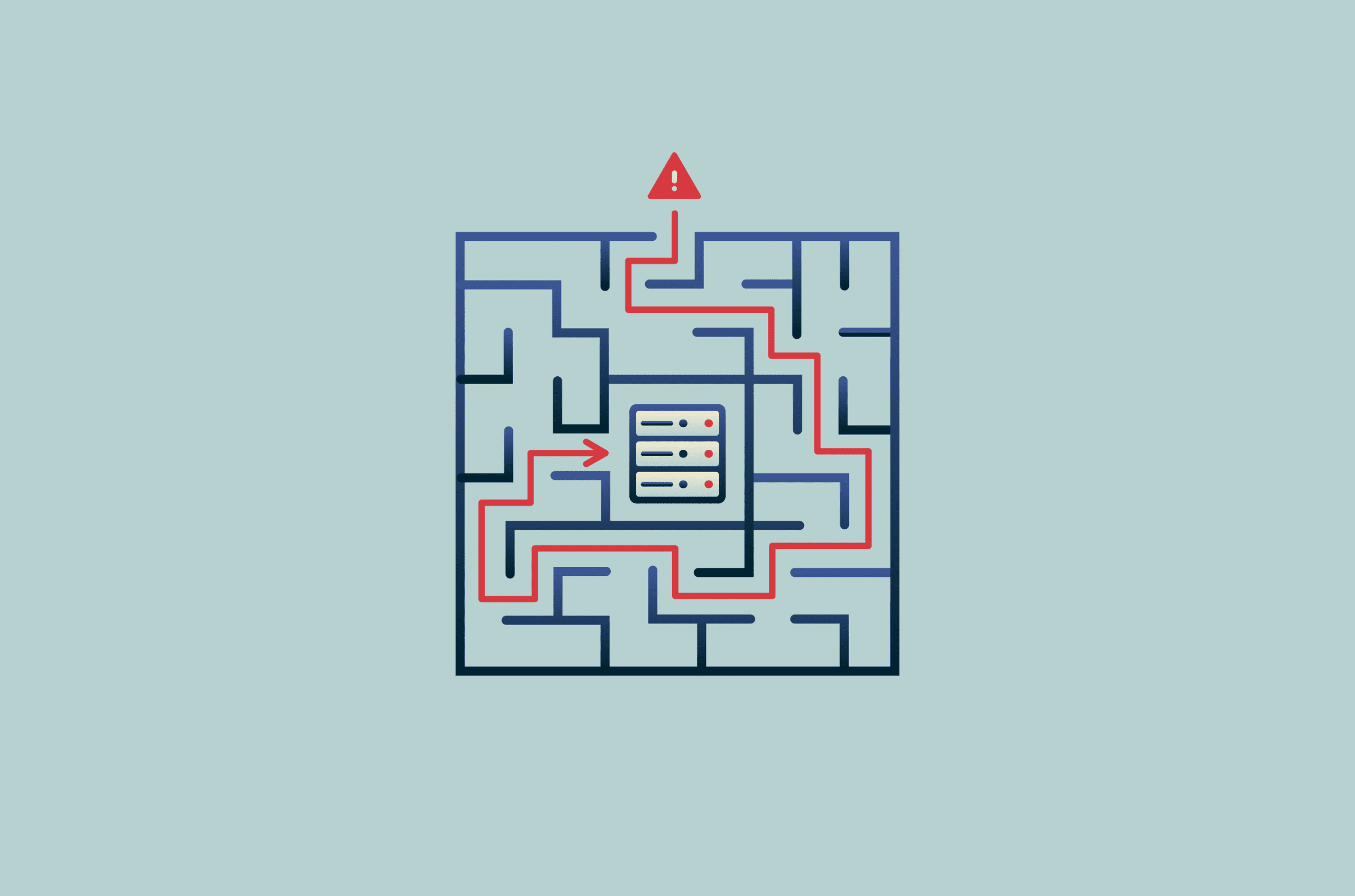
A cyberattack rarely starts with a dramatic “break-in.” Most start with an opening, such as outdated software or weak passwords, which are exploited using specific methods to gain unauthorized access.
This entry point is known as the attack vector. It’s the path threat actors use to gain initial access, move through systems, and execute their goal, such as data theft, extortion, fraud, or service disruption.
In this guide, you’ll learn what an attack vector is, the most common attack vectors seen in real incidents, and practical ways to spot them and reduce exposure.
What is an attack vector?
An attack vector, also known as a threat vector, is the path or route a cyberattacker uses to exploit vulnerabilities and gain unauthorized access to your system, network, device, or data.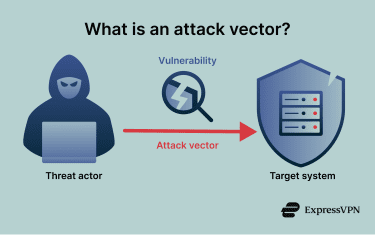
To fully understand attack vectors, let’s compare them with three related terms that are often conflated.
Attack vector vs. attack surface
An attack vector is the specific path a threat actor takes to breach your defenses. In contrast, an attack surface is the sum of all potential attack vectors an unauthorized user could use to enter or extract data.
Attack vector vs. vulnerability
A vulnerability is a weakness, flaw, or gap in a system, software, hardware, configuration, process, or human behavior that could be exploited. Examples include an unpatched bug in software or a weak password policy. The attack vector is the path used to reach and use that weakness.
Attack vector vs. exploit
An attack vector is the path used to exploit a weakness, while an exploit is the code, command, or technique that takes advantage of a weakness. For example, the attack vector could be the phishing email and the malicious link within it. The vulnerability in this case might be the victim’s desire to be helpful. The exploit of that vulnerability could be manipulative language used in the email to get the victim to take action.
How attack vectors work
Attack vectors often follow a familiar pattern:
- Identifying vulnerabilities: The attacker scans for weaknesses in the system or user behavior.
- Choosing an attack vector: The attacker selects the path or route to exploit the vulnerability.
- Payload delivery: The attack vector carries and delivers a payload, such as a malware download.
- Impact or objective achieved: Once the payload is activated, the attacker may achieve their goal, such as stealing credentials, installing malware, disrupting services, or accessing sensitive data.
Common types of attack vectors
Many cyberattack incidents can be categorized into a short list of types of attack vectors. The details shift by tactics, industry impact, and attack surface size, but the routes stay familiar.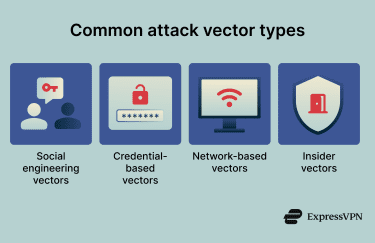
Social engineering vectors
Social engineering attack vectors focus on exploiting human behavior, not software flaws. They aim to deceive and persuade someone to do something that bypasses security measures.
Common social engineering paths include:
- Phishing: One of the most common forms of social engineering. It uses email or text messages that look legitimate to trick someone into taking an action that benefits the attacker.
- Pretexting: The attacker impersonates a coworker, superior, vendor, or support agent. They create a made-up scenario (a pretext) to obtain information or access.
- Physical social engineering: Attackers use methods like tailgating (following an authorized person), impersonation (e.g., carrying a ladder, wearing a hard hat), and shoulder surfing (watching the victim type or read sensitive information) to gain physical access to a facility.
Credential-based vectors
Credential abuse is one of the most straightforward avenues for attackers to exploit. When attackers log in with valid credentials, they can bypass many defenses that treat them as authorized users.
Credential-based vectors include:
- Credential stuffing: Automated attacks that reuse usernames and passwords from prior breaches.
- Multi-factor authentication (MFA) fatigue attack: Repeated login attempts trigger MFA push requests on the victim’s device, hoping to overwhelm them into accidentally approving one.
- Stolen session cookies and tokens: A stolen session cookie could allow an attacker to bypass a password change, while authentication tokens could grant access until they’re revoked.
Network-based vectors
Network attack vectors target how data moves between devices and services.
Common network-based vectors include:
- Man-in-the-middle (MITM) attack: An attacker positions themselves between you and a service to intercept or manipulate traffic. Common techniques for intercepting and decrypting data often include impersonating a trusted Wi-Fi access point, Domain Name System (DNS) manipulation, and packet sniffing on unencrypted networks.
- Distributed denial-of-service (DDoS) attack: A network of compromised devices floods a service with traffic so it’s unavailable to legitimate users. Targeted systems or services that may receive a flood of requests include network protocols, application layers, and misconfigured services.
Insider vectors
Insider threats involve misuse of legitimate access by employees, contractors, or partners. Some incidents involve malicious intent. Others involve mistakes or human error, such as misconfigured sharing settings or data sent to the wrong recipient.
Here are some actions that can be considered insider vectors:
- Downloading large datasets.
- Granting third-party app permissions.
- Sharing links with broad access.
- Copying files to personal cloud storage.
- Running scripts with admin permissions.
How to identify attack vectors in your organization
Identifying attack vectors involves systematically mapping your attack surface (all potential entry points) and assessing how attackers could exploit vulnerabilities to gain access. This is a proactive process rooted in attack surface management (ASM) and threat modeling, in which you continuously monitor your attack surface rather than conducting a one-time audit.
Below are the most common methods for identifying attack vectors: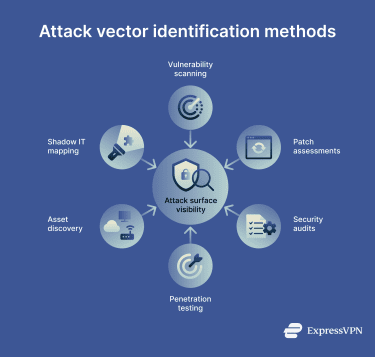
1. Vulnerability scanning
Automated tools are used to scan for weaknesses, like unpatched software, misconfigurations, and weak credentials. By identifying these vulnerabilities, you can uncover the potential attack vectors that attackers might use.
When triaging the results of a vulnerability scan, consider prioritizing the following areas:
- Actively targeted systems.
- Internet-exposed services.
- Remote access systems.
- Systems that hold sensitive data.
2. Patch assessments
Patch assessments pinpoint which existing systems require updates to reduce the risk of them becoming potential attack vectors. With patch assessment tools, you can scan your infrastructure to identify gaps in operating systems, applications, firmware, and end-of-life systems.
A useful patch assessment associates missing patches with vulnerable systems. For example, a missing patch on a laptop used for email poses risk, but the risk profile of a missing patch on an internet-facing server can be much higher due to external exposure.
3. Security audits
Security audits evaluate controls and processes and confirm if they’re working and compliant with established policies. They help you find attack vectors created by gaps in policy, access control, and configuration.
Audit targets often include:
- Identity and access management (MFA coverage, privileged access).
- Account lifecycle (onboarding, role change, offboarding).
- Logging and monitoring coverage.
- Vendor access and third-party integrations.
- Data access controls and sharing settings.
A good audit output doesn’t just list problems. It links each gap to a likely exploitation path. For example, “no MFA on email” maps to credential theft risk and “broad sharing on cloud folders” maps to data exposure risk.
4. Penetration testing
Penetration testing (also known as “pen testing”) simulates attacker behavior to find practical exploitation paths, not just theoretical issues. They can assess external exposure, internal networks, and web apps, and include social engineering tests when scoped and agreed upon in advance.
A strong penetration test aims to answer:
- Which system entry points are reachable?
- Which routes lead to sensitive data or privileged access?
- Which controls block movement, and which controls fail?
To maximize the value of pen test reports, it’s essential to have a clear remediation plan with designated owners and deadlines, retesting issues after fixes, and converting findings into permanent controls (e.g., scanning rules, monitoring alerts, access reviews).
5. Asset discovery
Asset discovery finds what you have, as unmanaged assets can become high-risk entry points.
When you conduct asset discovery, you should cover:
- Endpoints (laptops, phones, servers).
- Network devices (routers, switches, firewalls).
- Servers.
- Internet of Things (IoT) devices (printers, sensors).
- Cloud assets (virtual machines, storage, managed services).
- Software-as-a-Service (SaaS) apps connected to identity providers.
- Public-facing domains and subdomains.
A practical asset discovery output is an inventory with each asset’s owner, purpose, and exposure status. Assigning clear ownership helps ensure that every asset gets patched, monitored, and retired when no longer needed.
6. Shadow IT mapping
Shadow IT refers to tools and services used without IT or security team approval. Examples include the use of unauthorized cloud storage to share work files and sending work messages through unapproved apps. The risk comes from unmanaged accounts, weak settings, and unknown data flows.
Shadow IT mapping, a specific form of asset discovery, helps identify these unmonitored assets, which can serve as potential attack vectors. Steps in shadow IT mapping include:
- Reviewing single sign-in logs for unknown apps.
- Monitoring network traffic for unknown cloud services.
- Surveying teams on tools used for file sharing, project management, and customer outreach.
- Reviewing browser extension deployments.
By identifying these assets, you can update them, set access rules, and control data sharing.
Best practices to reduce exposure to attack vectors
Reducing exposure means cutting out the most likely exploitation paths in your environment, then putting guardrails in place that hold up over time. These practices reduce risk across many scenarios, from social engineering to network-based attack vectors.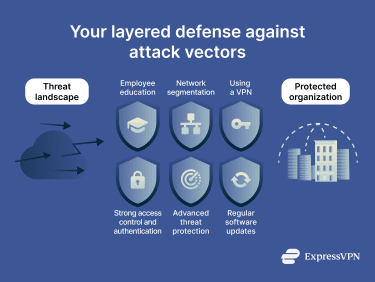
1. Train employees
Employee education reduces human-driven entry points, especially phishing and broader social engineering tactics. To create a training program that shares actionable, practical knowledge, you can cover cybersecurity topics that teach how to:
- Check sender addresses and domains.
- Spot fake login pages and suspicious prompts.
- Verify payment requests and vendor changes.
- Handle unexpected attachments and download links.
- Browse safely.
- Report and mitigate suspected mistakes.
An effective training program should present clear processes, not just awareness. This helps employees understand the next steps in identifying attack vectors and responding to security incidents to reduce hesitation and speed up response.
2. Improve access control and authentication
To reduce credential-based attack vectors, policies should enforce best practices, such as the use of:
- Strong password policies: Organizations should block known compromised passwords, encourage the use of strong passphrases and password managers, and limit password resets to high-risk cases.
- MFA: Stolen credentials are harder to use where there’s a second verification factor, so it’s highly recommended to use MFA for critical systems like email, remote access systems, admin consoles, and sensitive SaaS apps. You should also monitor changes to MFA settings, such as disablement attempts.
- Least privilege access: This helps limit what an attacker can do with a compromised account. To reduce the impact of compromised accounts, users should have only the access needed for their role, and admin privileges should be limited, time-bound, and audited.
3. Patch and update systems regularly
Reducing patch gaps reduces the set of entry points attackers can use. A comprehensive patch program should include:
- A predictable cadence for routine updates.
- A fast-track process for high-risk issues involving internet-facing systems and remote access tools.
- Testing for mission-critical systems.
- Verification through reporting.
Your patch program should cover all relevant systems, including operating systems, browsers and their components, third-party apps, network device firmware, and cloud service configurations that may act like patching in managed platforms.
4. Segment networks
Network segmentation limits threat propagation once an attacker gains access. This involves dividing networks into subnetworks or zones, so that a compromised endpoint remains isolated, helping prevent it from affecting the entire network.
Practical segmentation goals include:
- Separating user devices from servers.
- Separating production from test environments.
- Separating backups from general access.
- Limiting lateral movement paths, such as Server Message Block (SMB) and admin protocols, to the smallest set of systems.
5. Use advanced threat protection and endpoint security
Endpoint security tools can detect and stop behavior that matches common attack techniques. This matters for protecting against malware, credential theft tools, and ransomware precursors.
A modern endpoint security tool often includes:
- Endpoint detection and response (EDR) for behavior-based detection.
- Malware protection with real-time scanning.
- Controls that block suspicious scripts and child process behavior.
- Central logging and alert triage.
To get value from these tools, it’s essential to focus on protecting every endpoint that interacts with email, browsers, or sensitive apps. It’s also important to define the response protocols when the tool flags suspicious behavior and monitor actions associated with user accounts, such as unusual logins.
6. Use a virtual private network (VPN)
A VPN encrypts traffic between your device and the VPN server. That can reduce exposure on untrusted networks, where attackers may try to monitor traffic, manipulate DNS, or run rogue access points. It can help in scenarios like:
- Using public Wi-Fi in cafes, airports, and hotels.
- Traveling in areas with poor network coverage, where you may need to connect to insecure mobile networks.
- Working from networks you don’t control, such as friends’ or family’s home networks.
That said, a VPN doesn’t stop phishing and doesn’t remove malware from a device. If a threat actor already has entry or valid credentials, a VPN won’t prevent account misuse. Treat a VPN as one control in a larger set, not a universal fix.
FAQ: Common questions about attack vectors in cybersecurity
What is an attack vector in cybersecurity?
An attack vector is the route or path a threat actor uses to exploit vulnerabilities and get initial access to a system, account, or network.
What is the most common attack vector?
Phishing, exposed external remote services and internet-facing applications, and compromised credentials are among the most common attack vectors identified in the MITRE ATT&CKⓇ framework.
What is another name for an attack vector?
“Threat vector” is often used interchangeably with “attack vector.” Terms like “entry point” and “intrusion path” are also commonly used as synonyms, which describe the same idea: the route an attacker uses to gain access to a system.
How can I recognize attack vectors in my organization?
To identify attack vectors in your organization, start by inventorying and monitoring internet-facing services, user accounts, cloud resources, and third-party connections. Then look for reachable weaknesses: missing patches, weak remote access settings, accounts without multi-factor authentication (MFA), broad sharing permissions, and unmanaged devices. Pair that with sign-in and endpoint logs to identify unusual access patterns that could indicate exposure.
What are the implications of a cyberattack through an attack vector?
A successful breach through an attack vector can lead to financial loss, data theft, account takeover, fraud, ransomware, or downtime.
What tools help defend against attack vectors?
To detect and reduce attack vectors, it’s typically recommended to combine tools for vulnerability scanning, patch management, multi-factor authentication (MFA) and privileged access management, email security filtering, endpoint and threat detection, asset discovery, and distributed denial-of-service (DDoS) and malware protection.
Take the first step to protect yourself online. Try ExpressVPN risk-free.
Get ExpressVPN