What is shadow IT, and why it matters for security



Shadow IT has become a common feature of modern workplaces as cloud services, Software-as-a-Service (SaaS) platforms, and browser-based tools make it easy for teams to adopt new technology quickly, often without direct involvement from IT or security teams.
This can be convenient, and in some cases, it may improve productivity, but it can cause serious issues from a security perspective. This guide takes an in-depth look at shadow IT, its associated risks, and effective prevention strategies.
What is shadow IT?
Shadow IT refers to the use of applications, services, or devices within an organization that haven’t been approved or reviewed by IT or security teams. Despite how it may sound, it doesn’t mean the technology is illegal, unsafe, or intentionally hidden. It also doesn’t imply malicious behavior by employees.
In most cases, the tools involved are legitimate, widely used services adopted to solve practical problems or work more efficiently. The defining characteristic of shadow IT is lack of oversight, not malicious intent. If IT or security teams are unaware of a tool, have not assessed its security posture, or can’t enforce controls around it, that tool falls into the category of shadow IT, regardless of how common or well known it is.
How shadow IT operates in modern workplaces
Shadow IT is becoming more common as modern workplaces increasingly rely on remote work and bring your own device (BYOD) policies. Bring your own app (BYOA) practices further accelerate shadow IT. Because modern cloud and SaaS tools are easy to access and require little technical setup, individuals and teams can introduce new applications without involving IT.
Once in use, these tools often spread informally through collaboration, shared links, recommendations, or team workflows, allowing them to become embedded in daily operations. Any of the following examples can be considered shadow IT:
- Using a project management platform different from the one the organization recommends to track and complete tasks.
- Communicating with colleagues through unapproved messaging apps.
- Storing or sharing work files using unauthorized cloud storage or file-sharing platforms.
- Using unmanaged personal accounts instead of corporate-issued accounts.
- Relying on unsanctioned AI tools to automate certain workflows.
- Connecting personal devices, such as laptops, smartphones, or even smart devices like fitness trackers, to company networks without IT approval.
Over time, business data may be created, stored, or shared within these systems, often without centralized oversight, security controls, or consistent access management.
Why do employees use shadow IT?
Employees use shadow IT primarily to get their work done more efficiently. The following factors explain the most common drivers behind this in modern organizations.
Employee preferences
Some employees prefer using certain tools instead of those recommended by the security team, which can be due to personal preference or simply because they’re familiar with them. Tools used in previous roles feel easier to use, require less ramp-up time, and allow employees to deliver results faster.
In other cases, employees choose unapproved tools because they offer advantages aligned with personal or professional goals, such as better privacy while working, the ability to meet a specific business need, or opportunities to gain a competitive advantage in their careers.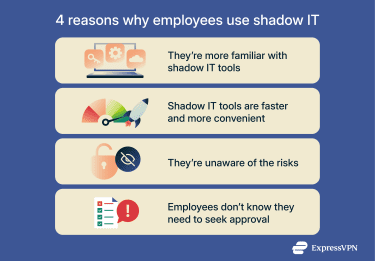
Lack of awareness
Employees may be unaware of the risks associated with shadow IT. They don't intend to circumvent security guidelines set by IT teams but may simply not realize that their behavior can put corporate data at risk. In some cases, they may not even know they need permission from the security team to use third-party apps or devices in the first place, often because approval policies are unclear or nonexistent.
Accessibility and usability
Even when employees know they need permission to use third-party services or devices, they may be reluctant to ask because approval processes can be lengthy or complicated. This often clashes with tight deadlines or performance expectations, leading employees to prioritize unapproved tools that deliver faster results. In some cases, these tools also offer a more user-friendly design or more core features than IT-approved services.
What are the risks of shadow IT?
Shadow IT can pose a serious threat to an organization’s assets by enabling unauthorized access to internal networks and sensitive data.
Loss of visibility and control
Shadow IT creates security gaps because IT teams may be unaware of employees using third-party hardware and software. Without this visibility, organizations can’t consistently enforce security policies, manage access, or ensure systems receive timely updates. As a result, security teams often discover shadow IT only after an incident has occurred.
Data leakage risks
Shadow IT increases the likelihood that sensitive data will be stored, shared, or exposed inappropriately. These tools may lack strong access controls or encryption, and employees may accidentally share data with unauthorized parties.
For example, in one reported incident, employees at a staffing company used personal cloud storage accounts to share sensitive documents, potentially exposing personal information to unauthorized users.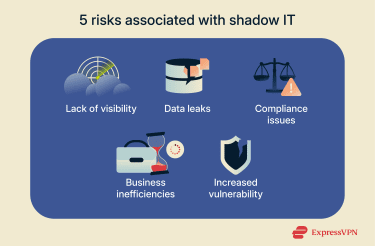
Legal and compliance issues
Shadow IT devices and apps can increase the risk of legal action against organizations, as many organizations must comply with strict data protection regulations, such as the General Data Protection Regulation (GDPR) or the California Consumer Privacy Act (CCPA). Noncompliance can result in serious consequences, including substantial fines or the suspension of business activities.
For example, if an employee uses an unapproved file-sharing app to give a colleague access to a document containing customers’ personal details, they may accidentally make the file publicly accessible. If that happens, a cybercriminal can then discover the exposed data and sell it on the dark web, leading to severe regulatory penalties for the business.
Business inefficiencies due to fragmentation and data loss
When teams rely on different tools for similar tasks, information becomes siloed and harder to manage. Fragmentation also increases the risk of data loss. If employees store critical information in unapproved systems and leave the organization without transferring access, the business may permanently lose valuable data.
In addition, employees who rely on unauthorized tools may encounter compatibility issues when a company updates its approved IT infrastructure. Because IT departments are often unaware of shadow IT tools, these changes don’t account for them. As a result, workflows can be disrupted, affecting the functionality of both sanctioned and unsanctioned tools and assets.
Increased vulnerability to cyberattacks
Shadow IT expands the organization’s attack surface by introducing a wide range of tools and devices that follow different security standards. Because these systems use different configurations, update cycles, and patching practices, they create inconsistent security coverage across the environment. Malicious actors may exploit these weaknesses to gain unauthorized access to an organization’s network, infect endpoints with malware, and exfiltrate data to sell for profit.
How can organizations effectively manage shadow IT?
Shadow IT risks can be reduced through clear policy implementation, regular employee training, and comprehensive security solutions that detect unsanctioned tool usage and help protect company networks.
Establishing clear policies
Organizations should define clear policies that specify how employees may use third-party apps and devices. These policies should outline the security requirements a tool must meet to become approved, identify disallowed services, and describe the consequences of noncompliance.
Policies should also define a clear review timeframe so employees are not blocked by slow approval processes. Organizations can reduce friction by simplifying requests, maintaining a list of pre-vetted tools, or providing an internal portal for third-party software submissions.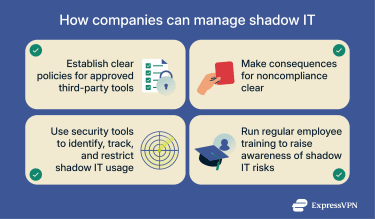
Tools for shadow IT detection
Tools that identify unapproved apps, accounts, and services in use across networks can help security teams understand usage patterns, identify risk, and enforce shadow IT policies. Some organizations also adopt integrated security platforms that combine shadow IT discovery with broader controls. For example, a Secure Access Service Edge (SASE) architecture can enable organizations to:
- Use Cloud Access Security Broker (CASB) tools to automate shadow IT detection and blocking.
- Implement zero-trust models to enforce strict access controls and ensure only secure devices connect to internal resources.
- Leverage firewalls and web filtering to protect against cyber threats, like phishing attacks.
Regular training and awareness programs
Organizations should provide regular training to ensure employees understand the security risks associated with unsanctioned tools. Training should explain how data breaches occur and use real-world examples to show how shadow IT can expose sensitive information. Clear, practical guidance helps employees make better decisions and recognize when they need to involve IT or security teams.
Best practices for preventing shadow IT
Organizations can reduce shadow IT by addressing the conditions that cause employees to adopt unapproved tools in the first place.
Encourage open communication
Shadow IT often develops when employees don’t have a clear way to request tools or discuss workflow needs. Organizations should define formal channels for communication between employees, managers, and IT teams so technology requirements surface early. This creates a predictable path for raising requests, discussing constraints, and resolving gaps before employees seek their own solutions.
Provide approved, user-friendly tools
Even with strong communication, shadow IT will persist if approved tools fail to support real work. Organizations should regularly evaluate sanctioned applications and devices to ensure they remain functional, usable, and aligned with current workflows. This includes retiring outdated tools, expanding feature sets where needed, and replacing platforms that consistently drive employees toward alternatives.
How VPNs help reduce shadow IT risks
Note: This section discussed corporate virtual private networks (VPNs), which are different from commercial VPNs like ExpressVPN that allow individual users or small teams to protect their online data.
Corporate VPNs help reduce shadow IT risks by securing network traffic. They encrypt employees’ connection to internal company networks when working remotely, regardless of whether employees are using approved or unapproved apps. This makes it significantly harder for attackers, especially on unsecured public Wi-Fi networks, to intercept or tamper with data.
That said, it is important to understand that a VPN doesn’t solve the governance, visibility, and data-at-rest problems that are the essence of shadow IT risk. It mitigates one specific threat (network interception) among many.
Learn more: For a broader look at how VPNs are used in work settings, including non-corporate use cases, read our guide on using a VPN at work.
FAQ: Common questions about shadow IT
What does the term "shadow IT" mean?
Shadow IT refers to software and devices used by employees that haven’t been approved by an organization’s security team. While the intent behind using these tools isn’t usually malicious, it can still expose companies to serious threats, such as data breaches and noncompliance with data security regulations.
What is an example of shadow IT?
Shadow IT includes any instance in which employees use unauthorized devices or apps. Common examples include storing company files on unapproved cloud platforms, sharing sensitive data through unsanctioned messaging apps, and connecting personal devices, such as laptops or smartphones, to an organization’s network without approval.
Why do employees use shadow IT?
Employees often use shadow IT because they’re unaware of potential security risks, prefer certain third-party tools over IT-approved solutions, or find these services easier to access due to subscription-based models and bring your own device (BYOD) workplace policies.
What are the risks associated with shadow IT?
Shadow IT tools may appear harmless, but they can cause significant damage. They can create security gaps because IT teams are often unaware of third-party tools, lead to unintentional data leaks, result in noncompliance with data protection regulations, and disrupt workflows, causing downtime or data loss.
What tools can identify shadow IT?
Organizations can use shadow IT discovery tools to detect, track, and restrict unsanctioned tools across company networks. However, a more effective approach may be to adopt comprehensive platforms, such as Secure Access Service Edge (SASE) solutions, which combine shadow IT discovery with other essential security services like web filtering and firewalls.
Why is understanding shadow IT important for cybersecurity?
Companies shouldn’t ignore shadow IT because it can introduce serious security risks. Using unapproved tools makes it harder for security teams to identify vulnerabilities, increases the risk of exposing sensitive data, and can lead to noncompliance with privacy regulations.
What best practices help reduce shadow IT risks?
Preventing shadow IT starts with fostering a company-wide culture of open communication, so employees feel comfortable requesting new tools instead of turning to unapproved software or devices. Organizations can further limit shadow IT adoption by providing access to pre-vetted tools that are accessible, easy to use, and feature-rich.
Take the first step to protect yourself online. Try ExpressVPN risk-free.
Get ExpressVPN