The ultimate guide to remote access VPN solutions



Remote access virtual private networks (VPNs) remain a common solution for businesses that need to extend secure network access beyond the office, as they support remote work without requiring major changes to existing network architecture.
This guide explains how they work, where they are most effective, and how they fit alongside newer access models used in modern environments.
Note: This article focuses on enterprise remote access VPNs, which differ from consumer VPN services designed for individual use, such as ExpressVPN.
What is a remote access VPN?
A remote access VPN is a security tool that allows users to securely connect to a private organizational network over the internet. Organizations commonly use them to give employees, partners, or contractors access to internal systems when they’re working outside the office.
How remote access VPNs work
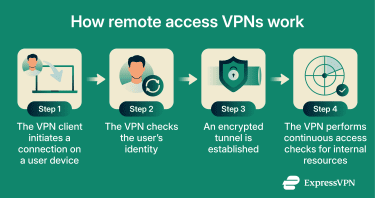
While the implementation can vary, a remote access VPN always performs three core functions: it verifies the user’s identity, secures the connection, and controls what the user can access once connected. The connection process typically follows these steps:
- The user starts the connection: The user opens a VPN client on their device and requests a connection to the organization’s private network.
- The VPN verifies the user’s identity: The VPN checks the user’s credentials to confirm they are authorized to connect. Some environments use additional authentication factors, but all remote access VPNs perform some form of identity verification before allowing access.
- The VPN secures the connection: After authentication, the VPN establishes an encrypted connection between the user’s device and the private network that protects data as it travels over the public internet.
- The VPN controls access to internal resources: Once connected, the VPN determines what the user can access on the network. At a minimum, it allows or denies network access. More advanced setups may restrict access to specific systems or services rather than the entire network.
Key features of remote access VPNs
Remote access VPNs rely on a set of core features that make secure, user-to-network connectivity possible.
Data encryption
Data encryption scrambles the traffic between the user’s device and the private network into an unreadable form to prevent anyone who intercepts the traffic from reading or altering it.
This protection is provided through standardized tunneling and encryption protocols, most commonly Internet Protocol Security (IPSec) or Secure Sockets Layer (SSL) / Transport Layer Security (TLS).
Multi-factor authentication (MFA)
MFA strengthens remote access VPN security by requiring users to verify their identity using more than one factor before access to the private network is granted. This means that in addition to a password, they may be required to provide a one-time code, approve a push notification, or complete another secondary verification step.
MFA reduces the risk of unauthorized access caused by credential compromise. Even if a password is exposed through phishing, reuse, or data breaches, the additional authentication factor makes it much harder for an attacker to successfully connect to the VPN.
Access control
Access control defines which internal systems a user can reach after connecting to a remote access VPN. Instead of exposing the entire private network, the VPN applies explicit rules that allow connections only to specific applications, servers, or network segments based on the user’s assigned access.
These rules are enforced at the VPN gateway during and after a connection is established, using attributes such as user identity, role, and device context. This helps contain the impact of compromised accounts and restricts lateral movement inside the network.
Logging and monitoring
Most enterprise remote access VPNs generate logs that record connection activity, authentication attempts, and session details. These logs provide visibility into who is connecting, when connections occur, and whether access attempts succeed or fail.
As such, they help organizations troubleshoot access issues, investigate suspicious activity, and support auditing or compliance requirements.
Device-based checks
Some remote access VPN deployments include basic checks on the connecting device before allowing access. These checks may verify elements such as device certificates, operating system status, or whether required security settings are in place to reduce risk from unmanaged or non-compliant devices.
Key benefits of remote access VPNs
The benefits of remote access VPNs fall into three areas: protecting sensitive data and user privacy, supporting remote and hybrid work models, and reducing reliance on physical office infrastructure. Here’s what that means: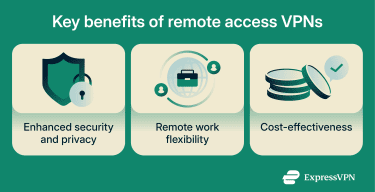
Enhanced security and privacy
Remote access VPNs reduce exposure to network-based threats by allowing users to connect to internal systems without sending traffic openly over the public internet. This is especially important when employees work from home, travel, or use public or untrusted networks, where interception and traffic manipulation are more likely.
By requiring authenticated access to a controlled network entry point, remote access VPNs also reduce the likelihood of unauthorized connections to internal systems.
Remote work flexibility
Remote access VPNs let employees use internal tools in the same way regardless of where they work, all while preserving existing network restrictions and access policies. Because the VPN provides a consistent network entry point, organizations can support remote and hybrid work without modifying internal applications or exposing them directly to the internet.
Cost-effectiveness for businesses
Remote access VPNs allow organizations to support off-site work without expanding physical office infrastructure or deploying location-specific access solutions. Employees connect securely using existing home or mobile networks, reducing reliance on leased lines, on-premises hardware, and dedicated office space.
Centralized management of access policies and monitoring also simplifies administration, helping reduce operational overhead as the organization scales.
Challenges and considerations for remote access VPNs
By extending internal network connectivity beyond the office, remote access VPNs also extend an organization’s trust boundary. This introduces security, performance, and management challenges, typically stemming from:
- Misconfiguration and policy errors: Incorrect access rules, weak authentication settings, or outdated VPN configurations can unintentionally expose internal systems or weaken security controls.
- Credential theft and account compromise: Remote access VPNs rely on user credentials. Attackers may gain direct entry into the internal network if they steal passwords.
- Overly broad network use: A VPN connection may grant wider access than a user actually needs. This increases the potential impact of a compromised account by allowing lateral movement within a network.
- Endpoint security risk: Remote VPNs rely on the security posture of connecting devices, including remote systems that may be unmanaged, outdated, or poorly secured. If an endpoint is compromised, the VPN connection can provide an attacker with legitimate access to internal resources.
- Single point of failure: Because VPN access is centralized, performance issues, outages, or capacity limits in the VPN infrastructure can disrupt access to internal systems for a large number of remote users simultaneously.
Common problems and solutions
| Problem | High-level mitigation |
| Unreliable user connections | Capacity planning and redundant VPN infrastructure |
| Degraded connection performance | Traffic prioritization and selective routing strategies |
| Users blocked from required systems | Clearly defined, role-based access policies |
| Users granted broader access than necessary | Least-privilege access enforcement and periodic reviews |
| Expanded attack surface from remote access | Strong authentication requirements and regular policy audits |
| VPN service outages | High-availability design and failover mechanisms |
How to set up a remote access VPN
Setting up a remote access VPN is a process that spans planning, deployment, and ongoing management.
Step-by-step guide to configuration
Remote access VPN configuration typically progresses through a number of implementation stages, each with a specific security or access outcome. These stages help ensure users can connect securely while limiting unnecessary network exposure.
Choosing the right VPN client
The VPN client determines how users authenticate, how traffic is encrypted, and how access policies are enforced. In enterprise environments, organizations typically opt for client-based VPNs because they support stronger authentication and more consistent policy enforcement than browser-based (clientless) VPNs, which often rely on web portals and offer limited control.
Key considerations when selecting a VPN client include:
- Platform support: The client should support the operating systems and device types in use to avoid fragmented access or insecure workarounds.
- Authentication capabilities: Integration with enterprise identity providers and support for MFA are essential for verifying user identity before access is granted.
- Manageability: Centralized configuration, update control, and rapid access revocation are critical for maintaining security at scale.
- Logging and visibility: Connection logging and auditing support help with monitoring, incident response, and compliance.
- Scalability and usability: The client should perform reliably as the user base grows and be usable enough to avoid support issues or unsafe workarounds.
Some environments also consider whether the client can assess device security posture before allowing access, which can reduce risk in bring-your-own-device (BYOD) or mixed-device scenarios.
Installation process overview
After selecting a VPN client, organizations typically deploy it in a few straightforward steps:
- Setting up the VPN gateway (server-side): Admins deploy the VPN gateway, or enable it on an existing firewall or VPN appliance, and define the basics: the VPN protocol, encryption settings, allowed networks, and how the gateway will authenticate users.
- Connecting authentication and policies (server-side): Admins configure the gateway to use the organization’s authentication method, such as single sign-on (SSO) and MFA. They then define access policies on the gateway, or in the VPN management console, that map users to allowed internal resources.
- Enrolling users and devices (client + management): Users install the VPN client and receive the configuration profile, often via a mobile device management (MDM) or unified endpoint management (UEM) system, an enrollment portal, or a managed installer. If the organization requires device approval, admins register devices or require a device certificate so only approved endpoints can connect.
- Testing the first connection: Finally, teams verify that users authenticate successfully (including MFA), the tunnel encrypts traffic, and policies restrict access to only the intended internal resources.
Note that the exact installation and onboarding steps vary by provider, operating system, and organizational environment.
Common mistakes to avoid
The following issues are common across organizations and are usually the result of process gaps rather than technical flaws:
- Defaulting to broad access during onboarding: Granting wide network access for convenience increases exposure and makes later access reviews harder to manage.
- Treating authentication as a one-time decision: Enabling a VPN without enforcing strong authentication from the outset, or failing to update authentication requirements over time, leaves remote access vulnerable as threats evolve.
- Failing to review access as roles change: Users can retain access long after their responsibilities change. Without regular access reviews, privilege creep becomes difficult to detect and correct.
- Ignoring remote device context: Permitting connections without considering device ownership or security posture can introduce unmanaged or poorly secured endpoints into trusted network environments.
- Underestimating operational load on VPN infrastructure: Failing to account for peak usage, redundancy, or maintenance can lead to reliability issues affecting many team members at once.
Understanding alternatives to remote access VPNs
While remote access VPNs are a long-established approach to secure remote connectivity, they’re not the only model available. In practice, many organizations combine multiple remote access models.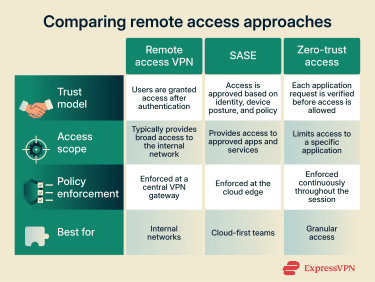
Overview of SASE and zero-trust concepts
Secure Access Service Edge (SASE) and zero trust change how remote access is designed by replacing broad network access with per-application access based on identity and policy.
SASE is an architecture that delivers networking and security controls through cloud-based enforcement points. Instead of sending remote traffic through a central VPN gateway, users connect to nearby SASE services that authenticate identity, enforce access policies, and inspect traffic before allowing connections to specific applications or services. This reduces reliance on a single entry point and better supports cloud-hosted and geographically distributed systems.
Zero trust is the security model that defines how access decisions are made in this approach. It assumes no implicit trust based on network location and evaluates access continuously. Users and devices receive access only to explicitly authorized applications or resources, rather than entire network segments.
Why consider alternatives?
Organizations may also look for stronger alignment with cloud-first architectures. As more systems are delivered as Software-as-a-Service (SaaS) or hosted across multiple cloud providers, some may prefer a model that was designed with cloud-native environments in mind.
Scalability and performance are other considerations. Cloud-delivered access models enforce security policies closer to the user, which can support geographically distributed teams.
Finally, some organizations adopt alternatives to support a reduced-trust security posture or more granular access control. Alternatives such as SASE and zero-trust-based models grant access per application or service. Additionally, they evaluate access and restrict exposure to only the resources explicitly authorized.
Differences between a remote access VPN and a site-to-site VPN
Unlike a remote access VPN that connects individual users to a private network, a site-to-site VPN connects entire networks to each other. Instead of individual users logging in, a VPN gateway links two or more trusted locations. This lets systems at each site communicate automatically and is commonly used to connect branch offices, data centers, or cloud networks.
| Feature | Remote access VPN | Site-to-site VPN |
| Connection model | User-to-network | Network-to-network |
| Typical users | Individual employee/contractor | Offices, branches, data centers |
| Authentication | Per-user credentials | Gateway-to-gateway |
| Access scope | Limited by user policy | Broad network-level access |
| Common use case | Remote work, mobile access | Linking fixed locations |
FAQ: Common questions about remote access VPNs
Does a VPN allow remote access?
A VPN allows remote access only when it is designed to connect users to a specific private network. This is known as a remote access VPN, which differs from VPNs that only protect internet traffic.
What is the difference between a site-to-site VPN and a remote access VPN?
A remote access VPN connects individual users to a private network using per-user authentication. A site-to-site VPN connects entire networks to each other, supporting a different connectivity model and use case.
What are the benefits of remote access VPNs?
Remote access VPNs help protect data in transit and control who can access internal systems from outside the office. They also support remote work, centralized access management, and operational flexibility.
Take the first step to protect yourself online. Try ExpressVPN risk-free.
Get ExpressVPN