What is RedLine Stealer malware and how does it work?


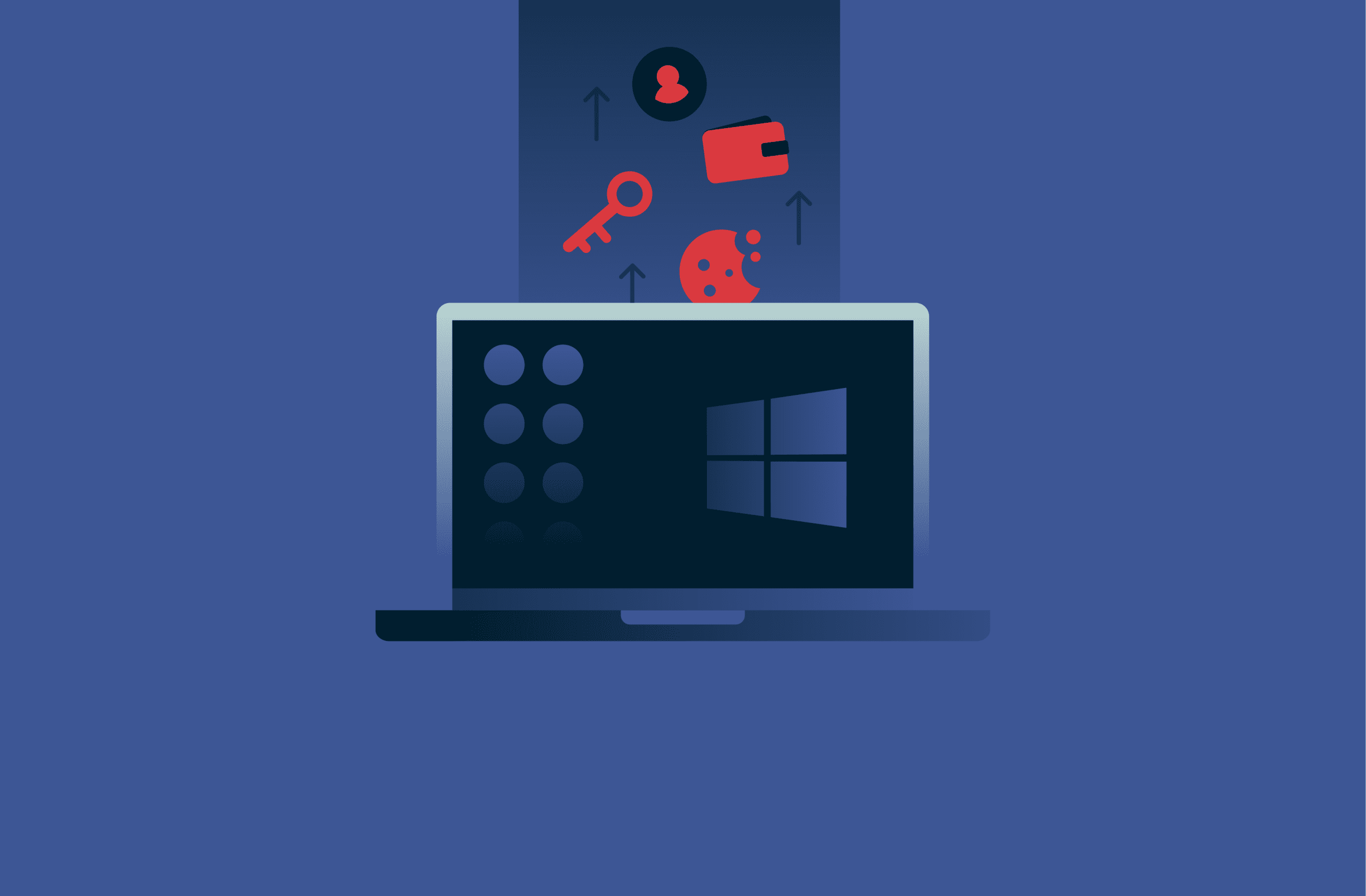
RedLine Stealer is one of the most common information-stealing tools in cybercrime, primarily targeting Windows users. It quietly collects passwords, cookies, cryptocurrency wallets, and other sensitive data, then sends it to attackers.
Understanding how info stealers work, and how RedLine Stealer fits into that picture, helps you reduce the chance of an infection and limit damage if an attack succeeds.
This guide explains what RedLine Stealer is, how it operates, the data it targets, and how attackers use that data in cybercrime. You’ll also learn how to detect and remove it if you suspect an infection.
What is RedLine Stealer?
Security researchers from cybersecurity company Proofpoint first identified RedLine Stealer in 2020, and the U.S. government-funded research organization MITRE now tracks it as Software S1240 in the Adversarial Tactics, Techniques, and Common Knowledge (ATT&CK) framework. It’s an information-stealing Trojan that focuses on browsers, credentials, cryptocurrency wallets, and detailed device profiling.
Cybercriminals often sell and rent RedLine Stealer malware on the dark web as Malware-as-a-Service (MaaS). This means a core team maintains the backend and builder, then sells licenses to cybercriminal groups (called affiliates). These affiliates then use RedLine Stealer in their own campaigns. They don’t even need technical skills. They simply have to configure it through a point-and-click control panel and launch their attack.
Attackers widely used RedLine until 28th October 2024, when Operation Magnus disrupted much of its backend. The Dutch National Police and the FBI seized servers, domains, and Telegram channels linked to RedLine and another info stealer known as META.
Despite the operation, RedLine continues to appear in new incidents through older builds, cracked copies, or repackaged variants.
How RedLine Stealer operates
To understand how info stealers work, it helps to follow a typical RedLine Stealer infection chain:
- Initial execution: The victim runs a malicious file, opens a booby-trapped document, or launches a fake installer that contains the RedLine malware. Victims often encounter these files through phishing, malvertising, or “free” cracked software.
- Malware payload delivery: Once the file runs, it either unpacks and executes the RedLine Stealer payload directly or uses a loader to download it from a remote server. Many samples use packed or encrypted code to evade detection.
- Stealer malware behavior and persistence mechanisms: After launch, RedLine Stealer scans the system for browsers, password stores, cryptocurrency wallets, messaging apps, and other data sources. To survive reboots, it uses persistence mechanisms like Windows scheduled tasks or registry run keys. It may also set up its own Windows service.
- Data collection and exfiltration: The malware collects data into logs and sends them to the RedLine control panel via HTTP or HTTPS. Communication can involve encoded or encrypted traffic. The malware may also limit execution based on country or environment.
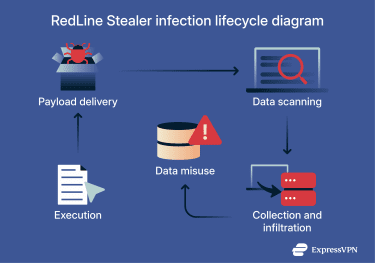
RedLine Stealer isn’t just a data collector. It can download extra payloads and disable or tamper with security tools. This makes it a staging point for later attack phases, such as ransomware.
What data does RedLine Stealer steal?
RedLine Stealer focuses on information attackers can easily monetize or exploit. It collects direct secrets like passwords, plus contextual information that helps attackers understand the victim’s environment.
RedLine commonly affects individual users, but stolen credentials are often later used to access corporate environments. As a MaaS tool, it lowers the barrier to entry for cybercrime, allowing attackers to profit from stolen credentials and accounts without the technical expertise required to breach a corporate network directly.
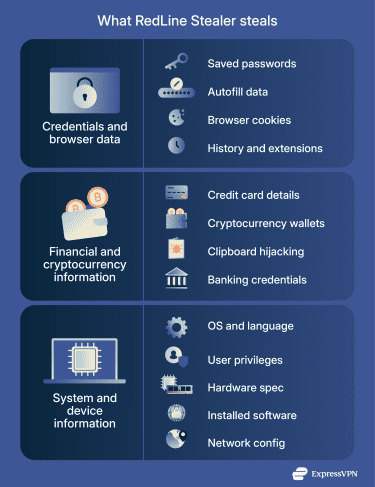
Credentials and browser data
RedLine malware targets almost every source of stored credentials on a Windows system, including:
- Saved passwords from browsers and password managers.
- Autofill data like names, addresses, and phone numbers.
- Browser cookies, including session cookies that can bypass multi-factor authentication (MFA).
- Browser histories and installed browser extensions.
This browser-centric focus makes RedLine Stealer attacks highly profitable. If a user saves login credentials for email, social media, work portals, or developer tools in their browser, RedLine Stealer can grab all of them with a single scan.
The malware can also exfiltrate credentials from file transfer clients and some desktop VPN tools. These entries help attackers map where the victim logs in and which services might accept stolen passwords.
Apart from login credentials, RedLine steals session tokens from apps like Discord, Steam, and Telegram. This lets attackers hijack active sessions without a password.
Financial and cryptocurrency information
RedLine can:
- Collect credit card details stored in browsers.
- Steal cryptocurrency wallets and wallet configuration files.
- Hijack clipboard data to replace copied cryptocurrency addresses.
- Steal online banking or payment account credentials.
Financial focus makes RedLine Stealer particularly attractive in cybercrime. Attackers can drain stolen wallets directly. They can also use compromised accounts for money laundering or fraudulent purchases. Alternatively, they can resell them to criminals who specialize in those tasks.
System and device information
RedLine Stealer fingerprints each device thoroughly, gathering:
- Operating system version and system language.
- Usernames, privileges, and administrator status.
- Hardware details like CPU, graphics card, and memory.
- Installed software, including security tools and virtual private network (VPN) clients.
- IP address, city, country, and network configuration.
This information helps attackers assess a device’s value and plan next steps. For example, attackers might handle a home gaming computer with crypto wallets and lots of saved passwords differently from a corporate laptop with business VPN access.
What happens to victims’ stolen data
Once RedLine Stealer has a victim’s data, it packages it into stealer logs and sends them to the attacker's server. These logs are easily searchable. Cybercriminals can query them with keywords such as “bank,” “VPN,” or “Social Security number” to locate high-value targets.
From there, criminals trade that data on dark web marketplaces and forums. Buyers may use it for their own goals, including identity theft, account takeovers, and corporate network access.
Identity theft and fraud
Stolen personal data and credentials fuel identity theft. Attackers can:
- Reset passwords and take control of your email and social accounts.
- Use saved personal details to pass identity checks.
- Open fraudulent bank accounts or apply for loans in your name.
- Impersonate you in phishing campaigns targeting your contacts.
Info stealer logs often contain enough data to answer security questions, pass weak verification checks, and trick support agents. RedLine Stealer symptoms are hard to spot, so the first visible sign might be a fraud incident weeks later.
Account takeovers and resale
These logs appear for sale on “bot shops,” where buyers can purchase access to individual victim logs or bulk datasets. Attackers use these logs for:
- Direct account takeovers on email, social media, cloud services, and developer tools.
- Credential stuffing against banking, gaming, and subscription platforms.
- Bypassing MFA with stolen session cookies.
- Spam campaigns and abuse of advertising or influencer accounts.
In many cases, the original RedLine Stealer attack is only the first step. Other groups then buy the logs and run their own campaigns, which can continue long after the victim has cleaned up the initial infection.
How RedLine Stealer infects devices
RedLine Stealer infection chains vary from campaign to campaign, since affiliates choose their own lures and packers. Security advisories still highlight a few common patterns.
1. Malicious downloads
Many RedLine campaigns abuse people’s interest in free tools and shortcuts. Report from Kroll, a global risk and financial advisory firm specializing in investigations and incident response, shows criminals often distribute the malware as:
- Fake “free” versions of commercial software.
- Cracked games and cheat tools.
- Fake AI chatbot installers.
- Fake PDF converters or system utilities.
Attackers often pair these lures with search engine poisoning or malvertising. A user searching for a free converter or “download ChatGPT desktop” may see a malicious site at the top of results. When the victim runs the installer, RedLine starts in the background.
2. Phishing emails
RedLine also spreads through phishing campaigns. Common patterns include:
- Macro-enabled Office documents or archives with executable files.
- HTML attachments that mimic sign-in pages and trigger downloads.
- Links to fake login pages that serve malware instead of documents.
These emails often pretend to be invoices, shipping notices, password reset messages, or job-related communication.
3. Malicious websites
Some RedLine Stealer campaigns use compromised or malicious websites to host the payload. In these scenarios, RedLine masquerades as legitimate tools hosted on typosquatted domains, such as fake PDF converter sites.
Victims might reach these pages through search results, sponsored ads, or links in emails and social media posts. A single click on a download button is enough to trigger infection.
4. Malware loaders
RedLine often appears alongside loaders that specialize in downloading and running additional malware on infected systems. These loaders may use obfuscated code, encrypted configuration files, and checks for sandboxes or virtual machines.
Layering lets attackers swap payloads without changing the initial lure. One campaign might use the same phishing email for weeks, swapping RedLine for another stealer or ransomware depending on demand.
5. YouTube scams
RedLine Stealer was also observed spreading through YouTube videos that advertise game cheats, cracked software, or “unlocked” tools. Gaming and crypto communities are particularly vulnerable. The video description links to a download, often hosted on a file-sharing site, that actually contains a stealer.
YouTube scams have a low barrier to infection due to social proof. Attackers can manipulate view counts, comments, and ratings, making the lure appear legitimate.
6. Fake job offers and weaponized work samples
Some RedLine Stealer campaigns use fake recruitment and freelance offers as the first step. Attackers contact targets on LinkedIn, GitHub, Discord, Telegram, or email posing as hiring managers or clients. After a short exchange, they send a “work sample,” “technical test,” or “assignment” in an archive that runs RedLine when the victim opens it.
7. Messaging apps, cloud storage, and collaboration tools
Attackers may also spread infostealers like RedLine through cloud and collaboration tools like OneDrive, Google Drive, Dropbox, Slack, and Teams. They send links to archives that pose as project handovers, design packs, or internal updates.
Some campaigns use compromised business accounts, so messages look legitimate. Others rely on look-alike accounts that share “meeting notes” or “client files” from unknown storage locations.
8. The ClickFix technique
A prominent method involves deceptive verification pages. These sites present a “verify you are human” prompt that mimics a standard CAPTCHA. Once you interact with it, the site provides specific instructions: press Windows Key + R, then CTRL + V, then Enter.
This sequence pastes and executes a PowerShell command that the website has placed on your clipboard. Since the user manually triggers the execution, this method often evades automated detection.
Signs of a RedLine Stealer infection
RedLine Stealer’s goal is to stay undetected. Even so, some changes can indicate stealer malware activity on your device.
System slowdowns
Info stealers run background processes that scan files, query browsers, and send data over the network. This can cause slowdowns due to higher resource usage, especially on systems that rarely run heavy loads.
Unfamiliar software installed
RedLine Stealer may appear under a misleading name or arrive bundled with a tool the victim intended to install. If you spot new entries in “Apps & Features” or the Start menu that you don’t recognize, especially around the time of a strange download, treat that as a warning sign.
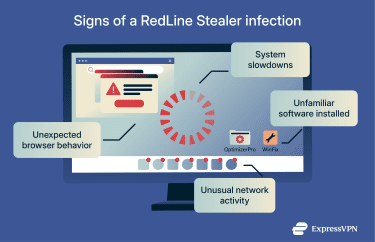
Unusual network activity
Stealer malware often connects to command-and-control servers using encrypted web traffic. If you monitor your own network, you might notice:
- Frequent connections to unknown domains or IPs.
- Spikes in outbound traffic without a clear reason.
- Activity from a system at unusual times.
Enterprise environments can flag this through security information and event management (SIEM) or firewall logs.
Unexpected browser behavior
RedLine Stealer symptoms can include browser changes, such as:
- Missing saved passwords or autofill data.
- New extensions that you didn’t install.
- Changed homepage or search settings.
- New profiles or user data directories.
These changes might come from the malware itself or from attackers who used your stolen data.
How RedLine Stealer is detected
Detecting RedLine Stealer involves endpoint monitoring, network traffic analysis, and proactive threat hunting.
Antivirus software
Modern antivirus and endpoint detection and response (EDR) tools can detect RedLine Stealer virus samples using signatures and behavioral signs. Security vendors continue to update detection logic based on new campaigns and RedLine variants, especially after the 2024 backend takedown.
Checking browser data
If stealer malware has run on a device, assume your saved browser data is exposed. Review and clear browser password stores if you suspect an infection, then change those passwords from a clean device.
Monitoring network traffic
On corporate networks, defenders can look for suspicious outbound traffic patterns linked to known RedLine infrastructure or generic stealer behavior like repeated posts of encoded blobs to untrusted domains.
Reviewing system logs
Security logs from Windows, EDR agents, and proxies often contain clues. Examples include:
- New scheduled tasks or services created shortly after a suspicious download.
- Processes launched from unusual directories.
- Security tools that stopped unexpectedly or reported tampering.
Security teams often combine these signals with threat intelligence feeds to confirm a RedLine Stealer infection.
For accurate detection, it’s best to monitor endpoints, browsers, and network traffic together. The same layered strategy applies to prevention. A few habits and controls can block the most common delivery paths and make stolen data less useful.
How to protect yourself from RedLine Stealer
No single method stops RedLine on its own. A mix of good habits and technical controls puts you in a stronger position.
Practice safe browsing and download practices
Most RedLine Stealer infections start with a choice the victim didn’t realize was risky. To reduce that risk:
- Avoid cracked software, pirated games, and unofficial “free” versions of paid tools. Download apps from official vendors, app stores, or trusted package repositories.
- Treat sponsored search results with caution, especially for utilities and AI tools.
- Be careful with email attachments and links, even when the sender looks familiar.
These habits help across many malware families, not just RedLine.
Use two-factor authentication
2FA adds another step to your login process, such as a one-time code, hardware token, or biometric check. Even when RedLine captures a password, 2FA can block simple login attempts with that password alone. It works best when you:
- Turn it on for email, banking, social media, and cloud accounts.
- Use an authenticator app or hardware key rather than SMS or email where possible.
- Treat unexpected 2FA prompts as a warning sign and don’t approve them.
That said, some attackers use stolen cookies to bypass 2FA, so it isn’t foolproof. Still, it blocks a large share of low-effort account takeover attempts.
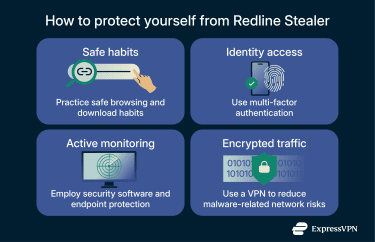
Employ security software and endpoint protection
Good endpoint hygiene makes life harder for stealer malware:
- Keep operating systems and applications patched.
- Run reputable antivirus or EDR tools and let them update automatically.
- Limit everyday work to non-administrator accounts.
- Remove unused software.
On corporate networks, centralized logging, application control, and web filtering tools can further reduce exposure.
Use a VPN to reduce malware-related network risks
A virtual private network (VPN) encrypts the traffic between your device and the VPN server. It doesn’t stop you from downloading RedLine Stealer, and it doesn’t clean an already infected device. Still, a VPN can reduce some network-level risks that often accompany malware campaigns.
For example, a VPN can:
- Protect your traffic from eavesdroppers on public Wi-Fi.
- Limit some types of man-in-the-middle (MITM) attacks.
- Provide extra security tools, for example, block known malicious domains through threat-filtering services.
See a VPN as one layer in a wider security plan, not a direct defense against RedLine.
What to do if you suspect a RedLine Stealer infection
Immediate steps to take
If you think RedLine or another info stealer has infected your device, follow the steps below.
1. Disconnect the device from the network
Disconnect Wi-Fi and unplug network cables. This limits further data exfiltration and stops the malware from talking to its command-and-control servers.
2. Run a full antivirus or EDR scan
Don’t rely on a quick scan alone. Use a trusted security product to scan the entire system. If it flags RedLine Stealer, follow the vendor’s removal guidance.
3. Check for suspicious applications and tasks
Look for unfamiliar software, startup entries, and scheduled tasks. Remove any that overlap with the infection timeframe or lack a clear purpose. On a work device, record what you find and share it with your security team.
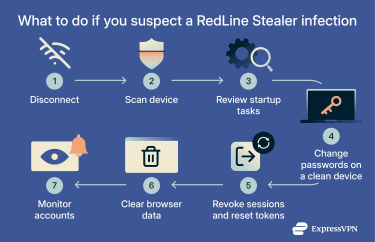
4. Use a clean device to change passwords
Assume that all passwords and browser-stored credentials on the suspected device are exposed. From a different, known-clean device, change passwords for:
- Email accounts.
- Banking and payment services.
- Cloud storage and productivity tools.
- Social media and messaging platforms.
Turn on 2FA wherever possible as you do this.
5. Revoke active sessions and reset tokens
Many online services let you log out on all devices, rotate recovery codes, or revoke application tokens. Use those options to cut off attackers who might still have active sessions from stolen cookies.
6. Clear browser data from the infected device
Once you’ve removed the malware, clear saved passwords, cookies, and autofill data from browsers on the affected system. This reduces the value of leftover data if the device is compromised again.
7. Monitor accounts for suspicious activity
Monitor login attempts, password reset emails, and financial transactions for several weeks after the incident. Report suspicious events to your providers, as they may indicate identity theft or account takeover.
When to seek professional help
In some cases, it’s better to seek professional help than try to remove RedLine Stealer yourself. Consider professional help if:
- You suspect sensitive data was exposed: If browser passwords, email accounts, crypto wallets, or financial details may have been stolen, a professional incident response team can help assess what data was compromised and what actions to take next.
- You’re seeing ongoing suspicious activity: Continued account takeovers, unauthorized logins, password reset emails you didn’t request, or new malware detections after cleanup may indicate that the infection wasn’t fully removed.
- The infection affects a work or shared device: If the compromised device is used for work, school, or shared with others, professional help can reduce the risk of lateral spread, data leaks, or compliance issues.
- You’re unsure how the malware entered your system: If you can’t identify the original infection vector, professionals can perform forensic analysis to prevent reinfection and close any remaining gaps.
- Crypto or financial loss is involved: If funds are missing or wallets were accessed, time is critical. Security professionals can help secure remaining assets and guide next steps, even if recovery isn’t guaranteed.
- You need documentation or reporting support: Businesses or individuals facing legal, regulatory, or insurance requirements may need formal incident reports that only professional responders can provide.
Incident response teams can collect forensic data, trace the infection path, and help you close gaps that stealer malware exploited.
FAQ: Common questions about RedLine Stealer
What makes RedLine Stealer particularly dangerous?
RedLine Stealer combines ease of use with wide data coverage. The Malware-as-a-Service (MaaS) model lets many criminals launch campaigns without building their own tools. The stealer targets credentials, cookies, wallets, and system data in a single run. This combination makes it a frequent source of logs in info stealer markets.
Can RedLine Stealer steal cryptocurrency wallets?
Yes. Research shows that RedLine Stealer can search for local cryptocurrency wallets and related files. Some versions even hijack clipboard data. Attackers then sell these wallets or drain funds quickly themselves.
Can RedLine Stealer spread to other devices?
RedLine Stealer isn’t a worm that automatically spreads across networks. Still, the data it steals can give attackers access to other systems. If a compromised device holds credentials for VPN gateways, remote desktops, or admin consoles, attackers can use those to move into other environments.
Take the first step to protect yourself online. Try ExpressVPN risk-free.
Get ExpressVPN