How to prevent packet sniffing attacks



Packet sniffing is a fundamental network analysis and troubleshooting technique, but it’s also popular among malicious actors. When cybercriminals capture packets moving through a network, they can gain access to sensitive data. Depending on the packet’s contents, they could spy on the target, launch further attacks, or steal credentials.
Packet sniffing attacks aren’t limited to large corporations. Anyone using a public Wi‑Fi network or unencrypted connections is at risk. This guide explains how packet sniffing works, why it's dangerous, and how to detect and prevent it.
What is packet sniffing?
Packet sniffing, also called network sniffing, involves capturing and analyzing network packets to inspect their contents. When data travels over IP networks (including the internet), it's typically broken into packets, each containing a piece of data along with addressing/routing information.
A packet sniffer is a software or hardware tool that captures these packets. Once captured, packets can be reassembled and read if the payload isn't encrypted.
How packet sniffing works
Network interface cards (NICs) normally ignore traffic not meant for their device. Packet sniffers bypass this by placing the NIC into promiscuous mode, allowing it to capture packets it can see regardless of their destination.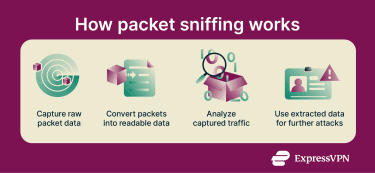
On wired networks, sniffers usually need a special vantage point to see more than just their own traffic. A common method is switched port analyzer (SPAN), also called port mirroring, where a switch sends a copy of selected traffic to the sniffer’s port. Another option is a network test access point (TAP), a hardware device placed in-line that passively copies traffic to a monitoring tool. On older hub-based networks, hubs broadcast all network activity to every connected device.
On wireless networks, sniffers use monitor mode to capture Wi-Fi traffic in range, not just traffic addressed to them.
Once sniffers capture packets, they use specialized software to reconstruct the data and extract sensitive information, including credentials.
Why packet sniffing is a security risk
While network administrators use packet sniffing for troubleshooting and monitoring, attackers use it to harvest sensitive information. Unencrypted packets can reveal user credentials, credit card numbers, and confidential messages.
Because sniffers operate at the network and data link layer (and can capture higher-layer data riding on it), victims typically don’t know that their traffic is being monitored.
Sniffing undermines privacy and enables broader attacks. For example, attackers can use captured credentials to impersonate users, gain system access, move laterally through networks, or plant malware. Captured session tokens allow attackers to hijack sessions without passwords.
Even encrypted traffic isn’t immune. While sniffers can’t read HTTPS traffic, they can still see metadata such as IP addresses and data volume. Attackers may use this information for reconnaissance (gathering information about the network) or to identify opportunities for downgrade attacks or misconfigurations.
What’s the purpose of packet sniffing attacks?
Attackers use packet sniffing for a variety of malicious purposes. By capturing network traffic at strategic points, such as a compromised router, a malicious Wi‑Fi hotspot, or a mirrored switch port, they can gather sensitive information and mount further attacks.
Stealing credentials for unauthorized access
Threat actors can passively sniff network traffic to capture authentication material, including credentials and session tokens. Some groups might also use packet-capture utilities on network devices to monitor traffic in compromised environments, for example, Salt Typhoon has been linked to such tooling.
Financial fraud and data theft
Sniffing can support financial crimes when payment or account data is transmitted without strong encryption, for example, in poorly secured internal networks or legacy systems. Attackers may then sell the stolen data or use it to commit fraud.
Even when traffic is encrypted, captured data can sometimes be abused via replay attacks, where authentication or access-control information is captured and retransmitted to trigger an unauthorized effect. While this doesn't decrypt the information, if a system lacks replay protection (such as nonces, counters, or timestamp checks), it may accept the replayed data as legitimate, enabling unauthorized access.
Surveillance and corporate espionage
Packet sniffing can enable covert surveillance by monitoring traffic patterns and collecting data in transit. Because passive sniffing may leave limited host-level traces, it can support long-term espionage, especially when attackers have access to network infrastructure or can observe unencrypted segments of communications.
Types of packet sniffing attacks
Passive vs. active packet sniffing
Broadly speaking, there are two main types of packet sniffing: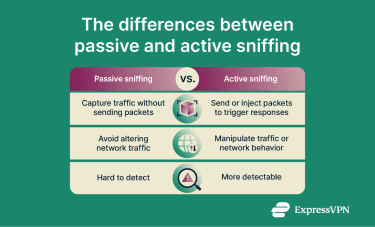
- Passive sniffing: The attacker captures network traffic without actively manipulating the network. This can be difficult to detect because it produces no unusual signals or network changes. Passive sniffing is most effective when traffic is already visible (for example, on shared media, a mirrored/SPAN switch port, or a network TAP).
- Active sniffing: The attacker manipulates the network to make traffic visible or readable, for example, through an evil twin attack or Secure Sockets Layer (SSL) / Transport Layer Security (TLS) downgrade attack. Because active sniffing can alter traffic flows or network behavior, it’s often easier to detect.
Common packet sniffing techniques
Attackers use several sniffing techniques, including but not limited to:
- Password sniffing: Captures credentials or session tokens transmitted over the network. This may involve passive capture in a position where traffic is visible, or active interception, such as Address Resolution Protocol (ARP) poisoning.
- ARP spoofing: On a local network, the attacker links their Media Access Control (MAC) address with the IP address of a legitimate device (often the gateway), causing traffic to be redirected through the attacker for interception and relaying.
- Evil twin attacks: Attackers create fraudulent Wi-Fi networks that impersonate legitimate ones. Once devices connect, traffic that passes through the attacker-controlled hotspot can be monitored or manipulated.
- SSL/TLS downgrade attacks: Attackers attempt to force a connection into a less secure mode (or an outdated protocol or cipher), which can make interception easier in some scenarios.
How to detect packet sniffing on a network
Detecting sniffing is difficult because attackers may passively listen for extended periods. However, certain symptoms may indicate sniffing or other man‑in‑the‑middle (MITM) activity. The following signs merit investigation: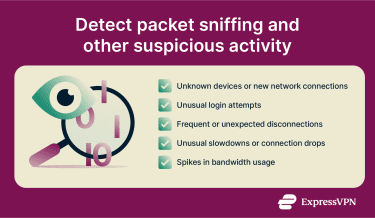
- Unknown device connections: Unrecognized devices on the network pose a potential security risk. Monitoring the router’s device list for unfamiliar MAC addresses helps identify them.
- Unauthorized login attempts: Frequent failed login attempts or logins from unfamiliar locations can indicate password sniffing. If credentials or session tokens are captured via sniffing, they may be tested quickly, which can create bursts of failed logins or logins from new IPs/regions.
- Unexpected session disconnections: Repeated disconnects may indicate active interference. In wireless environments, deauthentication/disassociation activity may be used to force reconnections or to steer devices toward rogue access points, which can support interception attempts.
- Unusual connection slowdowns and latency: Sudden, unexplained network delays or disconnections may indicate active interception, where traffic is being manipulated in real time. Passive sniffing alone doesn't cause these symptoms, but if an attacker is performing MITM attacks alongside packet capture, it can add latency or instability.
- Bandwidth usage spikes: Significant increases in bandwidth may signal data exfiltration following a sniffing operation. Passive sniffing doesn't generate additional traffic, but when captured data is copied and transmitted off the network, it may show up as higher bandwidth use.
Tools used to detect packet sniffing
Sniffing detection typically relies on monitoring tools that can spot unusual traffic patterns, unknown devices, or signs of data exfiltration.
Built-in network monitoring tools
Widely used examples of network monitoring tools include:
- Packet Monitor (Pktmon): Packet Monitor (pktmon.exe) is an in-box Windows network diagnostics tool that can capture network traffic for analysis and help investigate unusual activity. Captures can be saved, for example, as an event trace log (ETL) and converted for review in other tools.
- macOS Activity Monitor: Mac users can open Activity Monitor (in Applications > Utilities) and click the Network tab to view real-time network activity, including packets or data sent and received, which is useful for spotting unexpected transfers.
- Router administrative panels: Log into your router's settings, commonly via an address like 192.168.1.1 or 192.168.0.1, but check the router label/manual. Review the connected devices list for anything unfamiliar and check bandwidth/traffic usage by device. If you find unknown devices, change the Wi-Fi password (and the router admin password), and remove or block them if the router supports it.
Leak detection tools
Leak tests don’t detect sniffing, but they can indicate whether virtual private network (VPN) and network settings expose identifying data. For example, Web Real-Time Communication (WebRTC) or Domain Name System (DNS) leaks can reveal IP-related details in the browser even when a VPN is active.
How to prevent packet sniffing attacks
While detection is challenging, proactive security measures can reduce exposure to packet sniffing. The following practices help protect against packet-sniffing attacks and enhance your overall online security.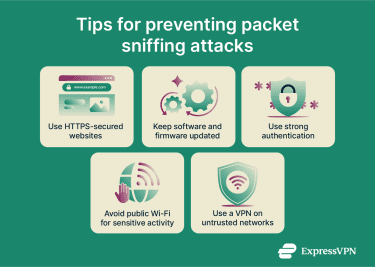
- Use a VPN: A reputable VPN encrypts data between a device and the VPN server, making captured packet payloads unreadable on the local network. Many VPN apps also route DNS queries through the encrypted tunnel to help prevent local snooping, provided leak protection is working.
- Stick to HTTPS websites: Use sites that support HTTPS (look for the padlock next to the URL). HTTPS relies on TLS to encrypt data in transit and prevent tampering.
- Keep software and firmware up to date: Attackers exploit vulnerabilities in outdated systems. Keep software, routers, and firewalls up-to-date to patch security holes.
- Use secure authentication methods: Even if sniffers capture credentials, multi-factor authentication (MFA) can reduce the risk of account takeover by requiring additional verification beyond passwords. SMS or email codes are common, but for stronger protection against phishing and session hijacking, use phishing-resistant options such as hardware security keys or fast identity online (FIDO2) authentication.
FAQ: Common questions about packet sniffing attacks
Is Wireshark a packet sniffer?
Yes. Wireshark is an open‑source tool that captures and analyzes network packets for troubleshooting and security analysis. It runs on major operating systems and uses the network interface’s promiscuous mode to capture packets not addressed to the device.
When are packet sniffers used legitimately?
Legitimate uses include troubleshooting network issues, analyzing performance, and monitoring network traffic. Administrators use them to diagnose latency problems, identify misconfigurations, and support intrusion detection and incident investigation. However, attackers may use sniffers to steal sensitive data.
How can I tell if my network is being sniffed?
Passive sniffing is difficult to detect since attackers listen without generating obvious network activity. However, suspicious outcomes may leave traces, such as unauthorized login attempts from unfamiliar locations. Warning signs of active sniffing include sudden slowdowns and unusual bandwidth spikes.
Can a VPN protect against packet sniffing attacks?
Yes. A VPN encrypts traffic between the device and the VPN server, so even if someone intercepts it on the local network, they won’t be able to read it. High-quality VPNs may also route Domain Name System (DNS) queries through the encrypted tunnel (and some providers run private, encrypted DNS). Some providers also offer free tools to test for IP, DNS, or Web Real-Time Communication (WebRTC) leaks.
Take the first step to protect yourself online. Try ExpressVPN risk-free.
Get ExpressVPN


















 Support Center
  FAQ
FAQ  VPN Setup Tutorials


