Download the best VPN for Mac in 2026
Fast VPN app setup for Mac
- Runs natively on Apple silicon Macs (M1 and up)
- Operates smoothly in the background without interruptions
- Supports post-quantum encryption on Lightway and WireGuard
- Choose which apps use the VPN with split tunneling
Get ExpressVPN Download Mac VPN
Compatible with macOS 11 (Big Sur) and later
30-day money-back guarantee for new subscribers

Why you need a VPN for Mac
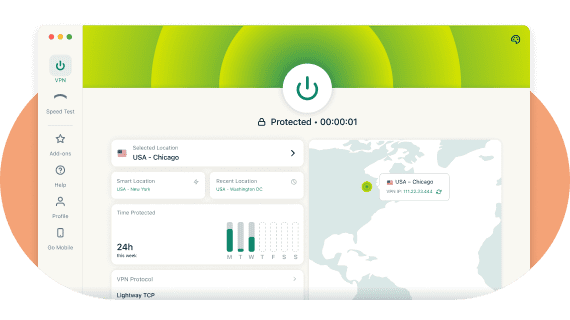
Apple products, including Macs, MacBooks, and MacBook Airs, have a reputation for being secure, but that doesn’t mean you’re immune to third-party surveillance and cyberattacks. Macs don’t come with a built-in VPN, so if you want to enhance the security of your device, you’ll need a VPN app for your Mac.

Protection on public Wi-Fi
Mac users are just as vulnerable as anyone else when connecting to shared networks or public Wi-Fi. A VPN encrypts your data, helping keep it safe from third parties.

Added layers of security
Although macOS is considered secure thanks to its Unix-based architecture, Mac users are still vulnerable to online threats like malware and data breaches. A VPN can help by adding encryption and privacy to your online activity.

Robust encryption to protect your data
Our custom protocol, Lightway, includes post-quantum protection by default. This helps protect sessions even as computational capabilities evolve. ExpressVPN’s Mac app also supports post-quantum WireGuard.

Kill switch for continuous protection
Network Lock, ExpressVPN's kill switch, acts as your safety net if your VPN unexpectedly drops. Internet traffic is stopped until the VPN reconnects, helping reduce exposure when the app is transitioning between networks.

VPN apps for Mac and iPhone
Make sure all your Apple devices are protected. Download the iOS VPN app on your iPhone and iPad, and connect up to 14 devices at once, all under one subscription. Dark mode is also available for more comfortable use in low-light environments.

Fast speeds for streaming
With a global network of upgraded high-speed servers (up to 40 Gbps in some locations), ExpressVPN offers fast speeds and unlimited bandwidth. Stream your favorite shows with a stable, high-speed connection. The Mac app helps you pick the fastest option quickly with Smart Location, Recent Location, and Favorites.
How to use a VPN on Mac

What does a VPN for Mac do?
A Mac VPN enhances your online privacy and security by encrypting your internet connection, changing your IP address, and protecting your data from potential threats. It allows you to stay private when browsing and using your online accounts, and to secure your online activity on public Wi-Fi. Additionally, a VPN can help limit some types of network-based tracking, offering an extra layer of protection on top of macOS’s built-in security features.
How to get a VPN for Mac
-
![How to sign up for ExpressVPN]()
Step 1
-
![Download App@2x 4]()
Step 2
Download and install the ExpressVPN app for Mac.
-
![Get A Private Ip Address@2x 7]()
Step 3
Hit the On button to connect to the location of your choice.



How to set up Dedicated IP for Mac

What Apple devices and macOS versions does ExpressVPN support?

Supported Mac devices: MacBook, MacBook Air, MacBook Pro (including Apple silicon Macs), iMac, iMac Pro, Mac Pro, and Mac mini.
Supported macOS versions: macOS Tahoe (26), macOS Sequoia (15), macOS Sonoma (14), macOS Ventura (13), macOS Monterey (12), macOS Big Sur (11).
Why use ExpressVPN for Mac: Key features

Faster connection speeds
ExpressVPN has a global network of high-capacity servers in 105 countries, supporting fast and reliable connections. The Mac app offers quick access to Smart Location and recent connections.

DNS leak protection
Strong leak protection is enabled by default, ensuring your DNS requests remain protected.

Advanced server tech
ExpressVPN’s TrustedServer technology means that server data is wiped on every reboot. RAM-only VPN servers never write to the hard drive, so nothing is stored on disk.

No-logs policy
ExpressVPN does not collect activity or connection logs, and we regularly commission independent auditors to examine our code and verify our security claims.

Split tunneling
Choose which apps use the VPN and which connect normally on macOS 11+ (website version), giving you more control over your traffic.

Network automation
Set rules that automatically connect or disconnect the VPN depending on the networks you join, such as trusted home Wi-Fi or new public networks.

Dedicated IP
Use a consistent IP address after activating Dedicated IP on your mobile device and signing in on your Mac.

Favorites and quick connection tools
Mark up to 10 server locations as Favorites and access them alongside Smart Location and Recent Locations for faster connection choices.
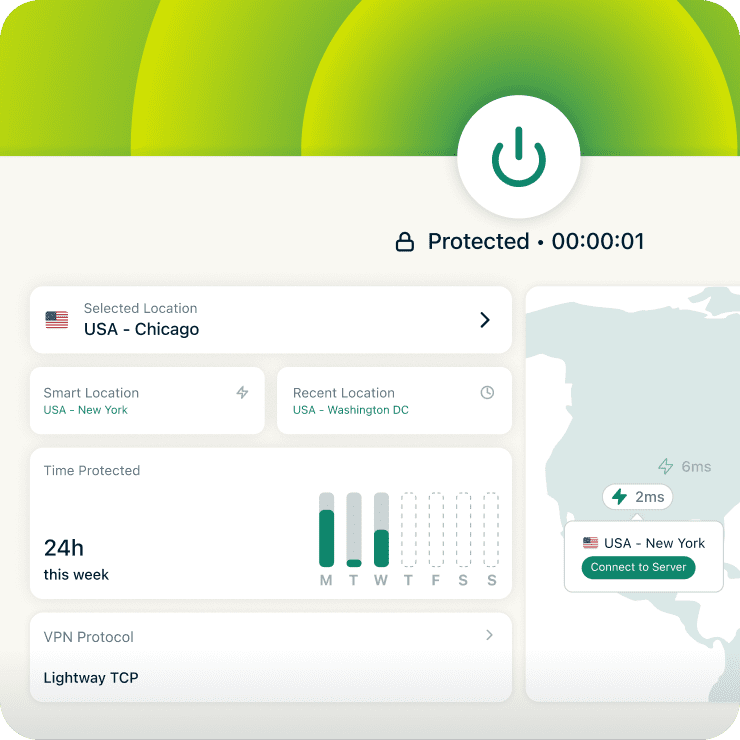
Streamlined interface
ExpressVPN’s Mac app layout provides convenient access to Smart Location, Recent Locations, and your Favorites, making it easy to connect the way you want. You can also select servers using the server map view.
Download a VPN app for all your devices
A single ExpressVPN subscription lets you download a VPN for every popular platform. Set up ExpressVPN on multiple devices and use it on up to 14 at the same time.


What people are saying about ExpressVPN
Join the thousands of satisfied customers who trust ExpressVPN
I have ExpressVPN on all my devices - phone, laptop, tablet, AppleTV, etc., and absolutely love it.


* A sample of reviews from our most satisfied customers
Got an account with @expressvpn yesterday. Great decision for traveling out of the country!
@D_Geiger

* A sample of reviews from our most satisfied customers
With its consistent performance and reliable security, ExpressVPN is the best VPN out there.

* We sometimes pay expert sites for customer referrals
FAQ: VPN for Mac
What is a Mac VPN?
A VPN for Mac is software designed to enhance your security and privacy when you go online on macOS devices. It forms a secure connection between your computer and the internet, encrypting your data to help keep your activity private on many types of networks.
A Mac VPN also gives you a different IP address—one that belongs to the VPN company and is shared by numerous users—which can make it appear as if you're connecting from another location.
Does my Mac have a VPN built in?
While macOS provides the option to connect to a VPN server in System Preferences, it is technically not a VPN service. It is actually a conduit that connects to third-party VPN services like ExpressVPN.
Should I use a free VPN for Mac?
While there are free VPNs and proxies available, they often come with significant privacy risks, limited server locations, slow speeds, and data caps.
To ensure a fast, private, and secure connection for every customer, ExpressVPN pays for a network of high-speed servers in 105 countries. Our global network of servers means you’ll experience unlimited bandwidth and fast speeds. We also offer advanced tools such as post-quantum protection, a password manager, and parental controls.
Try ExpressVPN out and take advantage of our 30-day money-back guarantee.
What is the best VPN for Mac?
ExpressVPN is a strong choice for Mac users. The easy-to-use app is compatible with all Mac models, including the latest Apple silicon and macOS versions. ExpressVPN’s Mac app also includes split tunneling, post-quantum protection on multiple protocols (including WireGuard), network automation, and an interface designed for quicker access to key features. Dark mode is available for more comfortable use in low-light environments and can also help reduce battery usage on MacBooks.
How do I know the ExpressVPN app for macOS is secure?
Security is at the forefront of what we do at ExpressVPN. Not only do we aim to design our apps and systems to offer a high level of privacy and security, but we also routinely engage independent auditors to validate our security claims. It’s one of the best ways for our users to know if they can trust our services to protect them. See the full list of audits and read the full reports.
What is the best VPN for gaming on Mac?
With VPN servers across 105 countries, best-in-class encryption, and fast speeds that support stable connections, ExpressVPN is a strong option for gaming online on your Mac.
Why is my Mac VPN not working?
There are several reasons why your Mac VPN might not be working. Common causes include firewall issues, network connectivity issues, VPN protocol compatibility, and third-party software conflicts. To troubleshoot, you can check out our Mac support page.
Will a VPN for Mac slow my internet connection?
A VPN for Mac can potentially slow down your internet connection. This slowdown occurs because your internet traffic is being encrypted and routed through a VPN server, which can be farther away than your normal server. Factors like the quality of the VPN service, the distance to the VPN server, and the strength of the encryption used can influence the extent of the slowdown.
However, ExpressVPN takes steps to ensure you get optimal speeds, including:
- High-capacity servers in 105 countries, giving you many nearby options to choose from
- Unlimited bandwidth, so your downloads are never capped
- A custom protocol, Lightway, which was designed with speed in mind
Can I set up a Mac VPN using the OpenVPN protocol?
You can! Setting up a Mac VPN using the OpenVPN protocol involves downloading and installing OpenVPN Connect, acquiring OpenVPN configuration files from your VPN provider, and importing the configuration files into OpenVPN Connect. To set up a VPN on a Mac using the OpenVPN protocol follow the setup tutorial for How to use ExpressVPN with Tunnelblick for OpenVPN on OS X.
Risk-free VPN for Mac
Love ExpressVPN—or get your money back.
New users: try ExpressVPN for Mac with a 30-day money-back guarantee today and secure your internet!