What is Zoom bombing? A guide to secure virtual meetings


If you’ve ever been in a video conference and an unknown participant suddenly interrupted the call, shared offensive content, or repeatedly unmuted themselves or otherwise disrupted the call, you may have experienced Zoom bombing. These incidents can interfere with meetings, classes, or lectures and, in some cases, expose participants to follow-on risks, such as harassment or phishing attempts.
Fortunately, many Zoom bombing attempts can be prevented by using Zoom’s built-in security features appropriately. By the end of this article, you’ll understand how Zoom bombing works, its hidden dangers, and what you can do to reduce the likelihood of it happening.
What Zoom bombing means
Zoom bombing refers to malicious intrusions into a virtual meeting or gathering, often to disrupt the call. The behavior can occur on any video-conferencing platform, but when these "gate-crashes" began in early 2020, most reported incidents involved Zoom meetings that were publicly shared or lacked basic access controls.
Zoom bombing attacks usually include yelling or shouting profanities, playing profane videos, broadcasting offensive, explicit, or otherwise disturbing content, and harassing attendees, sometimes followed by doxxing using information obtained during the call. Some reported Zoom bombing instances have also involved attackers joining with disturbing profile pictures and hateful graffiti being drawn on attendees' screens.
The evolution of Zoom bombing
The term gained widespread use in early 2020 as remote work and learning skyrocketed, and many Zoom meetings were created without passwords (called passcodes) or waiting rooms, with links widely shared on social media and public forums. Attackers exploited this openness by joining publicly shared meeting links or, in some cases, attempting to guess valid meeting IDs.
Despite its appearance as a harmless prank, internet trolling escalated into an organized, dangerous phenomenon. In March 2020, the FBI warned of teleconferencing hijacking and provided guidelines to mitigate such incidents. Some jurisdictions, such as Michigan, have clarified or applied existing laws to prosecute Zoom bombing-style conduct, making certain offenses punishable by fines or imprisonment.
As news of these incidents spread, Zoom introduced stronger security defaults, requiring meetings to use passcodes, enable waiting rooms, or implement other security measures. The company also expanded host-level security controls and gave administrators the option to customize or disable Personal Meeting IDs (PMIs) altogether.
These changes significantly reduced the prevalence of Zoom bombing incidents, though they did not eliminate the risk entirely. If Zoom’s security settings are misconfigured or the host allows anyone to join the meeting, calls can still be interrupted.
How Zoom bombing works
Zoom bombing typically occurs in phases, starting when a person or group finds a meeting target. Zoom meetings usually use 10- to 11-digit Meeting IDs: a 10-digit number is assigned to a user's PMI, while 11-digit numbers are generally used for meetings created for a specific session or series.
Because a PMI doesn't change unless it’s reset (and will expire if it hasn’t been used for 365 days), sharing it can increase exposure across multiple meetings over time. Meetings created with automatically generated IDs, by contrast, typically use a new identifier for each session, which limits reuse if access details are exposed.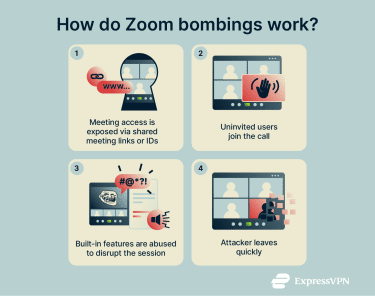
Zoom includes meeting passcodes as a security measure, but access details may be posted publicly for convenience. In some cases, attackers can also gain passcodes indirectly through leaked information or social engineering.
Even safeguards like waiting rooms can be ineffective if hosts admit unknown participants or misconfigure access controls. In less common cases, attackers may obtain Zoom credentials through phishing, allowing them to impersonate a user or access future meetings.
Once an attacker has access to a meeting link, ID, or compromised credentials, they may join a group or a meeting without a Zoom account or under a misleading display name and hijack the session by sharing their screen, using virtual backgrounds, posting obscene chat messages, or playing loud audio.
After disrupting the session, the Zoom bomber often quickly leaves the meeting, which can limit the amount of identifying information captured. Logs and timestamps don’t automatically reveal an attacker’s real-world identity, but without them, there’s almost nothing to investigate. They provide the “who,” “when,” and “how long” that may allow Zoom, organizations, or law enforcement to connect the dots.
Prevention strategies
Preventing Zoom bombing requires combining proper configurations, user education, and effective organizational policies.
Essential Zoom security settings
Many incidents result from insecure or unchanged meeting settings. Implementing the following changes reduces the risk of Zoom bombing and helps protect your team: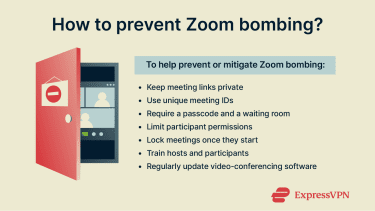
- Keep links private: Don’t post the event link in public online spaces.
- Unique meeting IDs: Use a unique meeting ID for each session instead of reusing your PMI.
- Require a passcode and waiting room: Use passcodes to restrict access and waiting rooms to vet participants before admission.
- Restrict file sharing and screen controls: Consider limiting file transfers, screen sharing, and annotation tools to the host or co‑hosts to prevent attendees from receiving unsolicited content and seeing inappropriate screens and images.
- Disable private chat features: Turn off chat features that could be abused for malicious activity, such as private messaging or file transfers.
- Require registration: Ask participants to register with their email to help verify identities and deter casual intruders.
- Update software and enable end‑to‑end encryption (E2EE): E2EE only works when everyone joins using a supported Zoom desktop or mobile app (or a Zoom Room), so make sure all participants are on compatible clients.
User education and awareness
Technical safeguards only work when participants understand them. Train employees, students, and other stakeholders to treat meeting links and passcodes as confidential. Avoid posting sensitive data (including links) publicly and share or access meeting details only through trusted channels. Attendees should treat unsolicited messages with caution and avoid opening links or attachments until the sender’s identity has been verified.
In virtual classrooms and workspaces, hosts should know how to mute participants, lock meetings, and remove attendees.
Organizations can reinforce these practices by including security guidance in onboarding and providing regular training.
Short refresher guides can help reinforce this awareness and keep every participant on the same page (or rather, the same call).
How VPNs help protect Zoom users on unsecured networks
A virtual private network (VPN) encrypts data between your device and the VPN server and masks your IP address by only showing the VPN server’s address. Using a VPN alongside Zoom can improve network-level privacy and security, particularly on unsecured networks, but it does not directly prevent Zoom bombing.
Protecting Zoom traffic on public Wi-Fi
Public Wi‑Fi networks are susceptible to a range of attacks, including man‑in‑the‑middle attacks (MITM), where attackers intercept or alter traffic, and rogue networks, which are designed to trick the victim into connecting so attackers can steal data.
A VPN provides extra protection while connected to public Wi-Fi by encrypting your data, making it unreadable by any third parties on the local network.
Encrypting network traffic to reduce exposure
A VPN creates an encrypted tunnel that protects your data from people monitoring the same network, such as Wi-Fi operators or nearby attackers. This adds an additional layer of encrypted protection to Zoom traffic, in addition to Zoom’s application-level protections for audio and video.
Not all VPNs offer the same level of protection. Some top-tier providers, such as ExpressVPN, include features like kill switches that block internet access if the VPN disconnects, automatic connections that help maintain protection on public Wi-Fi, and tools that block access to known malicious websites.
Together, these features lower the risk of certain online threats. However, they do not replace proper Zoom security settings or fully prevent phishing or meeting disruptions.
Protecting user privacy and IP information
VPNs mask your real IP address, making IP-based tracking by websites, advertisers, and attackers more difficult. This can help reduce exposure to some forms of targeting and add privacy when joining confidential meetings or virtual classrooms.
However, once you log into an account or share personal details with Zoom, your identity becomes linked to that account, and tracking methods like cookies or device fingerprinting may still apply.
What a VPN can’t prevent in Zoom bombing
While important for online privacy, a VPN has limitations. It secures your internet connection but doesn't control who joins your meeting or what they do once inside. It also doesn't affect how Zoom meetings are discovered, which is determined by link sharing and meeting settings. A VPN also does not mask Zoom profile information. For example, if your real name is visible in a Zoom call, other participants can still see it.
Used alongside Zoom’s built-in security features, a VPN can enhance privacy on unsecured networks, but it should be treated as part of a broader security and privacy strategy rather than a complete solution.
How to respond to a Zoom bombing incident
Even with precautions, your meetings can still be interrupted. Because of this, organizations and educational institutions should have an official response plan that includes the following: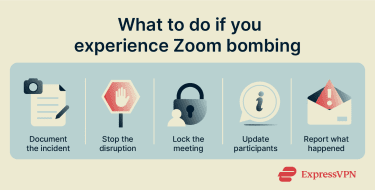
- Document everything: Save chat logs, participant lists, timestamps, screenshots, and any available meeting metadata before anything is lost. This information can be valuable for internal reviews, Zoom support, or investigators if escalation is required.
- Stop online meeting disruptions: Mute the offender, remove them from the meeting, and disable any participant controls being abused (such as unauthorized screen sharing and annotations).
- Lock down the meeting: Hosts can enable Zoom's meeting lock feature to prevent others from joining.
- Communicate with participants: Briefly explain what happened, confirm whether the meeting is secure (or if it will be rescheduled), and share any next steps the team should take.
- Report and escalate when needed: Report the incident through internal channels. For example, report it to Zoom directly via the Zoom Trust & Safety request form and, if appropriate, to law enforcement or your local internet crime agency, including meeting details and any recordings. In the U.S., this can be done through the Internet Crime Complaint Center (IC3), run by the FBI. If the incident occurred at work or in an educational setting, it should also be reported through the organization's internal IT or security channels to preserve evidence and prevent future disruptions.
FAQ: Common questions about Zoom bombing
Is Zoom bombing illegal?
In many cases, Zoom bombing can violate U.S. federal or state laws, depending on the behavior involved. In other countries, Zoom bombing may be prosecuted under cybercrime, harassment, or communications laws rather than platform-specific legislation.
How can I report a Zoom bombing incident?
Start by documenting what happened, including the meeting ID, date, and time, participant list, chat logs, screenshots, or any available recordings. Hosts should then report the incident directly to Zoom.
For more serious incidents involving threats, harassment, hate speech, or repeated targeting, you may also want to report the incident to authorities.
What security settings should I enable in Zoom?
To make Zoom more secure, use unique meeting IDs, passcodes, and waiting rooms. Additionally, restrict screen sharing and other features, keep Zoom updated, and enable end‑to‑end encryption (E2EE) for sensitive calls when compatible with required meeting features.
What are the consequences of Zoom bombing?
The consequences of Zoom bombing depend on what happened during the incident and vary by region. The attacker might face disciplinary action in workplaces and schools if the incident were reported and evidence provided. In more severe cases, federal prosecutors may pursue charges under applicable cybercrime or communications laws, depending on the facts of the incident.
How can organizations prepare staff against Zoom bombing?
To ensure staff are ready to deal with Zoom bombing, provide training on meeting security and how to avoid phishing, enforce policies requiring unique IDs, and restrict screen sharing. Hosts and co-hosts should receive additional training on how to remove intruders and properly document and report the attack.
Take the first step to protect yourself online. Try ExpressVPN risk-free.
Get ExpressVPN