What is SSH? An introduction to Secure Shell protocol


With remote access, we can log into servers from coffee shops, manage cloud systems from home offices, and allow tech support to access our computers from anywhere. The Secure Shell (SSH) protocol plays a vital role in securing these connections.
This is important because an unprotected remote connection can leave a device or server exposed to unauthorized access and misuse.
In the sections ahead, we’ll break down how SSH works and why it matters for security. We’ll also describe its limitations and risks and how it fits into real-world remote access scenarios.
What is SSH (Secure Shell)?
SSH is a protocol that offers a way to connect remotely to a system without exposing sensitive information in transit. It’s designed to securely send commands to another computer over an unsecured network and uses public key cryptography to authenticate servers and users and encrypt data so that information stays private while it moves between systems.
At a practical level, SSH allows people to:
- Control servers remotely.
- Manage cloud infrastructure.
- Transfer files securely.
- Run commands on distant machines as if they were local.
SSH also supports tunneling, often called port forwarding. This allows data to move securely between networks that normally wouldn’t be able to communicate directly, creating protected pathways for applications and services.
Advantages of SSH over older remote access methods
Older remote access tools weren’t designed with encryption in mind. Protocols like Telnet, rlogin, and basic File Transfer Protocol (FTP) transmitted data in plaintext, which meant anyone intercepting the connection could see usernames, passwords, and commands as they traveled across the network.
SSH took the place of these systems because it was designed with security in mind. It encrypts communication and verifies identities before allowing access. That makes it a safer alternative to older remote login and file transfer methods that are inadequate for today’s threat environment. Note that SSH can also support password authentication for backward compatibility.
Why SSH matters for security
SSH creates encrypted connections between devices, typically between a user’s computer and a remote server. Encryption scrambles the data traveling across the network so that intercepted traffic appears as meaningless noise. In practice, this means commands, credentials, and files remain private even when they travel over open networks.
SSH operates on a client-server model, where the SSH client establishes the connection with the SSH server. In most cases, the user’s device acts as the SSH client, which connects to an SSH server on a remote system. The client uses cryptographic techniques to confirm the server's identity during setup, thwarting impersonation attacks.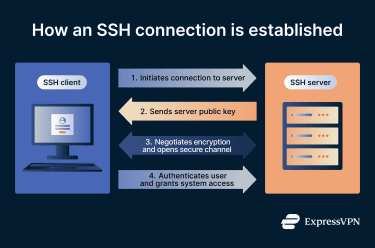
Once the connection is established, SSH switches to encrypted communication. It uses symmetric encryption, meaning the two systems share a secret session key that encrypts and decrypts all transmitted data.
It also uses cryptographic hashing to preserve data integrity, allowing each side to verify that the information hasn’t been altered during transmission. This combination ensures that information remains confidential and unaltered while moving between systems.
How SSH works at a high level
As we’ve seen above, SSH follows a simple idea: create a private, encrypted channel between two machines, verify who’s on each end of that channel, and only then allow data and commands to move between them.
At a protocol level, SSH is structured in layers. The transport layer is responsible for establishing a secure connection. It handles key exchange, encryption, and integrity protection, creating a protected communication channel across the network. Above the transport layer is the application layer, which manages the use of the secure channel for activities like remote access, command execution, file transfers, and data tunneling.
In addition to data encryption, SSH can also offer optional data compression, which can improve performance over slow or unstable network connections by reducing the amount of data transmitted.
Most modern systems implement SSH through OpenSSH, the open-source implementation that has become the standard across Linux and macOS and is increasingly used in Windows environments also. OpenSSH provides the tools and services that enable encrypted connections, authentication, and secure session management in real-world deployments.
The concept of encrypted communication channels
For encryption to work, both systems communicate to create a shared session key. This key encrypts all communication between them. From that point forward, any data moving across the connection is scrambled into unreadable ciphertext.
Once the encrypted channel is in place, the connection becomes a protected tunnel. The tunnel carries commands, files, and system messages without exposing them to the underlying network.
When the session ends, the encryption keys are discarded. Any new connection requires a new secure setup, which prevents old sessions from being reused or replayed.
Authentication in SSH
Encryption protects the connection, but authentication determines who is allowed to use it. SSH supports various ways to verify identity, with two of the most common being passwords and public keys.
Password authentication works the way you’d expect. A user provides a username and password, and the server checks whether they match a valid account. While encryption protects the password in transit, this method still depends on the strength and secrecy of the password itself.
Key-based authentication works differently. Instead of a shared secret like a password, the user has a pair of cryptographic keys: a public key and a private key. The public key is stored on the server. The private key stays on the user’s device.
When a connection is made, the server sends a challenge that only the private key can correctly answer. The user proves their identity without ever sending the private key across the network. The server verifies the response using the public key it already has.
The role of the SSH client and server
The SSH client-server architecture creates a clear division of responsibility. One side initiates the connection, and the other side controls access.
The SSH client is the application a user runs to start a secure connection. In most environments, this is done through command-line tools, which provide direct access to remote systems through typed commands rather than graphical interfaces. The client handles the setup process, negotiates encryption, verifies the server’s identity, and manages authentication. From the user's point of view, it’s the interface for initiating secure sessions, sending commands, and transferring files.
The SSH server runs on the remote system. It listens for incoming connection requests, presents its identity to connecting clients, enforces authentication rules, and controls what actions a user is allowed to perform after access is granted.
| Stage of connection | SSH client (user side) | SSH server (remote system side) |
| Connection setup | Initiates the connection to the server on port 22 or a custom port | Listens for incoming connection requests |
| Protocol identification | Sends identification information to the server | Sends identification information to the client |
| Encryption negotiation | Negotiates encryption methods and key exchange algorithms | Negotiates encryption methods and key exchange algorithms |
| Secure channel creation and server authentication | Verifies the server’s host public key (prompts if it has changed); participates in shared session key generation | Presents its host public key; participates in shared session key generation |
| Client authentication | Proves identity using password or cryptographic key | Verifies identity and validates credentials or keys |
| Access control | Requests authorization for SSH services (e.g. shell, exec, or port forwarding) | Checks SSH policy and configuration to allow or deny the request |
| Session management | Sends commands, requests file transfers, and opens channels | Controls allowed actions and available services |
Common uses of SSH
SSH is part of the everyday infrastructure that keeps digital systems running. From small personal servers to global cloud platforms, it provides a central function for a wide variety of use cases.
Secure remote system access
One of the most common uses of SSH is remote login. It lets users access another computer or server as if they were there, but without exposing the network connection.
This is essential for managing systems that don’t have physical screens, keyboards, or local interfaces. Servers in data centers, cloud environments, and home labs often operate entirely through remote access.
With SSH, administrators can:
- Run commands on remote machines.
- Configure systems and software.
- Monitor performance and logs.
- Troubleshoot issues in real time.
All of this happens through an encrypted channel, which keeps data protected during transmission.
Tunneling and port forwarding
SSH also supports tunneling and port forwarding, which allows network traffic to be securely routed through an encrypted SSH connection.
This makes it possible to access internal services, databases, or applications that aren’t directly exposed to the public internet. By forwarding traffic through a secure SSH tunnel, systems can communicate across network boundaries while keeping the underlying data stream encrypted and protected.
Managing servers and cloud infrastructure
SSH plays a central role in managing cloud and server environments at scale. Enterprises often operate thousands of servers and virtual machines across platforms like AWS, Azure, and Google Cloud, all of which rely on SSH for secure remote access.
Administrators, system engineers, and automated services use SSH keys for passwordless authentication. This allows authorized users and applications to access systems without exposing reusable credentials, reducing the risk of credential theft while improving operational efficiency.
SSH supports everyday infrastructure tasks too, such as system configuration, scaling resources, deploying applications, and troubleshooting production and development environments. By combining encrypted connections with controlled authentication, SSH becomes a secure control layer for managing complex, distributed systems.
Automating administrative tasks securely
SSH keys can be used for non-interactive authentication, meaning systems and applications can run tasks automatically without storing or transmitting plaintext passwords. This makes large-scale automation both practical and secure.
Common automation uses include:
- Backup scripts: Running scheduled backups without exposing credentials.
- File transfers: Moving data securely between systems using Secure Copy Protocol (SCP) and Secure FTP (SFTP). SCP provides simple copy functionality over SSH, while SFTP facilitates advanced file management, including directory listings and file permissions.
- Nightly maintenance jobs: Performing updates, cleanup tasks, and system checks.
- Monitoring agents: Collecting system metrics and logs without manual access.
- Continuous integration/continuous deployment (CI/CD) pipelines: Supporting secure deployments and automated workflows.
- Scheduled data exchanges: Transferring reports and datasets between services.
Because these processes rely on encrypted connections and key-based authentication, automation doesn’t weaken security.
SSH and related secure technologies
SSH is part of an organization’s overall security posture. While it shares some similarities with technologies like virtual private networks (VPNs) and HTTPS, particularly encryption, each serves a different function and addresses a different type of security need.
Understanding how these tools differ and how they complement each other helps clarify where SSH fits within modern security architecture.
How SSH differs from VPNs and HTTPS
SSH, VPNs, and HTTPS all encrypt data, but they differ in what they encrypt and how they encrypt it.
- SSH secures the connection between a client and a server.
- VPNs secure network traffic.
- HTTPS secures web communication.
SSH differs from VPNs because it secures direct connections between devices. It creates a private, encrypted channel for remote access, command execution, file transfers, and tunneling between specific systems. Its scope is targeted and controlled, usually between a client and a server.
VPNs operate at the network level rather than the session level. Instead of securing a single connection, a VPN encrypts all traffic from a device or network and routes it through an encrypted tunnel. This protects browsing, applications, and background services, not just specific remote access sessions.
HTTPS verifies the identity of the server and can, in some niche cases, also verify the client using mutual Transport Layer Security (mTLS). However, this is uncommon on the public web, and HTTPS doesn’t typically provide the same mutual, key-based identity verification model used by SSH.
In simple terms, with HTTPS, your browser knows it’s talking to the right website, but the website doesn’t verify who you are in the same cryptographic way SSH does. HTTPS protects web traffic, not remote system access, command execution, or infrastructure control.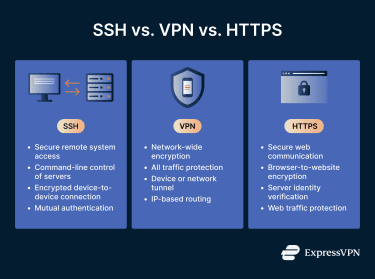
There are also practical differences in how these technologies are used. SSH provides command-line access and system control, which HTTPS does not. Firewalls may restrict SSH access in some environments, while HTTPS traffic is almost always allowed because it supports everyday web use.
When SSH is used alongside other security tools
By default, SSH uses port 22 for connections. Because it provides direct system access, it needs surrounding protections. Many networks leave port 22 open by default, which allows legitimate remote access, but this also means SSH can pass through firewalls that aren’t tightly restricted. This makes it a common target for automated scanning and brute-force login attempts.
For that reason, SSH is often combined with other security controls. VPNs are commonly used to limit who can reach SSH services in the first place, reducing exposure before authentication ever happens. Firewalls, access control policies, identity systems, and monitoring tools add additional layers that restrict access, filter traffic, and detect suspicious activity.
Is SSH secure?
SSH is only as secure as the way it’s configured and managed. The protocol is built for secure communication, but this security relies on how access is controlled and how responsibly it’s deployed.
Because SSH access often comes with elevated privileges, such as the ability to install applications, modify systems, or delete and extract data, misuse can cause serious damage.
SSH has also appeared in documented attacks where it was used to exfiltrate sensitive data, establish hidden access paths into secure networks, and gain root access on servers.
Strengths of the SSH protocol
SSH was built with security as a core principle. Several design choices make it fundamentally strong as a remote access protocol:
- Encrypted data in transit: Commands, credentials, and transferred files are protected from interception on public and private networks. Intercepted traffic appears as unreadable encrypted data.
- Verified identities: SSH confirms both the server’s identity and the user’s authorization before granting access, reducing the risk of impersonation and man-in-the-middle (MITM) attacks.
- Separated encryption and authentication: The secure channel is established first, then authentication occurs. This prevents credentials from being exposed during connection setup and reduces the attack surface.
- Modern authentication support: Key-based access, role-based permissions, and access control integration allow organizations to move beyond basic passwords and enforce stronger security policies.
Common security misconceptions about SSH
One of the most common misconceptions is that using SSH automatically makes a system secure. SSH protects the connection, but it doesn’t protect against poor configuration or human error.
Another misconception is that encryption alone is enough. Encrypted traffic can still be misused if the wrong people are allowed to access it. Security depends on who has access, how this is managed, and how credentials and keys are protected.
Some people also assume SSH is only for technical experts or large organizations. In reality, SSH is used everywhere, from personal servers and home labs to global cloud platforms. Its security benefits apply at every scale.
Finally, there’s a belief that SSH is inherently dangerous because it’s used in attacks. In practice, attackers don’t exploit SSH itself. They exploit weak passwords, stolen keys, misconfigurations, and poor access management. SSH is the channel, not the vulnerability.
Limitations and risks to be aware of
SSH security risks and limitations come more from the people managing it than from the protocol itself. When organizations treat it as “set it and forget it,” risks start to appear.
Human error and credential misuse
Many SSH risks come from management failures. Common problem areas include:
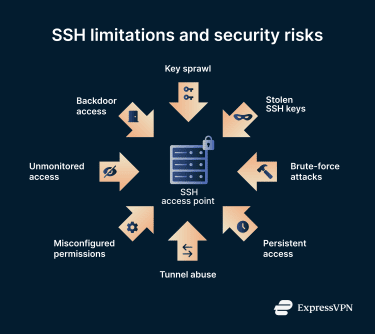
- Key sprawl: As organizations grow, SSH keys multiply across users, systems, services, scripts, and applications. Over time, large numbers of forgotten or unmonitored keys accumulate, creating hidden access paths that attackers can exploit.
- No automatic expiration: SSH keys do not expire by default. Old keys often remain active because administrators are unsure which systems still rely on them, increasing long-term exposure.
- Credential theft and brute-force targeting: SSH is a frequent target for brute-force attacks, malware, and credential theft due to the level of system access it provides.
- Abuse of SSH tunneling: Encrypted tunnels can be used to hide malicious activity inside legitimate-looking traffic, making detection more difficult.
- Backdoor access: Attackers can use stolen credentials or weak keys to create persistent access paths that remain even after the original entry point is closed.
Why SSH security depends on proper management
SSH relies heavily on trust relationships between devices and users. Without careful management of those relationships, security gradually deteriorates.
Key systemic risk factors include:
- Scale problem: SSH works well at any scale, but managing keys, access paths, and trust relationships becomes increasingly complex across thousands of servers, services, and automated systems.
- Ownership ambiguity: SSH keys created by scripts, CI/CD pipelines, automated services, and former employees often lack clear ownership, making it difficult to determine who is responsible for specific access paths.
- Lifecycle mismatch: Infrastructure changes quickly, while SSH trust relationships persist unless actively managed, creating outdated access paths as systems evolve.
- Visibility gap: Traditional security tools often have limited visibility into SSH usage, key distribution, and trust relationships.
- Operational tradeoffs: Administrators frequently prioritize uptime, automation, and system availability over access hygiene, causing access controls to lag behind operational needs.
Overall, strong authentication, key rotation, access monitoring, and proper configuration are required to ensure that SSH remains a security asset rather than becoming a liability.
FAQ: Common questions about SSH
Is SSH safe for beginners to use?
Secure Shell (SSH) is safe for beginners when it’s used with proper defaults and basic security practices. Most modern systems come with secure configurations, encrypted connections, and built-in protections, making SSH safe for common use cases. The main risk doesn’t come from using SSH itself, but from poor setup.
What is SSHD, in simple terms?
SSHD stands for Secure Shell Daemon. It’s the program that runs on a server and handles incoming SSH connections. When you connect to a system using SSH, SSHD is what receives the request, verifies identity, manages authentication, and establishes the secure session. It listens for connections on port 22 by default and controls access, encryption, and permissions on the server side.
Can SSH be used on Windows, macOS, and Linux?
Linux and macOS include built-in Secure Shell (SSH) support by default. Windows also supports SSH through native tools and built-in OpenSSH support in modern versions. This cross-platform compatibility is one of the reasons SSH is so widely used in personal, enterprise, and cloud environments.
Is SSH the same thing as a VPN?
While Secure Shell (SSH) and virtual private networks (VPNs) use encryption, they operate at different levels and serve different purposes. In many environments, they’re used together: SSH secures direct connections between specific devices, while a VPN encrypts all network traffic from a device or network, protecting everything from browsing activity to background app traffic.
Do you need technical expertise to understand SSH?
Using Secure Shell (SSH) at a basic level can be simple. Understanding advanced configurations, automation, and infrastructure management takes more experience, but the core idea is straightforward: SSH creates a secure, private connection between devices so data and commands can move safely. If you create your own server, you can add SSH to enable remote access.
Take the first step to protect yourself online. Try ExpressVPN risk-free.
Get ExpressVPN















 Support Center
  FAQ
FAQ  VPN Setup Tutorials


