What is a smurf attack and why is it a security risk?


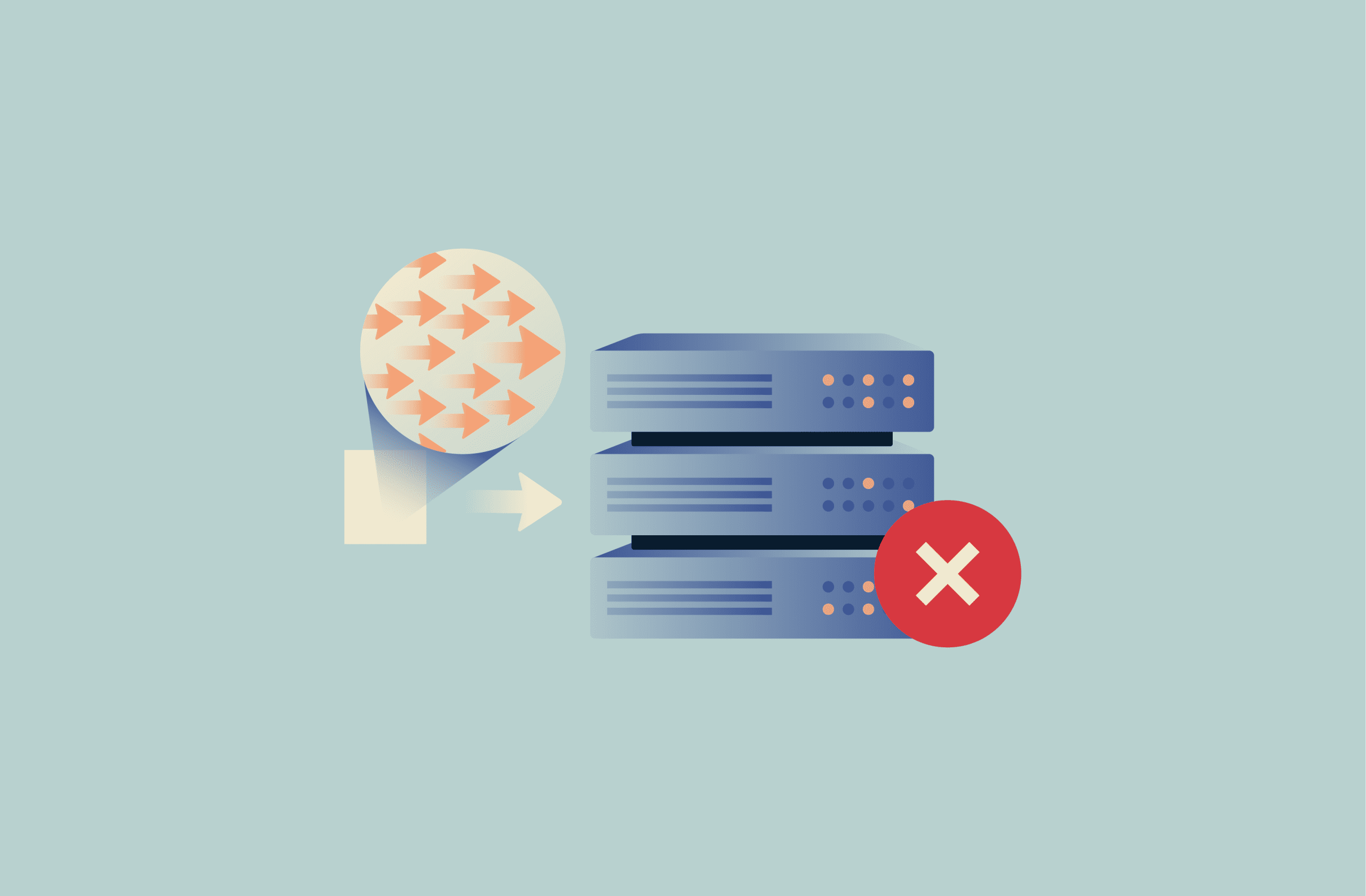
A smurf attack is a denial-of-service (DoS) attack that can make systems or services unavailable without breaking into them or exploiting software flaws. Instead of targeting user accounts or applications, the attack works by overwhelming a network with traffic so legitimate requests can’t be handled properly.
This guide explains what a smurf attack is and how it works. It also explains why it’s largely treated as a legacy risk today and why it’s still referenced in security education.
What is a smurf attack?
Origin of the term “smurf attack”
The term “smurf attack” comes from the name of an early proof-of-concept tool called Smurf, which circulated in the late 1990s. The tool showed how normal network behavior could be used to direct large amounts of traffic toward a single target.
The name is a reference to The Smurfs, small fictional characters that are usually depicted working together as a group. The comparison reflects how many small responses can add up to a much larger effect.
How a smurf attack works
Smurf attacks rely on the Internet Control Message Protocol (ICMP). ICMP is a network protocol used by computers and network devices to report errors and perform basic connectivity checks. In a smurf attack, this normal function is exploited to overwhelm a target with traffic, which can prevent systems or services from responding normally.
The network conditions that made smurf attacks easy are no longer common. The term is still used today when referring to this early DoS technique.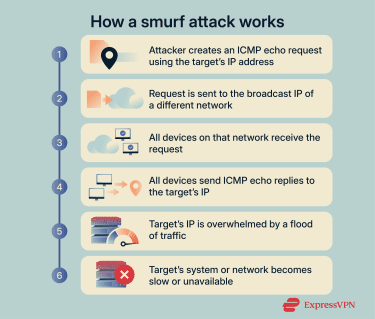
Spoofed IP address and broadcast ICMP requests
Smurf attacks make use of an ICMP function called an echo request. It’s a basic reachability check used by tools like ping, where one device asks another device to reply.
The first step involves IP spoofing. IP spoofing means sending network messages that appear to come from a different source. In a smurf attack, the attacker forges the source IP address so it looks like the echo request came from the intended target.
Instead of sending this request to a single device, the attacker sends it to a network’s broadcast address. This causes every device on that network to receive the request at the same time.
ICMP echo replies and traffic amplification
Every device that received the echo request then sends its reply to the spoofed source address, which points to the target system. Depending on how many devices are connected to the chosen network, a single forged request can trigger hundreds or even thousands of replies.
As a result, the target system receives far more traffic than the attacker sent. It has to receive and process all of these replies, even though it didn’t initiate the exchange. As the volume grows, the system can become overwhelmed and struggle to handle normal traffic.
Signs and symptoms of a smurf attack
Smurf attacks don’t leave obvious signs of intrusion. Systems aren’t altered, and there’s no visible breach. Instead, the impact shows up through degraded performance and unusual traffic patterns.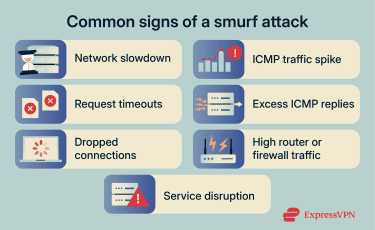
Unusual network latency or packet loss
One of the earliest signs appears at the network level. As traffic increases, packets can be delayed or dropped before they reach their destination.
As the disruption grows, services that rely on the network may start to slow down. Requests that normally complete quickly can take longer, time out, or fail altogether. Users might notice delayed page loads, interrupted sessions, or inconsistent access.
When packets don’t reach their destination, applications often retry the same requests. This adds more load to the network and can make the slowdown more severe and persistent.
High ICMP traffic volume
Another common sign is a sudden spike in ICMP traffic. Network traffic logs or monitoring dashboards may show far more ICMP messages than usual, especially incoming reply messages rather than routine outgoing checks. This can be visible in router or firewall logs or in packet-capture tools.
Because ICMP traffic is typically low and predictable in normal operation, an unexpected surge can stand out clearly. When this increase isn’t tied to routine diagnostics or maintenance, it may indicate a traffic-based attack in progress.
Service instability or temporary downtime
As traffic continues to accumulate, affected systems may become unstable. Services can stop responding intermittently, refuse new connections, or restart unexpectedly.
In more severe cases, services may become completely unavailable for short periods. Once traffic levels drop, systems may recover on their own. This can make the issue appear intermittent and harder to diagnose.
What are the consequences of smurf attacks?
Smurf attacks primarily cause performance slowdowns or service disruptions. They can also expose weaknesses in how a network is configured.
Bandwidth exhaustion
Network bandwidth is a finite resource. During a smurf attack, a large share of that capacity can be consumed by unwanted traffic generated as part of the attack. As available bandwidth is used up, there is less room for legitimate communication to move across the network.
This congestion doesn’t just affect the targeted system. Other services that rely on the same network links may also experience degraded performance, even if they aren’t directly involved in the attack.
Denial-of-service impact on availability
Smurf attacks are designed to interfere with availability rather than system access or data integrity. When network resources are overwhelmed, services may no longer be able to reliably accept or process incoming requests.
Even short interruptions can affect users, automated processes, or dependent services, especially in environments where continuous access is expected.
Exposure of weak network configuration
A smurf attack can expose weaknesses in how a network is configured. Because the attack depends on certain traffic-handling behaviors being allowed, its success often indicates that those controls are too permissive or outdated.
This exposure is itself a risk. If the underlying configuration issues remain unaddressed, the network may be vulnerable to repeated disruption or to other traffic-based attacks that rely on similar conditions.
Are smurf attacks still relevant today?
Are smurf attacks still a real threat?
For most modern networks, smurf attacks are unlikely to succeed. Routers today typically block ICMP echo requests sent to broadcast addresses by default, which removes the behavior these attacks depend on. Internet service providers (ISPs) also filter traffic that looks like forged or abusive network messages before it reaches customer networks.
In addition, many organizations now monitor traffic patterns more closely. Sudden spikes in response traffic are more likely to be detected and limited before they cause prolonged disruption. Together, these changes mean the attack is harder to execute and easier to stop than it once was.
Smurf attacks can still occur, but usually only in environments where older equipment is in use or where safeguards have been deliberately disabled.
Who is most at risk?
Risk is highest in legacy or poorly maintained networks. This may include environments where ICMP echo requests to broadcast addresses are still enabled for compatibility reasons, internal networks that haven’t been reviewed in years, or lab and test setups that prioritize convenience over security controls.
Smurf-style traffic is more likely to appear inside private networks than on the public internet. This is because internal networks are more likely to keep legacy network configurations or temporary test setups in place. Those environments are more likely to allow broadcast ICMP requests to trigger responses from many devices at once.
Are modern routers immune?
Modern routers aren’t immune, but they are protected by default. Most current devices ship with protections that block ICMP echo requests sent to broadcast addresses and limit excessive response traffic.
Issues usually only arise when these protections are changed. For example, allowing broadcast ICMP requests to support older software or relaxing traffic limits for troubleshooting can unintentionally reintroduce risk. That’s why smurf attacks are now treated as a configuration issue rather than a mainstream external threat.
How smurf attacks are prevented
Preventing smurf attacks is primarily about how networks are configured to handle certain types of traffic.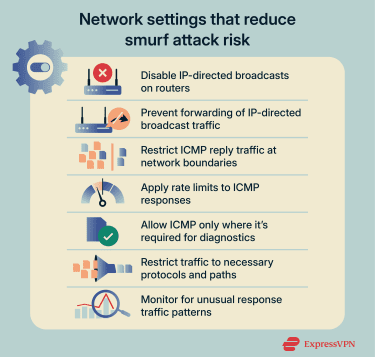
Disable IP-directed broadcasts
Smurf attacks only work if broadcast traffic is forwarded by routers. If that forwarding is blocked, the attack can’t generate large numbers of responses.
Disabling IP-directed broadcasts prevents routers from forwarding traffic to broadcast addresses when that traffic originates outside the subnet. Instead of being delivered to every device on a network, that traffic is dropped at the router.
On most modern networks, IP-directed broadcasts are already disabled by default and aren’t needed for normal operation. Risk mainly exists in legacy environments or in networks where IP-directed broadcast forwarding has been explicitly enabled and left unrestricted.
Filter or limit ICMP traffic
Another protective step is to control how ICMP messages are allowed to pass through a network.
Filtering ICMP traffic means blocking or restricting specific ICMP messages at routers or firewalls. For example, a network can be configured to limit or block ICMP reply traffic leaving the network, so internal devices don’t generate large numbers of responses to unsolicited or abnormal ICMP requests.
Rate limiting allows ICMP traffic to pass, but only up to a defined amount within a short time window. When ICMP messages are generated faster than that limit, additional messages are dropped automatically. This prevents sudden bursts of reply traffic from consuming bandwidth or system resources.
ICMP isn’t usually disabled entirely because it still plays a role in reporting network errors and supporting basic diagnostics. Network teams typically observe normal ICMP usage and apply limits that allow routine activity while preventing unusually large response volumes.
Apply network hardening and traffic controls
Beyond broadcast handling and ICMP limits, smurf attack impact also depends on how traffic moves inside a network.
Networks that aren’t segmented make it easier for traffic surges to spread. Segmentation means splitting a network into smaller parts, so a spike in one area doesn’t affect everything else.
This can limit how far the disruption spreads. It also helps keep unrelated services stable while teams investigate.
Related: Cybersecurity tips for small businesses
How smurf attacks compare to other DoS attacks
Smurf attacks are a type of DoS attack, but they don’t fit neatly into a single category. How they’re classified depends on where the response traffic comes from.
Smurf attacks vs. DDoS attacks
A DoS attack disrupts a service by sending it more traffic than it can handle from a limited number of sources. A distributed DoS (DDoS) attack does the same thing, but the traffic comes from many different systems at the same time.
A smurf attack can fall into either category. If responses are triggered from devices on a single network, the impact is closer to a DoS attack. If responses are triggered across multiple networks, the attack is typically described as DDoS.
Smurf attacks vs. other amplification attacks
Smurf attacks are a type of amplification attack. In amplification attacks, a small request is used to trigger a much larger amount of response traffic toward a target.
Most modern amplification attacks rely on internet-facing services that respond automatically to routine queries. Examples include Domain Name System (DNS) amplification attacks and Network Time Protocol (NTP) amplification attacks, where exposed servers are abused to generate large response volumes.
Smurf attacks use the same amplification idea but a different setup. Instead of relying on public servers, they depend on how devices inside a network respond to broadcast messages.
Smurf vs. fraggle attacks
Fraggle attacks are similar to smurf attacks, but they use a different kind of network traffic. Smurf attacks rely on ICMP messages, while fraggle attacks use User Datagram Protocol (UDP) messages instead.
UDP is a protocol that’s used for sending data over a network. Like ICMP, UDP has an echo function. Attackers could exploit this behavior so that many systems sent replies to the same target at once.
Fraggle attacks are now uncommon, too. As networks moved away from automatic responses and tightened default settings, the conditions that made these attacks possible largely disappeared.
FAQ: Common questions about smurf attacks
What makes smurf attacks effective?
Smurf attacks are effective because a single request can trigger responses from many devices at once, all directed at the same target. Those responses are generated automatically and appear legitimate, so they aren’t blocked by default.
When networks allow broadcast forwarding and unrestricted replies, a small amount of attacker effort can result in a much larger volume of incoming traffic.
Can smurf attacks bypass firewalls?
Smurf attacks don’t bypass firewalls in the traditional sense. Instead, they depend on how firewalls and routers are configured to handle response traffic. If a firewall allows broadcast forwarding or large volumes of Internet Control Message Protocol (ICMP) replies without limits, the attack can succeed.
What tools are used in a smurf attack?
Smurf attacks don’t require specialized or advanced tools. They’re typically carried out using basic networking utilities or simple scripts that can send forged network messages. Because the technique relies on how other systems respond, the attacker doesn’t need direct access to the target or sophisticated malware.
How do I know if my system was targeted?
Smurf attacks don’t leave signs of intrusion, such as altered files or compromised accounts. Instead, systems may slow down suddenly, services may become temporarily unavailable, or monitoring tools may show unusual spikes in response traffic. Because systems often recover once traffic drops, logs or traffic data are usually needed to confirm what happened.
Take the first step to protect yourself online. Try ExpressVPN risk-free.
Get ExpressVPN