How to protect your Linux system from malware attacks


Linux is generally very secure, thanks to its strong permission model, mandatory access control, open-source scrutiny, and secure authentication controls. Its design is also less complex than Windows or macOS, with fewer legacy features and backward-compatibility requirements, so many common malware techniques are less effective on it.
That said, Linux systems can still be vulnerable to malware if weaknesses in configuration, updates, or system maintenance are found.
This guide explains what Linux malware is, common types of Linux malware, why attackers target Linux, and how to recognize potential infections. You'll also learn practical security measures to protect your system and what to do if it becomes infected.
What is Linux malware?
Linux malware refers to malicious software designed to perform unauthorized actions on a Linux system, such as stealing data, hijacking system resources, creating backdoors for remote access, or interfering with normal operations. Linux malware typically targets servers, cloud environments, and network-connected devices.
Common types of Linux malware
Linux malware comes in several forms, each designed to accomplish a specific objective. Below are the most common types.
Trojans
Trojans disguise themselves as legitimate software, including system utilities, software updates, and helpful scripts. Attackers commonly spread them through social and community platforms (such as Discord, forums, and code-sharing sites), where the files appear functional but contain hidden, harmful code.
Once installed, they may steal login credentials, create backdoors for remote access, or download additional malicious payloads. Some Trojans target specific applications like databases or web servers to extract sensitive information. They may also modify system configurations to maintain persistence across reboots.
Botnets
Botnet malware turns a Linux system into part of a remotely controlled network of compromised devices. These devices, often servers or cloud instances, can then be used to carry out activities like distributed denial-of-service (DDoS) attacks, spam distribution, large-scale scanning, or coordination of attacks against other targets.
Some Linux botnets try to reduce resource usage to avoid detection while waiting for commands from a central control server. They also try to establish persistence across reboots.
Botnet malware often targets Internet of Things (IoT) devices running Linux, such as routers, cameras, and smart home devices. These devices frequently have weak credentials and rarely receive security updates, making them easier to compromise and control.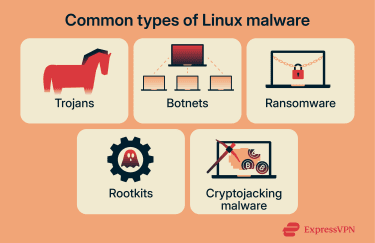
Ransomware
While less common on Linux than on other platforms, Linux ransomware encrypts files or locks systems and demands payment to restore them.
Server-targeted ransomware can encrypt databases, configuration files, and backups, potentially disrupting entire organizations. Some variants specifically target virtual machine (VM) files, affecting multiple systems simultaneously. The impact can be severe because servers typically handle important data and services.
Rootkits
Rootkits are designed to hide malicious activity and maintain long-term, stealthy access to a compromised system. On Linux, they can modify kernel components, system binaries, common utilities, or authentication mechanisms to conceal files, processes, or network connections.
A rootkit might alter commands like ps, netstat, or ls so that malicious processes, open backdoors, or unauthorized network connections aren’t displayed. This allows attackers to quietly run additional malware, steal data, monitor user activity, or remotely control the system without being noticed. Some kernel-level rootkits load directly into the OS core, giving attackers persistent, privileged control.
Cryptojacking malware
Cryptojacking malware hijacks a Linux system’s computing resources to mine cryptocurrency without the owner’s knowledge. Linux cloud servers, containers, and AI workloads are frequent targets because they often provide access to powerful CPUs and GPUs, which can generate far greater mining profits than standard desktop hardware.
GPUs are growing especially attractive to attackers with the rise of machine learning (ML), data science, and large language models (LLMs). Cryptojacking malware can detect and abuse available GPU resources while keeping usage just low enough to blend in with normal compute-intensive activity, making detection harder in cloud and server environments.
While cryptojacking malware doesn’t typically steal data, it degrades system performance and drives up electricity or cloud infrastructure costs. Prolonged mining activity can also accelerate hardware wear due to sustained high resource utilization.
Cryptojacking malware commonly enters Linux systems through misconfigured containers, exposed APIs, unsecured development tools, or vulnerable web applications. In cloud environments, it may spread by abusing shared credentials, overly permissive access controls, or poorly isolated workloads.
Why Linux systems are targeted by malware
Attackers often target Linux because it’s widely used in server infrastructure and cloud environments and because of how its systems are managed. Command-line access and remote services are common, and when these are poorly secured, they can become easy entry points for attackers.
Widespread use of Linux in servers and cloud environments
A large share of servers, cloud infrastructure, VMs, containers, and network services run on Linux systems. This makes them valuable targets for attackers looking for reliable, always-on systems. The continuous operation means infected systems can perform malicious activities around the clock.
Additionally, servers often handle sensitive information, including customer data, financial records, and proprietary business information. A successful attack on a single server can provide access to databases, email systems, or internal networks.
Cloud platforms' scalability features can also inadvertently accelerate the spread of malware when compromised. Auto-scaling mechanisms may clone infected VM or container images across new Linux instances, while orchestration tools and infrastructure-as-code templates can replicate malicious code within minutes.
Misconfigurations and exposed services
Malware also frequently targets Linux systems because they’re sometimes deployed with inadequate hardening and misconfigurations that create easy entry points for attackers.
Common configuration issues include Secure Shell (SSH) services accessible from the internet with weak authentication, databases exposed without proper access controls, and web applications running with excessive permissions. These misconfigurations could result from quick deployments, incomplete security reviews, or a lack of ongoing maintenance.
Default settings can introduce risks as well. Systems deployed with default passwords, unnecessary services enabled, or overly permissive firewall rules can provide entry points for attackers.
Unpatched software is another common risk factor. While Linux distributions regularly release security updates, delays in patching leave known vulnerabilities exploitable for extended periods. Attackers often track public vulnerability disclosures and may attempt to exploit systems before patches are applied.
Signs your Linux system may be infected
Linux malware often operates quietly. Because of this, signs of malware infection tend to appear as subtle changes in behavior or performance. Recognizing these indicators can help limit their impact:
- Unfamiliar or unauthorized processes running in the background, especially those restarting automatically after being stopped, or those running with root privileges.
- Unexpected spikes in CPU, memory, or disk usage that don’t align with normal workloads.
- New user accounts or changes to permissions that weren’t intentionally configured.
- New files appearing in system directories, particularly in /tmp, /var/tmp, or hidden directories.
- Changes to system configurations, such as modified firewall rules, altered scheduled tasks, or unexpected entries in startup scripts, without administrator action.
- Modified system files or binaries, particularly in directories like /bin, /sbin, or /usr/bin.
- Outbound network connections to unfamiliar IP addresses or domains.
- Increased bandwidth usage without corresponding legitimate activity.
- Login attempts from unfamiliar locations or at unusual times.
How to protect your Linux system from malware
Protecting a Linux system from malware is largely about reducing exposure and maintaining visibility into system activity.
Keeping Linux systems updated and patched
Software updates address security vulnerabilities that attackers could exploit. Linux distributions regularly release patches for the OS kernel, system libraries, and included applications. Applying these updates promptly reduces exposure to known vulnerabilities.
Configure your system to check for updates regularly. Most distributions provide package managers like apt, yum, or dnf that simplify the update process. You can automate security updates using tools like unattended-upgrades on Debian-based systems or dnf-automatic on Red Hat-based distributions.
Additionally, keep third-party applications and dependencies up to date alongside system packages. Web servers, databases, and programming language runtimes all require regular updates. Containerized applications need updated base images and dependencies managed with language-specific tools such as pip, npm, or gem.
Securing user accounts and permissions
Linux relies heavily on permissions, which means misconfigured accounts can increase risk. Malware often spreads by taking advantage of unnecessary privileges or weak authentication.
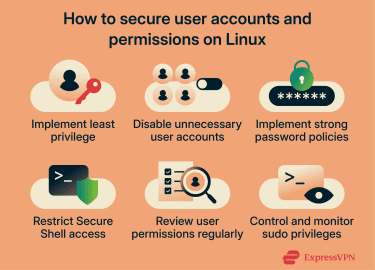
With strong access controls, you can limit what users and processes can do on your system:
- Follow the principle of least privilege: Grant only the minimum permissions necessary for each service to function. This approach helps contain potential damage if credentials become compromised.
- Disable or remove unnecessary user accounts: This is especially important for default accounts created during installation. Each active account represents a potential entry point for attackers. Service accounts should have restricted shells and no interactive login capability unless required.
- Implement strong password policies: Use policies that require complex passwords that are difficult to guess.
- Restrict SSH access to specific users and IP addresses: Disable SSH root login, require admins to sign in using individual user accounts, and use sudo for privileged tasks. This improves accountability by creating an audit trail for administrative actions.
- Review user permissions regularly: Remove access when employees leave and update permissions as roles change.
- Control and monitor sudo privileges: Configure sudo to log all commands and require password re-entry after timeout periods. Limit which commands each user can execute with elevated privileges. Avoid granting unrestricted sudo access unless absolutely necessary.
Limiting exposed services and network access
Every network service running on your system represents a potential attack surface. Minimizing the number of services exposed to the network, especially to the public internet, narrows the attack surface.
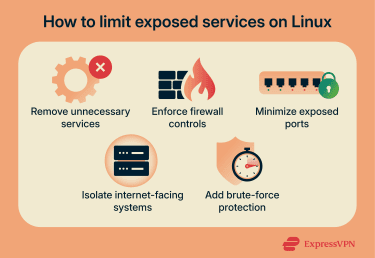
Here are some practical ways you can limit exposed services and networks:
- Remove unnecessary services: Disable those you don't actively use and ensure necessary services are properly configured and hardened.
- Enforce firewall controls with a default-deny policy: Configure iptables, nftables, or firewall management tools like ufw or firewalld to allow only necessary connections. Default-deny firewall policies can reduce the attack surface by limiting access to only explicitly allowed services.
- Minimize exposed ports and restrict access: Close unused ports, and when possible, limit access to necessary ports by source IP address. For example, SSH access might only need to be available from specific management networks rather than the entire internet. Database ports should typically only accept connections from application servers that need them.
- Isolate internet-facing systems: Place public-facing web servers in a demilitarized zone, which is a separate, isolated network segment that sits between the internet and your internal network. Keep it separate from internal databases and application servers. This limits an attacker’s ability to move laterally through your network if they compromise one system.
- Add brute-force protection: Implement rate limiting and connection throttling for exposed services. Tools like Fail2ban automatically block IP addresses that show suspicious behavior, such as repeated failed login attempts. This mitigates brute-force attacks and reduces log noise from automated scanning.
Using security tools and monitoring
Active monitoring helps detect security issues before they cause significant damage. Implement both real-time alerting for critical events and regular review processes for identifying potential problems.
Here’s how you can use security tools and monitoring to better catch issues:
- Use security scanners to identify vulnerabilities in your systems: Tools like OpenVAS or Nessus can perform comprehensive vulnerability assessments and check for outdated software, misconfigurations, and known security issues. Schedule regular scans and address identified problems based on their severity and exploitability.
- System monitoring tools: The ps and top commands show running processes and resource usage, but rootkits can modify these utilities to hide malicious processes. To detect discrepancies, run trusted tools from installation media, rescue environments, or known-good backups and compare their output with what you see on the live system. Utilities like netstat or ss can also reveal active connections and listening ports. Compare results against expected patterns and watch for unusual ports or unfamiliar remote addresses.
- Deploy intrusion detection systems: These systems monitor network traffic and system activity for suspicious patterns. Tools like Advanced Intrusion Detection Environment (AIDE) and Tripwire track file system changes, while network-based tools like Snort or Suricata analyze traffic for attack signatures. Configure these tools to alert you to potential security incidents requiring investigation.
- Log analysis tools: System logs contain valuable information about security events. Review /var/log/auth.log for authentication attempts, /var/log/syslog for system messages, and application-specific logs for unusual activity. Tools like Logwatch or Fail2ban can automate log analysis and alert you to suspicious patterns.
How an enterprise VPN helps reduce network-based malware risks
An enterprise VPN can help reduce certain network-based malware risks, particularly when Linux systems connect over untrusted or shared networks.
In practical terms, an enterprise VPN can:
- Protect remote Linux administration sessions and file transfers from interception.
- Minimize the risk of man-in-the-middle (MITM) attacks and other forms of traffic interception on unsecured networks.
- Limit exposure by keeping remote administrative interfaces off the public internet. Users connect to the VPN first, then access Linux servers through the encrypted tunnel.
It’s important to note that a VPN doesn’t stop malware already on a system. Instead, it acts as an additional layer that helps protect network traffic and remote access paths when used alongside other security measures.
What to do if your Linux system is infected
When a Linux system shows signs of malware, the priority is to limit further impact, understand what was affected, and restore the system safely. Acting carefully helps prevent additional damage while preserving information needed to address the root cause.
Isolating the affected system
Isolating the system helps prevent malware from spreading or communicating with external command-and-control servers.
Common ways to isolate an affected Linux system include:
- Disconnecting the system from external networks: Unplug the Ethernet cable or disable Wi-Fi on the machine. If it’s a server or VM, you can also turn off the network interface in the hypervisor or cloud console or temporarily block outbound internet access at the firewall.
- Disabling non-essential services and scheduled tasks: Identify services that don’t need to run during the investigation and stop them. On Linux, you can list running services with systemctl and stop specific ones. Additionally, check scheduled tasks like cron jobs and disable anything suspicious or unnecessary.
- Restricting remote access until the situation is assessed: Temporarily block remote login methods such as SSH and remote management ports using firewall rules, or limit access to only trusted admin IP addresses. You can also turn off password-based logins and allow only key-based access.
If the system provides critical services that can't be taken offline, consider placing it in a quarantine network segment with restricted access. Monitor all traffic to and from the isolated system to identify command-and-control communications or attempts to spread.
Removing malware and restoring from backups
Start by scanning the system using malware detection tools. Boot from trusted external media to avoid relying on potentially compromised system binaries. Run tools such as ClamAV, rkhunter, and chkrootkit from a clean boot environment to detect malicious files and processes.
For systems infected with rootkits, rebuilding from scratch is the most reliable recovery option. Reinstall the OS from trusted installation media, apply all security updates, and restore data from clean backups. This approach ensures no remnants of the infection stay hidden in system files or configurations.
Verify that backups are clean before restoration. Malware might have been present on the system before your most recent backup, meaning restoration could reintroduce the infection. Check multiple backup versions and scan them for malware before using them for recovery.
Additionally, restore only the necessary data files, not entire system configurations or executables. Configuration files can contain malicious modifications, and executable files might be trojaned versions. Rebuild system configurations manually from documentation rather than restoring potentially compromised files.
Finally, change all passwords and credentials after recovery. Malware targeting credentials is common, so assume that attackers may have access to all credentials on the compromised system. This includes user passwords, SSH keys, database credentials, and API tokens.
FAQ: Common questions about Linux malware
Can Linux systems get malware?
Linux systems can be affected by various types of malware. It often focuses on servers, cloud environments, and systems with exposed services or outdated software rather than individual desktop users.
Why are Linux servers common malware targets?
Linux servers are widely used to host websites, applications, and cloud workloads, and many of them run continuously with remote access enabled. Additionally, many of these servers often handle valuable data. This makes them attractive targets, especially when services are misconfigured, unpatched, or overly exposed. Attackers usually prioritize reliability and long-term access over visible disruption.
What are the most common types of Linux malware?
The most common types of Linux malware include Trojans, botnets, ransomware, rootkits, and cryptojacking malware. Each serves a different objective, such as gaining remote access, hiding long-term activity, encrypting data, or using system resources without permission.
How can you detect malware on a Linux system?
You can detect malware on a Linux system by monitoring for unusual CPU or network usage, checking for unauthorized processes and files, reviewing system logs for suspicious activity, and using security tools like ClamAV for virus scanning or rkhunter for rootkit detection. File integrity checkers like Advanced Intrusion Detection Environment (AIDE) can identify unauthorized modifications to system files.
Regularly monitoring running processes with commands like ps and top, along with network connection analysis using netstat or ss, also helps identify anomalies. Combining multiple detection methods increases the likelihood of finding sophisticated threats.
What should you do if your Linux system is infected?
If a Linux system appears to be infected, the first step is to isolate it to limit further impact. From there, you can investigate the cause, remove malicious components, and restore clean data or system files from trusted backups. Finally, review configurations and apply updates afterward to reduce the risk of reinfection.
Take the first step to protect yourself online. Try ExpressVPN risk-free.
Get ExpressVPN