What is dynamic multipoint VPN (DMVPN)?



As networks expand across multiple offices and cloud environments, keeping every site securely connected becomes a challenge. Traditional virtual private network (VPN) setups often struggle to scale without adding complexity or cost.
Dynamic multipoint VPN (DMVPN) offers a smart way to build secure, on-demand tunnels between remote locations, without constant manual configuration. It combines Internet Protocol Security (IPsec) encryption with dynamic routing to keep communications efficient, adaptable, and protected.
In this guide, we’ll explore how DMVPN works, its core technologies and phases, and why it’s commonly used for building scalable, secure enterprise networks.
Introduction to DMVPN
DMVPN is a network framework that helps large organizations connect different sites securely over the internet. It uses a central hub to manage connections between remote locations, allowing them to form secure tunnels dynamically when needed.
This flexible design keeps communication encrypted, adaptable, and easy to maintain across distributed networks.
What is DMVPN, and how does it differ from a regular VPN?
Unlike traditional VPN setups, DMVPN creates secure, temporary connections between sites only when they’re needed. This removes the need for fixed, always-on links and cuts down on manual setup.
A regular site-to-site VPN keeps a constant connection between two locations, often a main office and a branch. In large networks, setting up and maintaining all these connections can be time-consuming and complex.
DMVPN automates this process. It uses a central hub to coordinate new tunnels so that two branches can communicate directly and securely when necessary. This keeps the network flexible, efficient, and protected.
Why is DMVPN used?
DMVPN helps organizations build secure, scalable networks without extensive manual setup. It was designed to solve four key challenges in modern wide-area networks:
Scalability
In traditional VPNs, every new branch requires manual configuration on multiple routers, a process that grows harder as the network expands. DMVPN simplifies scaling by keeping the control logic at a central hub, so new sites can connect quickly with minimal setup.
Operational costs
DMVPN lets businesses use regular internet connections, such as broadband or 4G/LTE, as the transport layer for encrypted traffic. This approach reduces expenses while bringing IPsec-grade encryption over standard internet links, avoiding the dedicated-circuit cost of leased lines or multiprotocol label switching (MPLS).
Performance
When offices need to exchange data directly, DMVPN allows spoke-to-spoke tunnels to form automatically. This avoids routing all traffic through the hub, reducing latency and improving speeds for tasks like video calls, Voice over Internet Protocol (VoIP), or large file transfers.
IP flexibility
Many remote sites use internet services with changing public IP addresses. DMVPN uses the Next Hop Resolution Protocol (NHRP) to keep track of those addresses in real time, ensuring each connection remains stable even when an IP changes.
How does DMVPN work?
In a DMVPN setup, all sites connect over a shared public network using encrypted IPsec tunnels. Each site maintains a permanent tunnel to a central hub, ensuring continuous connectivity and coordination. In contrast, direct tunnels between spoke sites are created dynamically, forming only when two locations need to exchange traffic.
Each site, known as a spoke, connects to a central hub that keeps track of which locations are online and how to reach them. When one spoke needs to reach another, it asks the hub for that information and then forms a direct, secure link. Once the exchange ends, the tunnel can close, keeping the network lean and easy to manage.
DMVPN protocols explained
DMVPN combines several well-established networking methods to create secure, on-demand tunnels between sites. It's not a single protocol but a setup that combines tunneling, routing, and encryption protocols to ensure that data can move safely across public networks.
Learn more about common VPN protocols to understand how tunneling and encryption come together in VPN technology.
GRE over IPsec
DMVPN starts with Generic Routing Encapsulation (GRE), a tunneling protocol that wraps regular internet traffic inside another IP packet, forming a private tunnel between two points over a public network. This means routing updates and other traffic can travel as if all sites were on the same internal network.
GRE also supports multicast traffic, which many routing systems rely on to share network updates automatically. Without this, remote sites wouldn’t be able to find each other or exchange routes on their own.
Multipoint GRE (mGRE)
A regular GRE tunnel links just two devices. Multipoint GRE (mGRE) expands on that idea by letting many connections share one tunnel interface. In DMVPN, this means the hub can reach multiple remote sites through a single logical link instead of setting up separate tunnels for each one.
In older VPN setups, adding a new branch meant creating another tunnel manually. With mGRE, the hub doesn’t need to know every site ahead of time; new locations can connect automatically when they come online.
Dynamic routing protocols
Routing protocols define how data travels across a DMVPN network. Once the tunnels are in place, these protocols share route information between sites automatically so each branch knows the best path to reach others. DMVPN commonly uses three main dynamic routing protocols:
- Open Shortest Path First (OSPF): Builds a complete map of the network by exchanging detailed topology information. It works well for small-to-medium organizations where all sites need consistent, real-time updates.
- Enhanced Interior Gateway Routing Protocol (EIGRP): A Cisco-developed hybrid routing protocol that adapts quickly and works well in Cisco-centric environments but can be difficult to troubleshoot.
- Border Gateway Protocol (BGP): Mostly used in large-scale or multi-organization networks. Instead of sharing full topology data, it focuses on path-based routing between independent networks, making it ideal when connecting remote sites that belong to different administrative domains.
Next Hop Resolution Protocol (NHRP)
NHRP allows each site in a DMVPN network to find the current public address of other sites so they can connect directly when needed. It works as a lookup system that keeps track of where every spoke is located on the internet.
The hub acts as an NHRP server, storing a list of all registered spokes. Each spoke, acting as a client, sends a small registration message to the hub when it comes online. This message includes its internal tunnel address and its public IP address.
When one spoke wants to reach another, it asks the hub for the destination’s address. The hub replies with that information, and the two spokes then create a secure, direct tunnel between them. This process happens automatically, allowing traffic to travel efficiently without passing through the hub.
IPsec encryption
While GRE builds the tunnel and NHRP manages the addressing, IPsec is what keeps everything secure. It encrypts all traffic inside the GRE tunnel so data can move safely across the public internet.
Without IPsec, the information passing through a GRE tunnel, including routing updates and user data, would be visible to anyone on the network. IPsec prevents this by adding three layers of protection:
- Encryption: Scrambles the data so only the intended receiver can read it.
- Integrity: Checks that the information hasn’t been changed in transit.
- Authentication: Verifies that both devices exchanging data are legitimate.
In a DMVPN setup, IPsec works in tunnel mode, meaning it encrypts the entire GRE packet, including its headers. This way, both the contents and the routing information stay private and protected from interception.
DMVPN phases explained
DMVPN works in three distinct phases, each building on the same core ideas but adding new levels of flexibility and efficiency. These phases describe how the system handles connections between remote sites, from the early hub-and-spoke design to more dynamic, direct links between branches.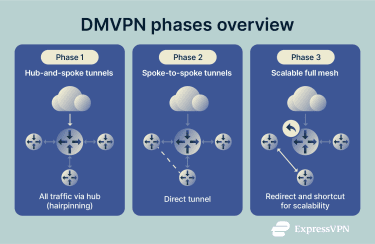
Phase 1: Hub-and-spoke tunnels
Phase 1 is the starting point for a DMVPN setup. It uses a simple hub-and-spoke design, where each branch connects only to the main hub. Most traffic flows from the remote sites back to headquarters, making this setup straightforward but limited in flexibility.
In this phase, the hub uses an mGRE interface to manage all connections through one shared tunnel. Each spoke creates a standard point-to-point GRE tunnel that connects directly to the hub’s public IP address.
Because all data must pass through the hub, spokes can’t communicate with each other directly. If one branch needs to reach another, the traffic first travels to the hub and then back out to the destination. This process, often called hairpinning, increases delay but keeps routing simple.
Spokes only need a single route that points to the hub to reach any other site in the network. This makes configuration easy but results in longer paths between branches.
Phase 2: Spoke-to-spoke tunnels
Phase 2 introduces a major improvement: direct communication between branch sites. Instead of sending all traffic through the hub, spokes can now build their own secure tunnels when they need to exchange data.
The change comes from giving every spoke an mGRE interface, the same kind used by the hub. This lets any spoke create a new tunnel dynamically with another spoke, removing the need for fixed point-to-point links.
How it works:
- Initial contact: The first packet between two spokes still passes through the hub, which knows how to reach every site.
- Address lookup: The originating spoke asks the hub for the destination spoke’s public IP address using NHRP.
- Direct link: Once it has that address, the two spokes automatically form a secure, encrypted tunnel and send traffic directly between them.
This setup makes branch-to-branch communication faster and reduces the load on the hub. However, because all spokes now communicate directly, routing becomes more detailed: each spoke needs to know the specific networks behind the others. The hub can’t summarize routes because route summarization breaks NHRP and prevents spokes from correctly resolving each other’s next-hop addresses, forcing routes to be advertised explicitly and increasing management complexity at scale.
That said, even with this extra routing work, Phase 2 provides a major boost in efficiency for organizations that need quick, direct links between remote offices.
Phase 3: Scalable full mesh
Phase 3 fine-tunes the DMVPN design for better scalability and simpler operations. It keeps the direct spoke-to-spoke communication from Phase 2 but removes the need for each spoke to store full routing details about every other site.
This works through two behaviors on the hub:
- NHRP redirect (hub): When the hub receives traffic meant for another spoke, it notifies the sender that a direct path is available by sending an NHRP redirect message.
- NHRP shortcut (spoke): The spoke adds a quick local route to the destination and then forms a direct, encrypted tunnel.
With this setup, the hub can advertise simple, summarized routes instead of many specific ones, so each spoke keeps a smaller routing table. The network still uses on-demand spoke-to-spoke tunnels, with less configuration work overall.
In practice, you get the simplicity of the original hub-and-spoke model plus the performance of direct spoke links, a fit that scales well across large, distributed networks.
Advantages of using DMVPN
DMVPN offers practical benefits for organizations that need to connect remote sites securely. Its design focuses on flexibility and automation, helping networks grow and adapt without constant reconfiguration.
Scalability for growing networks
Traditional VPNs often struggle to expand because every new site requires creating and maintaining multiple static tunnels. As the network grows, this setup becomes harder to manage and more error-prone.
DMVPN avoids that problem by using a central hub with an mGRE interface and NHRP to manage all connections dynamically. Each new branch only needs to connect to the hub; no additional changes are required for the existing sites. This design makes it easy to add locations and scale the network without complex configuration.
Secure branch connectivity
DMVPN keeps all communication between branch sites secure by using IPsec encryption for every connection. This ensures that data stays private even when it travels over the public internet.
Improved bandwidth efficiency
DMVPN lets branches create direct spoke-to-spoke tunnels when they need to exchange data. After a quick address lookup using NHRP, traffic moves straight between the two sites instead of routing through the hub.
This setup lets data travel the most efficient route, reducing latency and keeping bandwidth use balanced across the network. The hub handles only essential traffic, while branches communicate directly.
Reduced operational expenses
DMVPN helps lower network costs by removing the need for dedicated private connections between offices. Instead of paying for leased lines or MPLS services, companies can use regular broadband, fiber, or 4G/LTE links secured with IPsec encryption. This keeps data protected while taking advantage of more affordable internet options.
Because new sites connect automatically through the hub, there’s no need to reconfigure every router each time the network expands. That cuts setup time and reduces ongoing maintenance work for IT teams.
Direct spoke-to-spoke tunnels also take pressure off the central hub, which no longer has to process all inter-branch traffic. This means existing hardware can handle more connections without constant upgrades, keeping operations smooth and budgets under control.
Disadvantages of using DMVPN
While DMVPN can be a powerful tool for connecting sites, it has some limitations that organizations should be aware of.
Complexity in large deployments
DMVPN simplifies tunnel creation, but managing a large network can still be challenging. Spokes have to maintain detailed routing information for all other sites, and route summarization is limited due to NHRP next-hop resolution. This can make configuration and troubleshooting more complex than it is with newer, cloud-friendly architectures.
Issues with NAT and CGNAT
DMVPN relies on IPsec and GRE, which can sometimes struggle with Network Address Translation (NAT) traversal, particularly in networks using carrier-grade NAT (CGNAT). Extra configuration may be needed to ensure tunnels are established correctly, adding operational overhead.
Aging technology
DMVPN was designed for hub-and-spoke architectures and gained popularity in the era of MPLS and site-to-site VPNs. Modern alternatives, such as software-defined wide area networks (SD-WAN), often offer easier centralized management, integrated security, and better support for cloud connectivity.
Limited visibility and monitoring
DMVPN reduces a hub’s traffic load, but it also means monitoring and troubleshooting traffic between sites can be harder, since traffic may bypass central logging points.
DMVPN configuration guide
Setting up a DMVPN involves bringing together several core technologies to create a secure and flexible network. While DMVPN makes ongoing management easier, the initial configuration still requires careful planning and attention to detail.
Setting up DMVPN on Cisco routers
Setting up a DMVPN network means configuring the central hub and the remote spokes so they can work together. Cisco developed this model, and most DMVPN deployments today still follow its framework.
Each stage builds on the previous one to ensure the network stays secure, connected, and consistent with the chosen DMVPN phase.
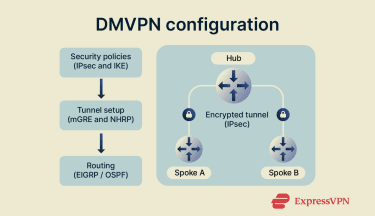
Setting up a DMVPN network follows a clear sequence that connects security, tunneling, and routing. Each step builds on the one before it to keep the system stable and consistent.
- Define security policies: Start by applying matching IPsec rules on the hub and spokes. These rules control how data is encrypted and how devices verify each other before a tunnel is created.
- Create the tunnel interface: Next, configure the GRE tunnel in multipoint mode (mGRE) and enable NHRP so each site can discover addresses and form direct connections when needed.
- Enable routing: Finally, add a dynamic routing protocol such as EIGRP or OSPF. This lets every site exchange route information automatically and keep traffic moving efficiently as the network grows.
Best practices for secure deployment
DMVPN uses IPsec encryption by default, but maintaining strong and reliable protection depends on how the network is designed and managed. The following practices help strengthen security and performance across connected sites.
- Choose IKEv2 for key exchange
IKEv2, the newer version of the Internet Key Exchange protocol, offers better security and reliability than IKEv1. It handles connection drops more efficiently and improves communication through NAT, which makes it the preferred option for most modern IPsec deployments.
- Use strong authentication methods
Pre-shared keys are simple but can be difficult to manage securely in large networks. Digital certificates (based on public key infrastructure, or PKI) provide stronger authentication and allow each device to verify the other’s identity more effectively.
- Limit control plane exposure
The hub acts as the central control point for the network, making it a critical asset to protect. Restricting which devices can send routing or NHRP messages to the hub helps prevent unauthorized access or false route updates.
- Keep the hub secure and streamlined
Since the hub coordinates all communication, it should run only the features and services it needs. Using updated software and strong password policies reduces its exposure to potential attacks.
- Match settings to your network design
If a network doesn’t require direct spoke-to-spoke communication, the configuration should reflect that. Disabling redirect or shortcut behavior ensures that all traffic follows the intended paths and complies with network policy.
- Optimize packet size to prevent fragmentation
Because IPsec adds extra data to each packet, adjusting the maximum transmission unit (MTU) and segment size (MSS) on tunnel interfaces can improve performance. Setting slightly smaller limits helps avoid fragmentation and keeps the network running efficiently.
Troubleshooting DMVPN
Because DMVPN builds connections dynamically, diagnosing issues can sometimes be more complex than with static VPNs. When a tunnel fails to form or performance slows down, the problem often comes from a mismatch between one of its main components: IPsec, NHRP, or the routing configuration.
Before troubleshooting in detail, it helps to check for a few common setup issues. Things like mismatched IPsec settings, different NHRP network IDs, wrong tunnel modes, routing conflicts, or recursive routing loops can all stop tunnels from forming or make them unstable. Checking these areas first often solves the problem right away.
Troubleshooting starts by checking each layer in order. Begin with the physical connection, then verify IPsec encryption, confirm that NHRP is resolving addresses correctly, and finally review the routing setup. Working through these steps helps to pinpoint the issue faster.
Common connection issues
When a DMVPN connection fails, the cause usually lies in one of four areas: IPsec negotiation, NHRP communication, routing setup, or the basic network connection between sites. Check those areas in order to isolate the cause.
Phase 1 (IKE) negotiation issues
If the secure session doesn’t start and the tunnel stays down, the problem often comes from mismatched IKE settings between the hub and the spokes. This can happen when the devices use different encryption types, authentication methods, or key parameters. Once both sides match, the session comes up as expected.
Phase 2 (IPsec) setup problems
Sometimes the initial security handshake succeeds, but the IPsec tunnel still doesn’t form. This usually points to a mismatch in encryption or hashing settings used to protect the data traffic. Matching those settings on all devices keeps the tunnel stable.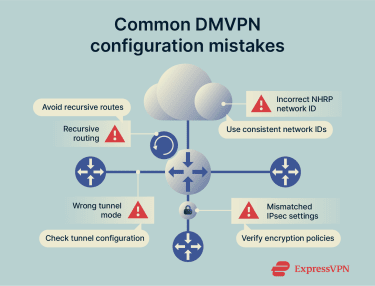
NHRP registration or resolution errors
In some cases, the tunnel appears active, but communication between sites fails. This often happens when a spoke doesn’t register properly with the hub or can’t find the address of another spoke. It often comes down to inconsistent NHRP IDs or missing address entries.
Underlay or reachability failures
If the tunnel never comes up at all, there may be a basic connectivity problem between the hub and spokes. The devices might not be able to reach each other’s public IP addresses, or a network filter could be blocking the ports needed for IPsec communication.
Monitoring and optimizing DMVPN performance
Keeping a DMVPN network stable isn’t only about configuration; it also means checking in regularly to make sure everything runs as expected. Continuous monitoring helps spot small issues before they turn into outages, such as tunnels not registering or traffic taking inefficient routes.
Teams usually focus on three areas:
- Tunnel stability: Confirming that hub and spoke connections stay active and exchange data normally.
- Address resolution: Making sure NHRP entries stay updated so sites can locate each other quickly.
- Encryption health: Checking that IPsec sessions remain established and secure.
To keep performance high, small network adjustments can make a big difference. Applying quality of service (QoS) rules, which control which types of traffic get priority, helps keep voice and video calls smooth even when the network is busy.
It’s also useful to review how data flows between branches. If traffic keeps passing through the hub when direct paths are available, that usually points to a configuration issue worth fixing for increased efficiency.
FAQ: Common questions about DMVPN
What is the difference between a VPN and a DMVPN?
The core difference is scalability and flexibility. A standard virtual private network (VPN) creates fixed, point-to-point tunnels that require manual setup for each connection, while a dynamic multipoint VPN (DMVPN) builds secure, on-demand tunnels between multiple sites, allowing the network to expand without extra configuration.
What protocols are used in DMVPN deployments?
Dynamic multipoint virtual private network (DMVPN) relies on several core protocols that work together to create and secure the network. Multipoint Generic Routing Encapsulation (mGRE) establishes a single tunnel interface that can support multiple remote connections, Next Hop Resolution Protocol (NHRP) lets spokes discover each other and connect dynamically, Internet Protocol Security (IPsec) adds encryption, and dynamic routing protocols such as Open Shortest Path First (OSPF), Enhanced Interior Gateway Routing Protocol (EIGRP), and Border Gateway Protocol (BGP) keep network routes updated automatically.
Is DMVPN secure?
Yes. Dynamic multipoint virtual private network (DMVPN) is secure due to its overall architecture, which layers multiple security controls. Generic Routing Encapsulation (GRE) provides the tunnel framework, while Internet Protocol Security (IPsec) handles encryption and integrity. Additional components, like Internet Key Exchange (IKE) for key management, cryptographic algorithms and certificates for authentication, Next Hop Resolution Protocol (NHRP) authentication, and access control policies, work together to secure data and routing information across public networks.
How does DMVPN impact network performance?
Dynamic multipoint virtual private network (DMVPN) improves performance by allowing data to travel directly between branch sites instead of routing everything through a central hub. These on-demand tunnels reduce delay and ease the load on the central router to keep the network stable and responsive.
Take the first step to protect yourself online. Try ExpressVPN risk-free.
Get ExpressVPN