Bluetooth security guide: How to stay safe from wireless attacks


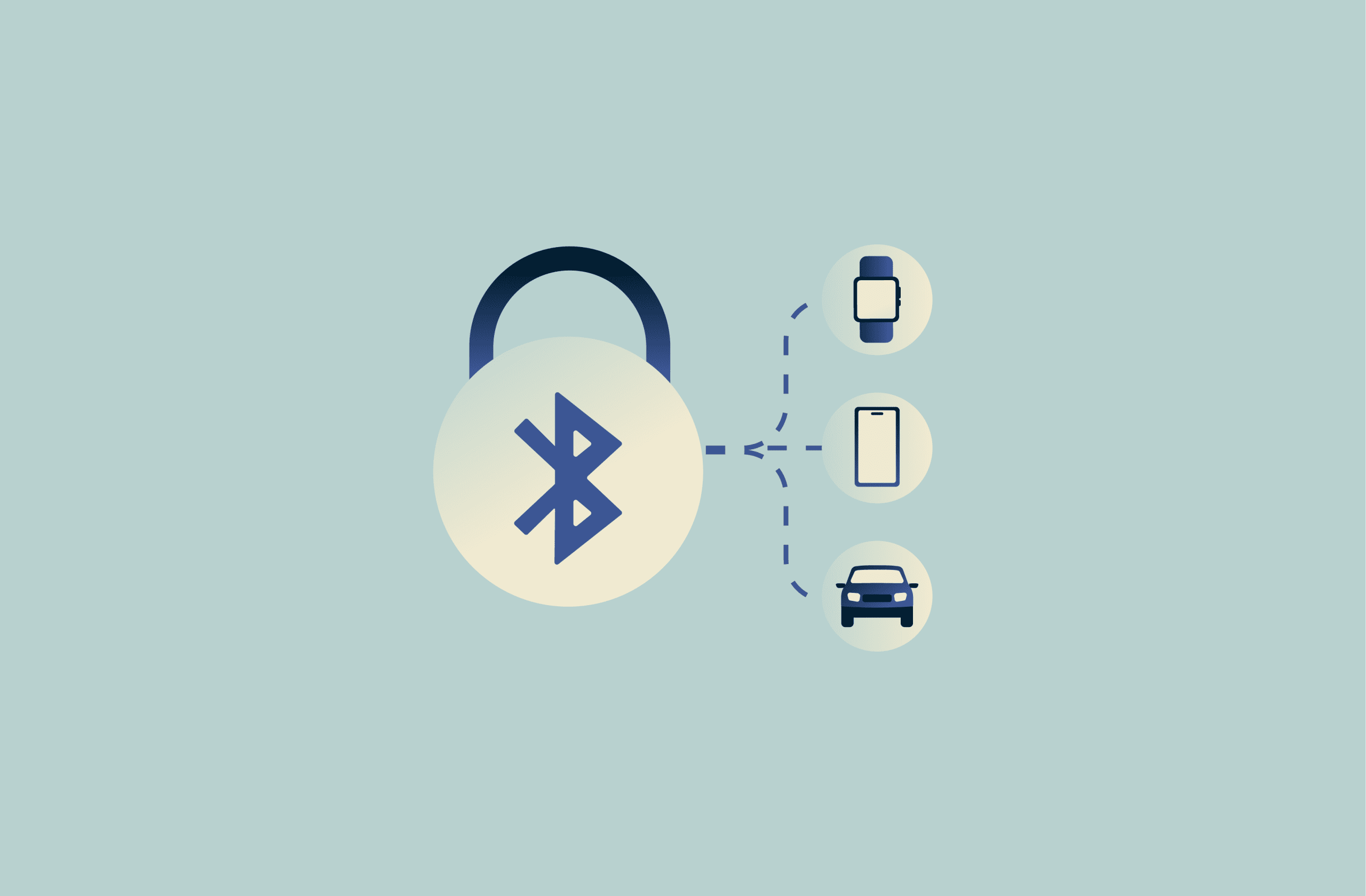
Bluetooth connects everything from speakers and keyboards to phones, wearables, and cars. It’s convenient, but any wireless technology can introduce risk.
This guide outlines how Bluetooth works at a high level and the practical steps that can reduce exposure, especially around pairing, encryption, and device access.
What is Bluetooth?
Bluetooth is a short-range wireless communication standard that allows two devices to exchange data directly without requiring Wi-Fi or a cellular connection.
It’s optimized for low power consumption, making it ideal for accessories and devices that run for long periods on small batteries.
Common uses of Bluetooth devices
Bluetooth is widely used because it’s flexible. It’s used with many types of devices, including:
- Audio accessories: Connecting wireless earbuds, headphones, and speakers.
- Peripherals: Linking mice, keyboards, and game controllers.
- Wearable devices: Syncing fitness bands, smartwatches, and health sensors.
- Automotive systems: Providing in-car connectivity, media control, and hands-free calling.
- Personal devices: Facilitating short-range file transfers between phones or computers.
- Smart home and Internet of Things (IoT) devices: Connecting locks, lights, thermostats, and sensors.
Each use case introduces slightly different security expectations. For example, audio streaming generally transfers less sensitive data than a smart lock on a front door.
Bluetooth versions overview
First developed and released in the late 1990s, Bluetooth has evolved through numerous versions. Updates have improved speed, range, power efficiency, and security. Below are some key updates and the important features that each added.
| Version | Key improvements |
| Bluetooth 4.0 / 4.1 / 4.2 | Introduced and refined Bluetooth Low Energy (BLE) for low-power devices, improving battery life and performance. Bluetooth 4.2 also added major BLE security and privacy upgrades, such as LE Secure Connections (stronger pairing), Link Layer Privacy, and LE Data Packet Length Extension (more efficient data transfer). |
| Bluetooth 5.0 / 5.1 | Increased range and throughput for Bluetooth LE, introduced new LE capabilities (for example, LE 2M PHY, LE Coded PHY, and LE Advertising Extensions in 5.0; and Angle of Arrival/Angle of Departure in 5.1). |
| Bluetooth 5.2 / 5.3 | Added key building blocks for LE Audio (introduced with 5.2) and other connection and efficiency refinements (including in 5.3). |
Many security improvements arrived over time. For example, LE Secure Connections (Bluetooth 4.2) strengthens LE pairing using modern cryptography, but real-world protection during setup can still depend on the pairing method and what both devices support.
These features are generally available only when both devices support (and negotiate) them. Bluetooth is generally backward-compatible, but connections may fall back to the capabilities of the least capable device.
In practice, this means accessories such as headphones, wearables, or car systems are more likely than phones or computers to support older Bluetooth capabilities, which can lead to weaker security defaults in some pairings.
How does Bluetooth work?
Instead of relying on a central access point like Wi-Fi, Bluetooth creates a point-to-point (and in some cases, a small peer network) connection between devices.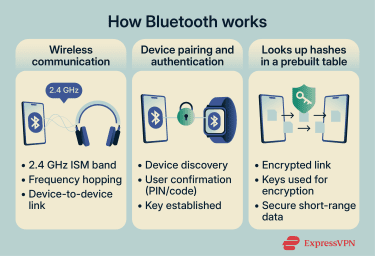
At a basic level, each device in a connection transmits and receives data through radio signals. These signals are managed through defined rules for discovery, pairing, authentication, and encryption.
These rules determine how Bluetooth connections are established, how devices interact, and how security is applied.
Frequency and range
Bluetooth operates in the 2.4 GHz band, a range designated for industrial, scientific, and medical (ISM) purposes. The ISM band is also used for other wireless technologies such as Wi-Fi, baby monitors, and some cordless phones. Because it’s quite crowded, Bluetooth is designed to minimize interference rather than avoid it entirely.
To do this, Bluetooth uses frequency-hopping spread spectrum (FHSS), commonly implemented as adaptive frequency hopping (AFH). Instead of transmitting data on a single fixed channel, devices rapidly switch between channels. If interference affects one channel, the connection continues on another.
In addition to the Bluetooth version, the range depends on the power class of the devices involved and, more generally, on the link budget (transmit power and receiver sensitivity) at both ends.
In general, devices are divided into three classes (with typical ranges often quoted as):
- Class 3 devices: Medical sensors and key fobs; about 3 feet (1 meter).
- Class 2 devices: Most phones, headphones, and keyboards; roughly 33 feet (about 10 meters).
- Class 1 devices: Some automotive systems and industrial equipment; up to 330 feet (100 meters).
In practice, range is also affected by device power, antenna quality, and environmental interference.
Device pairing process
Before devices can communicate over an encrypted Bluetooth link, they typically go through pairing, which establishes shared keys to protect the connection. Pairing is one of the most security-critical stages of Bluetooth operation.
A modern pairing process typically includes:
- Device discovery: One device scans for nearby Bluetooth signals and identifies potential peers.
- Authentication: The user confirms the connection, often by approving a prompt, entering a PIN, or verifying a numeric code displayed on both devices.
- Key generation and exchange: The devices generate and exchange cryptographic keys to encrypt the link (and, depending on configuration, support future reconnections).
How data is transferred securely
Once paired, Bluetooth devices can communicate over an encrypted link. In BLE, link-layer encryption uses Advanced Encryption Standard with Cipher Block Chaining Message Authentication Code (AES-CMAC) with 128-bit keys.
However, Bluetooth security isn’t determined solely by encryption. The actual protection level depends on several factors:
- Bluetooth version and security mode: Newer versions support stronger security options, while older devices and configurations may allow weaker key negotiation.
- Pairing method: Connections established without proper verification may still be encrypted, but can be easier to compromise.
- Device implementation: Both devices involved in the connection must correctly enforce security features. If either side handles encryption or authentication poorly, overall protection is reduced.
Pairing sets up keys for the connection; bonding is when devices store those keys so they can reconnect securely without re-pairing.
Is Bluetooth secure? Key vulnerabilities explained
Bluetooth security depends on both device factors and human behavior. It's generally safe for everyday use when devices are up to date and paired securely, but the protocol and its implementations aren’t flawless.
Bluetooth is designed for short-range, low-power device connectivity and offers multiple security and privacy options, so outcomes depend on which features a device supports and how they’re implemented.
That doesn’t make Bluetooth inherently unsafe, but security outcomes vary depending on device age, software support, pairing behavior, and environment.
Common Bluetooth security flaws
Most Bluetooth security issues often stem from device implementation and usage, though protocol-level weaknesses can also occur.
Less-than-ideal encryption
Modern Bluetooth supports strong encryption, but some devices and configurations can still negotiate weaker protections during connection setup, especially when older pairing methods or downgrade behavior are involved.
In practice, this is more common with older or less frequently updated hardware. Accessories and embedded devices are also more likely to lag behind phones and computers in adopting newer capabilities and security features.
BLE adds another variable, and while it supports encryption and authentication, security levels vary depending on the security mode, pairing method, and implementation quality.
In practice, this means protections can differ across devices, but for many consumer products used as intended, the risk is often manageable.
Insecure pairing
Pairing is another area where problems can arise. Pairing with an unknown device can increase the chance of unauthorized access, especially if the device uses weak or legacy pairing methods (such as default or predictable PINs), which are more common in older and embedded systems.
Many modern accessories, including wireless headphones, use streamlined pairing methods that don’t require entering a PIN. These connections may still use encryption, but some “low-interaction” methods provide limited verification during setup, which can reduce protection against interception or man-in-the-middle attacks during pairing.
Lack of updates
Bluetooth also depends on firmware and software updates. When devices stop receiving updates, known vulnerabilities may remain unpatched.
This is a potential issue with many types of Bluetooth devices. Though phones and computers typically receive regular updates that may include Bluetooth security fixes and newer Bluetooth features.
That isn’t always the case for accessories and embedded devices. Some may not support updates at all, and others may require vendor apps or manual steps that many people never complete. Over time, this can increase exposure as more vulnerabilities are discovered and patched elsewhere.
Types of Bluetooth attacks
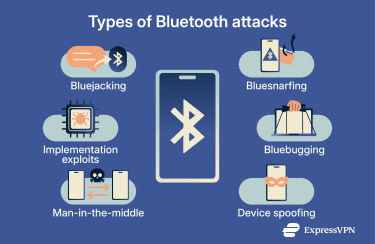 Security researchers have identified several categories of Bluetooth attacks. Many rely on close physical proximity, specific device behavior, and conditions that are more common in targeted or unusual scenarios. Examples include:
- Bluejacking (legacy): Sending unsolicited messages to nearby devices. It’s usually harmless, but it can indicate Bluetooth is discoverable.
- Bluesnarfing (legacy): Extracting data such as contacts, messages, or files from vulnerable or outdated devices without authorization.
- Bluebugging (legacy): Exploiting deeper flaws to gain control over device functions, including calls or data access.
- Device spoofing: Impersonating a trusted device to trick users into pairing.
- Man-in-the-middle (MITM) attacks: Interfering with the pairing process to intercept or alter communications. This is more feasible when pairing is unauthenticated.
- Implementation exploits: Leveraging vulnerabilities in Bluetooth software/firmware to crash devices, leak data, or, in some cases, run attacker-controlled code.
In practice, legacy “blue-” attacks are uncommon on modern, fully updated devices, and many real-world risks stem from outdated software, permissive pairing behavior, or prolonged proximity to a target device.
Real-world Bluetooth exploits
Most documented Bluetooth exploits come from controlled research or targeted scenarios rather than everyday use.
Researchers have demonstrated standard-compliant downgrade attacks during pairing/key negotiation that can reduce key strength on vulnerable Bluetooth connections.
There have also been past demonstrations of Bluetooth being used to spread malware between devices, usually in older mobile ecosystems and often requiring user interaction (such as accepting a transfer or installing an app).
For example, BlueBorne and BleedingTooth are sets of implementation-level vulnerabilities in Bluetooth stacks that, in vulnerable configurations, could sometimes be triggered without pairing and with minimal user interaction. Under the right circumstances, these flaws can lead to serious consequences, including remote code execution.
Step-by-step guide to securing your Bluetooth devices
Securing Bluetooth devices is largely about configuration and habits rather than employing specialized tools. A few deliberate choices around pairing, visibility, and updates can significantly reduce exposure without changing how you use your devices day to day.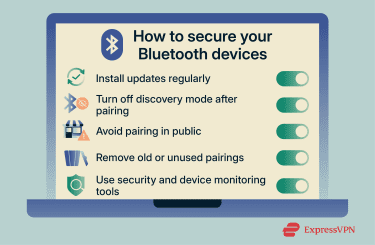
Keep your device updated
Bluetooth security depends on a combination of operating system software, drivers, and device firmware. Security fixes are typically delivered through software and firmware updates.
Manufacturers often patch vulnerabilities in encryption, authentication, and connection handling, so delaying updates leaves known issues unresolved.
It’s important to install updates for both primary devices and accessories. Many newer wireless headphones, wearables, and smart devices receive firmware updates (often via a companion app or a wired connection). If an update path exists, check for available updates periodically.
Devices that don’t support updates aren’t necessarily unsafe, but they may not receive fixes for newly discovered issues and may miss newer security improvements over time.
Use non-discoverable mode
When discoverability is enabled, a device is easier for nearby scanners to identify, which helps with initial pairing but increases visibility in public environments.
Once pairing is complete, discoverability often provides little benefit. Limiting it reduces exposure to unsolicited scans and connection attempts.
Avoid pairing in public
The pairing process is one of the most sensitive stages of a Bluetooth connection. Pairing in crowded or uncontrolled environments makes it easier for attackers to attempt spoofing or interfere with verification, especially if pairing is rushed or unauthenticated.
When pairing is necessary, it’s best done in private or low-traffic settings where device names and confirmation codes can be verified.
Public pairing doesn’t automatically lead to compromise, but it does increase exposure because attackers only need to be within range.
Delete old or unused pairings
Bluetooth devices often reconnect automatically to previously paired hardware. Over time, this can lead to a device trusting connections that are no longer actively used.
Reviewing and removing old or unused pairings on your phone or computer limits unnecessary trust relationships and helps ensuredevices connect only to hardware you still recognize.
If you notice unusual behavior, resetting Bluetooth settings (or clearing saved pairings) can also remove stale or corrupted entries.
Use security apps and device monitoring
Bluetooth doesn’t require an internet connection to communicate, but Bluetooth activity can still show up in system settings, permissions, and logs.
Reviewing Bluetooth permissions and system behavior, alongside general device security practices, helps reinforce overall protection.
Bluetooth vs. other wireless technologies
Bluetooth is one of several ways devices communicate wirelessly. Each protocol is designed for a specific range, data volume, and use case, and those design choices influence how security risks tend to appear in practice.
Bluetooth vs. Wi-Fi: Which is safer?
Bluetooth and Wi-Fi aren’t direct substitutes. They’re built for different types of communication.
Bluetooth is optimized for short-range, low-power, device-to-device links, such as headphones, keyboards, or wearables. Wi-Fi is designed for higher data volumes and continuous network access, including internet connectivity.
Wi-Fi commonly uses standardized network security frameworks such as Wi-Fi Protected Access 3 (WPA3), with options for centralized authentication in enterprise environments.
Bluetooth also supports encryption and authentication, but security outcomes depend heavily on the pairing method, negotiated security mode, and device implementation.
In practice, Bluetooth is often a good fit for peripherals and short-range device links, while Wi-Fi is typically used for sustained, high-throughput network access.
Read more: For a broader view of wireless network protection, see how to secure your home Wi-Fi.
Bluetooth vs. NFC: Range and risk
Near Field Communication (NFC) operates at extremely short distances, typically a few centimeters. This physical limitation reduces exposure because devices must be almost touching to communicate.
NFC is commonly used for payments, access cards, and quick authentication. By comparison, many consumer Bluetooth connections work at around 30 feet (10 meters) in typical conditions (though real-world range varies by device and environment).
Because NFC requires close physical proximity, it naturally limits who can attempt to interact with a device. Bluetooth trades that limitation for convenience and flexibility.
NFC vs. Bluetooth vs. Wi-Fi: Typical use cases
In many cases, the choice of wireless protocol is dictated by the device or task rather than user preference. Still, understanding their roles helps set appropriate expectations.
- NFC: Best suited for brief, proximity-based interactions such as authentication or payments.
- Bluetooth: Designed for accessories and short-range, device-to-device links.
- Wi-Fi: Intended for sustained data transfer, network access, and internet connectivity.
Using each protocol within its intended scope reduces reliance on Bluetooth for tasks it wasn’t designed to handle and helps keep wireless communication predictable and manageable.
FAQ: Common questions about Bluetooth security
Is Bluetooth security strong enough for work use?
Bluetooth is generally suitable for work peripherals such as keyboards, mice, and headsets. For transferring sensitive business data, encrypted Wi-Fi or wired connections are often preferred because they’re designed for sustained network traffic and can be managed more consistently in enterprise environments.
Can someone hack into my Bluetooth without me knowing?
Bluetooth hacking is possible but uncommon outside of targeted scenarios. It typically requires proximity and vulnerable or unpatched software.
How to tell if my Bluetooth has been hacked?
Watch for repeated unknown pairing requests, unfamiliar devices listed as paired, and unusual system behavior (including unexpected battery drain). These signs aren’t proof on their own, but they can indicate unwanted Bluetooth activity worth investigating. Removing unknown pairings, resetting Bluetooth settings, and updating firmware can help rule out stale connections and address known vulnerabilities.
How can I make my Bluetooth safer?
Keep devices updated, limit discoverability, pair deliberately, and remove connections you no longer use. These steps help reduce exposure to many common Bluetooth risks.
Does Bluetooth use your mobile data?
No. Bluetooth connects devices directly and doesn’t use cellular or Wi-Fi data to transmit, but apps that use Bluetooth (like streaming audio) may still use mobile data.
Can a VPN protect my Bluetooth connection?
A virtual private network (VPN) protects internet traffic, not local Bluetooth communication. It’s useful for online privacy and secure browsing, but it doesn’t secure Bluetooth pairing or Bluetooth links themselves. If a device uses Bluetooth to access the internet (such as tethering), a VPN can still protect the internet traffic, but not the Bluetooth radio link.
Should I turn off Bluetooth when not in use?
Yes. Turning Bluetooth off when it’s not needed reduces unnecessary exposure. It may also help conserve battery life, though the impact is often small on modern devices.
Take the first step to protect yourself online. Try ExpressVPN risk-free.
Get ExpressVPN