What is access control? How it works and why it matters


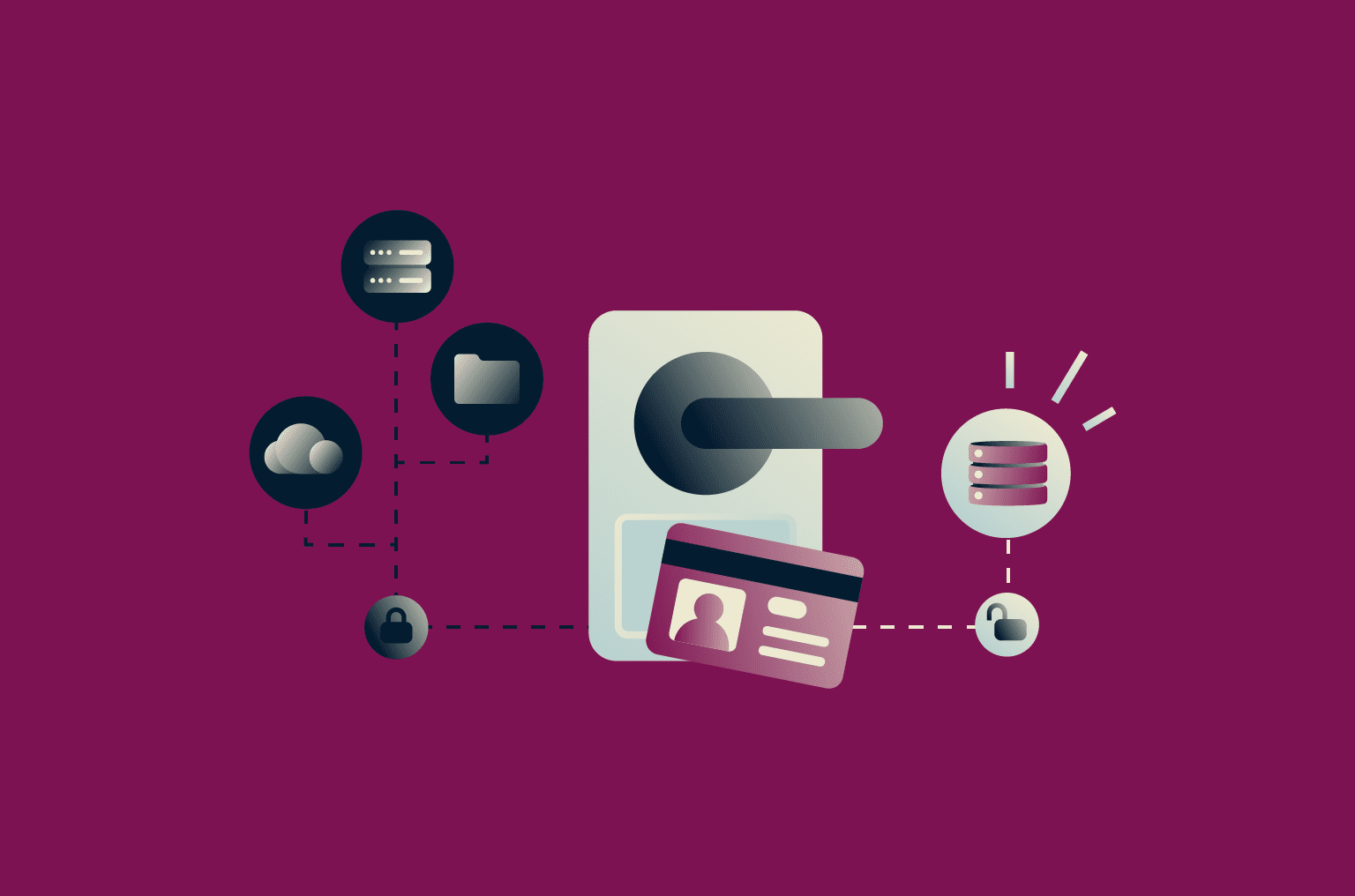
Access control in cybersecurity determines who can access digital systems, applications, and data, and what they can do with them. Just as you wouldn’t let anyone wander freely through your house or office building, you shouldn’t allow users or devices to move freely through your networks and systems.
When implemented properly, access control reduces the likelihood and impact of cyberattacks, insider threats, and human error, all of which can have serious consequences for an organization.
In this article, we explain how access control works, examine its different types, and outline practical considerations for implementing it across various environments.
What is access control in cybersecurity?
In cybersecurity, access control determines which users, devices, or services can access digital resources (e.g., files, apps, APIs, systems, and networks). It also determines what actions they’re allowed to perform, such as reading, writing, or administering those resources, and under what conditions access is granted.
Access control protects resources from unauthorized access by external attackers or malicious insiders. It also helps ensure that legitimate users and systems have access only to resources appropriate to their roles, responsibilities, and clearances.
Organizations typically enforce access control through a combination of identity and access management (IAM) systems, OS- and app-level permissions, and network-level controls.
Why access control matters today
Access control is essential today due to the prevalence of cyber threats. According to the Cyber Security Breaches Survey 2025, commissioned by the U.K. government, 43% of businesses experienced a cybersecurity breach or attack between June 2024 and June 2025.
The financial impact of these breaches can be severe. IBM’s 2025 Cost of a Data Breach report found that the global average cost of a data breach in 2025 was $4.44 million, with the average cost in the U.S. reaching an all-time high of $10.22 million.
Additionally, some of the top causes of data breaches identified by IBM, including phishing and compromised credentials, can be mitigated through access controls. Measures like multi-factor authentication (MFA), least privilege, conditional access, and segmentation help limit what attackers can do if credentials are stolen or access is gained.
How access control works (step by step)
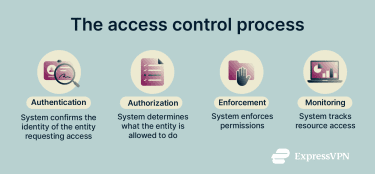
There are many types of access control, but here's a general explanation of the process that applies across all models.
Step 1: Identity verification (authentication)
The first step in any access control process is confirming the identity of the entity requesting access. An entity here can refer to anything that might request access to digital resources, whether that’s a user, device, app, or service. Accurate authentication is critical because all subsequent access decisions rely on knowing the correct identity.
Identity verification often involves verifying credentials such as passwords, passkeys, security tokens, certificates, or biometrics, typically via an identity provider (IdP). Popular IdPs include Okta and Microsoft Entra ID.
Step 2: Permission evaluation (authorization)
Once an entity is authenticated, the system determines what actions it’s allowed to perform. It does this by evaluating the entity's permissions against policies or rules, taking into account factors like the entity’s role, attributes, and the sensitivity of the resource. Based on this evaluation, the system may allow or deny access or require additional verification.
A simple example of authorization in action is when a system allows a project manager to edit documents in a shared folder while restricting team members to view-only access.
Step 3: Access enforcement
After authorization decisions are made, the system must enforce them; otherwise, they’re meaningless. In other words, the system must have mechanisms that allow or block an entity from performing specific actions.
Enforcement can occur at multiple layers. For example, an app might prevent a user from opening a file they don’t have permission for, while a network proxy or API gateway can restrict access to particular services or endpoints based on identity and permissions.
Step 4: Monitoring and logging access activity
The final step in the access control process includes logging who accessed which resource, when, and what actions they performed. If these logs are retained, protected from tampering, and regularly reviewed or analyzed, they can serve several important purposes:
- Auditing: Organizations can review access activity to ensure policies are being followed. For example, auditors can verify that sensitive data was only accessed by authorized personnel.
- Compliance: Many industries are required to comply with regulations such as the General Data Protection Regulation (GDPR), Health Insurance Portability and Accountability Act (HIPAA), and Payment Card Industry Data Security Standard (PCI DSS). Monitoring and logging provide the records needed to demonstrate adherence to these standards.
- Threat detection: By analyzing access patterns, organizations can spot unusual or suspicious behavior that may indicate a security threat, such as a user accessing large amounts of sensitive data at odd hours.
Types of access control
There are multiple models and techniques for implementing access control, each designed to meet different security needs.
Note that some of these models are mutually exclusive, while others can be combined to provide layered or hybrid security.
Mandatory access control (MAC)
MAC is a strict access control model where the system or administrators assign labels to both users and resources, and access is automatically allowed or denied based on those labels. Users cannot modify the rules, even for resources they create.
This access control model is often used in high-security environments, like government or military systems. By removing the human element from access decisions, it’s designed to ensure that rules are followed consistently and reduce the risk of accidental or intentional data exposure.
Here’s a simple example of MAC in action: In a government system, an official may label a document as “Confidential” when creating it. After that, the system automatically enforces who can access it. Even the official can’t grant access to someone without the required clearance.
Discretionary access control (DAC)
DAC is similar to MAC, but it gives the owner of a resource the authority to change its permissions, making the model more flexible. However, because control is distributed among individual users rather than centralized under the system, there’s a higher risk of mistakes or misuse.
This model is often used in file systems (e.g., Google Drive, Microsoft OneDrive, Dropbox) where security requirements aren’t as stringent.
Role-based access control (RBAC)
In RBAC, rather than assigning permissions to individual users, permissions are assigned to roles, and each user is given one or more roles. For example, the “Manager” role might allow editing reports and approving expenses, while the “Employee” role only allows viewing reports.
Assigning a user the “Manager” role automatically grants them all the permissions associated with that role, without needing to configure each permission individually.
This approach simplifies management for administrators, which is why it’s often used in organizations with many users. However, RBAC can get messy if roles proliferate or permissions are layered without regular review, a challenge sometimes called “role explosion.”
Attribute-based access control (ABAC)
ABAC evaluates multiple attributes when granting access. These could include attributes of the user, the resource, or the environment. This makes it similar to RBAC but more granular and flexible, since RBAC considers only the user's assigned role(s).
Using ABAC, a company could allow access to a file only if the user is in the finance department (user attribute), the file is classified as non-confidential (resource attribute), and the access occurs during business hours (environmental attribute).
Rule-based access control (RuBAC)
RuBAC determines access by checking specific, predefined rules set by administrators. For example, using a RuBAC model, an organization might stipulate that access should be denied if:
- The user isn't connected to a virtual private network (VPN).
- The user’s IP address isn’t from a whitelisted range.
- The user is attempting to access the system outside business hours.
While RuBAC and ABAC can enforce similar conditions, the key difference is how they evaluate access. RuBAC uses fixed, predefined if/then rules. ABAC, in contrast, evaluates multiple attributes dynamically.
For example, RuBAC could block access if a user attempts to log in outside business hours. ABAC, in contrast, could block access only if the user is outside business hours and off-premises, taking multiple attributes into account to make a context-aware decision.
Access control lists (ACLs)
While many access control models, including MAC, DAC, RBAC, ABAC, and RuBAC, define rules at the system or policy level, ACLs apply to individual resources or objects. In this model, each controlled resource, whether it's a file, folder, router, firewall, or network device, has its own list of permissions specifying which users or groups can access it and what actions they can perform.
This model of access control is granular and straightforward, but managing ACLs at scale can be challenging, since each list must be maintained individually.
Network access control (NAC)
The other access control methods described above focus on deciding who can access files or apps once inside the system. NAC focuses on controlling which devices and users are allowed to connect to a network in the first place.
NAC can verify things like whether a device has up-to-date security software, meets configuration standards, or is an approved device type. Based on these checks, NAC can grant full access, limit the device to a restricted network segment, or block it entirely.
Common use cases include:
- Checking that laptops and desktops have up-to-date security software before connecting.
- Restricting guest or contractor devices to a separate network.
- Blocking insecure Internet of Things (IoT) devices from accessing sensitive systems.
Access control policies and best practices
The following best practices can help organizations implement access control more effectively.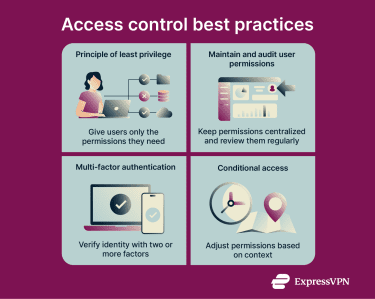
Principle of least privilege (PoLP)
PoLP is a core best practice in access control and is commonly applied in zero-trust security frameworks. It means giving users only the minimum permissions they need to perform their tasks.
This helps limit the resources a bad actor can access if a compromised account is used. Similarly, it reduces the impact of insider threats. Finally, it protects against human error, like someone accidentally leaking sensitive files, since fewer people have access to sensitive information in the first place.
Setting and managing user permissions
Effectively managing user permissions is a key part of access control. A common approach is RBAC, which makes it easier to grant new users the access they need and to update or remove access when roles change. However, organizations should evaluate which access control model best fits their environment and security requirements.
Regardless of the model, some best practices for managing user permissions include:
- Reviewing permissions regularly to ensure they remain appropriate.
- Removing obsolete accounts promptly.
- Revoking unnecessary privileges to limit potential exposure.
- Maintaining a centralized record of roles and access rights for auditing and compliance.
Multi-factor authentication (MFA) and conditional access
MFA strengthens access controls by requiring users to verify their identity with two or more factors. This might include something they know (a password), something they have (a security token or phone app), or something they are (biometrics like a fingerprint).
Some modern or sophisticated attacks may be able to bypass MFA. Nonetheless, MFA is still one of the most effective controls for reducing account compromise when implemented correctly and combined with other safeguards.
Conditional access is a security mechanism that adjusts access requirements based on certain factors. On IAM or IdP platforms, these factors are often risk-based (meaning access may change if certain conditions indicate higher risk) and can include the user’s device, location, or time of access.
It can be combined with MFA to enforce stronger, context-aware access controls. For example, a system might require MFA only when a user logs in from an unfamiliar device, outside business hours, or from a different location. This allows the organization to balance security and usability, enforcing stricter checks when risk is higher while keeping routine access smooth for trusted situations.
Access control in modern environments
Modern IT environments, such as cloud apps and remote workforces, create new challenges for access control that require updated strategies. One of the biggest challenges is that traditional network boundaries are no longer a reliable basis for deciding who should be trusted.
In the past, most apps and data lived on servers inside a company’s own network. Access to that network was tightly controlled: users were physically in the office, using company-managed devices, connected through known and trusted networks. Firewalls and other perimeter defenses acted as strong gatekeepers, protecting internal resources from outside threats.
Under those conditions, if someone had valid credentials and was already inside the network, it was reasonable to assume their device and connection were secure, so checking credentials at the perimeter was often enough.
That assumption breaks down in cloud, Software-as-a-Service (SaaS), and remote or hybrid environments. In these environments, apps and data are no longer confined to a single internal network, and users connect from a wide range of devices and locations over the internet.
As a result, access control can’t rely solely on network boundaries and must account for who is accessing a resource, where they are accessing it from, and under what conditions.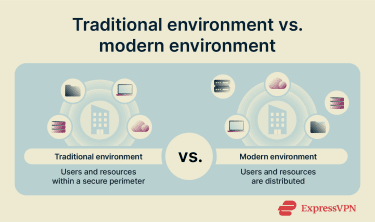
Zero trust and context-aware access
Zero trust is a security model designed to address the challenges organizations face in modern environments.
A zero-trust model removes the assumption that anything should be trusted by default, even when users have valid credentials. Rather than relying on network location or a one-time login, access decisions are continuously evaluated based on current conditions.
This doesn’t necessarily mean users are constantly re-authenticated (i.e., asked to re-enter their credentials). It means that access can be adjusted during a session if relevant conditions change. To support this approach, zero trust relies heavily on context-aware (or conditional) access.
Technologies that enable digital access control
Digital access control relies on technologies that identify users, verify their identity, and enforce permissions across systems and environments. Besides ACLs and NACs, here are some other significant technologies.
Identity and access management (IAM) systems
IAM systems are the backbone of digital access control. They help organizations manage user identities, verify them, enforce authentication and authorization, and control user permissions across systems, apps, and cloud services.
At a basic level, an IAM system is designed to ensure that each user or device has a unique identity and that access to resources is granted only according to policies or roles. It centralizes account and permission management, making it easier for administrators to add, update, or revoke access as needed.
IAM systems also support single sign-on (SSO), allowing users to securely access multiple services with a single set of credentials. Standards like OpenID Connect (OIDC) and Security Assertion Markup Language (SAML) enable trusted identity verification across different apps and platforms.
By integrating authentication, authorization, and permissions into a single platform, IAM simplifies the enforcement of access control policies consistently, even across complex cloud, SaaS, and remote environments. It also provides a foundation for modern security approaches, such as zero trust.
Biometric authentication (digital use cases)
Biometric authentication uses the unique physical or behavioral traits of a person, such as fingerprints, facial features, or voice patterns, to verify user identity and support access control decisions. An example of biometric authentication is a smartphone that lets users unlock it with a fingerprint or facial scan rather than a PIN.
Biometric authentication can strengthen identity verification beyond traditional methods like passwords, which are easier for attackers to guess or steal. It can also improve convenience, since traits cannot be easily shared or forgotten.
That said, because biometric systems are probabilistic (they rely on matching patterns rather than exact replicas), they aren’t infallible. Additionally, biometric templates can still be stolen, and traits cannot be changed, so a compromised template could increase the risk of permanent unauthorized access.
For these reasons, biometric authentication is most effective when used as part of MFA, combined with other factors, such as passwords or security tokens.
Common access control challenges and solutions
Common mistakes in implementing effective access control include:
- Poorly defined roles: In RBAC, overlapping, unclear, or too many roles (sometimes called “role explosion”) can lead to inconsistent or excessive access.
- Failure to enforce least privilege: Users, service accounts, and API keys may accumulate permissions they no longer need (a phenomenon called privilege creep) or be granted broader access than necessary, increasing the risk of unauthorized access.
- Lack of strong authentication practices: Failing to enforce strong passwords or MFA can undermine security even if other access controls are configured correctly.
- Unauthorized or unmanaged applications (shadow IT): Employees using unsanctioned apps or services can bypass official access controls, creating hidden risks for sensitive data and systems.
All of these challenges can be mitigated through regular access reviews, auditing, and logging, which help detect problems before they lead to security issues.
Balancing security and usability
Another major challenge in access control is finding the right balance between strong security and a smooth user experience. If security measures are too strict, users may become frustrated and resort to insecure workarounds.
For example, overly strict password policies can lead users to write down passwords on sticky notes or reuse the same password across multiple accounts.
To address this, organizations can adjust access requirements based on context, such as only requiring MFA when a login seems unusual or allowing users to access multiple applications with a SSO while still enforcing identity verification.
Scaling access control as organizations grow
When implementing access control, organizations must consider how well their systems scale as the company grows. Solutions that work for a small team may become cumbersome in larger environments.
For example, managing individual ACLs can be straightforward for a few users but quickly becomes difficult to maintain and audit across hundreds or thousands of employees.
To help ensure access control remains effective at scale, organizations often adopt RBAC or IAM systems, which centralize identity and permission management. Scaling typically also requires standardized roles to define consistent permissions, automated updates to access as people join or leave, and periodic access reviews to prevent role or ACL sprawl.
FAQ: Common questions about access control
What is access control?
Access control in cybersecurity is the process of determining who can access which resources, under what conditions, and what actions they can perform. The goal of access control is to protect an organization’s data and systems from unauthorized use or breaches.
What’s the difference between authentication and authorization?
Authentication and authorization are both components of access control. Authentication is the process of verifying a user’s identity, such as entering a password, scanning a fingerprint, or using a security token. Authorization determines what a verified user is allowed to do, such as viewing a document, editing a file, or accessing an administrative panel.
What is an example of access control in cybersecurity?
An example of access control in cybersecurity is requiring multi-factor authentication (MFA) to access a corporate email system. Another example is allowing only members of the finance team to approve invoices in a company’s accounting software; other employees may view invoices but cannot make changes.
How does access control prevent data breaches?
Access control prevents data breaches by limiting exposure to sensitive information. For example, by restricting users to only the permissions they need, organizations reduce the number of potential attack points and limit what a cybercriminal could access if an account is compromised.
Does access control replace other security tools?
No, access control complements rather than replaces other security tools. They all have different roles. For example, firewalls block unauthorized network connections, and intrusion detection systems monitor for suspicious activity and alert administrators. Access control focuses on who can access which resources and what actions they can perform.
Take the first step to protect yourself online. Try ExpressVPN risk-free.
Get ExpressVPN