Snapchat scams: Recognize the risks and stay safe


Snapchat’s fast, temporary style makes it easy to stay connected, but it can also make things easier for scammers. Fake accounts, phishing attempts, and sudden requests for money often rely on catching you off guard before you have time to think. Disappearing messages can also make it harder to notice or keep track of red flags.
These scams typically exploit trust and create a sense of urgency rather than relying on technical tricks. Once you know the common warning signs, however, they’re much easier to spot. This guide covers the most common Snapchat scams, how to identify suspicious profiles, and practical steps you can take to protect your account and personal information.
What are Snapchat scams?
Snapchat scams involve someone using the platform in a deceptive way, usually to steal personal information, private photos, money, or access to your account. These scams often begin with a message that seems harmless, sometimes even coming from a profile that looks familiar, before shifting into a request you wouldn’t normally expect from a friend.
While scams exist on nearly every social platform, certain features of Snapchat can make some types of scams more effective. Snapchat is commonly used for direct communication with friends and people users already know, rather than for interacting with a broad public audience. Its design emphasizes private, informal exchanges, such as one-to-one messages, small group chats, and disappearing photos or videos, which can make interactions feel more personal and trustworthy than on many other social platforms.
Unlike platforms that center on public profiles, feeds, or large networks of acquaintances, Snapchat interactions often take place in closed conversations. This can lower users’ guard and make unexpected messages seem less suspicious at first glance. Scammers take advantage of this dynamic by impersonating real people or hijacking legitimate accounts, relying on familiarity and social trust rather than technical exploits to succeed.
Snapchat scams to watch out for
Most Snapchat scams rely on social engineering tactics to lure you in and build trust. Some scammers use emotional pressure to steer conversations in a direction that benefits them. A chat might begin normally, then gradually start moving into messages that feel emotionally heavy or demanding.
You might see things like “If you really cared, you’d help me,” “Don’t tell anyone about this,” or “I need an answer right now.” These messages are designed to make you act quickly or feel responsible for someone else’s emotions.
Some scammers also pretend to be Snapchat employees to push you to act without thinking. However, Snapchat emphasizes that it will never contact you via Snap or Chat to assist you. If you recognize any of the techniques below, it’s a good idea to block and report the profile.
“Friend” account recovery scams
In this scam, you might receive a message from someone who appears to be a friend saying they’re locked out of their Snapchat account. The chat often feels ordinary at first. Then they ask you to pass along a verification code or link that they’ve had sent to you by mistake.
The trick here is that the code being sent to you is actually the verification code to reset the password on your own account. Snapchat will never require a recovery code to be sent to a different user, so any request that follows this pattern isn’t legitimate.
Romance scams and fake “sugar daddy” offers
Romance scams on Snapchat often begin with a friendly message from someone who seems interested in getting to know you. They can also start on a dating platform and then move on to Snapchat. The conversation can feel personal and genuine at first, and the other person might take time to build rapport.
At some point, they introduce a problem or emergency that can include requests for money, gift cards, or payments through other apps. You may be asked to help cover travel costs or other small fees linked to plans that won’t take place (meet-up scams).
Requests often become more specific once the scammer feels you’re engaged in the conversation. The goal is usually to get hold of your personal information or take your money before disappearing.
A similar version involves “sugar daddy” or “sponsor” offers. These accounts may promise gifts, money, or exciting trips, and the chat can feel flattering at the start. Eventually, however, they start demanding money from you or pressure you into sharing your bank details. The scammer typically disappears once you’ve sent something of value.
Sextortion
Like romance scams, sextortion schemes can start with friendly or flirtatious messages. However, the other person soon asks for private photos, directs you to unfamiliar links, or encourages you to continue the chat elsewhere.
Sextortion happens when someone then pushes you to share intimate images and then uses those images or screenshots to blackmail you.
Sham contests and giveaways
You might get Snapchat messages saying you’ve won a prize or qualified for a special reward. These offers might look convincing, especially if they talk about well-known brands or use professional-looking photos.
In reality, these messages are phishing scams that often lead you to pages that collect your information or ask for small fees that never result in any prize. Scammers may also encourage you to share the offer with friends on Snapchat or post to your Story, which can spread the scam further.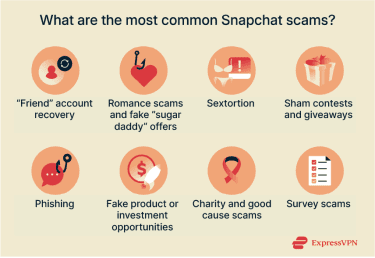
Snapchat employee impersonation (phishing)
These scams start with a link or message that looks like it comes from Snapchat itself. It might say that you need to verify your account, confirm a login attempt, or view a message that couldn’t be delivered.
The link often leads to a page designed to look like Snapchat’s login screen, so you enter your details. This is designed to give the scammer access to your account, which could leave you at risk of identity theft and fraud.
Phishing attempts can even start outside of Snapchat, such as emails or messages on other platforms, saying there’s an issue with your Snap account.
Fake product or investment opportunities
Some scammers use Snapchat to promote products or investment deals that don’t exist. These offers might appear in a Story, a direct message, or via a familiar account. The message can sound appealing, especially with heavily discounted items or small investments that promise fast gains.
The offers often build toward requests for payment through other apps before anything is delivered. Usually, nothing is sent after the payment, and the account stops replying soon after. Genuine sellers or investment services typically don’t rely on disappearing messages in Snapchat or sudden pressure. Be wary if an offer feels rushed or hard to verify.
Charity and good cause scams
Messages asking for donations can sometimes appear in a Story or a direct chat. They might talk about a real event, personal emergency, or fundraising drive to get you to send money. The message might come from a hacked account of someone you recognize to make it more convincing.
Most established charities don’t collect donations through disappearing messages or personal accounts. They also typically avoid unusual payment methods like gift cards or direct transfers to individuals.
Survey scams
Survey scams on Snapchat often appear as messages claiming you can earn quick rewards like gift cards, discounts, or exclusive perks by completing a short questionnaire. Once you click the link, you may be asked for personal details, login information, or payment to unlock the reward.
In some cases, the final page sends you to more offers that keep asking for additional information. Scammers may also collect the details you enter, such as email addresses or phone numbers, which can lead to more unwanted contact or attempts to target you again.
How Snapchat protects its users
Snapchat uses various safety measures to help protect you and flag suspicious behavior. One of these is signal-based detection, which is automated software that looks for patterns linked to harmful or abusive activity. This helps identify and remove certain accounts before they can reach you, which also reduces the chance of you being contacted by a scammer.
The platform also participates in the Take It Down program, an initiative run by the National Center for Missing & Exploited Children (NCMEC) that is designed to combat sextortion and the nonconsensual sharing of intimate images of anyone under the age of 18. The program allows users to create a digital fingerprint, also known as a hash, of selected photos or videos. This fingerprint is generated on the user’s device and shared with participating platforms, including Snapchat, without uploading the actual image or video.
Snapchat then uses this fingerprint to automatically detect and remove matching content if someone attempts to upload or reshare it on the platform. Importantly, users do not need to wait for an image or video to appear on Snapchat before taking action. The tool is designed so that it can also be used proactively, allowing people to reduce the risk of harmful content being shared in the first place.
Snapchat also offers Safety Snapshot, a digital literacy channel designed to educate users about data privacy, account security, online safety topics, and Snapchat security features through short in-app content.
How to protect yourself from Snapchat scams
Protecting yourself on Snapchat isn’t just about watching out for suspicious messages. You should also take steps to secure your account and use Snapchat’s built-in privacy measures to reduce the risk of being targeted. Here are some tips to help you.
Tips to secure your Snapchat account
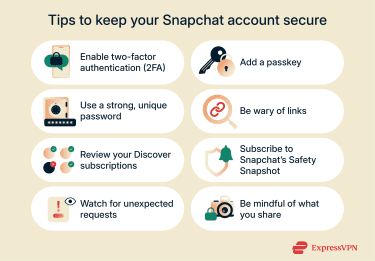
- Enable two-factor authentication (2FA): Snapchat lets you set up 2FA through SMS or an authenticator app. This means you need both a password and a verification code to sign in, which prevents people from accessing your account with just your login details.
- Add a passkey: Snapchat supports passkeys that work with Face ID, Touch ID, or your device PIN instead of typing a password. The passkey stays on your device and can’t be entered on a fake login page, which helps protect your account from phishing.
- Use a strong password: Make sure your Snapchat password is unique. If someone gets into your Snap account, a reused password could let them access your other accounts too. Choose a password that’s hard to guess and uses a mixture of letters, numbers, and symbols.
- Be wary of links: If a message outside Snapchat asks you to verify your account or fix a login issue, it’s safer to open the app directly and check for alerts there. Avoid clicking on links from unknown accounts in Snap, too. That way, you can avoid fake login pages or other phishing sites.
- Review your Snapchat Discover content: Discover shows content from creators and accounts you follow and recommended content from Snapchat. Remove channels you don’t recognize or no longer want to see to limit misleading posts or promotions.
- Subscribe to Snapchat’s in-app safety channel: The Safety Snapshot includes updates highlighting current scams and security tips, which can help you detect suspicious activity sooner.
- Be careful about what you share: Think twice about what you share on Snapchat. Even if Stories delete automatically, someone could still screenshot your post.
Learn more: Thinking of leaving Snapchat instead? Find out how to delete your Snapchat account.
Adjust your privacy settings
Snapchat lets you control who can contact you, see your content, and find your account. Go to Privacy Controls in the app, and follow these steps to adjust your settings:
- Choose who can contact you: Limit who’s allowed to send you Snaps or messages by selecting friends only or making a custom list.
- Control who can view your Story: You can share Stories with all your friends or a smaller group, or create private Stories only selected people can see.
- Set who can generate with your Selfie: Choose whether friends can create AI Snaps including your My Selfie, and turn off the option that shows your My Selfie in ads.
- Manage your location on the Snap Map: Share your location with chosen friends or turn on Ghost Mode so only you can see yourself on the map. When Ghost Mode is on, your Bitmoji shows a blue sign with a ghost icon to indicate that your location is hidden on the Snap Map. Ghost Mode doesn’t affect live location sharing, so friends you’ve chosen to share it with can still see where you are. Snaps you submit to Snap Map may still appear on the Map, because this setting controls your personal location, not public content you choose to share.
- Choose who can see you in Find Friends: Decide whether you appear in Find Friends, which helps others discover your account. Note that updates can take up to 72 hours to take effect.
- Limit how people find your account: Turn off features that let others find you through your phone number or Quick Add.
- Review friend requests: Check profiles before accepting or block accounts that seem unfamiliar.
- Control your Activity Indicator: Choose whether other Snapchatters can see if you’ve been active recently.
- Set who can use your Cameos and Stickers: Decide whether friends, everyone, or only you can use the Cameos and Stickers you create.
- Control what appears on your Public Profile: If you have a Snapchat account and are 16 or older, you also have a Public Profile. If you decide to use it, make sure to review which information is visible and who can see it.
- Use My Eyes Only: Protect Snaps you want to keep entirely private by moving them from Memories to My Eyes Only. They will be protected with a passcode so only you can open them on your device.
- Check connected apps and devices: Snapchat shows third-party apps and devices linked to your account, so you can simply remove any you don’t recognize.
Should you use a VPN with Snapchat?
Using a virtual private network (VPN) can add an extra layer of privacy when accessing Snapchat, especially on public or shared Wi-Fi. A VPN encrypts your internet traffic and masks your IP address, which helps reduce the amount of network-level information exposed while you’re online.
It’s important to understand that a VPN won’t stop scams or filter suspicious messages inside Snapchat. However, it can make you less exposed on open networks and provide additional protection against certain risks tied to network monitoring or credential interception.
For example, on unsecured networks, attackers may attempt to intercept connections or redirect users to fraudulent websites, a technique often referred to as a man-in-the-middle (MITM) attack. By encrypting your connection, a VPN makes this kind of interference more difficult, helping protect your login activity on untrusted Wi-Fi.
Some VPNs also offer optional safety features. For example, ExpressVPN includes Threat Manager, a built-in tool that helps block known trackers and prevent connections to certain known malicious domains.
Keep in mind that a VPN doesn’t change what you share in the app or how Snapchat’s features work. To stay protected, it should be used alongside Snapchat’s own security and privacy controls.
How to identify a fake Snapchat account
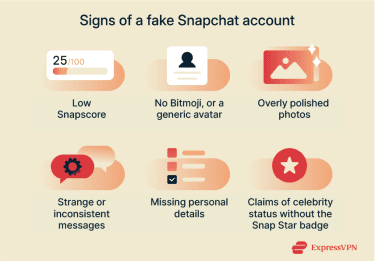
Fake Snapchat accounts often look convincing, but there are small clues that can help you tell when something isn’t quite right. Some signs to look out for include:
- Low Snapscore: A very low score can indicate a new or inactive account, which is common for profiles created quickly for scams.
- No Bitmoji or a generic avatar: Many people personalize their Bitmoji, so a blank or default icon can be a hint that the account was set up quickly, with minimal effort.
- Unusual or overly polished photos: Profile images that look like stock photos or heavily edited selfies can be a sign that the person isn’t who they claim to be.
- Strange or inconsistent messages: Messages with odd phrasing, generic compliments, or sudden requests often come from accounts that aren’t genuine.
- Missing personal details: A profile with little information, no real photos, or a Story that never changes should be approached with caution.
- Claims of celebrity status without verification: Public figures on Snapchat have a yellow “Snap Star” badge. If someone claims to be well known but doesn’t have the badge, the account likely isn’t authentic.
How to tell if your Snapchat account has been hacked
If someone has hacked your account, you might notice suspicious activity. Look out for:
- Login alerts from unknown locations or devices: These can appear by email or as in-app notifications when someone signs in from a place you don’t recognize.
- Unfamiliar devices in Session Management: If you see a device you’ve never used, it may mean someone else is logged in.
- Changes to your personal details: Your phone number, email, or display name might look different without you updating them.
- 2FA added without your input: This can be a sign someone else is trying to secure access to your account.
- Messages or spam you didn’t send: Friends may tell you they received strange messages from your account.
- New friends you didn’t add: Fake or compromised accounts sometimes connect with new contacts on your behalf.
- Stories or Spotlight posts you don’t recognize: If content you didn’t create appears on your profile, it’s usually a sign you’ve been hacked.
- Repeated logouts: Being forced to log in again and again may indicate someone else is accessing your account.
- Unfamiliar data download notifications: Alerts about a Download My Data request you didn’t make can signal someone is trying to export your information.
How to report suspicious activity
Snapchat lets you report messages, profiles, and harmful or suspicious content. Follow these steps to report suspicious activity.
Report a suspicious chat or message
- Open the chat with the message you want to report.
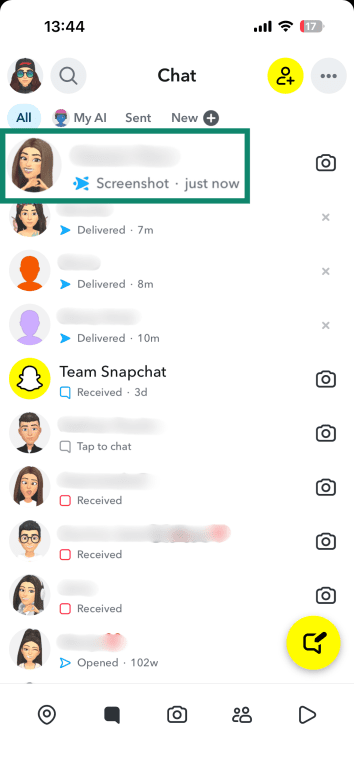
- Press and hold the message, then select Report from the menu.
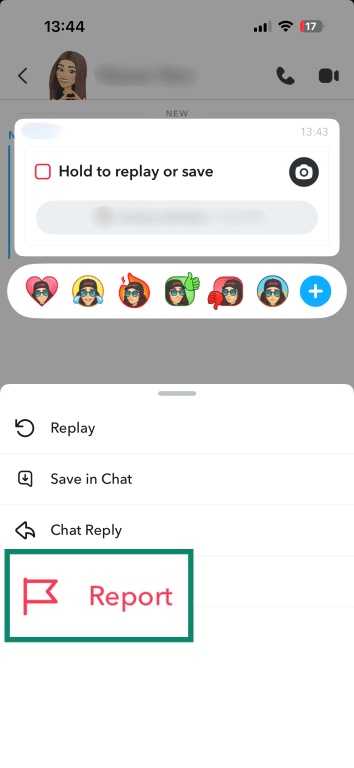
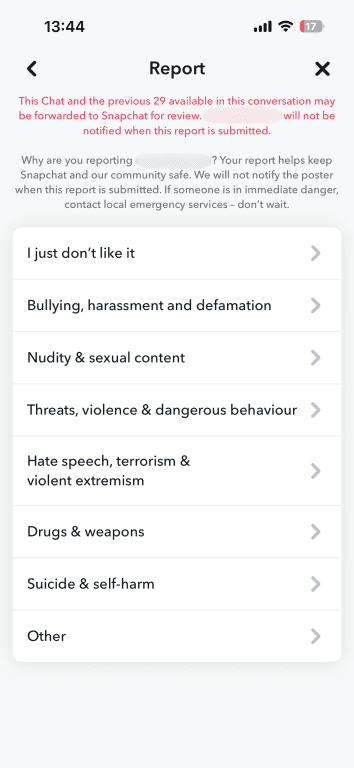
- Choose the reason that best describes the issue and submit the report.
Report a suspicious profile
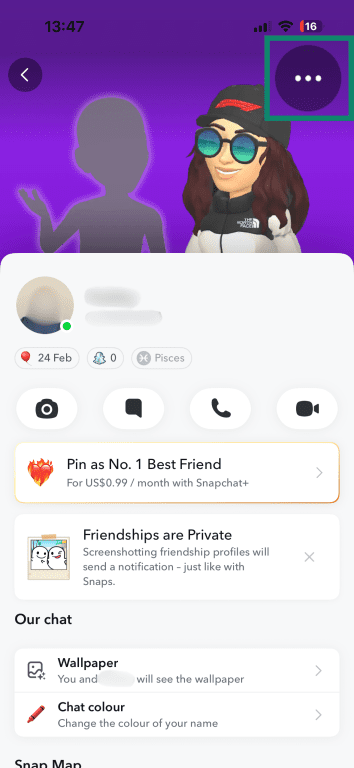
- Open the profile of the person you want to report and tap the three-dot menu in the top-right corner.
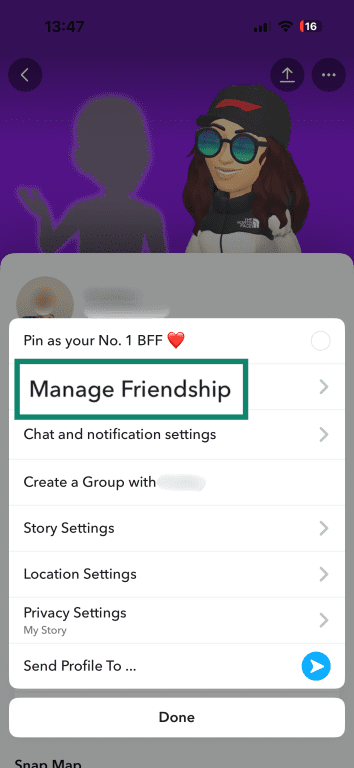
- Click Manage Friendship.
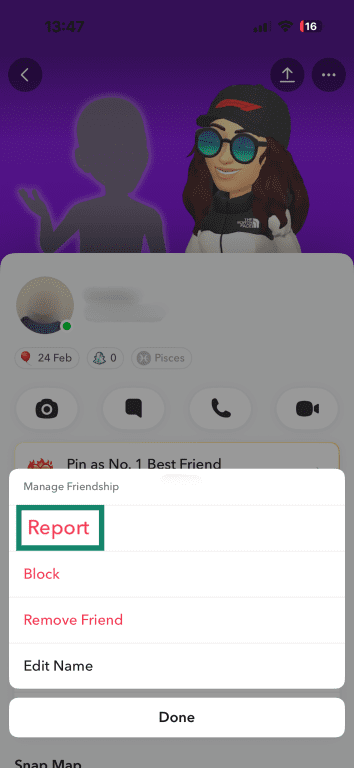
- Select Report.
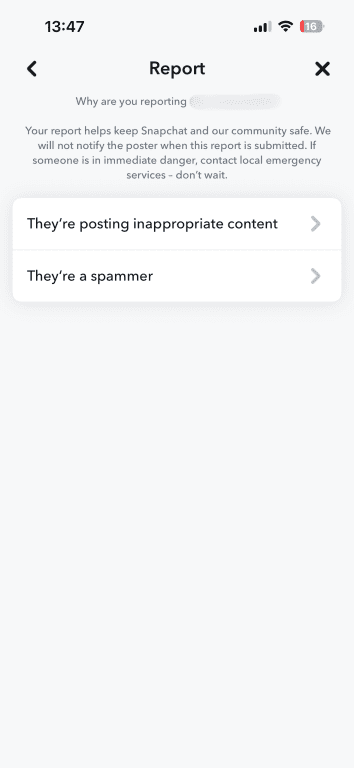
- Pick the category that matches what you noticed (e.g., fake account, inappropriate content) and submit the report.
Report a suspicious Snap or Story
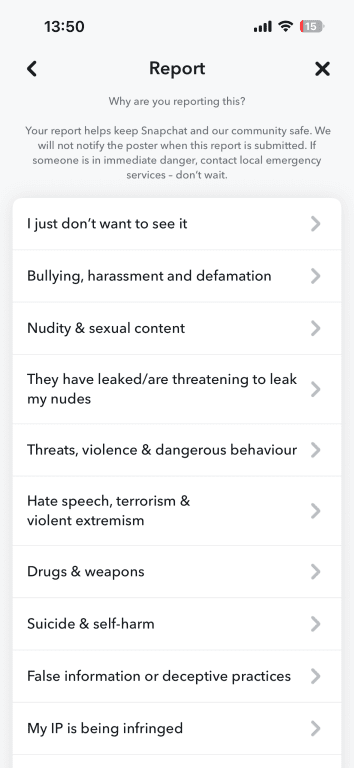
- View the Snap or Story you find concerning. Press and hold on the content, then tap Report.
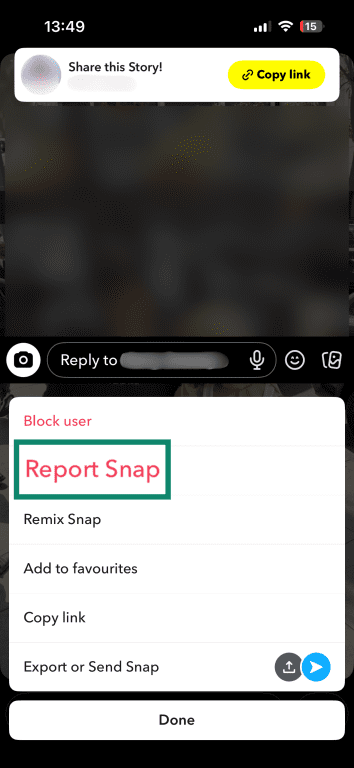
- Select the reason for your report and submit it.
Tip: You can also hide any Story that you don't want to see on Discover. Just press and hold on a Story and tap Hide.
Report a suspicious link
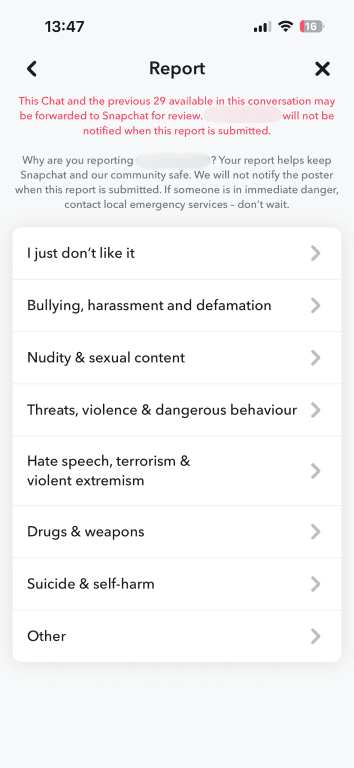
- Press and hold the link in the chat and choose Report.
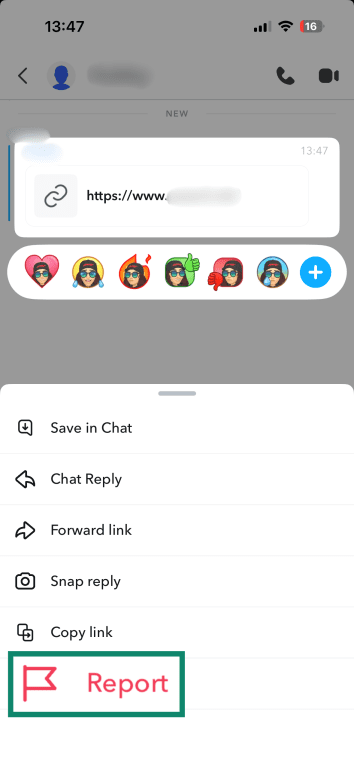
- Select the option that describes why the link seems unsafe and submit your report.
What to do if you’ve been scammed on Snapchat
If you think you’ve been scammed on Snapchat, there are clear actions you can take to protect your account and limit any further impact.
Report the scam to Snapchat and the authorities
You can report suspicious stories, links, and profiles using the steps we’ve covered above. If the issue involves money, stolen information, or a compromised account, you might want to escalate it. If you can’t report the account through Snapchat or you’re blocked from doing so, you can use the Snapchat Support website to flag issues.
For scams involving financial loss or fraud, you should contact your bank. You can also report the incident to the Federal Trade Commission (FTC) or to the Internet Crime Complaint Center (IC3). It’s a good idea to keep screenshots of profiles, messages, etc. so you have further evidence if you submit a report.
How to block or remove accounts
Blocking someone on Snapchat stops them from sending you Snaps or Chats and removes them from your friends list.
To block a friend, follow the same steps for reporting a suspicious profile, but select Block rather than Report. If you want to remove someone without blocking them, you can use Manage Friendship and choose Remove Friend instead. This removes them from your friends list and stops them from seeing private Stories, but depending on your privacy settings, they still may be able to contact you.
Steps to recover your account
Snapchat may temporarily lock your account if you or someone else enters the wrong password several times in a short period. This can happen if you mistype your details, but it can also be a sign that someone else is trying to access your account and is guessing the password. If you know your login details are correct and it was you, wait 48 hours before trying again.
If you suspect it was someone else trying to log into your account, it’s a good idea to change your password. You can reset your password on the Snapchat Accounts Portal to regain access. Otherwise, you can reset it easily in the app.
If you see a message that Snapchat has locked your account for violating the Community Guidelines or Terms of Service, you can’t unlock it. Instead, you can apply for an appeal if the option is available. Simply open the app, try to log in, and tap Appeal Decision.
If you believe your account has been compromised and the perpetrator locked you out of your account, you should contact Snapchat Support to help you recover access.
FAQ: Common questions about Snapchat scams
How can I tell if someone is real on Snapchat?
A real account usually has a consistent Snapscore, a personalized Bitmoji, and their messages to you mirror how that person usually communicates with you. Fake Snapchat accounts often have very low activity and generic profile images. The person may also message you with sudden requests for money, login codes, or private photos. If something feels off, you can ask the person to send a quick voice or video Snap, or check their username against the one you already have saved.
What should I do if someone is impersonating a friend?
The safest approach is to check with your friend through another platform to see whether the account is real. If it isn’t, block the account and report it directly in Snapchat. You can do this by pressing and holding the username, tapping “Manage Friendship,” and selecting “Report.”
How do I report a fake account?
To report a fake account, open the profile, tap the three-dot menu in the corner, and select “Report.” Choose the reason that matches what you’re seeing, such as a scammer pretending to be someone else or posting misleading content.
Can someone steal my information through Snapchat?
Someone can’t access your account just by adding you or viewing your Story, but they can try to trick you into sharing details through scams or phishing links. Avoid entering your login information anywhere outside the Snapchat app. Turn on two-factor authentication (2FA), and check your linked devices regularly to make sure only your own devices are logged in.
How do I stop scammers from contacting me?
Snapchat lets you adjust your privacy settings so you can control who contacts you. You can limit who can send you Snaps, hide yourself from Quick Add, restrict who can view your Story, and turn on Ghost Mode to control who sees your location. Blocking suspicious accounts and removing unfamiliar subscriptions in Discover also helps reduce unwanted messages.
Is Snapchat safe for teens and kids?
Snapchat includes safety features like two-factor authentication (2FA), reporting tools, parental controls (Family Center), and options to limit who can contact or find an account. These settings can make the app safer, but they don’t remove every risk. Talking openly about scams, privacy, and unusual messages is still important, especially for younger users who may be new to social apps.
Take the first step to protect yourself online. Try ExpressVPN risk-free.
Get ExpressVPN