Roblox IP ban: What it is and what you can do


Roblox enforces community guidelines to keep the platform safe and inclusive for players and content creators. Users who break these rules may face enforcement actions, which might include an IP ban, alongside other types of restrictions.
This guide explains how IP-based moderation actions work in general and covers the other restrictions Roblox may apply. It also includes a detailed breakdown of behavior that can trigger a moderation action.
Note: Roblox’s Terms of Use and support articles don’t mention IP bans or explain how the platform enforces restrictions. Most available information on IP bans comes from user reports, forum discussions, and third-party blogs or news articles covering Roblox. The only official terms state that Roblox may suspend or terminate a user’s account if their actions violate its terms and community rules.
What is an IP ban?
An IP ban is a restriction that blocks users from accessing an online service through a specific IP address or range of IP addresses. It works by preventing any traffic from those IPs from reaching the platform’s servers.
IP ban vs. account ban
Unlike an IP ban, account-level restrictions only apply to a specific user account. If that account is suspended or terminated, the user can’t log in or use the service with it. However, if the same user has other accounts, they may still be able to access the platform unless those accounts are also restricted.
With an IP ban, the restriction applies to the network connection rather than a single account. This can prevent any accounts using that IP address from reaching the platform’s servers. That means the user may be unable to access the service from that network even with a different account, and it can also affect other people on the same connection, such as in a household, school, or workplace.
IP ban vs. device ban
A device-level ban means the platform prevents a specific device from creating new accounts or accessing the platform.
Reasons for Roblox enforcement actions
Roblox’s Community Standards describe a wide range of violations that can lead to enforcement actions. Common reasons include harassment and bullying, repeated spamming, disrupting other users’ experiences with exploits, and trying to evade active bans.
However, the guidelines also cover many other violations, such as accidentally sharing personal information, reusing other creators’ assets without permission, or discussing or depicting unapproved topics.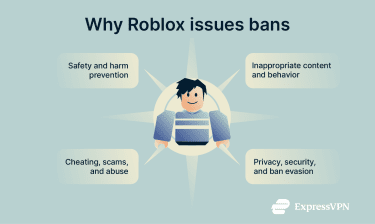
To make things clear and easy to follow, we’ve listed an overview of the offenses that can lead to a Roblox ban below and grouped them into the following categories.
Safety violations
To keep Roblox safe for everyone, the company prohibits the following:
- Exploitation of minors: Predatory behavior, child exploitation material, or attempts to manipulate or coerce minors.
- Violent extremism: Content that supports extremist groups, ideologies, or real-world violence.
- Bullying and harassment: Threats of real-world or online harm, stalking, intimidation, extortion, blackmail, sexual harassment, doxxing or threats to reveal personal information, impersonation that causes harm, and singling out individuals or groups for ridicule, humiliation, or degradation.
- Harmful behavior: Content that promotes self-harm, eating disorders, or other dangerous real-world actions.
- Discrimination: Hate speech, slurs, or targeted abuse based on identity traits such as race, ethnicity, or gender identity.
- Harmful off-platform behavior: Harassment or doxxing connected to Roblox users that occurs outside the platform.
Inappropriate content and behavior
Roblox also limits content that’s inappropriate, graphic, or potentially disturbing to its audience:
- Sensitive real-world events: Content that recreates, glorifies, or capitalizes on real-world tragedies, violence, or disasters.
- Violent content: Graphic violence or abuse involving people, animals, or fictional characters.
- Romantic and adult-themed content: Sexual or suggestive content, nudity, or solicitation of romantic relationships.
- Illegal and regulated goods: Content promoting illegal activity or regulated products like drugs, alcohol, or tobacco.
- Profanity: Swearing in text, images, or audio, including attempts to bypass filters.
- Political figures and entities: Content related to real-world political figures, parties, campaigns, or political advocacy that Roblox restricts under its Community Standards.
Cheating, scams, and abuse
Roblox enforces rules that protect gameplay fairness and help prevent users from being misled or exploited:
- Cheating and scams: Exploits, deceptive tactics, or attempts to access another user’s account without consent.
- Spam: Repetitive messages or uploads, misleading content, or creating experiences solely to direct users off Roblox.
- Intellectual property violations: Using another creator’s assets, code, media, or branding without permission.
- Advertising violations: Running ads without following Roblox’s Advertising Standards and disclosure requirements.
- Roblox economy abuse: Unauthorized Robux trading, off-platform transactions, or bypassing Roblox payment systems per Roblox’s Commerce Standards.
Privacy, security, and ban evasion
Roblox also restricts actions that expose personal data or try to bypass moderation:
- Sharing personal information: Users may be prohibited from posting or requesting passwords, addresses, phone numbers, payment details, or similar sensitive data.
- Directing users off-platform: Roblox restricts sharing external links, QR codes, or similar redirects, allowing them only in limited, approved contexts and platforms under its linking rules. Attempts to share unapproved links or circumvent link restrictions are prohibited.
- Evading security systems: Ban evasion, bypassing safety controls, or using tools to access Roblox in unauthorized ways.
- Disruptive content and behavior: Bots, injected scripts, hidden code, or false reports that disrupt users or experiences.
Common signs of Roblox moderation actions
Roblox may notify users of moderation actions through in-app messages or email, depending on the type of restriction. In some cases, access issues may also appear as error codes. For example, error codes 600 and 267 mean an experience creator has banned the player from their experience.
How to request a review or appeal from Roblox
Roblox lets players and content creators appeal certain moderation actions. These appeals are reviewed by a dedicated team at Roblox that can make any adjustment it deems necessary.
According to Roblox, some types of violations can be appealed through the Violations & Appeals tab in the account dashboard. This applies only to violations that show up there with an appeal link in your moderation notification. If your notification includes a “Violations & Appeals” link, that means Roblox has made that specific action eligible for appeal through that portal.
To access the tab manually, you can do so by following the steps outlined below. Note that this tutorial covers the account dashboard on Roblox’s site, so the steps may vary on its client applications.
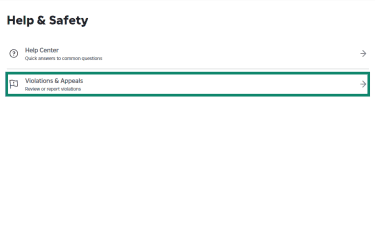
- Log into the Roblox dashboard and click the gear icon in the top right corner, then select Help & Safety.
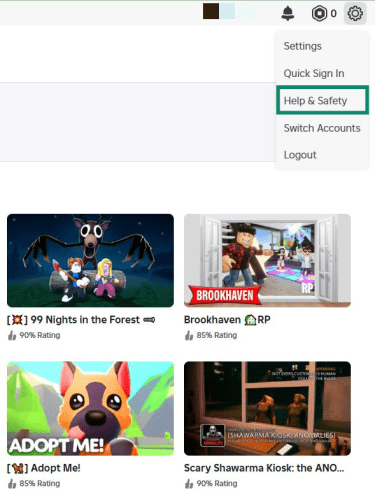
- Click Violations & Appeals.
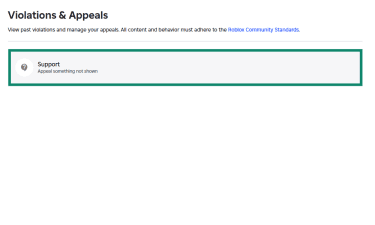
- Choose the moderation notification to submit for review. If none shows up, click the Appeal something not shown button and fill out the support form.
Other moderation actions must be appealed using the Roblox Support form. This includes actions like account terminations that lack a direct appeal link.
When submitting an appeal, you should keep the following rules in mind:
- You must submit the appeal within 30 days of receiving the moderation action.
- Each ban is reviewed only once, so duplicate appeals for the same action won’t be considered.
- Only the owner of the affected account can submit the appeal.
- Roblox’s Appeals team must be contacted from a valid email address for the account you’re appealing.
How to avoid Roblox account moderations
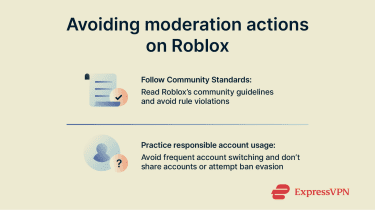
Following the Roblox Community Standards
The Roblox Community Standards define what behavior, actions, and content are allowed on the platform. Because violating these guidelines can lead to moderation actions, it’s important to read through the platform’s guidelines so you don’t accidentally break a rule.
Responsible account usage
Roblox doesn’t limit how many accounts you can create, but its built-in account switching feature supports only up to five accounts. If you manage multiple accounts, don’t share them with others, since you could be held responsible for their actions.
FAQ: Common questions about Roblox IP bans
Can Roblox ban your IP address?
Roblox doesn’t explicitly state that it bans IP addresses, but some user reports mention moderation actions that appear to apply to IP addresses or IP ranges. If an IP ban were in place, it would prevent specific IPs from communicating with the platform’s servers.
Does Roblox error 403 always mean an IP ban?
No. While some users have reported seeing error code 403 when they received moderation actions, Roblox states that this error indicates a connectivity issue. In simple terms, it means the Roblox client launched from the website didn’t initialize properly. Error codes 600 and 267, on the other hand, mean an experience creator has issued a ban for their experience.
Can multiple accounts be affected by moderation actions?
Yes. Roblox states that if a user violates its Community Standards, it may take action on other accounts that it determines belong to the same user. If you manage multiple Roblox accounts, it’s important to use them responsibly.
Can you appeal a Roblox ban?
Roblox lets users appeal bans in certain circumstances through the “Violations & Appeals” tab in the account dashboard or by using the support form. However, submitting an appeal doesn’t guarantee the ban will be lifted. Keep in mind that each ban is reviewed only once, and the appeal must be submitted within 30 days of receiving it. Only the owner of the affected account can submit it, and a valid email address is required.
Take the first step to protect yourself online. Try ExpressVPN risk-free.
Get ExpressVPN