Is cloud gaming safe? Security and privacy tips



Cloud gaming makes resource-intensive titles accessible on almost any device, but it also puts most of the gaming experience on someone else’s hardware. That shift raises a simple question: what happens to your data while you play?
Its security depends on a variety of factors, including how your connection is handled, what information the service collects, and how much control you have over your account and activity.
This guide outlines how cloud gaming works in the background, the key safety points to consider, and the steps you can take to keep your data safe.
What is cloud gaming?
Cloud gaming is a way to play video games over the internet by streaming them from remote servers instead of running them on your own device. The game runs in the cloud, and you control it through a real-time video feed on your device.
How cloud gaming works
Here’s what actually happens behind the scenes when you start a cloud-streamed game:
- A server starts your game: Your session runs on dedicated hardware in the provider’s data center, essentially a high-end PC or console in the cloud.
- The server renders the game: Rendering is the process of generating each frame of the game world. The server calculates geometry, lighting, shaders, physics, animations, and everything else needed to produce the final image.
- Frames are encoded into a stream: Encoding compresses those rendered frames into a video format small and fast enough to transmit with minimal delay. Cloud platforms use low-latency codecs tuned to update rapidly as the game changes.
- The stream is delivered to your device: The video feed is sent over your connection in real time. It’s similar to a live broadcast but optimized for responsiveness instead of just image quality.
- Your device decodes and displays it: Your device’s hardware decoder unpacks each frame and puts it on the screen with a tiny buffer to stay in sync with your inputs.
- Your inputs travel back to the server: Every action, such as button presses, stick movement, and mouse input, is transmitted upstream. The server applies them immediately and generates the next set of frames, completing the loop.
Why cloud gaming is growing in popularity
Cloud gaming appeals to gamers because it removes one of the largest barriers in traditional gaming: expensive hardware. Instead of buying a high-end PC or console, you subscribe to a service that handles the heavy computing and use devices you already own, like a mid-range laptop, to play new and demanding games.
There’s also an advantage in how the infrastructure works. When a provider upgrades its servers, you automatically get better performance without replacing anything on your end. Convenience is a major factor as well. You don’t have to download large game files, and your progress syncs across devices.
How safe is cloud gaming?
Cloud gaming can be a secure way to play games online if you choose reputable services and keep your account and devices secure. Big cloud gaming services generally follow standard security practices and reliable cloud infrastructure. However, this alone doesn’t eliminate risk.
Main cloud gaming security risks
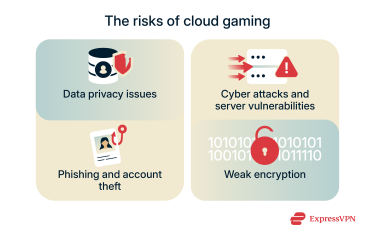
Data privacy issues
Cloud-gaming platforms collect a wide range of information to manage accounts, maintain sessions, and optimize performance. This can include your login details, gameplay history, device identifiers, network information, and, in some cases, location data.
In addition to the volume of data, there’s also the risk of how it’s stored, how long it’s retained, and whether it’s shared with other parties, such as analytics services or advertisers. If a provider lacks transparent policies or strong data-handling standards, your personal information may be exposed to unnecessary tracking or potential misuse.
Cyber attacks and server vulnerabilities
Cloud gaming depends on large, continuously running server systems, and any weakness in their servers can affect your security. Because they’re always online by design, it gives attackers far more opportunities to probe for weaknesses. If any part of the infrastructure is misconfigured or running outdated software, attackers could attempt to access account or session data.
Even with a secure platform, the ecosystem around cloud gaming can introduce issues. Unofficial clients, modified launchers, and “boosting” tools are common vectors for malware that can steal credentials or compromise your device.
Phishing and account theft
Cloud-gaming accounts are valuable targets because they often connect to payment methods, linked platforms, and personal data. Phishing is still one of the easiest ways for someone to get into your cloud-gaming account.
Instead of hacking the platform, attackers try to trick you into handing over your login by sending fake emails, support messages, or links that look legitimate. If you sign in on one of these pages, they get your credentials and can take over your account.
Lack of strong encryption
When you play through a cloud-gaming service, your device constantly exchanges data with the provider’s servers. If that connection isn’t properly encrypted, an attacker may be able to intercept it or tamper with the connection anywhere along the path. Weak spots can include login pages that don’t strictly enforce HTTPS, servers that still accept outdated Transport Layer Security (TLS) versions, or secondary features like WebSocket channels running without encryption.
What if the cloud gaming platform gets hacked?
If a cloud gaming platform gets hacked, the damage usually depends on what the service stores and how well it protects it. Major providers don’t keep full credit-card numbers on their own servers, but a breach could still expose things like account emails, password hashes, profile details, or anything the service syncs.
The biggest concerns for you as a user are someone trying to log into your account or using leaked data for phishing or credential-stuffing attacks. If a breach is announced, you should immediately change your password and check your account for unusual activity. The platform will typically share details about what happened and whether your data was affected, but taking those steps early helps you stay ahead of any follow-up attempts.
How to protect yourself when using cloud gaming platforms
Choose a verified and reputable platform
Your platform choice decides who runs the servers that store your games, saves, and payment data. Treat that choice like you would a bank or email provider. Here are some things you should consider:
- Who runs the service: A reliable platform is backed by a company that’s easy to identify and research. It should have public security information, documented policies, and a visible track record.
- What they say about security and privacy: The service should include a privacy policy that explains how data is handled, a security page outlining encryption and storage practices, and references to audits or certifications.
- Where the app comes from: Legitimate platforms distribute their apps through official stores or their own website. They don’t rely on modded APKs, unofficial mirrors, or third-party installers to deliver their content.
- How payments are handled: A trustworthy service processes subscriptions and purchases through established payment systems, such as PayPal or major card processors, that use fully encrypted checkout pages.
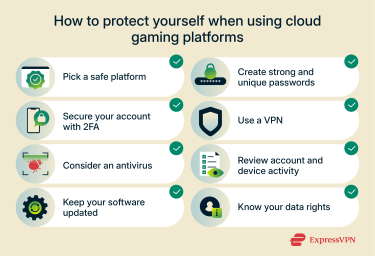
Create strong and unique passwords
Most account breaches come from reused or easily guessed passwords. Using a unique password for your cloud gaming account prevents attackers from getting in through leaks from other sites. For convenience, you can use a password manager to generate long and hard-to-guess passwords for your cloud gaming accounts and store them securely.
Use two-factor authentication (2FA)
2FA makes your account much harder to break into by adding a second step, usually a one-time code from your phone, to your login process. Even if someone learns your password, they won’t be able to log in without the second factor. Many platforms also offer login alerts or backup codes; keeping those enabled and stored safely helps you catch suspicious activity early and avoid lockouts.
Use a VPN
A virtual private network (VPN) adds an extra layer of privacy to your cloud gaming sessions by encrypting all the traffic between your device and the service. That makes it harder for anyone, including your internet service provider (ISP), a network admin, or a bad actor, to see what you’re doing or interfere with your session. A VPN is also useful on networks you don’t fully control, like public Wi-Fi or guest networks, because you can’t be sure how those networks are configured or who has access to them.
Keep your devices protected with an antivirus
Cloud gaming relies on your device to handle sign-ins, store payment information, and launch the app or browser session. If that device is compromised, an attacker could interfere with those steps even though the game itself runs remotely. A good antivirus can detect and remove malware on your system and prevent any incoming attack in real time.
Keep your software updated
Updates are one of the easiest ways to help prevent security issues that attackers may exploit. Operating system, browser, GPU driver, and cloud-gaming app updates often include quiet fixes for bugs that could be exploited by bad actors. Delaying updates may leave you exposed to problems that already have public fixes. Turning on automatic updates where possible reduces that risk without adding daily maintenance.
Know your legal rights
Privacy and consumer laws give you leverage when cloud gaming platforms mishandle your data or ignore your choices. Depending on your region, frameworks like the General Data Protection Regulation (GDPR) or the California Consumer Privacy Act (CCPA) let you request a copy of your data, correct or delete parts of it, limit how it’s used for advertising, and file complaints if a service refuses to comply.
FAQ: Common questions about cloud gaming safety
Is cloud gaming safe for kids?
Yes, cloud gaming can be safe for kids, but it depends on the platform and how the account is set up. Most major services include parental controls that let you limit purchases, restrict certain games, manage screen time, and block communication features like voice chat. Using best security practices when setting up the child’s account also goes a long way towards keeping them safe.
What should I do if my account is hacked?
The first thing you should do if you suspect your cloud gaming account is hacked is to change your password and log out of all devices. Review your account for any unusual activities, and set up two-factor authentication (2FA) next.
Can I use a VPN with cloud gaming?
Yes, most cloud gaming platforms work with a VPN, which can add a layer of privacy to your gaming sessions.
How do platforms handle user data?
Most cloud gaming services collect personal data, such as device details, gameplay activity, and diagnostic information. Payment data, on the other hand, is usually processed by third-party billing providers rather than kept directly by the platform.
Are there laws that protect cloud gamers?
Yes. For example, in the EU and California, cloud gaming providers must follow the data privacy laws that have been enacted. In the EU, the General Data Protection Regulation (GDPR) lets you access, correct, delete, and restrict how your personal data is used. In California, the California Consumer Privacy Act (CCPA), as amended by the California Privacy Rights Act (CPRA), provides similar rights and adds special limits on sensitive data.
Can I trust new or unknown cloud gaming services?
Not by default. Before signing up for any service, you should read its privacy policy and have a clear understanding of how it handles data. Look for transparency, parental controls, and a documented security or vulnerability-disclosure program. If the platform hides its ownership, lacks basic policies, or provides little detail on data handling, treat that as a warning.
Is it safe to use proxies or VPNs while gaming?
Yes, it’s safe to use a VPN or proxy while gaming. However, proxies don’t offer meaningful protection as many of them don’t encrypt your data. Meanwhile, a VPN secures your device if you plan on gaming on risky public Wi-Fi. However, make sure your use of a VPN aligns with the platform’s Terms of Service (ToS).
How can I report a security issue on a platform?
Use the platform’s official security reporting channels, and never on social media or random emails. Reputable cloud gaming services have formal vulnerability-disclosure programs or bug bounty systems with dedicated submission portals. For account abuse, fraud, or gameplay conduct, you can use the platform’s standard support or report-abuse tools.
Take the first step to protect yourself online. Try ExpressVPN risk-free.
Get ExpressVPN