What is clone phishing, and how can you avoid it?


Phishing attacks continue to evolve, making it harder to tell legitimate messages from malicious ones. Clone phishing is one such tactic that takes advantage of familiarity and trust, increasing the risk of account compromise and data theft.
This article explains how clone phishing works in practice, the warning signs to watch for, and the steps you can take to reduce your exposure.
What is clone phishing?
Clone phishing is a more sophisticated form of phishing: a message or email impersonation scam. In a clone phishing attack, a cybercriminal copies (or clones) a legitimate message from a trusted service provider, such as a bank, e-commerce platform, or social media site. The attacker then sends the recipient a nearly identical version of that message but replaces the original links or attachments with malicious ones.
As with other phishing attacks, the goal is to gain the victim’s trust and steal sensitive information, such as login credentials or banking details. What makes clone phishing more dangerous is how convincing it can be.
With traditional phishing, attackers typically send unsolicited messages that imitate a company’s branding or tone. These messages often contain inconsistencies, such as unusual formatting, grammatical errors, or requests that don’t match how the real service normally communicates, which can make them easier to spot.
In clone phishing attacks, the fraudulent message closely mirrors the original, with only minor changes. Because the structure, wording, and context appear familiar, these attacks are harder to detect and often require more technical awareness to identify.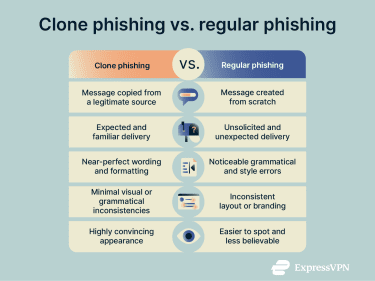
Clone phishing most commonly occurs via email, but it can also happen through SMS messages or direct messages on social platforms. For example, an attacker might clone a legitimate Amazon shipping notification and prompt the recipient to track or cancel an order.
The fake message may contain links to cloned login pages, which look exactly like the original tracking, banking, or social media homepages but scrape passwords and other information when someone tries using them to log in.
The messages may also sometimes have malicious attachments that infect the device with malware like keyloggers, which record every keystroke someone types, including card details and personal messages.
In more targeted scenarios, clone phishing can also overlap with spear phishing. Instead of sending cloned messages at scale, attackers may focus on a specific individual, gathering personal details such as their name, email address, or the services they use. This information allows the attacker to send a highly relevant cloned message (such as a login alert or account update request) that appears especially credible.
Learn more: Explore the difference between pharming and phishing.
Why attackers use clone phishing
Attackers adopt clone phishing techniques because of their effectiveness. Clone phishing is a highly convincing, inexpensive, and easily scalable form of social engineering. The same fake email or message is easy to replicate and send to hundreds of unsuspecting victims.
If someone does interact with malicious links and files or gives out personal information, attackers can exploit the data for financial gain, account takeover, identity theft, or resale on the dark web. In the case of businesses, phishing email links or files may attempt to infect the device with ransomware.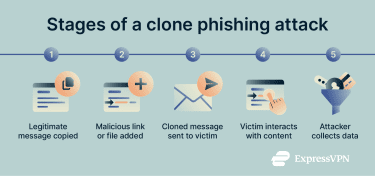
Signs of clone phishing
While clone phishing emails are generally near-perfect copies of legitimate communications, certain warning signs often appear in the modified sections introduced by attackers:
- Unusual email source: The sender’s email address may look authentic but often contains minor misspellings (for example, “rnicrosoft” instead of “microsoft”), additional random characters, or uses a different domain or email provider than the genuine source.
- Suspicious content and urgency: Messages frequently include urgent language, prompting immediate action such as password changes or account verifications. Unexpected attachments may also be included, which should be treated as suspicious even when the sender seems familiar.
- Generic greetings: While legitimate providers usually address recipients by name, cloned messages often use generic greetings like “Dear Sir/Madam” or “Dear Customer.”
- Requests for personal information: Clone phishing emails sometimes contain unclear or unusual requests, such as asking for sensitive information (like login credentials, credit card details, or other personal data) without a clear explanation or instructions that deviate from standard provider communications.
- Low-quality or altered visual elements: Cloned emails might use logos and images similar to the real provider. However, these can sometimes be pixelated or distorted if the attacker doesn’t have access to the original, high-resolution files.
- Messages referencing unexpected or unrequested actions: Clone phishing emails often mimic familiar formats but may include notifications about shipments not ordered or password resets that were not initiated.
Learn more: Read our detailed guide on phishing red flags in emails.
Examples of clone phishing scams
Several notable clone phishing campaigns illustrate the risks and tactics used by cybercriminals:
- Google Docs phishing attack (2017): The U.S. Cybersecurity and Infrastructure Security Agency (CISA) issued a report that attackers sent spoofed emails appearing to invite recipients to collaborate on a shared document. When users accepted the invitation, they were prompted to grant a malicious application access to their Google accounts.
- U.S. Internal Revenue Service (IRS) tax refund scams: The IRS has warned that scammers send cloned emails with links to fake tax refund websites designed to steal personal and financial information.
- Microsoft credential phishing campaign (2021): A report by Microsoft Threat Intelligence warned users about a widespread phishing campaign designed to resemble legitimate service notifications and embedded links that abused open redirect mechanisms on trusted domains. After multiple redirections, victims were taken to fake sign-in pages impersonating Office 365.
How to prevent clone phishing attacks
Phishing attack prevention entails awareness of common warning signs, security measures, and professional protection tools. The following measures are often recommended to mitigate phishing risks:
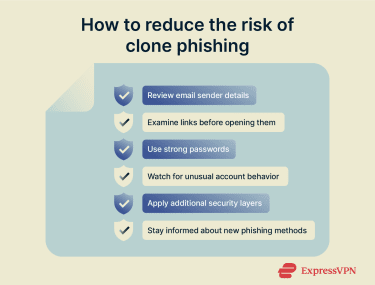
1. Check sender addresses carefully
Small inconsistencies in a sender’s email address are a key sign of impersonation, and they can be deliberately difficult to see at a glance. Here are a few key items to watch out for:
- Additional punctuation: Extra dashes, underscores, or full stops may appear harmless but can indicate a spoofed address. For example, a legitimate sender might use noreply@companyname.com, while a fraudulent version could appear as noreply@company_name.com or noreply@company-name.com.
- Different or extra letters and numbers: Subtle misspellings and character substitutions are commonly used because they are easy to overlook. Examples include “rn” instead of “m”, “c” instead of “o”, or “vv” instead of “w”. Variations such as “notificaticns”, “adrnin”, or “billling” may also appear. Some fake addresses add numbers, for example, noreply@c0mpany.com.
- Public domain: Established companies generally send emails from private domains (for example, @amazon.com). A message claiming to be from a brand but sent from a public domain, such as@gmail.com or @outlook.com, usually indicates impersonation.
- Different email extension: Legitimate organizations typically use consistent domain extensions, most often .com or a country-specific variant (such as .uk). Fraudulent emails may use similar-looking domains with alternative extensions like .co, .io, or .us.
In some cases, comparing a suspicious message with earlier emails from the same provider can reveal inconsistencies in the sender address, which may indicate a cloned or fraudulent communication.
Learn more: Find out how to spot and report an Amazon phishing email.
2. Avoid clicking suspicious links
Links in phishing messages may direct users to fraudulent websites designed to capture login credentials or other sensitive information. Attackers often rely on deceptive links rather than malicious attachments, particularly in credential-theft campaigns
On desktop, hovering over a hyperlink (without clicking) reveals the destination URL, which can help identify inconsistencies between the visible text and the actual link. On mobile, you can do the same by long-pressing a link. Many of the same warning signs that apply to suspicious sender addresses also apply to malicious links, including misspelled brand names or unusual domains.
For example, youtube.net is not associated with YouTube, whose official domain is youtube.com. Attackers may also rely on unsecured links that begin with “http://” rather than “https://”, although the presence of HTTPS alone doesn’t guarantee that a link is safe.
Learn more: How to check if a website is safe to visit
3. Use strong, unique passwords with a password manager
Using long, unique passwords helps limit the impact of account compromise. Complex passwords are harder to crack, and using different credentials for each service prevents attackers from accessing multiple accounts if one set of login details is exposed through phishing.
Password managers like ExpressKeys make managing passwords easier and more secure. It can generate strong passwords, securely store unlimited passwords, credit card details, and notes, and autofill login fields on recognized websites and apps.
Passwords in ExpressKeys are encrypted with zero-knowledge encryption, meaning only you can access your sensitive information. The app also alerts you if any of your passwords are weak, reused, or exposed in known data breaches, helping you improve your overall password health.
4. Monitor account activity
Clone phishing emails often impersonate replies to previous conversations or customer support requests, even if you never initiated those interactions. By referencing alleged earlier exchanges, these messages can look legitimate at first glance.
However, if you don’t recall any prior contact, this is a strong indicator of phishing. The same goes for suspicious account activity alerts, such as notifications about new device logins or unsolicited password reset emails.
Always verify such claims by checking your official account activity directly on the platform. Any inconsistencies between what the email says and what’s recorded in your account can signal a fraudulent attempt. Staying vigilant about unexpected messages helps you catch clone phishing early and protect your accounts.
Learn more: How to handle Google critical security alerts safely
5. Use additional protection measures
- Two-factor authentication (2FA): 2FA requires users to provide two forms of identification, typically a password plus a one-time code sent to their mobile device. This extra layer of security helps prevent unauthorized access, even if attackers have obtained login credentials through clone phishing. For even stronger protection, phishing-resistant multi-factor authentication (MFA) methods are recommended.
- Anti-phishing software: These tools detect and block fraudulent emails and websites by analyzing patterns, using reputation databases, and applying machine learning techniques to recognize suspicious behavior.
- Network-level threat blockers: Certain VPN services and security tools, such as ExpressVPN Threat Manager, offer extra protection by blocking connections to known phishing domains, trackers, and malicious servers at the network level. This can complement traditional anti-phishing software by preventing you from reaching harmful websites even after clicking suspicious links.
- Website verification services: These services confirm a website’s legitimacy by checking that its Secure Sockets Layer (SSL) certificate is valid and ensuring the site is not listed on blacklists maintained by trusted security providers.
- Email authentication protocols: Protocols like Domain-based Message Authentication, Reporting, and Conformance (DMARC) help prevent email spoofing by verifying that emails come from authorized sources, reducing the chance of receiving fake messages.
- Regular software updates: Keeping your operating system, web browsers, and other software up to date helps protect against vulnerabilities that attackers could exploit in clone phishing attacks.
6. Stay informed about new phishing techniques
Phishing attacks continue to evolve, using increasingly sophisticated social engineering tactics that can be difficult to detect without awareness. Clone phishing itself is becoming more convincing as attackers replicate legitimate emails or messages, often incorporating stolen personal information to increase credibility.
A notable development is the rise of social media cloning scams, where hackers create fake profiles that closely mimic real accounts. These cloned profiles can send direct messages that appear to come from trusted contacts on social media, making it harder to recognize them as fraudulent. Unlike clone phishing via email, these social media scams may also leverage advanced technologies such as deepfake videos or voice cloning, raising the stakes for victims.
Staying informed about such trends helps you recognize not only cloned emails but also emerging threats that blend identity theft, AI-powered scams, and social media manipulation.
Why clone phishing is so dangerous
Phishing is a serious concern because it’s prevalent. According to the FBI’s 2024 Internet Crime Report, phishing was the most commonly reported cybercrime, at nearly three times the rate of personal data breaches.
It’s also among the main causes of information theft, with the Pew Research Center reporting almost a quarter of surveyed Americans saying a scam email, text, or call led them to give away personal information.
This threat impacts not only everyday users but also organizations, with the trend accelerating. According to the World Economic Forum’s 2025 Global Cybersecurity Outlook report, 72% of surveyed organizations reported an increase in overall cyber risks, which includes a notable rise in phishing and social engineering attacks during 2024.
Clone phishing heightens these risks due to its highly convincing nature. When successful, clone phishing can lead to serious consequences for both individuals and organizations, including:
- Credential theft and full account takeover: Attackers can gain control over email accounts, cloud storage, and connected platforms, locking out victims while stealing sensitive information.
- Financial loss: Compromised banking details can enable unauthorized transactions, purchases, or invoice fraud, especially if 2FA isn’t enabled.
- Identity theft and fraud: Access to email and social media accounts provides attackers with a treasure trove of personal data, which they can use for further impersonation scams targeting the victim’s family and friends.
- Reputational damage to businesses: If hackers access confidential company information, it can lead to large-scale data breaches or impersonation scams that harm clients and damage the company’s trustworthiness.
- Persistent damage and delayed detection: Malware such as spyware installed during the attack may remain hidden, allowing hackers to monitor activities and steal information long after the initial breach.
FAQ: Common questions about clone phishing
What should I do if I suspect clone phishing?
If you suspect clone phishing, it’s best to avoid opening links or attached files. Thoroughly check the sender address for warning signs like misspelled words or unusual domains and extensions. If the message asks you to log into your account, open the official website from your browser instead of using the link. Where applicable, consider calling your provider to confirm the email’s authenticity.
How can I recover from a clone phishing scam?
Securing accounts is the first step to recovering from a clone phishing scam. This means changing passwords, especially if they’re reused across multiple platforms. Enable two-factor authentication for logging in or confirming transactions. Additionally, a reputable antivirus can help check for device malware. If you notice unauthorized transactions, contact your banking provider.
Are there tools to help prevent clone phishing?
Yes, certain tools can help with detecting and preventing clone phishing. An antivirus with an email scanning feature is an important safeguard. It automatically scans suspicious attachments to block malware and suspicious websites. Particularly for businesses, email phishing filters offer an additional layer of protection. These solutions use AI to detect fake emails and warn you about phishing attempts.
What are the main types of phishing attacks?
Phishing attacks come in several forms, most commonly as email phishing, smishing, vishing, and angler phishing (posing as a customer service agent). All forms employ similar methods, such as social engineering, urgency tactics, and malicious links or data requests, but the medium differs. Email phishing uses fake email addresses, impersonating real providers. Angler phishing uses social media, smishing relies on texts, and vishing involves calls.
What is an example of deepfake phishing?
Deepfake phishing follows the same principle as regular phishing, meaning impersonating someone to gain the victim’s trust. An example of deepfake phishing is a scammer using AI to generate a fake video or audio recording of a person you might know, like an employer or family member. The fake recording might use urgency tactics and ask you for financial help, aiming to deceive the recipient into sending money to the attacker.
Take the first step to protect yourself online. Try ExpressVPN risk-free.
Get ExpressVPN