What is a zero-day exploit? Everything you need to know



Before new devices and software are released, or operating system and firmware upgrades are published, they typically undergo rigorous testing to catch security weaknesses. But even with strong precautions, some vulnerabilities can still slip through. If cybercriminals discover these flaws, they can exploit them to take over critical systems and steal valuable data.
When that happens, it’s known as a zero-day exploit. This guide explains what the term means, how these vulnerabilities are discovered, and how vendors and organizations can detect and protect against them.
Note: The information in this guide is provided for educational purposes only. Identifying unknown vulnerabilities is carried out by authorized security researchers in controlled environments. Trying to find or exploit security flaws outside these conditions is unethical and illegal.
Understanding zero-day exploits
A zero-day exploit is a technique attackers use to take advantage of a cybersecurity vulnerability in hardware, software, or firmware that hasn’t been disclosed or fixed yet. The term “zero day” means the vendor has had zero days to address the flaw.
Zero-day terms: Vulnerabilities, exploits, attacks, and malware
The phrase “zero day” is often paired with several cybersecurity concepts. While these terms are sometimes used interchangeably, they refer to different things. Here’s a quick breakdown:
- Zero-day vulnerability: A security flaw that hasn’t been disclosed or fixed yet and can be exploited by malicious actors.
- Zero-day exploit: The method an attacker uses to take advantage of that unknown vulnerability.
- Zero-day attack: The point at which a cybercriminal uses a zero-day exploit to compromise a system, potentially stealing data or delivering malware in the process.
- Zero-day malware: Malicious software specifically designed to take advantage of unknown vulnerabilities and evade traditional antivirus detection.
Zero-day vs. known vulnerabilities
Unlike zero-day vulnerabilities, which haven’t been disclosed yet, security teams are aware of the existence of known vulnerabilities. In many cases, they’re also publicly documented and typically already have security patches or fixes available.
While cybercriminals may still try to exploit these known gaps, they’re easier to manage because security teams are aware of them. This makes it simpler to build protective measures into existing workflows. Known vulnerabilities also trigger security alerts, which improves visibility and allows for faster, more effective responses.
How zero-day vulnerabilities are discovered
Security researchers or software developers sometimes discover zero-day vulnerabilities during testing. Usually, they alert the affected vendor and, if contracted, assist in developing a security patch.
That’s the best-case scenario. In other cases, malicious actors are the first to discover the vulnerability. When that happens, they may use it to carry out cyberattacks before a fix is available.
Lifecycle of a zero-day exploit
The lifecycle of a zero-day exploit typically includes the following stages:
- A security flaw is introduced: A vulnerability is unintentionally introduced during the development of software, firmware, or hardware. This can result from coding errors, design flaws, or unexpected interactions between components.
- The vulnerability is discovered: The flaw is discovered by someone other than the vendor. This may be a malicious actor using techniques such as reverse engineering or fuzzing, or a security researcher or internal team conducting testing. At this stage, the vulnerability is still unknown to the vendor.
- The vulnerability is exploited (zero-day phase): Attackers develop and use an exploit that takes advantage of the flaw while it remains unpatched and undisclosed. During this phase, attacks may be targeted and stealthy, allowing attackers to compromise systems, steal data, or establish persistence without defenders knowing why.
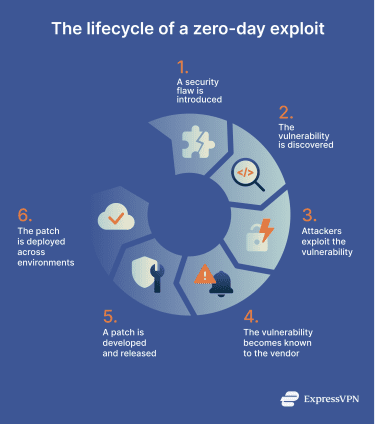
- Disclosure and vendor awareness: The vulnerability becomes known to the vendor through responsible disclosure, independent discovery, or incident response. At this point, it stops being a true zero-day, but systems remain vulnerable until a fix is available and deployed.
- Patch development and release: The vendor develops, tests, and releases a security patch or mitigation. Depending on complexity, this process can take days or weeks.
- Patch deployment and residual risk: Organizations begin rolling out the patch across their environments. Because deployment is not immediate, systems could remain exposed even after a fix exists, and attackers may continue exploiting unpatched systems.
Why are zero-day exploits so dangerous?
Zero-day exploits give attackers a head start: with no patch, no signatures, and limited visibility, organizations are exposed during the most critical phase of an attack. This initial advantage allows attackers to operate largely unchecked, which makes zero-day exploits especially dangerous for several reasons:
Difficult detection
Zero-day vulnerabilities can go unnoticed because they don’t match known threat signatures. During this early phase, attackers may deliberately keep exploitation quiet to avoid detection, maximize impact, or sell the vulnerability on underground markets.
Attack speed
Once attackers decide to act, or once a vulnerability becomes known beyond a small group, they tend to move quickly. Research from Google Cloud’s Mandiant team shows that attackers can develop exploit code within about a week once a vulnerability becomes known to them.
Lengthy patch implementation
Even when researchers or internal teams identify a flaw and patches are available, fixing it across real environments takes time. The 2024 Verizon Data Breach Investigations Report found that it takes around 55 days to remediate just 50% of critical vulnerabilities after patches are released.
Compliance risks
Successful zero-day attacks can result in data breaches that place organizations out of compliance with privacy and security regulations. In some cases, failing to properly disclose or respond to zero-day vulnerabilities can also introduce regulatory and legal risk.
The zero-day exploit market
Zero-day threats are valuable to vendors, government institutions, and cybercriminals. As a result, a market has developed around buying and selling zero-day vulnerabilities, often operating in a legal and ethical gray area.
On one side, security researchers, companies, and vendors share or trade information about zero-day threats to fix critical security flaws. On the other side, buyers can include criminal organizations.
According to cybersecurity researchers and media reports, the zero-day economy is often divided into three main markets:
- White hat markets: These involve vendors, companies, and ethical hackers who legally disclose security flaws. They include responsible disclosure programs that reward researchers for reporting vulnerabilities, as well as bug bounty programs and security competitions that encourage testing and audits.
- Gray hat markets: They involve brokers who act as intermediaries between sellers and buyers. They often purchase zero-day knowledge from researchers and may resell it to legitimate organizations, such as software or hardware vendors, or to malicious actors.
- Black markets: These mainly involve unethical researchers and hackers selling zero-day assets to cybercriminals who use them to compromise critical systems. Attackers may also share or trade knowledge of unknown vulnerabilities among themselves.
Real-world examples of zero-day attacks
Media outlets and security researchers have documented several well-known zero-day attacks, including the following ones:
- Java library vulnerability: This involved a security flaw in a Java library used for logging error messages. According to the National Cyber Security Centre (NCSC), attackers could’ve abused the vulnerability to steal sensitive information or spread malware.
- Massive supply-chain ransomware attack: Cybercriminals exploited multiple unpatched vulnerabilities to deliver ransomware, according to one report.
- Attack on a major film studio: One news report explains how attackers used an undisclosed vulnerability to steal company assets, expose private data, and deploy malware.
Detecting a zero-day attack
Detecting zero-day attacks is challenging because they exploit unknown vulnerabilities. That said, organizations can use modern cybersecurity tools and strategies to improve their chances of identifying security flaws early.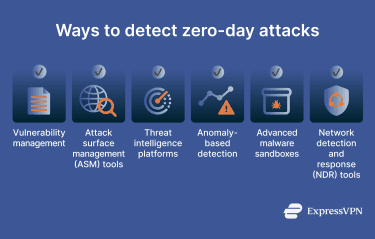
Detection techniques and tools
Organizations use different detection approaches depending on whether they are trying to discover unknown vulnerabilities or detect active zero-day attacks. Because zero-day exploits can’t be reliably identified using signatures alone, defenders rely on a combination of both.
Pre-attack detection: Discovering unknown vulnerabilities
These techniques focus on identifying weaknesses before or without active exploitation:
- Vulnerability management and security testing: Vendors and organizations may uncover zero-day flaws through code reviews, fuzzing, vulnerability assessments, and authorized penetration tests, which simulate real-world attacks to expose weaknesses.
- Attack surface management (ASM) tools: ASM solutions identify and continuously monitor exposed assets, such as internet-facing systems, APIs, and cloud services, to highlight potential entry points attackers could exploit.
Attack detection: Identifying zero-day exploitation
These tools focus on detecting malicious activity, even when the underlying vulnerability is unknown.
- Threat intelligence platforms: Threat intelligence platforms aggregate and analyze data from multiple sources to help security teams identify emerging attack techniques, exploit patterns, and indicators of compromise associated with zero-day activity.
- Anomaly-based detection: Anomaly-based systems monitor behavior rather than signatures to spot malware, using analytics and machine learning to flag suspicious activity that deviates from normal user or system behavior. Common examples include endpoint detection and response (EDR) and user and entity behavior analytics (UEBA) tools.
- Advanced malware sandboxes: Malware sandboxes execute suspicious files in isolated environments to observe previously unseen behavior and extract indicators of compromise linked to zero-day malware.
- Network detection and response (NDR) tools: NDR platforms analyze network traffic to detect behaviors such as lateral movement, command-and-control communication, or data exfiltration that may indicate zero-day exploitation.
Common indicators of compromise
Indicators of compromise can vary depending on the detection tools and techniques in use, but common signs may include:
- Unusual inbound or outbound network traffic.
- Abnormal login patterns on accounts with elevated privileges.
- Requests for additional permissions from administrative or privileged accounts.
- Multiple login attempts from unfamiliar geographic locations.
- Unauthorized changes to mobile device profiles or settings.
- Unknown apps or files recently installed or added to the system.
- An unusually high number of access requests for a specific file.
Protecting against zero-day exploits
Besides using advanced detection methods and tools to spot unknown security flaws, organizations can take other steps to defend against zero-day exploits. These include structured patch management processes, a zero-trust architecture, and regular employee training programs.
Best practices and patch management
Organizations should consider following a structured, continuous, and well-documented patch management process to apply security updates as soon as vendors release them. Delayed patching may put connected endpoints at risk, allowing attackers to exploit weaknesses in firmware, software, or hardware to gain unauthorized access to critical systems.
Vendors should consider adopting a proactive patch management lifecycle that includes ongoing vulnerability assessments. This helps internal teams identify and fix security flaws early, before malicious actors can exploit them. When multiple weaknesses are present, patching should be prioritized based on the severity of each vulnerability.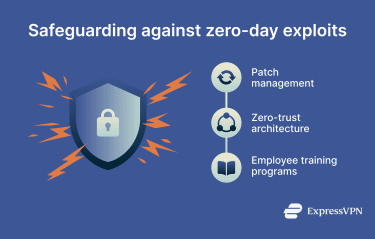
Zero-trust architecture
Zero-trust architecture is a security model built on the principle that users and endpoints can’t be trusted by default. It requires continuous identity verification before granting or maintaining access to network assets, which helps limit the impact of zero-day exploits. Even if an attacker gains unauthorized access, security teams can quickly revoke it once anomalous behavior is detected.
Zero-trust models can vary depending on how organizations implement them, but they usually include the following elements:
- Subnetting: Segments large networks into smaller subnets to isolate sensitive data and assets and reduce lateral movement.
- End-to-end encryption (E2EE): Encrypts data at rest and in transit, keeping it secure even if attackers intercept or access it through exploits.
- Real-time monitoring: Continuously inspects access attempts and behavioral signals for indicators of compromise and automatically flags anomalies.
- Device posture checks: Verifies an endpoint’s security status before granting access, ensuring only secured devices can connect. For example, unpatched devices may be denied access.
- Strict access rules: Limits access based on roles to reduce lateral movement. For instance, a customer support role may access client records but not employee payroll data.
- Ongoing authentication: Triggers additional verification, such as re-authentication, when risky actions are detected, like opening a high-value file or folder.
Employee training and awareness
While employees can’t prevent zero-day vulnerabilities, their actions can influence whether a zero-day exploit succeeds or spreads. Cybercriminals may use phishing attacks and social engineering alongside zero-day exploits to trick employees into granting unauthorized access, installing malicious software, or exposing sensitive data. To reduce this risk, organizations should implement training programs that help employees recognize and report phishing attempts.
Employee training programs should also promote good security habits, such as keeping software and endpoints up to date and using strong credentials.
Additionally, companies should develop and implement an incident response plan focused on zero-day vulnerabilities, exploits, and attacks. Such strategies can ensure employees react faster and don’t make mistakes when faced with zero-day cyber threats.
FAQ: Common questions about zero-day exploits
What is the difference between a zero-day exploit and a vulnerability?
These terms are often used interchangeably, but they mean different things. A zero-day vulnerability is an undisclosed weakness in hardware, software, or firmware. A zero-day exploit, on the other hand, is the technique a malicious actor uses to take advantage of that vulnerability.
Are zero-day attacks common?
Recently published reports show that zero-day exploitation continues to grow steadily. The data also suggest that attackers mainly target enterprise-grade products, especially security and networking services, which they consider high-value targets.
How can organizations defend against zero-day threats?
To protect against zero-day threats, organizations should follow a well-documented patch management process and run training programs that help employees recognize phishing attempts and keep software and endpoints up to date. They should also adopt a zero-trust framework, where continuous identity checks are required to grant and maintain access to network assets. On top of that, using advanced detection tools and techniques could help uncover unknown weaknesses before they’re exploited.
What should I do if I suspect a zero-day has been used?
If you think your organization has been targeted in a zero-day attack, follow your incident response plan and alert the appropriate internal teams right away. Security teams typically focus first on containment and recovery while also investigating the vulnerability so a patch or mitigation can be developed.
What is a zero-day phishing attack?
A zero-day phishing attack is a cyberattack where a malicious actor uses deceptive messages to trick someone into clicking a link or opening an attachment. If the attempt succeeds, the attacker may then exploit a zero-day vulnerability to compromise systems and steal sensitive data or other valuable assets.
Take the first step to protect yourself online. Try ExpressVPN risk-free.
Get ExpressVPN