What Is SaaS? Software-as-a-Service explained


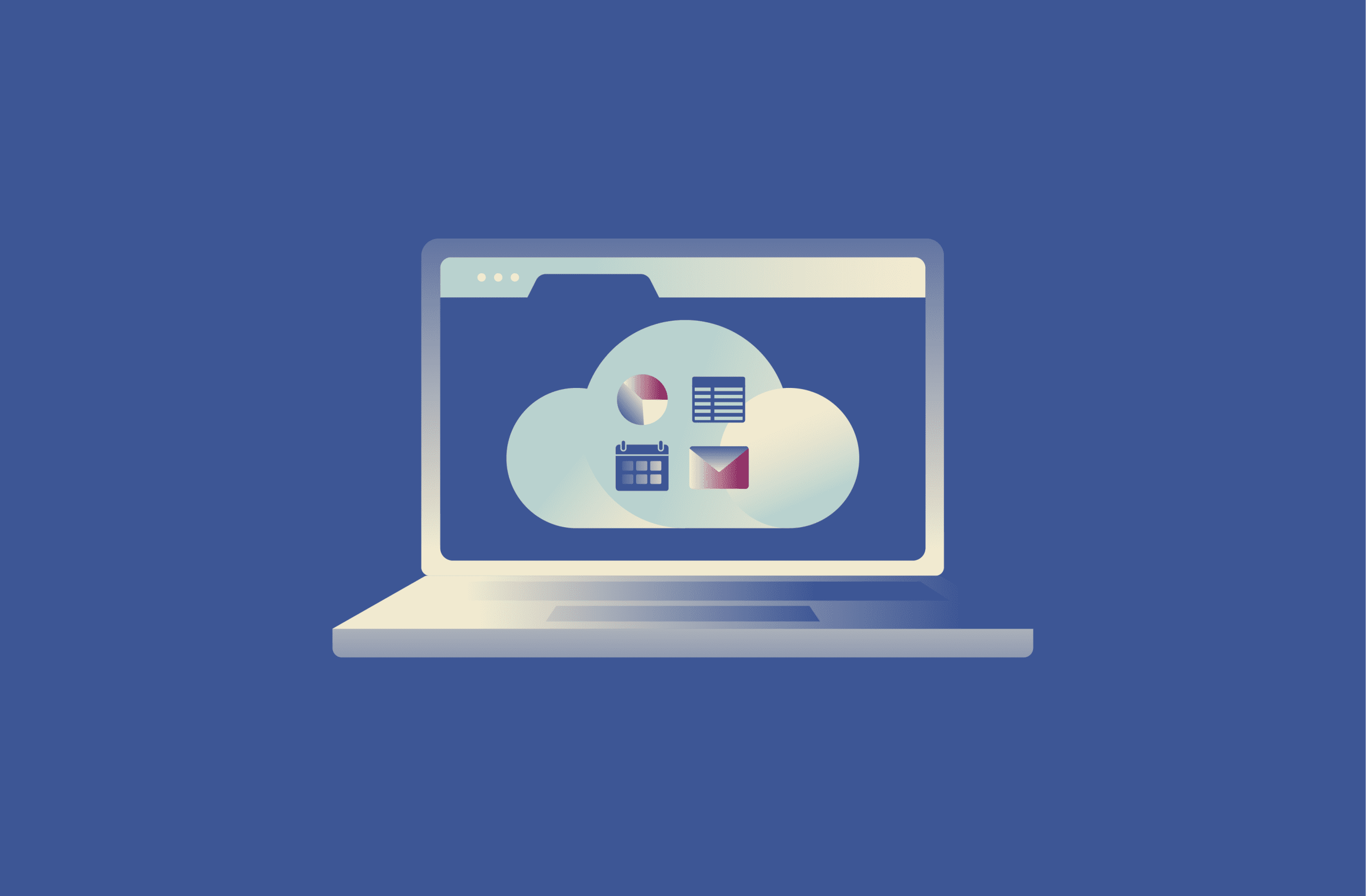
Software-as-a-Service (SaaS) is the delivery model behind many digital tools, such as email services, cloud storage, and browser-based collaboration apps. These tools are typically accessed over the internet rather than installed on a user’s device.
With SaaS, users no longer need to install programs or manually manage updates. They can open a service when needed and continue their work across devices with minimal setup.
So what does SaaS actually mean, and how does it differ from traditional software? This article explains what SaaS is, how it works, and why it has become one of the most common ways to use software today.
What is Software-as-a-Service (SaaS)?
SaaS is a way of delivering software where the provider runs and maintains the application on the user’s behalf. Instead of purchasing a license and installing a specific version locally, users access the software over the internet while the provider handles updates, security patches, and maintenance.
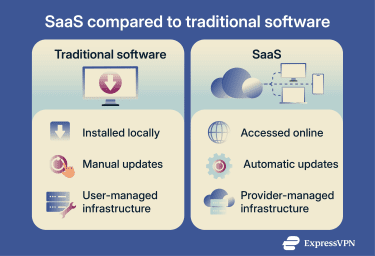
With traditional software, updates and fixes are typically applied manually on each device. With SaaS, the same centrally managed version of the software is available to all users at the same time. This reduces setup effort and ensures everyone is using the latest version.
SaaS is usually offered through a subscription rather than a one-time purchase. This pricing model can make tools that once required a large upfront investment more accessible to individuals and smaller teams.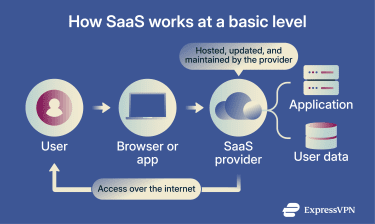
How does SaaS work?
SaaS applications operate from centralized systems designed to stay online continuously and support many users at the same time. People connect to these services throughout the day to work, store data, and collaborate.
Most SaaS providers don’t operate their own physical servers. Instead, they rely on large cloud infrastructure providers that run global networks of data centers. This allows SaaS companies to scale capacity as demand changes and keep services available across various regions.
Because the software runs in a shared environment, providers can apply updates and maintenance in one place rather than managing separate installations for each customer. This centralized approach leads to several practical differences compared to traditional software, including:
- Automatic updates: Bug fixes and new features are applied by the provider, without user action.
- Built-in maintenance: Server upkeep, performance tuning, and security patching are managed on the providers’ side.
- Consistent versions: Everyone uses the same version of the software, which reduces compatibility issues.
- Simpler support: Support teams don’t have to troubleshoot across outdated installations, making issues faster to resolve.
How users access SaaS
Most users access SaaS through a web browser, which works across different devices and operating systems. SaaS tools are typically designed to present the same interface and core features regardless of the device being used.
Some services do offer desktop and mobile apps. These are usually lightweight and focus on the interface, while the actual data processing still happens in the cloud, although some apps offer limited offline modes for basic tasks.
Because access happens remotely, SaaS tools rely on identity-based controls such as single sign-on (SSO) and multi-factor authentication (MFA).
SaaS pricing models
SaaS pricing models are usually designed to scale with how the product is used. Costs can be tied to users, features, or actual activity instead of a one-time purchase.
Common SaaS pricing models include:
- Per-user (or per-seat): You pay a recurring fee for each person with access.
- Tiered plans: Pricing is grouped into levels, with higher tiers unlocking more features or higher limits. Variations of this model may also include a free tier that lowers the entry barrier, while paid plans unlock advanced features or higher limits (freemium).
- Usage-based pricing: Costs are linked to activity, such as data stored, requests processed, or messages sent.
- Flat-rate pricing: One fixed price covers the entire product. It’s less common than other models.
SaaS use cases and examples
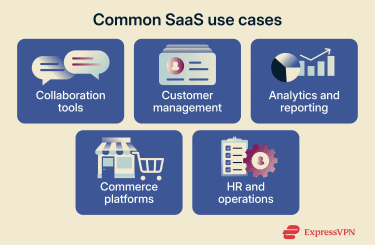
SaaS supports a wide range of everyday and business-critical applications, from simple collaboration tools to complex operational platforms.
Business productivity and collaboration tools
This category includes software that supports everyday work such as communication, document sharing, meetings, and coordination, especially for teams working across locations.
- Team communication: Tools like Slack and Microsoft Teams organize conversations into shared channels, making it easier for teams to follow discussions and stay aligned.
- Document creation and collaboration: Platforms such as Google Workspace allow multiple people to work on the same document at the same time, with changes saved automatically online.
- Video conferencing: Tools like Zoom support real-time meetings, from small group calls to large virtual sessions, without requiring local installation.
Customer management and sales platforms
This category includes software used to track, organize, and manage relationships with customers throughout the sales and support lifecycle. These tools help teams keep a shared record of customer interactions, follow up on leads, and coordinate sales and service work across an organization.
Customer relationship management (CRM) software is often cited as the first major business software category to move to a SaaS model. These platforms serve as a centralized database for every interaction a company has with its clients. Some examples include:
- Salesforce: It tracks leads, manages sales pipelines, and provides data-driven insights based on customer interactions, engagement signals, and behavior across sales, marketing, and service.
- HubSpot: A platform that combines CRM with tools for marketing, sales, and customer support, commonly used for managing contacts, campaigns, and customer interactions.
- Zendesk: A specialized service tool that allows companies to manage customer support tickets across email, social media, and live chat from a single dashboard.
Data, analytics, and decision-making tools
This category includes software used to collect, analyze, and visualize data to support business decisions. These tools help teams understand performance, spot trends, and turn large volumes of raw data into insights that guide strategy and day-to-day operations.
- Business intelligence (BI): Tableau and Looker (part of Google Cloud) take raw data and turn it into interactive visualizations.
- Web analytics: Google Analytics is commonly used for tracking website traffic, user demographics, and conversion rates, providing the data needed to optimize digital marketing efforts.
- Performance monitoring: Datadog and New Relic are examples of services that provide SaaS-based monitoring for a company’s own cloud applications.
Commerce and operational management software
Unlike sales platforms, which focus on leads and customer relationships, commerce and operational tools handle transactions, fulfillment, and internal business operations. SaaS is also used to manage how products are sold, shipped, and accounted for.
- E-commerce: Shopify is an example of a SaaS e-commerce platform for building and operating online stores, with built-in support for payments and order management.
- Enterprise resource planning (ERP): Tools like Oracle NetSuite provide cloud-based suites to manage a company’s entire operation, including accounting, inventory management, and order fulfillment.
- Human resources (HR): Workday and BambooHR are cloud-based HR platforms used for tasks such as payroll, benefits administration, and employee data management.
Advantages of SaaS
Beyond how it works, SaaS brings practical benefits to everyday use. These advantages are the reasons many individuals and businesses choose SaaS over more traditional software options.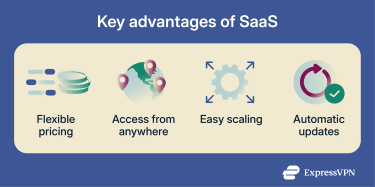
Pay only for what you use
With SaaS, you’re not locked into a big upfront purchase or a fixed setup that assumes you’ll need everything forever. Many services even offer free tiers or limited features at no cost, so you can try the software before committing. When you do pay, you can usually choose a plan based on how many people use it, how much you use it, or how long you need it for, and adjust it over time.
If your needs change, the software changes with you. You can add access when you need more, scale back when you don’t, or switch plans without replacing the product entirely. That flexibility applies just as much to individual users as it does to teams, helping you avoid paying for licenses or features you’re not actually using.
Lower upfront costs
Before SaaS, you typically had to buy licenses upfront, invest in servers to run it, and cover all the hidden extras, like space, power, cooling, and maintenance.
With SaaS, upfront costs are usually lower. The software runs on the provider’s infrastructure, so there’s no need to buy or maintain your own servers. You also don’t have to plan for peak capacity or guess how much equipment you might need months ahead.
At the same time, this comes with trade-offs. Some tools that once worked entirely offline are now delivered as ongoing services, which can mean recurring payments and a greater reliance on internet access. These limitations are part of the broader set of trade-offs that come with SaaS, which we’ll look at in more detail below.
Access from anywhere
SaaS isn’t tied to a specific machine. You can start something on one device and pick it up on another without having to plan ahead.
You might work on your desktop for a while, step out and check something on your phone, then later open your laptop and keep going from where you left off. The software stays available across devices, which makes it easier to fit work around your day instead of being tied to a single setup.
Easy to scale up or down
SaaS is built to handle changes in how software is used. This might involve adding or removing users, changing permissions, or adjusting how many devices are connected.
Compared to traditional software, this removes much of the friction that comes with fixed installations and long-term infrastructure decisions. You’re less likely to end up maintaining systems or resources you no longer need.
Faster setup and automatic updates
Getting started with traditional software can involve more steps, depending on how it’s deployed. Installation, configuration, and compatibility checks are often handled locally, and updates may require manual planning or downtime.
With SaaS, much of that setup is handled by the provider ahead of time. When you create an account, you’re accessing software that’s already running in a shared environment. There may still be configuration involved, but there’s usually no need to install or maintain the underlying system yourself.
Updates follow the same pattern. You don’t have to track versions, schedule upgrades, or wonder whether everyone is using the same release. Improvements and security fixes roll out in the background, without interrupting daily work. The software stays current by default, which reduces risk and avoids the slow drift that happens when systems fall out of sync.
Disadvantages and challenges of SaaS
SaaS makes software easier to use, but it also shifts a lot of control away from the user. When applications live online and are run by someone else, new trade-offs appear. Some are technical, while others are operational.
Internet dependence and downtime risk
SaaS depends entirely on having a working internet connection. If your connection drops, access to your tools is usually limited. Some SaaS apps offer offline modes for basic tasks, but full functionality and real-time updates typically require being online. Even when the internet is available, slow or unstable connections can make everyday work feel sluggish and unreliable.
There’s also the question of availability on the provider’s side. When you use SaaS, uptime is no longer something you control directly. If a service experiences an outage, work can be disrupted for everyone using it at the same time. Even short interruptions can be noticeable when core tools are affected.
This isn’t just theoretical. Teams around the globe regularly run into short but disruptive outages in everyday tools, like project management or communication apps. When that happens, work can slow down or stop altogether.
Because of this, many teams plan ahead with backup internet connections, alternative tools, or simple fallback workflows, knowing that access to SaaS depends on both the network and the service itself.
Data privacy and compliance concerns
Using SaaS means trusting another company with your data. That often includes customer information, internal documents, financial records, or other material that you’d normally keep close.
You don’t decide where the servers are, who physically manages them, or how access is enforced day to day. Those responsibilities also extend to third parties the provider relies on, such as cloud infrastructure or security vendors. Even if the provider is reputable, your data protection depends on their systems, their processes, and how well those partners manage risk and respond when something goes wrong.
This setup increases exposure to data breaches. If a SaaS provider is compromised, the impact can affect many customers at once. Breaches can stem from misconfigurations, stolen credentials, or vulnerabilities in connected third-party services. While providers typically invest heavily in security, no system is immune to errors or attacks.
Legal and regulatory requirements can make this more complicated. In sectors like healthcare, finance, or education, data is often subject to strict rules about where it can be stored and who can access it.
Vendor lock-in and switching costs
Relying heavily on a single SaaS provider can make it harder to switch later on. Over time, the software can become tightly embedded in daily workflows, which increases the cost and effort of moving to another tool.
One common issue is data portability. Some providers make it easy to export your data, while others don’t. Even when exports are available, moving years of records, files, or activity history can be time-consuming, especially if the new tool organizes information differently. Certain products are designed with portability in mind, but this aspect isn’t consistent across all SaaS categories.
Integrations can also contribute to lock-in. SaaS tools are often connected to other services, such as billing, analytics, or automation tools. Replacing one platform may require finding compatible alternatives or reworking how those connections function, which can add friction and delay.
Limited customization
Because SaaS is designed to work for a large number of users at once, it rarely offers the same level of flexibility as software built specifically for one organization.
Most tools follow a “good enough for most” approach. You get the features, layouts, and workflows the provider decides to ship. If your team works in a very specific way, that can mean adjusting how you operate just to fit the software, rather than shaping the tool around your needs.
Over time, this can create problems, especially when updates change how a feature works or remove something your team relied on, with little ability to influence those decisions.
SaaS vs. traditional software: Which one is better for your needs?
The right choice depends on practical constraints like where your team works, how stable your internet access is, and how much control you need over the software itself. In some cases, those constraints leave little room for choice.
SaaS makes sense if:
- Your team needs to access the same tools from different locations or devices.
- You don’t want to run or maintain servers, hardware, or internal infrastructure.
- The number of users changes often, and you need to add or remove access without reinstalling anything.
Traditional (on-premises) software makes more sense if:
- Your data must stay on systems you physically control, due to legal or contractual requirements.
- Reliable internet access can’t be assumed during daily work.
- You prefer a one-time purchase over ongoing subscription fees.
- You need software that can run fully offline, without relying on cloud services.
- You’re using older or specialized hardware that isn’t well supported by modern SaaS tools.
- You require deep customization or control over how the software behaves behind the scenes.
- Long-term costs are easier to manage with a fixed license rather than recurring payments.
SaaS vs. PaaS vs. IaaS
These three models describe different ways of delivering software and infrastructure. SaaS delivers a complete application that users access online, Platform-as-a-Service (PaaS) provides a managed environment for building and running applications, and Infrastructure-as-a-Service (IaaS) supplies raw computing resources that users configure and manage themselves.
With SaaS, you use a finished application that’s ready out of the box, such as email, CRM tools, document editors, or dashboards. The provider takes care of running and maintaining both the software and the underlying platform, so you don’t have to think about servers, updates, or infrastructure. Your role is mainly to configure the product, manage user access, and work with the data the application allows you to store and process.
With PaaS, you use a managed platform to build and run your own applications rather than relying on a finished product. The provider handles the servers, operating systems, and runtime environment in the background, and your focus is on developing and maintaining your application.
With IaaS, you rent fundamental computing resources such as virtual machines, storage, and networking, instead of buying and running physical servers yourself. The provider is responsible for maintaining the data centers and the underlying hardware, while you manage everything that runs on top of that infrastructure, including operating systems, runtime environments, and your applications.
FAQ: Common questions about SaaS
Is Zoom a SaaS?
Yes. Zoom is considered Software-as-a-Service (SaaS) because it’s delivered over the internet and used through an app or browser. It’s offered through a subscription model, including both free and paid plans.
Is Amazon a SaaS company?
Amazon is not a Software-as-a-Service (SaaS) company. Amazon is an online marketplace that also offers Amazon Web Services (AWS), but AWS is not a SaaS product. AWS primarily provides infrastructure and platform services such as computing power, storage, and development environments. These are tools that other companies use to build and run their own software, including SaaS products.
What is an example of SaaS?
Examples of Software-as-a-Service (SaaS) include email services like Google Workspace, collaboration tools such as Slack and Microsoft Teams, video conferencing apps like Zoom, and customer relationship management (CRM) systems such as Salesforce.
What industries benefit most from SaaS?
Software-as-a-Service (SaaS) is widely used in industries that need flexibility and easy access to tools. This includes technology, healthcare, education, finance, retail, and professional services.
Is SaaS suitable for small businesses and startups?
Yes. Software-as-a-Service (SaaS) works well for small teams because it’s easy to start, doesn’t require a large upfront investment, and scales as the business grows. It also reduces the need for in-house IT, which helps startups focus on building their product or service.
Take the first step to protect yourself online. Try ExpressVPN risk-free.
Get ExpressVPN