Spear phishing: Everything you need to know



Spear phishing can be an especially effective type of online scam because it’s designed to appear legitimate. Rather than relying on broad, generic messages, attackers research their targets and tailor the scam to a specific individual or organization.
This guide explains what spear phishing is, how it differs from traditional phishing, and why it may be successful against both individuals and organizations. It also breaks down common warning signs, real-world examples, and practical steps you can take to reduce risk and recover if something goes wrong.
What is spear phishing?
Spear phishing is a targeted form of phishing where an attacker sends a message to a specific person or organization. The attacker customizes the message to the recipient; it can appear as an email from a manager, client, or even a family member. The attacker may ask the victim to fill out a form, grant them access to a document or folder, or send them money, for example.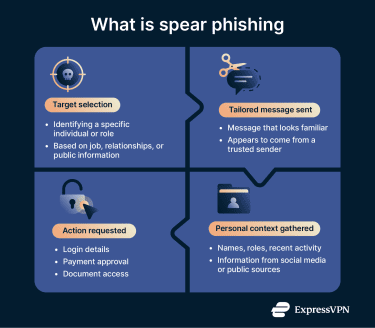
How spear phishing differs from regular phishing
Spear phishing and regular phishing are both forms of cyberattacks that attempt to get the victim to reveal information or send money. However, they differ in how they operate.
- Targeting: Regular phishing is often a generic message that can be sent to entire mailing lists. Spear phishing uses social engineering to better understand the specific victim and target the attack.
- Context: Generic phishing messages rarely reference personal details. Spear phishing includes real-world context such as names, job titles, shared contacts, or recent events.
- Tone: Mass phishing often includes spelling or grammar mistakes that can signal something is off, though some large-scale phishing campaigns are well-written. Spear phishing messages tend to read more like normal workplace or personal communication, even if minor errors occasionally slip through.
- Goal: While both aim to steal information or money, spear phishing often supports more focused outcomes, such as account takeover attempts, internal fraud, installing malware, corporate espionage, or credential harvesting.
Common traits of spear phishing messages
Spear phishing attacks typically share a few common traits:
- Personalized details: Attackers often mention real information, such as a manager’s name, a current project, or a recent transaction. These details may come from public profiles, breached data, or previous communications.
- Believable sender: Attacks may mimic someone the target already trusts, such as a colleague, vendor, or service provider. In a business email compromise (BEC) attack, the criminal gains access to a real email account or creates a new account using a look-alike domain and sends requests from there.
- Specific request: Unlike standard phishing, which often relies on broad or generic prompts, spear phishing messages typically request a concrete action, such as reviewing a document, confirming login details, or processing a payment.
How spear phishing works
Spear phishing works by tailoring the message to the target. Even a few accurate details can make a request feel normal, especially when the target already expects similar messages. From there, the goal is simple: create a message that looks ordinary and prompts a specific action.
Stages of a spear phishing attack
Spear phishing follows a fairly predictable pattern, even though each message may be unique.
Reconnaissance and target profiling
Spear phishers collect information about their targets using publicly available or indirectly obtained data. Common sources include:
- Social media: Platforms like LinkedIn, Facebook, or X can list job roles, professional connections, and daily routines.
- Public online sources: Company websites, blog posts, press releases, or conference listings can expose responsibilities and reporting structures.
- Email data: Attackers may rely on leaked email lists from data breaches, previous email threads from compromised inboxes, or other unauthorized sources to reach specific individuals.
Crafting a personalized message
Once they have the information, the attackers write a believable message, aiming to mirror the tone, formatting, and writing style of a real person or organization the target recognizes.
Most messages include a clear prompt to act, such as reviewing a document, approving a request, or resolving an issue. That request is framed to seem routine but also often time-sensitive.
Delivery of the malicious payload
Once the message is ready, the attacker delivers it through a channel the target already trusts, most often email, but sometimes messaging apps or SMS. The delivery itself is usually unremarkable; the message arrives looking like any other routine communication and may not require follow-up or interaction from the attacker.
At this point, success depends entirely on whether the target engages. Clicking a link, opening an attachment, or responding to the request moves the attack forward. The payload may involve a fake login page, a document designed to capture credentials, or a download that installs malicious software.
Credential theft or account compromise
Some spear phishing attacks ask for access to documents, while others send links to a spoofed website that the attackers control. In both cases, once the attacker has the information they’re after, it gives them the ability to steal credentials or change access permissions for the accounts. It can be immediate, or they may capture credentials for later use.
From there, attackers often look to expand their reach. They may review past messages, reset passwords, or use the compromised account to impersonate the victim and contact others. In organizational settings, this can lead to lateral movement across systems. For individuals, it can result in account lockouts, unauthorized purchases, or repeated impersonation attempts.
Social engineering techniques used in spear phishing
Spear phishing relies on social engineering to make the email feel authentic. Basic information, such as a name, job title, and email address, allows for initial targeting, but effective attacks usually require specific context to create a believable scenario.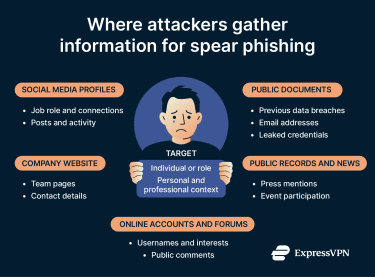
For example, posing as a colleague discussing an internal project requires knowledge of the project, team members, and communication style. Impersonating a vendor requires enough detail to make an invoice or request appear plausible. Much of this information may be available online, either directly through the company website, via published documents, or through social media.
By combining these details, attackers build a tailored narrative that fits the target’s expectations and environment.
Pretexting and impersonation
Pretexting gives a spear phishing message its reason for showing up. Instead of asking for something out of the blue, the attacker creates a scenario that matches the target’s expectations, like a manager asking for a quick review, a vendor following up on an invoice, or a family member reaching out from a new number.
The attacker may mimic a real contact, a known brand, or a familiar service, and they usually match the tone and formatting accordingly.
Urgency and psychological manipulation
Many spear phishing messages pressure the target to act quickly. This is to reduce the possibility of the target talking to the person the attacker is mimicking or noticing inconsistencies in the request. By creating an urgent scenario, the hope is that the target won’t have time to think, so they’ll act before verifying the information.
The pressure can be subtle: it may sound like a routine deadline or a quick approval. In personal scams, it may lean on emotion, like a sudden emergency or an awkward situation that feels private.
Real-world examples of spear phishing
Spear phishing attacks come in many forms, but the one consistency is the use of personal information to facilitate the scam. Here are some examples.
- CEO fraud and executive impersonation: Attackers pose as a company executive, often a CEO or senior manager, and contact employees with financial authority. The message typically requests an urgent payment, wire transfer, or confidential action, framed as time-sensitive and routine to avoid scrutiny.
- BEC: In BEC schemes, attackers compromise or impersonate a trusted business email account, such as a vendor or finance contact. They use that access to redirect payments, alter invoice details, or request sensitive information while appearing to operate within normal business workflows.
- Fake family emergencies: Individuals may receive messages claiming to come from a family member in distress, such as a child who has lost a phone or needs urgent financial help. These messages rely on emotional pressure and familiarity rather than technical tricks.
- Credential harvesting through personalized links: Some spear phishing messages direct targets to realistic-looking login pages that imitate email providers, cloud services, or internal tools. When victims enter their credentials, attackers capture the information and use it to access real accounts.
How to recognize a spear phishing message
Spear phishing messages are designed to feel ordinary, so they can be harder to spot than generic phishing scams. Here are some things to look out for.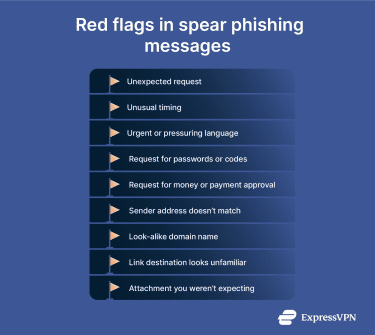
Subtle red flags
The red flags in a spear phishing email often show up as a request that feels slightly off rather than clearly wrong. The timing may be unusual, the tone may differ from what you expect, or the request may skip a step that normally exists. When all these details appear at once, they may indicate a potential issue with the email.
These emails often try to move the conversation forward quickly. That pressure may be professional or emotional, but the effect is the same: less time to pause and verify.
Domain and sender spoofing
Attackers frequently rely on sender details that look correct at a glance. Display names may match someone you know, while the actual email address uses a slightly altered domain or unfamiliar structure. Checking the sender address carefully can reveal inconsistencies that are easy to miss when reading quickly. Even small differences matter, especially when the message asks you to take action.
That said, be aware that the attacker might use a real compromised email address, and in that case, you should reach out to that contact using another channel to confirm.
Suspicious requests for information
Be cautious when a message asks you to share sensitive information, approve access, or move money, particularly if the request arrives unexpectedly. Legitimate organizations and individuals usually rely on established processes for these actions.
When a request involves credentials, payments, or confidential documents, taking a moment to confirm it through another channel is often enough to expose a spear phishing attempt.
How to protect yourself from spear phishing
Spear phishing is highly targeted, but it's not unavoidable. By following best practices for online security and enabling the right email security controls, you can lower your risk of being victimized. Good protection comes from a comprehensive cyber defense, including multiple security layers, education, and technical safeguards.
Best practices for individuals
Spear phishing often targets individuals through messages that appear personal. These may include emails claiming to come from a child asking for urgent financial help or a distant relative referencing an upcoming family event. Because the message feels familiar, it can be easier to trust without verifying the details.
Verify sender identity
When a message claims to come from someone you know, slow down and check the details. Attackers often rely on familiarity, using names or relationships to lower suspicion. Looking beyond the display name to the actual sender address and confirming unexpected requests through a different channel can reveal impersonation attempts.
Check URLs, attachments, and requests
Malicious attachments and URL phishing are common in spear phishing messages. You can hover over URLs to verify they match the expected website, and exercise caution with unexpected attachments (especially Office files, PDFs, or ZIPs), even if they appear to come from someone you know.
Requests for sensitive information, account access, or money also deserve extra scrutiny. Legitimate services and individuals rarely ask for these details through unsolicited messages, so always reach out to the contact via another channel to verify the request.
Avoid oversharing online
Personal details shared online can make spear phishing more convincing. Information about family members, travel plans, or upcoming events may seem harmless, but it can provide attackers with useful context.
Limit what you share publicly, and adjust privacy settings on social media to reduce the amount of information available for misuse. Being mindful of your digital footprint makes it harder for attackers to craft messages that feel personal and credible.
Security essentials for organizations
Organizations face broader exposure because a single compromised account can affect many systems. Defensive strategies work best when they combine user awareness with technical controls that reduce attack reach and impact.
Employee awareness and anti-phishing training
One of the best ways to protect against spear phishing is to have a workforce that’s aware of it. Employees who understand how targeted phishing works are more likely to pause, question unusual messages, and report them, instead of reacting automatically.
Training should focus on recognizing subtle warning signs, such as unexpected requests, unfamiliar domains, or pressure to act quickly. Encourage employees to navigate directly to known websites instead of clicking links in emails. This habit matters outside work as well, since personal accounts often influence professional security.
Regular phishing simulations reinforce these lessons by giving employees practical experience in identifying and handling suspicious messages.
Email authentication controls (SPF, DKIM, DMARC)
Email remains the primary delivery method for spear phishing, so organizations should aim to reduce the number of malicious messages that reach inboxes. Protections to enable include:
- Sender Policy Framework (SPF): Checks whether an email originates from an authorized mail server for a given domain.
- DomainKeys Identified Mail (DKIM): Uses cryptographic signatures to confirm that a message hasn’t been altered and genuinely comes from the sending domain.
- Domain-based Message Authentication, Reporting, and Conformance (DMARC): Builds on SPF and DKIM by telling receiving servers how to handle messages that fail authentication and by providing reporting back to domain owners.
When configured correctly, these protocols make it harder for attackers to spoof trusted domains and impersonate internal senders.
Role-based access and multi-factor authentication (MFA) requirements
Limiting what users can access reduces the damage caused by one compromised account. Role-based access controls ensure employees only have the permissions necessary for their responsibilities, rather than broad access across systems. This principle aligns with a zero-trust security model, which assumes no user or device should be trusted by default and emphasizes strict access controls to reduce the impact of breaches.
MFA adds another layer of protection by requiring more than a password to log in. Phishing-resistant MFA methods are especially effective because they prevent attackers from reusing stolen credentials or intercepting one-time codes sent by email or text message.
Together, access controls and MFA help contain attacks even when a spear phishing attempt succeeds.
What to do if you fall victim to a spear phishing attack
If you think you responded to a spear phishing message, a quick response can help mitigate any damage. The priority is to regain control, limit further access, and reduce the chances of the same information being used again later.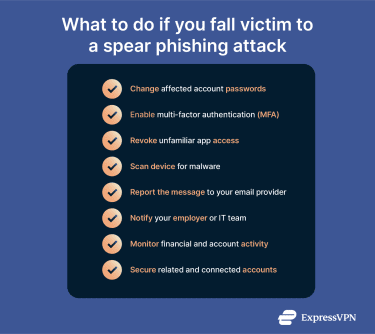
Immediate actions to secure your accounts
Start with the accounts or devices directly involved in the interaction. These are the most likely entry points and the easiest places for attackers to maintain access.
Reset passwords and enable MFA
Change the password on any account you may have interacted with, starting with email accounts and moving outward to services connected to them. Use new, unique passwords rather than modifying old ones.
If the service supports MFA, enable it immediately. This reduces the value of stolen credentials and can stop attackers from signing in even if they already have your password.
Revoke app permissions
Some spear phishing attempts succeed by convincing users to approve access rather than hand over credentials. Review any third-party apps, integrations, or connected services associated with affected accounts.
Remove anything unfamiliar or no longer needed. Cutting off this access helps prevent attackers from maintaining persistence after the initial interaction.
Scan devices for malware
If the message involved downloading a file, opening an attachment, or installing software, scan the device used in the interaction using a reliable antivirus.
Make sure your operating system and security tools are up to date before running a full scan and follow the recommended steps to remove anything detected.
How to report spear phishing attempts
Reporting serves two purposes: it helps protect others, and it creates a record in case the activity continues or escalates.
Report to email providers
Some email providers, like Gmail, give you the option to report an email as phishing. When you do this, the security team will inspect the email and flag other emails that come from the same sender, follow the template, or use the same wording.
If your email provider doesn’t have a dedicated phishing button, you can still click the Spam button to send an alert.
If you’ve already clicked a link or entered credentials, it’s still recommended to report the message. It may filter out follow-on attempts, especially if the attacker targets multiple people using the same template.
Report to employers or IT departments
If the incident involved a work account or device, notify your organization’s IT or security team as soon as possible. Even if no damage is obvious, early reporting allows teams to watch for related activity and protect other users.
This step matters even when the message appears personal but reaches a work inbox.
Report to online platforms
If you encounter phishing on social media, messaging apps, or online marketplaces, report the suspicious account or message directly to the platform. Most platforms have dedicated reporting tools for impersonation or scam activity, which can help suspend the malicious account and warn other users.
Report to the authorities
If the spear phishing attempt involved financial loss, identity theft, or sensitive personal data, you can notify local consumer protection agencies or law enforcement, for example, the FBI’s Internet Crime Complaint Center (IC3) in the U.S. If you decide to report, provide as much detail as possible: screenshots, URLs, or email headers can all help authorities investigate and may protect others.
Recovery steps and long-term monitoring
Even after you secure affected accounts, a spear phishing incident may continue to have downstream effects.
Check for identity theft
Spear phishing can expose personal information that attackers may reuse later or combine with other data sources. Signs of identity misuse may include unexpected account changes, password reset notifications you didn’t request, or new accounts created in your name.
Review your credit reports, and consider using identity monitoring services to surface issues that would otherwise go unnoticed, especially if the original incident involved personal or financial details.
Identity monitoring tools can provide an extra layer of visibility by alerting you to suspicious activity, such as newly opened accounts or exposed personal information. Services like ExpressVPN’s Identity Defender, available to U.S. customers on the Advanced and Pro plans, are designed to help track potential misuse and notify you early, giving you more time to respond before issues escalate.
Monitor financial activity
Financial misuse doesn’t always happen right away. Attackers may wait before attempting transactions or start with small test charges to avoid detection. Reviewing bank and credit card statements regularly makes it easier to spot unusual activity early.
If anything looks unfamiliar, contacting the financial institution promptly improves the chances of limiting losses and reversing unauthorized actions.
FAQ: Common questions about spear phishing
How is spear phishing different from phishing and whaling?
Phishing usually relies on generic messages sent to large groups, with little personalization. Spear phishing targets a specific individual or small group and uses personal or contextual details to appear legitimate. Whaling is a subtype of spear phishing that focuses on high-level targets, such as executives or senior decision-makers, where the potential payoff is higher.
How can I recognize a spear phishing email or message?
Spear phishing messages often look credible at first glance, which is why context matters. Unusual requests, unexpected timing, or pressure to act quickly can signal a problem. Messages that ask for sensitive information, money, or account access without prior discussion should prompt verification through a separate channel.
What should I do if I think I responded to a spear phishing email?
There are a few steps to take. Start by securing any affected accounts, especially email and financial services. Change passwords, enable multi-factor authentication (MFA) where possible, and review connected apps or permissions. If the message involved work accounts or financial activity, report the incident to the appropriate provider or organization so they can help limit further impact.
Why is spear phishing so dangerous for businesses?
There are many examples of how spear phishing exploits trust and can lead to credential theft, unauthorized payments, or internal access that is difficult to detect immediately. Targeted attacks often cause damage that goes beyond a single account, impacting systems, finances, and reputation.
Take the first step to protect yourself online. Try ExpressVPN risk-free.
Get ExpressVPN