How to prevent shoulder surfing: Essential tips for digital privacy


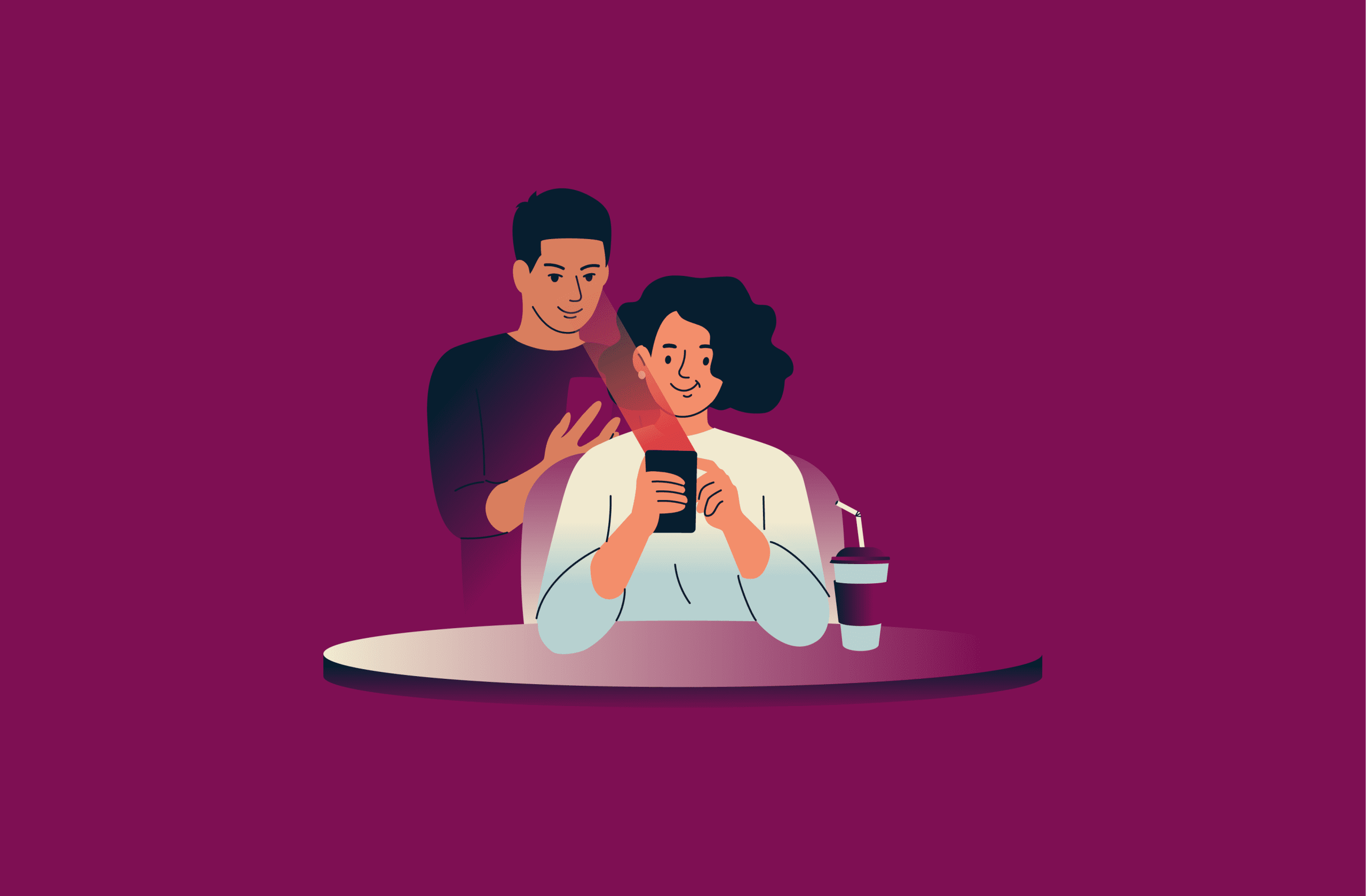
You know the feeling: someone stands a little too close, and you instinctively tilt your phone away. That instinct is there for a reason. In crowded spaces, a quick glance can reveal sensitive information, such as your passcode, bank card PIN, or one-time code that flashes on your lock screen.
This guide explains what shoulder surfing is and how to prevent it without turning your everyday errands into a security routine. We also cover subtle signs to watch for and the methods attackers commonly use.
What is shoulder surfing?
Shoulder surfing is a form of attack that exploits human behavior, not software vulnerabilities. The attacker steals sensitive information by watching the victim type or read it, often in a crowded setting.
Some also call shoulder surfing “visual hacking” or “screen snooping.” While the terminology varies, the goal stays the same: to capture data for account access, fraud, or identity theft.
How these attacks work in the real world
Shoulder surfing is simple because it only requires a good angle and a short window of time. The attacker identifies a moment when someone reveals information, such as logging into an account or approving a payment.
Below are the most common shoulder surfing tactics attackers use.
- Watching hands: Standing close enough to track finger movements on a keyboard. In some cases, skilled attackers don't need to see the screen if they can watch your hands.
- Viewing the screen: Reading what's on display from a short distance. For example, the next table in a cafe, a neighboring seat on a train, or anywhere else the screen faces outward.
- Listening for details: Attackers may listen nearby while someone reads out a card number, confirms an address, or repeats a booking reference.
It’s worth noting that attackers don’t always rely on memory. They might use a phone camera to film the screen, keypad, or conversation.
That brief moment of exposing your data can cause real harm. For instance, attackers can use a stolen password to access your accounts and use them for fraud. A captured PIN is just as dangerous, as they can withdraw cash if they manage to steal the card.
When are you most at risk?
Risk comes down to two things: how visible your information is and how easy it is for someone to get close without looking suspicious.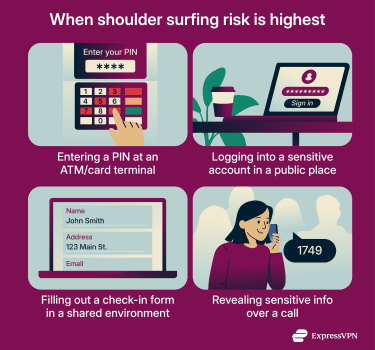
Shoulder-surfing attacks are most common in public places, particularly where device use is routine. These include airports, cafes, co-working spaces, trains, libraries, hotel lobbies, conferences, ATMs, and store checkouts.
Attackers might seize the moment you’re:
- Entering a PIN at an ATM or payment terminal.
- Logging into email, banking, or work tools in a shared space.
- Filling in personal details like name, address, or other identifiers on forms, onboarding screens, or check-in pages.
- Discussing payment details or account recovery steps on a call in a crowded area.
Screen size and layout matter more than it seems. Larger displays are easier to read from the side. A laptop on a cafe table gives passersby more chances to catch details than a smartphone screen. The risk is especially high if the screen is bright and facing an aisle.
Signs you’re being shoulder surfed
Most people nearby are just stuck in the same queue. The problem is you can't always tell who's glancing out of boredom and who's watching with intent.
A good rule is to watch for patterns. If someone keeps positioning themselves with a clear view of your screen or keypad, it might not be accidental.
Suspicious positioning
- Unnecessary closeness: Someone stands right behind you or slightly to your “typing side” at an ATM, payment terminal, or check-in counter, even when there’s space to queue normally.
- Loitering: A person hangs around the ATM, kiosk, ticket machine, or checkout area without using it. Be especially cautious if you notice that they keep track of other people.
- Seat selection that makes no sense: On public transport or in a cafe, someone picks the seat that gives them the cleanest view of your screen (or a surface that reflects it), even when other seats are available.
Suspicious interactions
- An “uninvited helper” move: Someone offers help (for example, with an ATM or card reader) without you asking. Be particularly wary if they try to rush you through steps.
- Distraction: Think bumped shoulder, a sudden question, or “you dropped this” at the exact moment you enter a PIN or passcode. This tactic breaks focus and creates a reason for someone to crowd in.
How to tell someone’s watching
- Eye-line tells: Someone is repeatedly looking at your screen while you type or scroll. If this goes on for a while, someone might be “peering” to capture login details, not just glancing at a headline.
- The “tilt test”: You adjust your screen angle, shift your chair, or turn slightly, and the person adjusts as well to keep a clear viewing angle.
- They track your hands: Watching finger movement can be enough to reconstruct what you typed, even if the screen isn’t perfectly visible.
Police have also warned about cases where criminals watch a phone passcode, then steal the device and attempt account access. If someone watches your unlock screen and follows you as you leave, take it seriously.
Consequences of shoulder surfing
A shoulder surfing incident always starts with a quick look, but the fallout depends on what data attackers got to capture.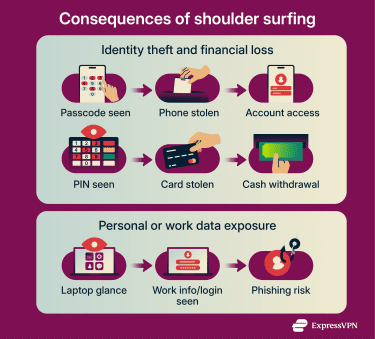
Identity theft
Shoulder surfing can lead to identity theft. If someone captures sensitive details like full name, email address, date of birth, or account number, especially in combination, they may be able to impersonate the victim.
On their own, these details may look harmless. In combination, they can help someone pass identity verification or get access to bank, employer, or service provider accounts.
Financial loss
Financial loss usually happens when a shoulder surfer captures a passcode or PIN, then steals the victim’s device or card to access banking apps or withdraw cash directly. This pattern is known as passcode harvesting.
In one City of London Police case, a thief watched a victim enter a four-digit PIN. They then stole the victim’s phone and bank card and withdrew £500 at an ATM.
Personal safety risks
Shoulder surfing can create personal safety risks when someone captures information that reveals where a person lives, where they work, or when they won’t be home. For example, they might see a home address in a form, a regular commute in a calendar, or travel dates in a booking confirmation. This could enable stalking, burglary, or targeted theft.
Police advice often warns that travel plans can signal when a home may be empty. While that guidance is usually framed around social media, the same risk logic applies if travel details are visible on a screen in public.
Exposure of work data
The privacy impact is often broader than people expect. A work laptop can reveal internal documents, customer details, or a corporate login.
Open offices and co-working spaces make shoulder surfing easy because screens face outward, people work in close proximity, and their attention is often elsewhere.
That’s why many workplace privacy policies often include screen positioning and clean-desk habits. Even if an attacker only sees part of the information, they can still use it to impersonate an employee or craft a believable phishing message.
How to prevent shoulder surfing attacks
Prevention is mostly about reducing visibility when sensitive information appears. That means controlling angles, limiting what appears on the lock screen, and ensuring that a single code doesn’t unlock everything.
For more context on why small habits like this matter, see why you should care about privacy.
Shield your device from view
When entering a PIN at an ATM or card terminal, cover the keypad with a free hand. When using a phone or laptop in public, step away from the crowd and, when possible, sit or stand with your back to a wall.
If you absolutely must unlock your device in public, limit what an observer can actually use. For example, store sensitive data in password-protected apps so that unlocking alone isn’t enough to access it.
Use a privacy screen protector
A privacy screen protector (also called a privacy filter) makes the display harder to read from the side. There’s a large selection of privacy screens for smartphones, tablets, laptops, and even large-sized monitors.
It’s worth noting that privacy screens are not a complete fix, as someone directly behind you can still see your screen. Still, they do reduce casual screen snooping.
Avoid sensitive tasks in public
Password resets, banking changes, and account recovery flows require extra caution. When possible, delay these until you’re in a more private setting.
If you can’t wait, minimize the risk. Step out of the queue, turn away from the crowd, complete the task quickly, and lock the screen.
Use strong passwords and 2FA
One password shouldn’t unlock multiple accounts. Use unique passwords for important services and enable two-factor authentication (2FA). That way, logging in typically requires both a password and a one-time code.
However, 2FA isn’t foolproof. If a one-time code pops up on a lock screen, it can be shoulder-surfed, too. Turning off message previews reduces that risk.
This extends to reading codes out loud. U.S. Army Cyber Command explicitly warns against verbalizing passwords or security codes in public, because listening can be part of a shoulder surfing attempt.
The Metropolitan Police also advises using biometrics and strong passwords rather than relying solely on a 4-digit passcodes to unlock your device.
What to do if you’ve been shoulder surfed
If a passcode, PIN, or login was exposed, treat it as compromised. Act fast to block any way in, then document what happened.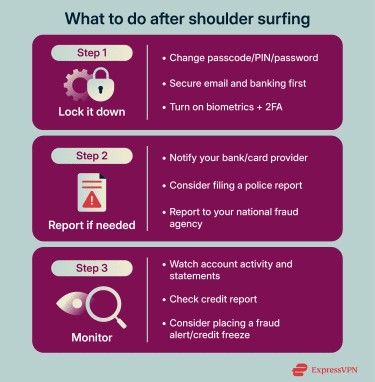
Immediate actions to take
Start with securing your most sensitive accounts, such as your email or banking app. First, visit your account security settings and review signed-in devices and recent login activity. Sign out of any unfamiliar session, then change the password and enable 2FA so the attacker can’t sign back in with a captured code.
Add biometrics to your phone if someone may have seen your passcode. If someone saw your bank card PIN, assume the card itself is at risk, too. Many banks let you freeze your card or change the PIN in-app.
Reporting the incident
Next, you might want to report the incident. If someone saw your card PIN or payment passcode, contact your bank or card provider to freeze the card or change the PIN. If they stole your device, contact your mobile carrier and use Find My iPhone or a similar tool to lock or erase the device remotely.
Then, consider filing a police report. This creates an official record, which helps when dealing with banks, mobile carriers, and credit bureaus, and police may be able to recover your device.
If possible, also file a report through your national fraud or cybercrime channel. Some countries offer centralized online reporting, such as the FBI’s Internet Crime Complaint Center (IC3) in the U.S., the Canadian Anti-Fraud Centre, or Australia’s ReportCyber portal. In Europe, Interpol’s portal can help you find law enforcement and cybercrime resources specific to your country.
Monitoring for identity theft
Monitoring matters because attackers might wait before using captured information. Watch for warning signs like unfamiliar card charges, password reset emails you didn’t request, new device login alerts, and changes to account details.
If you spot something suspicious, review bank statements and card activity. Then, check credit reports for new accounts, addresses, or hard inquiries. Place transaction and login alerts wherever possible so unexpected activity is flagged quickly.
In the U.S., you can place a fraud alert by contacting one of the three major credit bureaus (Equifax, Experian, and TransUnion). The bureau you contact must notify the other two. Initial fraud alerts last 12 months, and extended fraud alerts last 7 years if there is documentation of identity theft.
Other countries have similar identity protection steps through local credit and fraud prevention services. In the UK, Cifas Protective Registration flags your details so organisations using Cifas data run extra checks on applications in your name.
In Australia, credit reporting bodies like Experian let you temporarily freeze your credit report to block new account applications (starting at 21 days with an option to extend). In Canada, both Equifax and TransUnion offer fraud alerts or statements that stay on file for up to six years and prompt extra verification when creditors run checks. Laws vary by country, and watching itself isn’t always an offense. In practice, shoulder surfing typically leads to clearly illegal acts like theft, fraud, or unauthorized access, which is how police and fraud-prevention agencies treat it. Digital hacking typically targets systems, software, or networks. Shoulder surfing targets people directly. Malicious actors observe, listen to, or record sensitive information as you go about your day. Yes. Security cameras, webcams, or hidden cameras can capture screens and keypads if the angle is correct. Criminals might also install miniature cameras at ATMs specifically to record PIN entry. Shoulder surfing can occur anywhere you briefly reveal sensitive information. Examples include check-in kiosks, shared office printers, reception desks, and public-use computers, even while you confirm details on a phone call. Yes. The risk depends on behavior, not age. If a student unlocks a phone in a crowd, logs into a school portal on a shared computer, or reads account details out loud on a call, shoulder surfers can misuse their data just like that of adults. The most common exposure points are tied to activities, not industries. These include payments, account logins, form-filling, and account recovery. Those show up most often in retail, banking, travel, hospitality, and workplaces with laptops in shared spaces. Yes. The same observation tactics apply to any device with a screen. While larger screens are easier to read from a distance, smaller screens like smartwatches can still expose notifications to anyone standing close.FAQ: Common questions about shoulder surfing
Is shoulder surfing illegal in most countries?
How does shoulder surfing differ from digital hacking?
Can shoulder surfing happen via webcam or surveillance?
What are less obvious places where shoulder surfing can occur?
Are children and teens at risk of shoulder surfing?
What industries are most targeted by shoulder surfers?
Can smartwatches or tablets be targeted in shoulder surfing attacks?
Take the first step to protect yourself online. Try ExpressVPN risk-free.
Get ExpressVPN