Remote access Trojan (RAT): What it is and how to stay protected



A remote access Trojan (RAT) is a type of Trojan horse malware that gives attackers remote control over a device without the user’s knowledge or consent. Once installed, it can monitor activity, steal sensitive data, and carry out actions as if the attacker were sitting in front of the device.
RATs can affect Windows, macOS, Android, iOS, and Linux systems, often running quietly in the background. This makes them difficult to detect, but they typically leave behind warning signs that indicate something is wrong.
This guide explores why RATs pose such a serious risk, how they commonly end up on devices, and the steps that can help reduce exposure to them.
Key features and capabilities of RAT malware
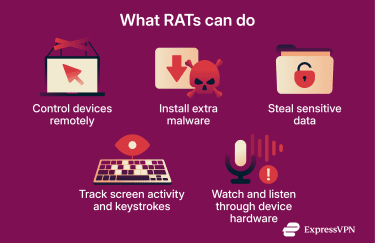
Attackers use RATs for:
- Remote control and system access: Attackers can run commands, open applications, browse files, and fully operate the infected system. This enables them to disable security tools, move laterally across a network, access internal systems, and carry out attacks, including data theft.
- Additional malware installation: Attackers can use a RAT to download and install additional malware onto an infected device. This can include tools that turn the device into part of a larger botnet.
- Keylogging and screen capture: Many RATs record keystrokes and take screenshots of the victim’s screen to capture sensitive data such as passwords, banking details, and personal files.
- Webcam and microphone access: Some RATS can activate a device’s camera or microphone. This allows attackers to spy on the target. In some cases, they can even record private or compromising footage that can be used for blackmail or sextortion.
How RATs differ from other malware types
RATs are designed to give attackers ongoing, interactive control over an infected device. Unlike many other types of malware that perform a single primary function, RATs act more like a hidden backdoor, allowing attackers to remotely manipulate the system over time.
Here’s how RATs differ from some common malware categories:
- RATs vs. spyware: Spyware primarily collects information such as keystrokes, screenshots, or browsing data. RATs can do this too, but they go further by enabling full remote control, allowing attackers to install additional malware, change system settings, or use the device as part of a larger attack.
- RATs vs. ransomware: Ransomware is typically loud and disruptive, encrypting files and demanding payment. RATs are stealthy and persistent. Attackers may keep a RAT installed for long periods to spy on victims, exfiltrate data, or prepare for future attacks.
- RATs vs. botnets: Botnet malware usually turns infected devices into “bots” that follow automated commands at scale, such as sending spam or launching distributed denial-of-service (DDoS) attacks. RATs enable more hands-on control, often targeting specific victims rather than operating purely through mass automation.
RATs vs. “regular” Trojans
RATs are a specific subtype of Trojan malware, but they differ from “regular” Trojans in both purpose and persistence.
While many Trojans are designed to perform a narrow malicious task, such as dropping a second-stage payload, installing adware, or stealing specific data, RATs are built to provide attackers with ongoing, interactive remote access to the infected system.
In other words, all RATs are Trojans, but not all Trojans are RATs: the defining difference is that RATs are designed for long-term remote control rather than a single, predefined malicious function.
How do remote access Trojans work?
A RAT must first gain entry to a victim’s system. This typically happens through social engineering; tricking the victim into opening a malicious attachment, clicking a deceptive link, or downloading software that appears legitimate. In these instances, attackers send emails that look legitimate but contain infected files. When the target downloads the file, they install the RAT onto their device without knowing.
This deceptive delivery method is why RATs are classified as Trojans. It’s a reference to the Ancient Greek story of the Trojan Horse, which concealed soldiers inside a seemingly harmless gift to infiltrate the city of Troy.
Once installed, the RAT typically establishes a backdoor that allows remote communication between the infected device and the attacker. This setup often includes a client component on the victim’s system and a server component controlled by the attacker. 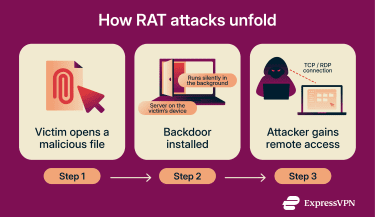
The client operates on the attacker’s remote system, while the server runs on the compromised device. Once a connection is established between the two, the attacker gains remote control over the infected device.
Common infection vectors and methods
In addition to social engineering, RATs can also infect devices via:
- Fake software and downloads: Attackers commonly bundle RATs with software that appears useful or enticing, such as free games, cracked versions of paid software, or pirated tools.
- Drive-by downloads from malicious websites: Visiting a compromised website can trigger an automatic download that installs a RAT without the user’s knowledge.
- Exploits of software vulnerabilities: Attackers exploit bugs in outdated systems or applications to install RATs without any action from the user.
How RATs remain undetected in systems
RATs rely on stealthy techniques that make malicious behavior look normal. This allows them to stay active on a system for long periods without detection.
Encrypted communication channels
RATs often encrypt the data they send to and receive from the attacker’s command and control (C2) server. This stops many network monitoring tools from flagging the activity or inspecting it for harmful content.
Polymorphic code that changes its signature
Many RATs modify their code each time they run, which changes their digital fingerprint. This makes them harder for security tools that rely solely on known malware signatures to detect.
More advanced security solutions can still identify RAT activity by using heuristic and behavior-based analysis to monitor suspicious actions.
Legitimate remote access communication ports
RATs can use the same remote access ports that legitimate IT support tools use to connect to computers. Modern businesses rely on services like Windows Remote Desktop Protocol (RDP) or tools such as TeamViewer for troubleshooting and supporting their users.
RATs leverage these common remote access channels so their traffic looks normal and blends in with trusted connections. Security systems often ignore activity on these ports because legitimate support tools use them regularly.
Rootkit techniques
Some advanced RATs embed themselves deep within the operating system using rootkit methods. They hide their files, processes, and registry entries from normal system views so that antivirus scanners and task lists can’t find them. This lets the RAT stay hidden even while it runs in the background and continues its malicious activity.
Examples of notorious remote access Trojans
RATs have evolved over decades and appear in many high-profile attacks. Some of the earliest examples helped shape how cybersecurity professionals detect and respond to backdoor malware, while modern variants continue to target individuals, businesses, and critical infrastructure.
Historical RATs that made headlines
These high-profile campaigns played a pivotal role in exposing weaknesses in operating systems and enterprise security.
Back Orifice 2000
Back Orifice 2000 (BO2K) is a RAT that first appeared in July 1999. It was associated with Cult of the Dead Cow, a hacker collective that stated that the tool was intended to expose weaknesses in Windows security and pressure Microsoft to strengthen its products. However, Microsoft experts categorized BO2K as malicious and having “absolutely no purpose except to damage users.”
BO2K functions like a typical RAT by letting an attacker remotely monitor and control a Windows machine. It affected only Windows 95, 98, and NT versions and was distributed via phishing emails.
PoisonIvy
PoisonIvy is a RAT that was used in several major attacks, including the 2011 Nitro campaign that targeted government agencies, chemical companies, and defense contractors to steal intellectual property.
In the Nitro attacks, attackers spread the PoisonIvy RAT through targeted phishing emails sent to specific employees. These emails carried malicious attachments disguised as legitimate business documents or security updates, often delivered as password-protected archives containing executable files. When victims opened the attachment, they unknowingly installed the RAT, which then allowed the attackers to remotely monitor infected systems, move through the corporate network, and steal sensitive data.
Adwind RAT
Adwind RAT was first identified in 2012 under the name Frutas and later circulated under aliases such as AlienSpy and jRAT. It’s built in Java, which allows it to run on Windows, macOS, Linux, and Android systems.
Cybercriminals often deployed the Adwind RAT via spam and spear phishing emails that lure victims into opening malicious attachments.
Once installed, Adwind gave attackers broad control, including the ability to log keystrokes, steal data, capture screenshots, and activate webcams and microphones.
Modern RAT variants and emerging threats
Today’s RATs are more covert, scalable, and financially motivated, often targeting mobile devices and leveraging social engineering, Malware-as-a-Service (MaaS) models, and built-in system features.
BTMOB RAT
BTMOB RAT is an Android RAT identified in early 2025. It has been observed spreading through fake websites that imitate popular services, as well as through malicious APKs.
After installation, the malware abuses Android’s accessibility features to grant attackers extensive control. Reported capabilities include live screen sharing, file access, audio capture, keylogging, and credential theft capabilities.
PlayPraetor and its variants
PlayPraetor is a sophisticated Android RAT. Researchers from cybersecurity company CTM360 first spotted it in 2025 after it tricked users into installing fake apps disguised as Google Play Store pages.
The malware operates as part of a large MaaS network that has infected over 11,000 devices. Its highest concentrations are in Europe (especially Portugal, Spain, and France), but also in Africa, Latin America, and Asia.
PlayPraetor abuses Android’s accessibility services to give attackers real-time control of compromised phones. The malware arrives via fake Google Play Store pages, Meta ads, or phishing SMS messages. It currently runs overlay attacks against nearly 200 banking and cryptocurrency apps to harvest credentials and commit fraud.
How to detect a remote access Trojan
Detecting a RAT early helps stop damage and protect personal information. The signs of a RAT infection can show up in everyday use and with the help of tools that monitor system behavior and network activity.
Common warning signs to watch for
Watch for these telltale symptoms that could indicate a RAT on your system:
- Slow or lagging performance: Unexplained slowdowns or frequent freezes can occur when a RAT consumes system resources while running in the background.
- Unusual browser behavior: Frequent redirects, strange search results, or popups that you didn’t trigger can indicate someone is manipulating your browser activity.
- Unknown files or programs: If you find files or programs you don’t recognize, they could be part of a RAT or other malware trying to hide on your device.
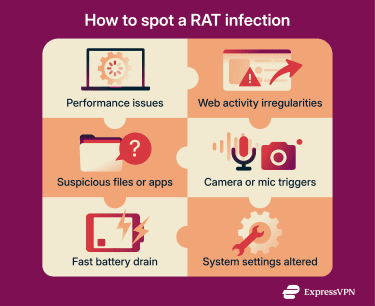
- Webcam or microphone activation: If your webcam or microphone light turns on unexpectedly, someone might be accessing it remotely.
- Fast-draining battery: A RAT can run background processes that consume power quickly, causing your device’s battery to drain faster than usual.
- Unauthorized system changes: The malware can modify system settings, startup behavior, and permissions so it automatically runs every time the device starts. You might notice this if programs you didn’t add appear in your startup list.
- Unexplained overheating: Continuous hidden activity can make your CPU or device heat up, even when performing light tasks.
Tools and software used for RAT detection
Many tools can help scan for RAT malware and catch hidden threats:
- Antivirus and anti-malware scanners: Established security suites, including built-in tools, can scan your device for known RAT signatures and behaviors.
- Task and process monitors: Built-in tools like Task Manager on Windows and Activity Monitor on macOS can help you spot unknown processes that use a lot of resources.
- Startup and autorun analyzers: Certain utilities can show programs that launch at startup, making it easier to find unwanted RAT components.
- Network traffic analyzers: Tools like Wireshark let users monitor outgoing connections for unusual activity to unfamiliar servers.
- Firewall and intrusion detection: Firewalls and intrusion detection systems (IDS) can alert you to suspicious inbound or outbound network traffic that may indicate a RAT connection.
What to do if you suspect a RAT infection
If you think a RAT has infected your device, taking the right steps can cut off the attacker, limit exposure, and help you regain control before the situation gets worse.
Disconnecting from the internet and isolating the device
If a device is offline, a RAT may no longer be able to receive live instructions from its operator. However, this doesn’t fully disable all RATs, as some are designed to carry out preconfigured actions even without an active connection.
Despite this, you should sever all network connections as quickly as possible. Disable Wi-Fi, unplug Ethernet cables, and remove the device from any local network to prevent communication with attackers and reduce the risk of lateral movement to other machines. Update all software (including antivirus software with the latest definitions) before disconnecting from the internet.
Running a full system scan with an antivirus
A full system scan will examine files, processes, and hidden areas of the system to find and quarantine all viruses and other malware, including RATs.
Resetting credentials and monitoring accounts
After you clean your device, change all your account passwords. Assume that attackers have stolen login credentials for email, banking, social media, and cloud services. Consider using a password manager to create and safely store unique passwords.
In addition, enable two-factor authentication (2FA) on every possible account to add an extra layer of security against unauthorized access.
Monitor your financial accounts, email activity logs, and other sensitive services for signs of unauthorized access or transactions. If you notice anything unusual, contact your financial institutions or service providers immediately and follow their guidance to secure your accounts.
How to protect against remote access Trojans
RATs rely on user mistakes, outdated software, and poor visibility into system activity. By combining good cyber hygiene with basic technical safeguards, you can lower your risk and stop most RAT attacks before they begin.
Best practices for cyber hygiene
These practices can help you reduce or avoid RAT attacks:
- Keep operating system and software updated: Software updates fix known security flaws that attackers commonly exploit to install RATs. Running the latest versions of operating systems, browsers, and applications helps reduce exposure to these vulnerabilities.
- Avoid untrusted links and downloads: RATs commonly spread through phishing emails, fake websites, and free software downloads. Only click links from trusted sources and download software from official websites or app stores to avoid RAT installations.
- Implement application whitelisting: Application whitelisting allows only approved programs to run on a system. This prevents unknown or unauthorized software from executing, which can stop RATs even if a user accidentally downloads a malicious file.
- Log and review system activity: Centralized logging and regular log reviews can help you detect suspicious behavior such as repeated login failures, privilege escalation, or unexpected process execution.
FAQ: Common questions about remote access Trojans
Is the "Trojan virus warning" real or fake?
A Trojan virus warning is only legitimate if it comes from trusted security software installed on the device. Warnings that appear in pop-ups, browser pages, or unsolicited messages are usually part of a tech support scam designed to pressure you into calling fake support numbers, installing malicious software, or paying for unnecessary services.
How often should I update my security software?
Security software should be updated whenever an update becomes available. These updates often include new threat definitions and fixes for emerging vulnerabilities, which helps maintain effective protection. Enabling automatic updates ensures the software stays current without requiring manual checks.
What are the best ways to prevent RAT infections?
You can prevent remote access Trojan (RAT) infections by keeping operating systems and software up to date, using reputable security tools such as antivirus software and firewalls, and avoiding suspicious links, attachments, or downloads from untrusted sources.
Are remote access Trojans illegal to use or distribute?
Using or distributing remote access Trojans (RATs) is illegal in many jurisdictions because they are typically used to gain unauthorized access to devices. While remote access tools can be legitimate when used with clear consent, RATs are generally associated with malicious activity and unlawful system access.
Take the first step to protect yourself online. Try ExpressVPN risk-free.
Get ExpressVPN